As a cloud engineer, I am sharing my personal experience based on thorough research and interactions with candidates of all levels who have attended Workday interviews at many renowned companies this year. To help you prepare effectively, I have created a list of most asked Workday interview questions with detailed answers and multiple choice questions (MCQs) to professionals of all levels. Most of the questions are related to Workday HCM, Modules, Studio, Integrations, Security, Reporting, and Business Processes.
By making yourself familiarize with these topics, you will be able to demonstrate your knowledge and problem-solving skills to secure high-paying job for any workday role.
Let's start.
Let's begin by learning about the top Workday interview questions for beginners. These are often asked by hiring managers in case of no to very little experience.
Workdays is a cloud-based software that simplifies Human Capital Management (HCM) and Financial Management. Think of it as a central hub for HR and finance teams. HR professionals use it for managing the entire employee lifecycle from recruitment and onboarding to performance management and succession planning. Finance teams use it for core financial functions like general ledger, accounts payable, revenue management, advanced analytics and reporting.
Modules in Workday are
Some key features are -
Business change means having to meet the individual needs of this age's labor market while making an impact. A flexible HR system is needed to handle whatever comes next. In this situation, Workday offers a cloud-native system with HR, finance, analysis and planning. It responds to changes, enables working in a more efficient manner and gives surface insights.
One HR system from this platform brings actual value to businesses. It also enables organizations to adapt quickly to changing business requirements with a unified data model, agility, scalability, advanced analytics and more. This is why many top leading companies on a global level like Adobe and Netflix, have put their trust in it. Many global enterprises across technology, healthcare, finance and retail industries use Workday for workforce and financial management.
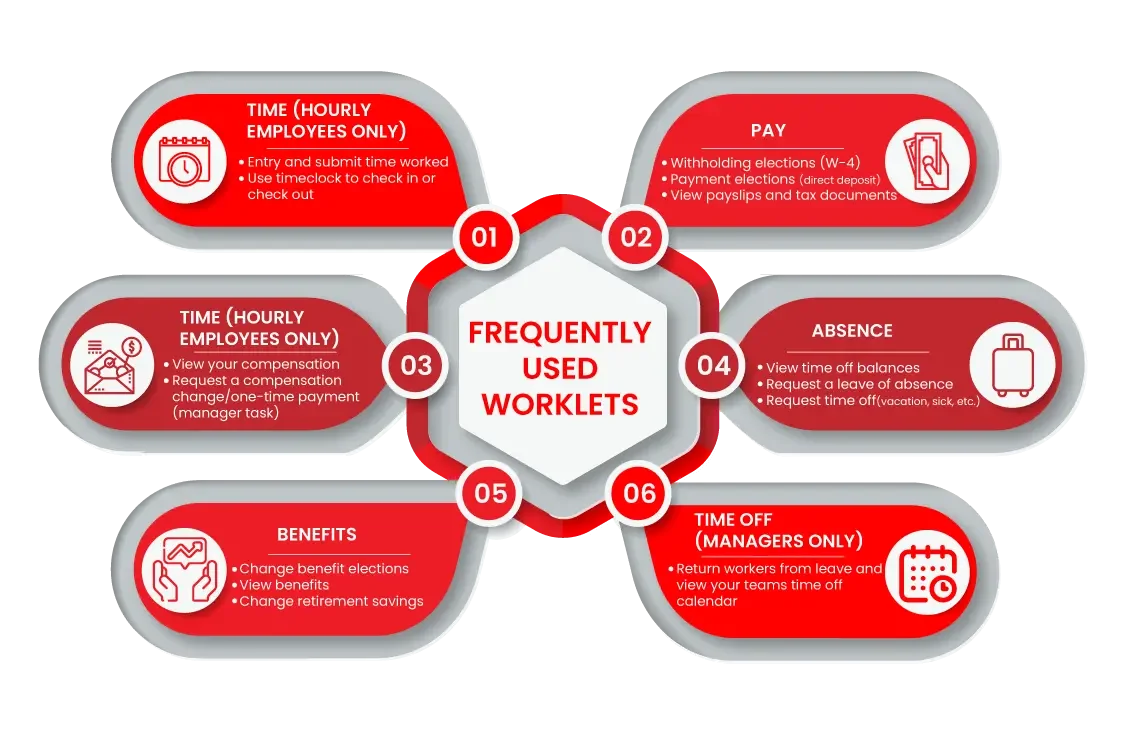
Workday Worklets are shortcuts to quickly access any task or information. These are available as clickable icons on its homepage. You can directly streamline your workflows to improve productivity by just clicking on them. The image given below shows some of these icons that you may find on its homepage.
Traditional ERP systems are usually on-premise, need heavy customization and take longer to update. Workday, on the other hand, is cloud-native, gets updated automatically twice a year and is built with a single unified data model, which makes it easier to maintain and scale.
Workday Community is an online platform where customers, partners and Workday employees can connect with each other. It is used to share best practices, ask questions, access documentation and stay updated with the latest releases and features.
Domains in Workday are groups of related securable items, such as tasks, reports and business processes. They are used to control who can view or edit specific data and functions, and they form the base on which security groups are given access.
Onboarding in Workday is the process that helps new hires get set up before and during their first days at the organization. It covers tasks like filling out personal information, completing paperwork, setting up direct deposit and getting introduced to the team, all handled through a guided workflow.
The Workday mobile app allows employees and managers to access Workday on the go. It can be used for tasks like approving requests, checking pay slips, applying for time off, viewing schedules and completing simple HR tasks directly from a phone or tablet.
Related Article: Workday Tutorial For Beginners
Let's now jump to the Workday interview questions for intermediate levels. These questions can be very helpful for individuals who want to advance their careers.
A Business process is a systematic record of different tasks to achieve specific goals. It is an automated process that decides the time and person to perform each task. This process only ends when all tasks are successfully completed.
Some examples of these processes are changing jobs, hiring or terminating employees, improving salaries and more. For instance, a hiring process will go as follows -
Initiating the hiring request.
Ensuring the data accuracy of this software requires following some key considerations and best practices. Here are some of them -
Hiring experts to perform tasks is not the only goal of resource management within an organization. They also work on their employees to enhance their skills consistently. Therefore, they need to create a process and analyze the reports of employees for the same.
Talent management is a feature of this software that helps in this case. It can create the process and monitor the employee's work and progress through. Hence, organizations can decide which employee can benefit them in the near future. Workday Skills Cloud also helps organizations identify employee capabilities, skill gaps and internal mobility opportunities using AI-driven skill intelligence.
Prism analytics is an analytical platform that has the capability of bringing data from external sources like CRM and spreadsheets. Here organizations can blend both internal and external data for comprehensive analytics. For example, a company could use Prism Analytics to combine employee performance data from Workday with sales data from their CRM to identify correlations between employee performance and sales revenue.
Yes, we can customize this software, as it is designed with flexibility in mind. It is possible through configuration options, custom reports, integrations, and tailored business processes. Here are the steps to achieve this instance -
A calculated field is a custom field that is built using existing data and functions to produce a new value. It is often used in reports to perform calculations like totals, comparisons or conditional logic without changing the underlying data.
A business process is the overall workflow that gets triggered for an event, like hiring or a job change. A business process definition is the actual configuration behind it, which lays out the steps, approvals, notifications and conditions that make the process run the way it should.
Condition rules are logic-based checks added to a step in a business process. They decide whether a particular step should run or be skipped, depending on the data involved, such as routing an approval only when a salary change is above a certain amount.
Absence management is the module that handles employee time off, such as vacation, sick leave and other types of leave. It allows employees to request time off, lets managers approve it and keeps track of balances automatically.
Workday Learning is a module that lets organizations create, assign and track training content for employees. It supports different formats like videos and documents, and it can be tied to career development plans within the platform.
Read Also- Expert's Guide On How To Learn WorkDay
Advanced-level professionals need to prepare for these Workday interview questions too. Becoming an expert means having to fulfill higher-level expectations put forth by the interviewers.
Configuring a business process here means beginning by outlining the steps. This is followed by assigning roles as well as security groups. The conditions and approvals are then set up as per the requirements for each step.
Testing the business process configuration is important and should be done in a sandbox environment prior to deploying it to production. Here are the steps for business process configuration -
Mass changes are managed here by using the Enterprise Interface Builder or EIB for bulk data uploads. Business processes that update records automatically according to specified criteria are also configured. All these changes are tested in a non-production environment for higher accuracy.
It is a repository that can store a special part of critical data with the help of some third-party tools. This data is very useful in creating complicated reports and data feeds, which is generally difficult within this software. It also ensures that information is readily accessible for critical functions. Therefore, it is also known as a supplementary data repository.
However, modern Workday implementations increasingly rely on Prism Analytics and cloud-based reporting tools for advanced analytics and data visualization.
Security Groups in relation to this software refer to access & permissions for users. This makes sure that employees are able to only see as well as do what's in line with their specific roles and responsibilities.
This software has amazing and robust reporting capabilities. It includes custom reports, composite reports and standard reports. Organizations use these capabilities to effectively analyze their workforce data. Workday Discovery Boards provide interactive dashboards that help HR and finance teams visualize workforce and operational data in real time.
A Business Process Security Policy controls who can initiate, approve or act on steps within a specific business process. A Domain Security Policy, on the other hand, controls access to a group of related items like reports and tasks, regardless of which business process they belong to.
A sandbox is a non-production environment used to test configuration changes, integrations and business process updates before they are deployed to the live system. It helps teams catch issues early without affecting real employee or financial data.
Workday keeps a history of configuration changes, including who made the change and when. This allows admins to review past changes, compare versions and roll back to a previous configuration if something goes wrong after an update.
Condition rules control whether a step should run based on the data involved, while to-do steps are manual action items assigned to a person within the process. Together, they allow business processes to be more flexible and handle exceptions without needing a completely separate workflow.
Workday Extend is a platform that allows organizations to build custom applications on top of Workday using the same data, security and user experience. It is used when the standard Workday functionality does not fully cover a specific business need.
Read Also- A Guide On How To Get a Workday HCM Certification
Before sitting for an interview, it's important to cover all the main aspects. These Workday HCM interview questions are quite important for the same.
Workday human capital management is a suite of tools that assist HR professionals in various processes. These processes are hiring, performance evaluation, task scheduling and workforce planning. It also offers some additional functionalities including handling payroll compliance requirements and employee benefits administration.
The following are the main features of this cloud-based tool -
A tenant is an app that needs its own secure and safe computing environment. Every customer here has their own secure tenant only they can access. It's a unique instance with a distinctive set of data that's held in a logically separated database. Multi-tenancy is an important feature for complete functionality usage through one app server.
HCM, Payroll and financials have custom and standard reports according to the business needs. Some reports amalgamate details from both the Financial and Payroll/HCM modules. These reports have features like calculated fields, custom prompts, charts, interactivity and graphics. Data in these reports can easily be made available and accessible to other apps.
Time tracking is a cloud-based tool. It allows the employees to record their work hours, request time off and manage their attendance online. This tool is accessible on both web and mobile devices, offering a user-friendly experience for employees. HR professionals use this data to check the employee's log time accurately and efficiently.
Compensation management is the module that helps organizations plan, manage and administer employee pay, bonuses and other rewards. It supports things like compensation reviews, merit increases and total rewards statements, all within a single system.
Succession planning helps organizations identify potential successors for key roles ahead of time. It allows managers and HR teams to track readiness levels of employees and build a talent pipeline for critical positions.
Workday HCM covers the broader employee lifecycle such as hiring, performance and talent management, while Workday Payroll specifically handles pay calculations, tax filings and compliance related to paying employees. Payroll works closely with HCM data but focuses only on the financial side of employment.
The org chart in Workday gives a visual view of the reporting structure within an organization. It helps employees and managers see who reports to whom, and it is often used during workforce planning and reorganizations.
Benefits administration is the part of Workday HCM that manages employee benefit plans such as health insurance, retirement plans and other perks. It handles enrollment, eligibility rules and life event changes like marriage or the birth of a child.
Workday Integration interview questions are a big part of any such interview. Hiring managers are always curious about the aspirant's knowledge in this aspect.
Workday integration is a way of connecting this software with a third-party tool to improve its capabilities. Payroll and resource management are undoubtedly great processes of this software. But with the help of this integration, experts can automate these processes to achieve high productivity and accuracy.
It also seamlessly connects as well as exchanges data with other apps & systems. There are many options for this integration, some of which are given below -
Error resolution here includes identifying the error messages, analyzing the issues & checking the integration event log. Corrections may also encompass modifying data adjustments or integration setups. The integration is then re-tested for smooth data transfer.
It uses AI and ML for offering intelligent recommendations, automation of routine tasks and perform predictive analytics. This further improves operational efficiency and decision-making. Workday now also uses generative AI capabilities through Workday Illuminate to automate repetitive HR and finance tasks, improve hiring recommendations, assist with skill mapping and provide conversational insights for managers and employees.
A data object is an entity in the form of templates that includes various types of data fields like name, title, job posts, etc. Data sources are sub-parts of a data object that can contain a specific type of data group. The sources give a particular set of data instances for reporting purposes.
It is a unified system that can manage each finance process within an organization. These processes are financial accounting, reporting, planning, processing, procurement, expense management, etc. This system benefits business in many ways including -
Workday Studio is a development tool used to build complex, custom integrations that go beyond what EIB or Cloud Connect can handle. It gives developers more control by allowing custom logic, transformations and error handling within the integration.
Inbound integrations bring data into Workday from external systems, such as loading new hires from a recruiting tool. Outbound integrations send data out of Workday to other systems, such as sending payroll data to a third-party provider.
A Workday connector is a pre-built integration template designed to work with a specific system or vendor, such as a benefits provider or a payroll system. It reduces the amount of custom development needed since much of the mapping and logic is already set up.
XSLT, or Extensible Stylesheet Language Transformations, is used to transform XML data from one format to another during an integration. It is commonly used in Workday Studio to reshape data before sending it to or receiving it from an external system.
EIB is a simpler tool best suited for straightforward inbound and outbound data transfers with minimal transformation logic. Workday Studio is meant for more complex integrations that need custom transformations, conditional logic or connections to systems that EIB cannot easily handle.
Let's now talk about Workday Reporting interview questions. Interviewers are keen on asking the questions mentioned below -
Workday Raas is a feature of this software that allows individuals to create and share custom reports in the form of web services. These reports always store structured data like XML or JSON and have seamless data extraction and integration capabilities. This means individuals can easily create reports and extract their data to their party tools or applications.
The following matrix reports are available in Workday -
Time Tracking here refers to a piece of a single system, finance and HCM. One wellspring of details and many bound-together activities assist in diminishing work costs, advancing laborer prosperity, overseeing consistent vulnerabilities and further developing efficiency.
Workday payroll is an important part of this HCM suite and encompasses human resources, progressed finance abilities and the board. It sets straight the complete finance beginning at initially employing to finance preparing and even charging compliances. Some main characteristics are -
Workday is expected to become the top source for all reporting needs as and when possible. This will promote it to become the key source of business info for HCM, financials and payroll. Reporting from Prism Analytics, Discovery Boards and external BI platforms like Power BI or Tableau can further enhance reporting capabilities. It's also expected to become useful whenever data that is inexist here is needed.
A calculated field lets report builders create custom values using formulas, functions or conditional logic on top of existing data. It is useful when the raw data does not already give the exact figure or comparison that is needed in a report.
A standard report comes pre-built with Workday and covers common reporting needs out of the box. A custom report is built by the user to meet specific requirements, using the fields, filters and formats that fit their particular use case.
A Discovery Board is an interactive dashboard within Workday that lets users explore and visualize data through charts and graphs. It allows people to drill into the numbers without needing to build a full report from scratch.
Drill-down reporting allows users to click on a summary figure in a report and see the more detailed data behind it. It is useful for going from a high-level number, like total headcount, down to the individual records that make it up.
Prompts allow the person running a report to enter or select criteria, such as a date range or department, before the report is generated. This makes the same report reusable for different situations instead of building a separate report for each case.
Now we will discuss the most frequently asked Workday Core Connector interview questions. These questions test the candidate's capability in database and external source integrations.
Workday connectors are basically pre-built templates that improve the platform functionalities for external systems. These systems include Human Capital Management, Payroll Interface, Financial Management and Speed Management. The templates are hosted and updated by Workday itself.
Workday Cloud Connect is used to perform its integration with external systems and third party tools. Its pre-built packages and connectors facilitate the integration process. With this feature, businesses can leverage different tools, such as administrators, payroll providers and HR applications. The best part is that there is no need to build integration from scratch.
Package connectors, also known as delivered ports, are integration templates specially designed for a particular vendor. These connectors streamline the integration process by providing standard interfaces for common applications like payroll, benefits and talent management systems. This reduces the need for custom programming.
Area override solution includes additional data fields in the output of an integration, which are not readily available through standard integration.
There three types of integration IDs are available on this platform including:
A Studio connector is an integration built using Workday Studio for cases where a pre-built core connector or package connector does not fully meet the requirement. It gives developers more flexibility to handle custom logic and unique data formats.
A core connector is a pre-built template that handles the connection and data mapping for a specific Workday process. A document transformation, on the other hand, is used to generate an output document, such as a PDF or a formatted file, from Workday data.
A transform step is used to convert or reshape data as it moves through an integration, such as changing a date format or mapping a field from one system's naming convention to another. It ensures the data lines up correctly between Workday and the connected system.
A launch parameter is a value that is passed into an integration at the time it runs, such as a date range or an employee ID. It allows the same integration to be reused with different inputs instead of hardcoding the values.
Package connectors are vendor-specific templates built for a particular third-party application, while core connectors are broader templates built for Workday's own modules like HCM, Payroll Interface and Financial Management. Both reduce the need for custom development, but they are aimed at different kinds of integrations.
These Workday interview questions are apt for beginners and even professionals of different levels. Preparing well before an important interview is essential to ace it and get the job of one's dreams. A hiring manager can ask questions from any minute point. This also makes it important to be careful of what one's adding to the resume.
Ans. They can go for the following job roles -
Ans. It require the following skills -
Ans. Becoming a HCM consultant with this platform requires obtaining a graduation degree, getting essential skills, acquiring relevant experience and getting certified.
Workday is an ERP system, mainly used for human resources, finance and workforce management, not for customer relationship management.
Workday focuses on HR and finance with an easy-to-use cloud platform, while SAP offers a complete ERP system for large and complex business operations.
Course Schedule
| Course Name | Batch Type | Details |
| Workday Training | Every Weekday | View Details |
| Workday Training | Every Weekend | View Details |

How To Learn DevOps in 2026? Benefits In Finding Remote Jobs
September 28th, 2026