Artificial intelligence has changed the way we interact with technology. A few years ago, most people used AI mainly to search for information, write content, or get quick answers. Today, AI has moved into a much more interactive space. People are using AI for storytelling, roleplay, entertainment, learning, and even creating digital characters that can communicate with their own personalities.
Tools such as ChatGPT, Google Gemini, and Claude have made AI assistants mainstream, but they are primarily designed to act as general-purpose assistants. They can write, answer questions, code, summarize information, and help with everyday tasks. But what if you do not want to talk to a generic AI assistant? What if you want to create a character like Jarvis or Friday from the Iron Man movie?
This is where Janitor AI comes into the picture. Instead of simply asking an AI assistant questions, you can create or choose characters and have conversations based on their personalities and backstories. You can build your own characters, explore thousands of characters created by other users, create different scenarios, and use AI models to make the conversations more interactive.
The growing interest in AI character platforms has made Janitor AI particularly popular among roleplay fans, writers, and people who want a more creative way to interact with AI. But before you start using it, you probably want to know more about Janitor AI. In this article, I will explain what Janitor is AI, how to use it, its key features, use cases, pricing, API options, safety considerations, and how it compares with other popular AI platforms. I will also share some practical tips to help you get better results from your AI characters.
Let’s begin!
TL;DR (Sort Summary)
- Janitor AI is a character-based AI platform for creating and chatting with customizable virtual characters. Unlike general AI assistants, it focuses on roleplay, storytelling, and creative conversations.
- Janitor AI is free to start and requires no coding. You can create a character, choose a model, and begin chatting, while external APIs can provide more consistent responses.
- Its biggest advantage is flexibility: character customization, multiple AI model options, group scenarios, and a large community character library.
- Choose Janitor AI for deeper character customization and roleplay freedom; choose Character AI for a simpler, more casual experience.
Read Also: What Is Google Antigravity?
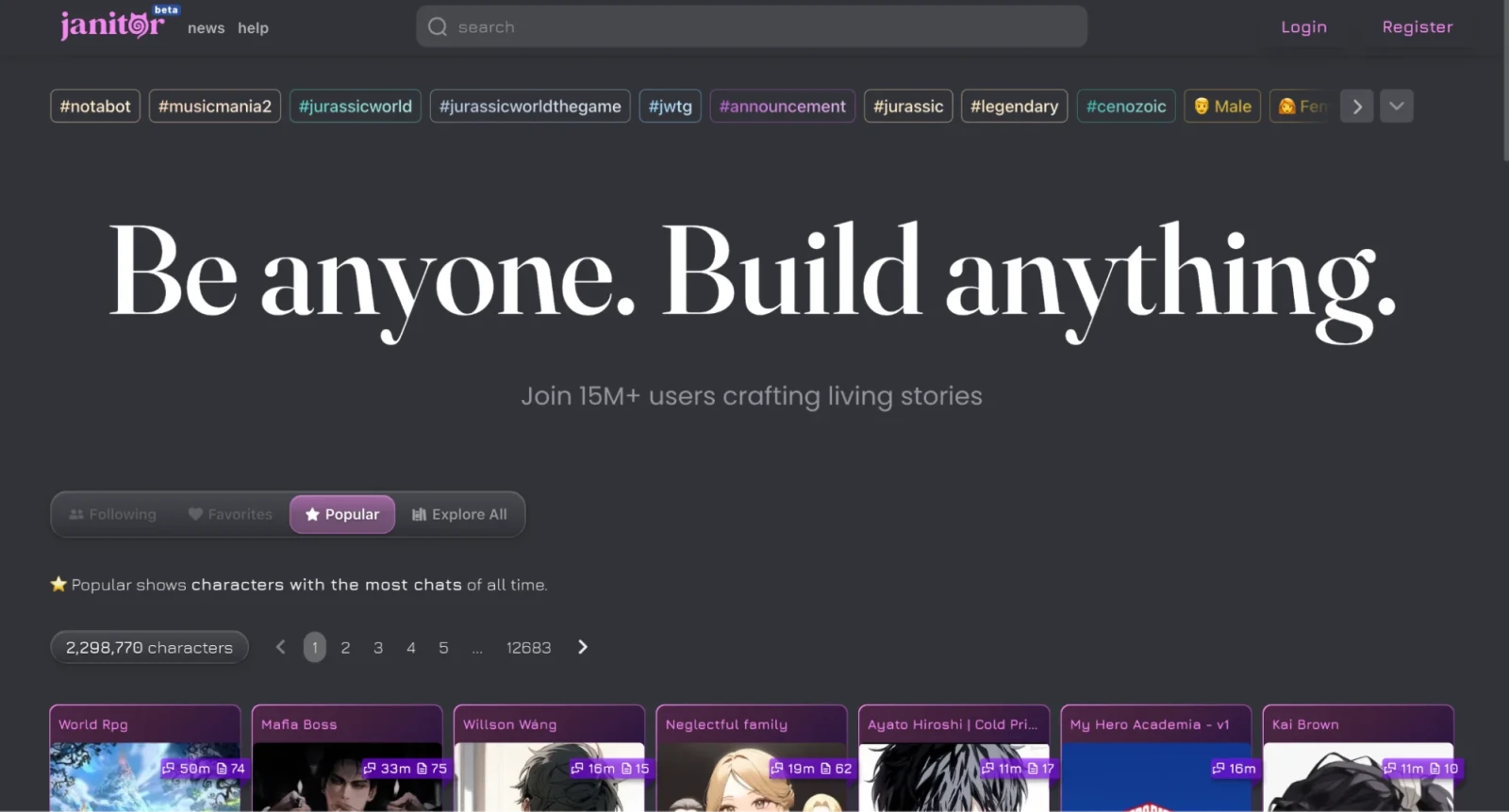
Janitor AI is a popular web-based platform where users can create, customize, and chat with virtual AI characters. You can build or use characters for storytelling, fictional roleplay, and creative companionship. It was launched in June 2023 and instantly gained popularity for its flexible character personalities and offering an alternative environment with fewer content filters than mainstream AI tools.
It distinguishes itself from ChatGPT, Google Gemini, and Claude because these platforms have made available "generic" (simply formed) conversational assistants. Janitor AI gives you the opportunity to create your own characters (with their own unique personalities) to use when communicating with others.
Janitor AI is also known as a character engine for AI-based communications. It is faviroite tool for indivulas who loves anime. They use it build on anime characters and characters from their favourite movies and games (for example, John Wick), or create characters from an imaginary position. By doing so, they are transforming a generic form of AI communications into an interactive storytelling format.
Janitor AI became popular because it removed the hardest part of building an AI character, and that is the technical setup. You no longer need to know prompt engineering or write any code. You just need to describe who you want to talk to. Here are a few reasons so many people use it.
1. Customization: You control everything about your character, including its name, personality, backstory, and speaking style. This makes every conversation feel personal instead of generic.
2. Free access: You don't need to pay anything just to browse characters or start chatting using the built-in model.
3. Variety: You get access to thousands of user-made characters, from anime and gaming icons to completely original creations.
4. Creative freedom: You are not limited to short, templated replies. You can write long, descriptive scenarios, and the AI adjusts to them.
The combination of easy setup, strong customization, and a large community is what made Janitor AI grow so fast among roleplay fans and writers.
Also Read: What is Claude Sonnet?
There are just a few basic things you need before you start creating characters. Once that is done, the rest becomes very smooth. Let's go step by step.
You need an email address to sign up. There is no separate app to download, since Janitor AI runs entirely in your browser.
You don't need writing experience. You just need to describe your character in simple words, such as their personality, background, and how they speak.
Janitor AI works with its free built-in model, called JanitorLLM. If you want faster and more consistent replies, you can also connect your own API key from a provider like OpenAI later on.
Once your account is ready, the process of creating and chatting with a character is very simple. You just follow these steps.
You start by giving your character a name, personality, background, and greeting message. This is the information the AI uses to shape every reply.
For instance, I wrote a short two-line backstory and one sentence describing my character's personality. That alone was enough for the AI to keep a consistent tone across a long conversation.
Before you start chatting, you select the model that will generate your character's replies. You can start with the free built-in model.
You type your message just like you would text a real person. It can be a simple greeting or the start of a full scenario.
As you keep chatting, Janitor AI updates the conversation history and feeds recent messages into every new reply. This is what makes your character remember earlier parts of the story instead of giving disconnected answers.
Next, we will move into tips for better results, where I will share what actually improves character replies and the common mistakes beginners usually make.
Janitor AI offers a few features that are worth knowing before you dive in. Let's go through them one by one.
Immersive mode removes distracting interface elements and streams your character's reply as it generates, similar to watching someone type in real time. It helps you stay focused on the story instead of the interface.
You can use the free built-in model or connect your own API key from providers like OpenAI. This gives you control over reply speed and quality.
You can set a scene or storyline so multiple characters respond within the same context. This is useful if you are writing a scene with more than one character involved.
You can browse thousands of characters made by other users, including anime, gaming, and original creations, instead of starting from scratch every time.
Next, we will look at real-world use cases, so you can see where Janitor AI fits best depending on whether you are a writer, roleplay fan, or student.
Related Article: Copilot vs. ChatGPT: Which AI Tool Is Right for You?
As I used Janitor AI more often for various purposes, I became aware that the application has different uses for different people, where the same application can have significantly different outcomes based on who is using it, and the purpose of use. Here are a few uses:
As a creative partner, Janitor AI can assist authors in creating dialogue, giving character voices to characters, and overcoming writer’s block without providing too much pressure on the author.
For instance, I created a character based on a stubborn detective and utilized the chat to draft an interrogation scene. Janito AI provided me with dialogue for the detective and could be rewritten directly back into my story.
Roleplay players can control the behaviour of a character, as well as where the storyline is developing or going. There are no word limitations (such as having to give a character a specific number of words or length of time for each response).
Students and language learners can use the character for practicing everyday conversation in a low-pressure environment and can gain confidence in communicating in general.
If you are a developer, Janito AI can help you test out different types of AI character-based types of conversations before you begin programming your own chatbot.
I used both platforms side by side for a week to see how they actually compare in daily use, and the difference became clear pretty quickly.
Both let you chat with custom characters, but they are not built for the same kind of user. Character AI gives you a large, easy-to-browse character library and a simple, casual chat experience. It works well if you want quick, lighthearted conversations without much setup.
Janitor AI gives you more control over the model behind your character and fewer content restrictions. It suits you if you want deeper customization, longer scenarios, and more freedom in how your story unfolds.
| Feature | Janitor AI | Character AI |
| Primary Purpose | AI chatbot platform focused on customizable roleplay, storytelling, and NSFW (via external models) | AI character chat platform designed for safe roleplay, entertainment, and conversations |
| Best For | Advanced users who want highly customizable AI characters | Casual users looking for fun conversations with AI characters |
| AI Models | Connects to external models like OpenAI, Claude, Gemini, KoboldAI, OpenRouter, etc. | Uses Character AI's proprietary language model |
| Customization | Extensive character creation with personality, prompts, lore, and API selection | Easy character creation but limited model customization |
| NSFW Support | Possible with supported third-party APIs/models | Strictly prohibited |
| API Support | Yes, users can connect their own API keys | No public API for chatting |
| Memory | Depends on the AI model being used; generally offers better long-term context | Good short-term memory but may forget older conversations |
| Conversation Quality | Highly dependent on the chosen AI model | Consistent and optimized for natural conversations |
| Ease of Setup | Moderate—requires API setup for premium models | Very easy—works immediately after signup |
| Free Version | Yes, but features depend on free APIs/models | Yes, with optional premium subscription |
| Pricing | Platform is free; API costs depend on the selected provider | Free with Character AI+ subscription |
| Ideal Users | Writers, roleplayers, developers, AI enthusiasts | Beginners, casual users, entertainment seekers |
Choose Janitor AI if you want maximum flexibility, different AI models, API integrations, and customizable roleplay experiences.
Choose Character AI if you want a simple, beginner-friendly platform for chatting with AI characters without worrying about APIs or technical setu
I often switch between these three depending on what I need that day, and the difference in purpose becomes obvious fast.
ChatGPT is a general-purpose assistant built for tasks like writing, coding, and answering questions. It gives you one consistent AI personality across every chat, and it is not designed around custom characters.
Meta AI works similarly. It is built into Meta's apps and focuses on quick answers, everyday assistance, and casual conversation rather than deep character roleplay.
Janitor AI is built specifically for character-based roleplay and storytelling. You are not talking to one fixed assistant. You are talking to characters you or other users created, each with a distinct personality and backstory.
| Feature | Janitor AI | ChatGPT | Meta AI |
| Primary Purpose | AI character roleplay and custom chatbot platform | General-purpose AI assistant for productivity, coding, writing, and research | Everyday AI assistant integrated into Meta apps |
| Best For | Character interactions, storytelling, roleplay | Work, education, coding, content creation, research | Social conversations, quick answers, image generation, Meta ecosystem |
| AI Models | Supports OpenAI, Claude, Gemini, OpenRouter, KoboldAI, and others | OpenAI GPT models | Meta's Llama models |
| Customization | Very high—users choose models and create custom characters | Custom GPTs, Projects, Memory, and custom instructions | Limited compared to ChatGPT and Janitor AI |
| Roleplay Experience | Excellent | Good | Basic |
| Writing Quality | Depends on selected AI model | Excellent | Good |
| Coding Assistance | Limited unless connected to a strong coding model | Excellent | Moderate |
| Research & Learning | Depends on connected model | Excellent | Good for simple queries |
| API Support | Yes (bring your own API) | Yes (OpenAI API, separate from ChatGPT subscription) | Meta provides APIs primarily for developers using Llama models |
| Image Generation | Depends on connected AI model | Built-in image generation | Built-in image generation in supported regions |
| Voice Conversations | Depends on model | Yes | Yes |
| Memory | Depends on AI provider | Built-in memory (where available) | Limited personalized memory |
| Pricing | Free platform; API usage may incur charges | Free plan with paid Plus/Pro options | Mostly free |
| Ease of Use | Medium (API configuration required for best experience) | Very easy | Very easy |
| Privacy | Depends on the AI provider you connect | Managed by OpenAI | Managed by Meta |
| Ideal Users | Roleplayers, writers, AI enthusiasts | Professionals, students, developers, businesses | Social media users and people wanting quick AI assistance |
If you need a productivity tool, choose ChatGPT. If you want a quick assistant inside apps you already use, choose Meta AI. If you want creative, character-driven conversations, choose Janitor AI.
Also Read: What is ChatGPT Go?
Janitor AI's free built-in model and a connected paid API serve different needs. Here is a clear comparison to help you decide.
| Feature | Free Built-In Model (JanitorLLM) | Paid API (e.g. OpenAI) |
| Cost | Free | Pay per use, based on tokens |
| Speed | Can slow down during busy hours | Generally faster and more stable |
| Reply Quality | Good for casual chats | More consistent and detailed |
| Setup | No setup needed | Requires an API key |
| Best For | Beginners and casual users | Regular users who want reliable replies |
Once I moved past the free model, connecting my own API key was the next thing I wanted to figure out, since it directly affects reply speed and quality.
You can follow this general process to connect an API to your Janitor AI account.
Open the settings menu inside your Janitor AI account.
Select your preferred API provider, such as OpenAI, Claude, or KoboldAI.
Paste your API key into the field provided.
Adjust any model-specific settings, such as temperature or response length, if available.
Save the settings and start a chat to test the connection.
A few things to keep in mind while setting this up:
OpenAI API gives you the best balance of quality, speed, and cost, which makes it the most popular pick among regular users.
Claude API works well if you want longer conversations and consistent character memory.
KoboldAI suits you if you want a self-hosted, free setup and don't mind extra technical effort.
Community proxies are free and contributed by other users, but they can be slow or unstable, so treat them as a backup rather than your main setup.
If you are new to Janitor AI, start with OpenAI. It has the easiest setup and the most documentation available online.
Read Also: Top Skills Needed to Become Prompt Engineer
Before you rely on Janitor AI regularly, it helps to understand where the costs actually come from. Here is a clear breakdown.
| Option | Price | Best For |
| Built-in model (JanitorLLM) | Free | Casual users who don't mind occasional queues |
| OpenAI API | Pay per use, based on tokens | Users who want fast and reliable responses |
| KoboldAI (self-hosted) | Free, but needs your own hardware | Technical users comfortable with setup |
| Community proxies | Free, contributed by users | A backup option, though not always stable |
The website itself never charges you a subscription fee. Any cost you pay comes from the external API you choose to connect, not from Janitor AI directly.
Janitor AI keeps your conversation history so your character can reference earlier messages and stay consistent. This happens within your active chat session and depends on the platform's stored data rather than a separate long-term memory system.
Content moderation on the platform is limited, and many public characters include mature themes. If you are a parent, it is worth staying involved if your child shows interest in the platform. If privacy is a concern for you personally, read the platform's privacy policy before connecting a personal API key, and avoid sharing sensitive information in your chats.
I looked into this closely before connecting my own API key, since privacy matters to me as much as it probably does to you.
Janitor AI keeps your conversation history so your character can reference earlier messages and stay consistent. This happens within your active chat session and depends on the platform's stored data rather than a separate long-term memory system that carries over automatically to every new chat.
If privacy is a top concern for you, read the platform's privacy policy before connecting a personal API key. It also helps to avoid sharing sensitive personal information in your chats, since this is good practice on any AI chat platform, not just Janitor AI.
This is where most people start noticing a real improvement in their conversations. These are things I learned only after testing several characters and adjusting my approach.
Always describe how your character thinks and speaks, such as calm, sarcastic, shy, or confident. If the personality is vague, the replies will feel inconsistent.
You don't need paragraphs of detail. Two or three sentences about your character's background are usually enough to guide the tone of the conversation.
If you want a specific setting, such as a coffee shop or a fantasy kingdom, mention it early. This helps the AI understand the context of your story.
Start with a simple character profile. Then add more detail after seeing how the AI responds. This gives you more control over the final result.
If replies feel repetitive or slow, try switching from the free built-in model to an external API for better quality.
Also Read: What is DeepSeek?
If you write a personality like "nice person," the AI does not have enough direction. Be specific about tone and behavior.
If you add too many traits and details at once, the AI can lose focus. Stick to the most important points first.
Janitor AI works best over a few messages, as the AI settles into the character. Give it a little room to adjust.
Your character's first message sets the tone for the entire chat. A weak greeting often leads to a weak conversation.
If you never check your model settings, you might be stuck on a slower option without realizing a faster one is available.
Janitor AI is based on a simple core idea: you describe a character, and the AI brings it to life through conversation. What makes it powerful is how accessible it is. You do not need any coding knowledge or technical background before using it. You just need a clear idea of who your character is.
If you are a beginner, start with a simple character profile and the free built-in model. Over time, you will notice your conversations improving without much extra effort. Whether you are a writer, roleplay fan, student, or developer, Janitor AI can easily become part of your creative routine. And now, you are ready to start building your own characters.
Yes, you can browse and chat with the built-in model for free. If you want faster responses, connecting an external API usually comes with a small cost based on how much you chat.
No, you can create a character using simple text fields for personality, background, and speaking style. No coding is required.
It is not recommended for children. Many public characters include mature content, so parental supervision is important.
Janitor AI gives you more customization and fewer content restrictions. Character AI gives you a simpler, more casual experience with stricter moderation.
Yes. You can connect your own API key in the settings menu to get faster and more consistent responses.