Think about the last time you opened a food delivery app, booked a cab or transferred money from your phone. Every one of those actions triggered something invisible, something working faster than you could blink, connecting systems that were never designed to talk to each other.
That invisible layer has a name. It is called an API.
Developers build with them. Businesses run on them. AI systems depend on them. And yet, most people have never had anyone sit down and explain what an API actually is in plain, human language. That changes right now.
In this blog, you will learn what an API is, how it works and how to start using one.
API stands for Application Programming Interface which is a set of rules that allows two software applications to talk to each other. Think of it as a digital middleman. It takes a request from one system, delivers it to another and brings back the response.
Here is the classic way to picture it:
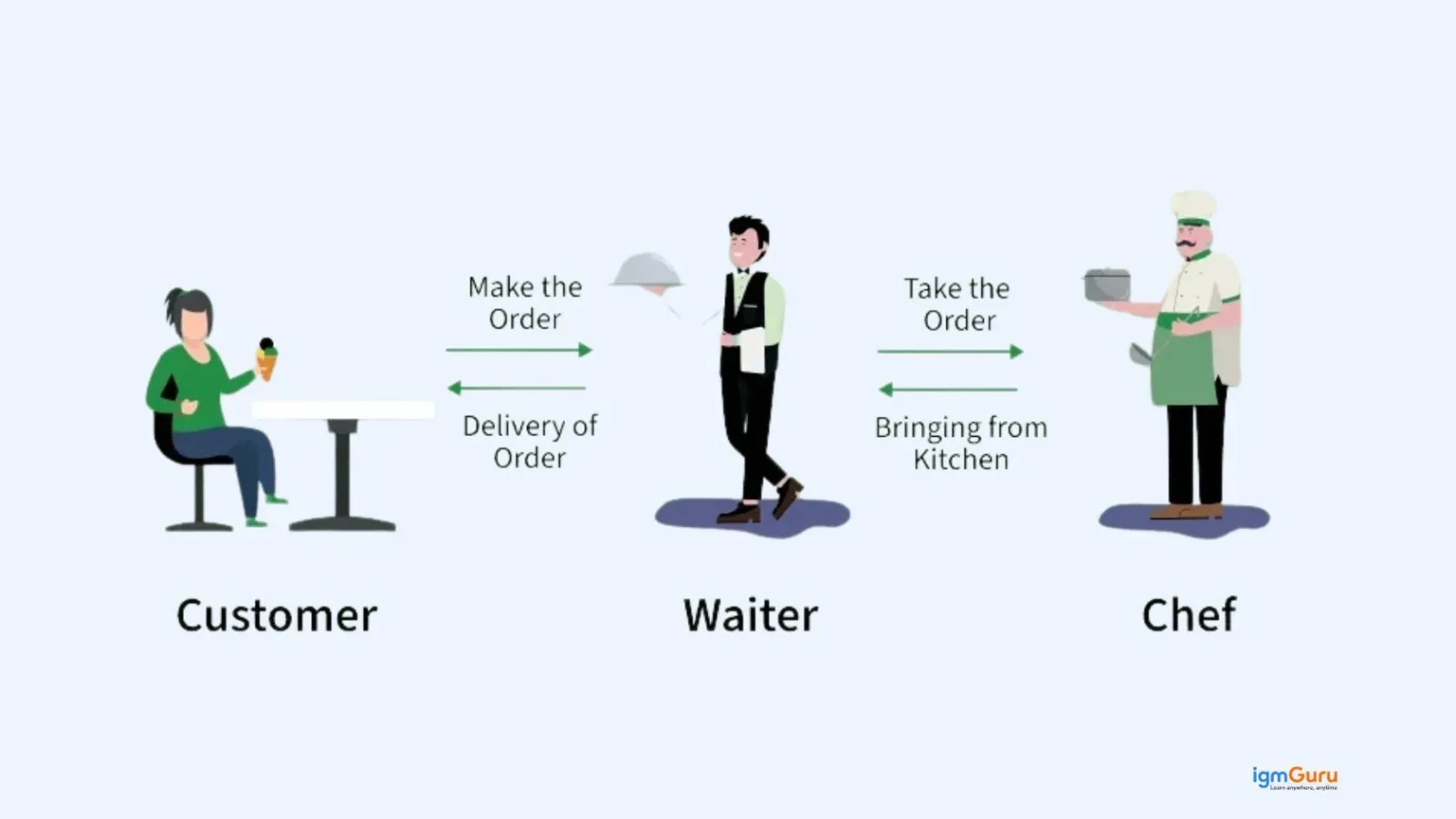
Imagine you are sitting at a restaurant. You tell the waiter what you want. The waiter walks to the kitchen, tells the chef and comes back with your food. You never enter the kitchen. You never talk to the chef directly. The waiter handles everything in between.
In this scenario:
That is exactly how this system works in software. It receives your request, forwards it to the right place and returns the result, all in milliseconds.
An application refers to any software that performs a specific function, whether it is a mobile app, a web platform or an IoT device.
A programming interface refers to the contract or set of rules that define how one application interacts with another.
Together, an API is the defined bridge that lets two different systems communicate in a structured, secure and repeatable way.
Read Also: What is FastAPI?
Understanding what an API is will only get you so far. The bigger question is why APIs have become so central to how modern software is built and used. The answer comes down to four simple realities.
APIs are not a new concept, but their importance has never been greater. Here is why:
1. Everything is connected: We live in a hyper-connected digital ecosystem. AI tools, cloud services, mobile apps, IoT devices and SaaS platforms all need to communicate with each other. APIs make this possible.
2. AI systems run on APIs: Large language models, image generators and AI assistants, including the ones you use every day, are accessed through APIs. When you integrate OpenAI, Gemini or Claude into an app, you are working with an AI API.
3. Businesses depend on API-first strategies: Modern companies do not build everything from scratch. They use APIs to plug in payment systems, shipping trackers, customer data tools and analytics platforms. This saves time, reduces cost and lets teams focus on what matters.
4. The API economy drives the digital world: APIs are now a core part of the global digital economy. Companies like Stripe, Twilio and Shopify have built billion-dollar businesses purely on the strength of their APIs.
Knowing what an API is gives you the concept. Knowing how it works gives you the confidence to actually use one. The good news is that the process is straightforward once you see it broken down. Every API interaction follows a basic request-response cycle. Here is how it works:
Step 1: The client sends a request: The user performs an action, like clicking a "Pay Now" button on a checkout page.
Step 2: The API receives the request: The API receives this action and reads the instruction. This instruction comes in the form of an HTTP request that includes the type of request, the endpoint (a specific URL) and any necessary data.
Step 3: The API communicates with the server: The API forwards the request to the right server or system. In our example, it contacts the payment gateway.
Step 4: The server processes the request: The payment gateway verifies the card, checks the balance and processes the transaction.
Step 5: The API returns the response: The server sends a result back to the API. The API delivers it to the original application. You see "Payment Successful" on your screen.
This entire process happens in under a second. No pages refresh. No new windows open. The API handles everything quietly in the background.
Read Also: Top Postman Interview Questions and Answers
Reading about APIs is a great start. Actually using one is where the real learning happens. The barrier to entry is much lower than most people expect and you do not need to be an experienced developer to make your first API call.
You do not need to be a senior developer to start working with APIs. Here is a beginner-friendly path:
1. Start with a public API: Pick something fun and free. The OpenWeatherMap API, the NASA API, or the PokéAPI are great starting points.
2. Use Postman: Postman is a free tool that lets you send API requests visually without writing any code. It is perfect for understanding how requests and responses work.
3. Read the API documentation: Every API has documentation that explains its endpoints, required parameters and response formats. Good documentation is a sign of a good API.
4. Make your first API call: In almost any programming language, fetching data from a public API takes fewer than 10 lines of code. Try it in Python using the requests library or in JavaScript using fetch.
Example (Python):
|
Example (JavaScript):
|
5. Build something small: Create a simple weather widget, a currency converter, or a quote generator. Real projects teach you faster than any tutorial.
An API endpoint is a specific URL where an API can receive requests. Think of it as a door in a building. Each door leads to a different room with different data or functionality.
Here’s what a real API request might look like:
|
Let’s break it down:
|
This is the main server where the API is hosted.
|
This tells the API what you want (current weather data).
|
This provides additional information (which city's weather you need).
Each endpoint is built to handle a specific task. For example, a weather API might include:
By calling different endpoints, you can access different types of data from the same API.
An API key is a unique code that identifies who is making the API request. It works like a password for your application.
When you sign up for a service like Google Maps or OpenAI, they give you an API key. Every time your app sends a request, it includes this key so the server can verify your identity and control your access.
API keys help providers:
Read Also: Web API Interview Questions and Answers
Not all APIs work the same way or serve the same audience. APIs are grouped into different types based on who can access them and what they are designed to do. Here are the four main types you will come across.
Open APIs are available to any developer. You register, get your API key and start building. Examples include the Google Maps API, OpenWeatherMap and the YouTube Data API. Public APIs fuel millions of third-party apps, tools and integrations across the web.
Private APIs are used within an organization. Teams use them to connect internal systems, share data across departments, or link microservices together. External users never see or access these APIs.
Partner APIs sit in the middle. Companies share them only with specific business partners under formal agreements. A shipping company might share a partner API with e-commerce platforms to provide real-time tracking.
Composite APIs combine multiple API calls into a single request. Instead of calling three separate endpoints to get user data, order history and shipping status, a composite API fetches all three in one go. They are especially useful in microservices architecture.
NOTE: Types of APIs define access. Architectural styles define how they communicate.
Once you know the types of APIs, the next thing to understand is how they are built. The architectural style of an API defines the rules it follows to send and receive data. Different styles suit different use cases, so it helps to know the key ones.
The structure or "style" of an API defines how it communicates. Here are the most important ones:
REST is the most widely used API style today. It uses standard HTTP methods:
REST APIs are stateless, meaning each request is independent. The server does not remember previous requests. This makes REST APIs fast, scalable and easy to build. Most public APIs, including social media APIs and cloud services, use REST.
SOAP is older and more rigid than REST. It relies on XML for all messages and follows a strict set of rules. SOAP is still used in industries like banking and healthcare, where security and strict data contracts are critical.
GraphQL is a modern alternative to REST, developed by Meta (Facebook). With GraphQL, the client asks for exactly the data it needs, nothing more, nothing less. This reduces unnecessary data transfer and speeds up applications. GraphQL has become a strong choice for apps with complex or nested data needs.
gRPC is Google's high-performance API framework. It uses a binary format called Protocol Buffers instead of JSON, which makes it significantly faster than REST. gRPC is common in real-time applications, AI pipelines and internal microservice communication.
WebSocket APIs enable two-way, real-time communication between a client and server. Unlike REST, which follows a request-response pattern, WebSocket keeps a live connection open. This powers chat apps, live dashboards and multiplayer games.
Read Also: Artificial Intelligence Interview Questions
APIs can sound abstract until you see them in action. The truth is, you have already been using APIs for years without knowing it. Here are some of the most common examples from your everyday digital life.
1. Google Maps on a Restaurant Website: When you visit a restaurant's website and see an embedded map, the site is using the Google Maps API to display that map without building its own mapping system.
2. "Log In with Google" Button: That button on nearly every website uses Google's OAuth API. It authenticates your identity without the website ever storing your password.
3. Weather Apps: When a weather app shows you the forecast, it is not collecting weather data itself. It pulls real-time data from a weather service through an API.
4. Spotify on Third-Party Apps: Playlist apps, music discovery tools and podcast managers all use the Spotify API to access song data, playlists and user listening history.
5. Payment Processing (Stripe, Razorpay): When you complete a payment on an e-commerce site, a payment API like Stripe or Razorpay handles the transaction securely without the website ever touching your card details.
6. AI Integrations: AI APIs are now everywhere. Developers integrate models like Claude, GPT, or Gemini into their apps using APIs. A single API call sends a prompt and returns an AI-generated response. The model lives on a remote server. The API is the bridge that connects it to your app.
API integration is the process of connecting two or more systems so they can share data and work together automatically.
For example:
API integration eliminates manual data entry, reduces errors and speeds up workflows. Businesses that adopt API-first integration strategies move faster, scale better and waste far less time on repetitive tasks.
API testing checks that an API works correctly, performs fast and stays secure. Unlike UI testing, API testing happens at the logic level. It validates:
Popular API testing tools include Postman, Insomnia, Bruno and k6 for performance testing.
APIs are powerful, but that power comes with responsibility. Every API you expose is a potential entry point into your system. If you do not secure it properly, you leave your data and your users at risk. Here is what good API security looks like.
Security is one of the biggest concerns around APIs. Because APIs expose data and functionality to the outside world, they are a common target for attacks.
Here are the key security practices every API should follow:
OWASP's API Security Top 10 remains the gold-standard checklist for any team building or using APIs.
APIs have always been important. But the rise of artificial intelligence has pushed them to the center of every major technology conversation. If you want to understand how AI products are built and delivered, you need to understand the role APIs play.
Artificial intelligence has completely changed how people think about APIs. AI APIs are now some of the most in-demand tools in software development. Here is how AI and APIs intersect:
NOTE: If you want to build with AI, learning how to work with APIs is not optional. It is the foundational skill.
Read Also: Claude vs. ChatGPT
APIs are not just a technical tool. They are a strategic advantage. When used well, they save time, reduce cost and unlock capabilities that would take months to build from scratch. Here is a quick look at what makes APIs so valuable.
APIs are incredibly useful, but they are not without their downsides. Before you build your product around third-party APIs or expose your own, it is worth understanding the risks and trade-offs involved.
Starting is the right move. But starting without knowing where most people trip up means you will likely make the same avoidable mistakes I did and the ones I have watched dozens of other developers make after me. Here is what to watch out for before you get too deep in.
This is the single most common mistake beginners make, and it is a painful one. When you paste your API key directly into your code and then push that code to a public GitHub repository, anyone can find it, use it, and rack up charges on your account. Always store API keys in environment variables, never in the code itself.
New developers often want to jump straight into making calls without reading the docs. This almost always leads to confusion about what parameters are required, what format the response comes in, and what the rate limits are. The documentation is not optional reading. It is the instruction manual. Read it first.
APIs do not always work perfectly. Servers go down, rate limits get hit, and requests sometimes fail. Beginners often write code that assumes every API call will succeed. When one does not, the whole app breaks. Always write code that handles error responses gracefully, with fallback behaviour and useful error messages.
A beginner who learns REST and then encounters a GraphQL API for the first time often gets lost. They try to use the same approach and wonder why nothing works. REST, GraphQL, and gRPC each have different rules, different request formats, and different ways of thinking about data. Learn which style you are working with before you write a single line of code.
Every API has a limit on how many requests you can make in a given period. Beginners often discover this the hard way, when their app suddenly stops working because they exceeded the limit. Always check the rate limits in the documentation upfront and build your app to stay well within them.
It is tempting to build your core product feature entirely on top of someone else's API. But if that API changes its pricing, deprecates an endpoint, or shuts down entirely, your product breaks with it. Understand the dependency you are creating before you commit to it.
These mistakes are not a sign of failure. Every experienced developer has made most of them. Knowing about them in advance puts you well ahead of where most people start.
If the internet is a city, APIs are the roads, pipes and power lines that keep everything running. You rarely see them. But without them, nothing works.
APIs power AI applications, connect global business systems, enable real-time data exchange and drive the digital economy. Whether you are a developer building the next big product, a founder designing a tech company, or simply someone curious about how software works, understanding APIs gives you a massive advantage.
APIs are not complex once you see them for what they are: messengers that carry requests and return responses. Master that concept and the rest follows naturally.
Start today. Open Postman or your browser and make your first API call. That is where real learning begins.
No, a website is designed for humans to read. An API is designed for computers to read. A website returns HTML. An API returns structured data, usually in JSON format.
Not always. Tools like Zapier and Make (formerly Integromat) let you connect APIs without writing a single line of code. But knowing the basics of code gives you far more control and flexibility.
Some APIs are completely free. Others offer a free tier with limited usage. High-traffic or AI-powered APIs are often paid, with pricing based on the number of requests.
REST APIs remain the most widely used. However, GraphQL has gained significant ground for complex apps and gRPC is the go-to choice for internal microservice communication. AI APIs built on REST are the fastest-growing category across the entire developer ecosystem.