Jira may not be the most intuitive tool but it is a powerful one. It has now become a staple tool in tracking bugs and managing projects. The 17th report of State of Agile shows that almost 65,000 companies are using this tool in their operations. Are you planning to use it? Explore this Jira bug tracking tutorial if you are.
This will answer all your questions related to the use of this tool. This includes its definition, importance and features along with the stages to perform bug tracking. This tutorial is apt for both individuals and companies planning to work on this tool. It will give a good start to understand everything about this tool. Let's begin with understanding what is Jira bug tracking?
Read Also: How To Learn ServiceNow?
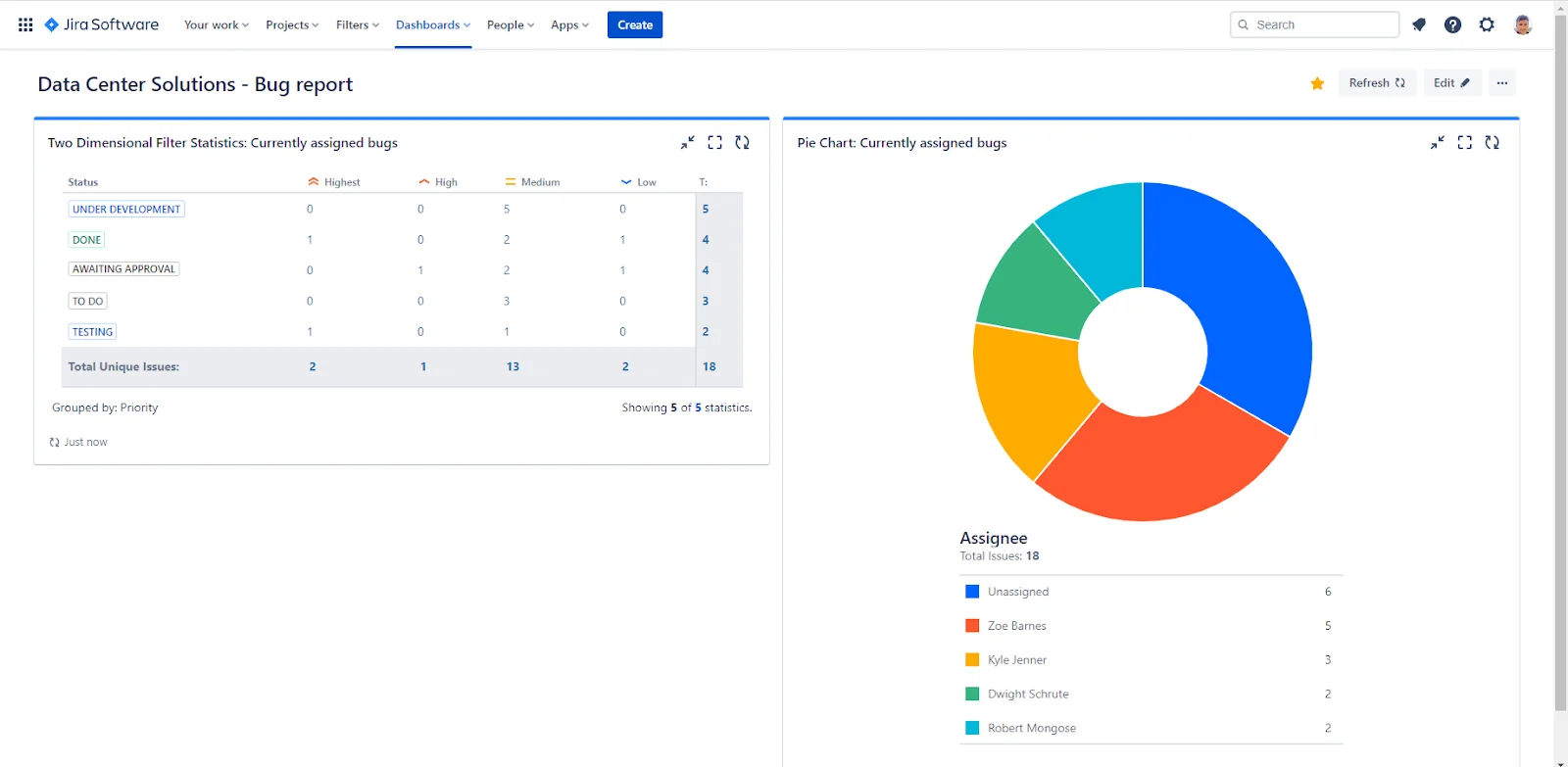
Jira bug tracking is basically a robust feature of the project management software Jira. A bug is an error or fault in code that results in unexpected behavior. This might result in serious consequences. These bugs affect the performance, working and the results of the code. It has to be removed as soon as possible.
This software has different features and tools for tracking the bugs within a program. It can detect, monitor and handle software issues or defects throughout the entire development lifecycle. It gives a centralized platform for bug tracking from finding to resolve them. This benefits developers for controlling quality control in software development.
Enrol in igmGuru's Agile and Scrum Certification Courses program to start your career in project management.
Have you ever wondered why to use Jira bug tracking software? There are many reasons to use this technique for finding bottlenecks. Bug finding and resolution is the main goal behind the development of this software. It can track almost each aspect of a software development lifecycle (SDLC). Companies from all over the world use this software.
It can collaborate and optimize many processes at a time. Its planning features and search functions are the main advantage. Enterprises can control their complete development of virtual products. The bug tracking and capturing is just one side of the coin. It also gives contextual information regarding the project. One can also prioritize and organize their tasks with this software.
This software gives many advantages for bug tracking. Software development teams get the most benefits of this software. It gives them the ability to handle and resolve bugs efficiently. Some of the most important key advantages are -
This software gives a centralized platform for detecting and monitoring bugs. All members within a team can easily detect, report and log these issues. This means no bug will be undetected in this process.
This tool automatically assigns bugs to the respected team member at the appropriate time. All the bugs will be handled in less time with their expertise. This mitigates delays in bug resolution.
This defect tracking tool gives a unified source for all types of bottlenecks including bugs and operations in SDLC. Now teams can prioritize their tasks along with delivering customer value.
Jira Bug tracking software can create custom workflows for different types of issues. This gives flexibility to teams for tailoring their bug tracking process according to their needs and requirements.
It gives a clear view on the status of bugs throughout its lifecycle. This visibility benefits teams in monitoring the process of bug resolution.
It gives real time bug reports to inform team members about issues progress. This includes the entire process from the backlog to completion. These notifications also make sure that the right person is notified at the right time.
Related Article- Jira and Confluence - Similarities, Differences and Integration
Bug removal on this software is performed in different stages. Each stage is dedicated to perform a particular task. These tasks include reporting, prioritizing, detecting, testing and resolving the bugs. Let's understand the stages of Jira tracking in details -
The first stage of issue removal is to create a bug report. This software has a wide list of issues to select. Select the appropriate one from this list, describe the details and add some additional material. Do not forget that the report must be structured and understandable. Each member of the QA team from technical to non technical background are expected to view it.
Now arrange the bugs on the basis of to assign them correctly in further stages. Urgent problems have to be resolved first and minor ones later. Set your priorities in a right order while considering the following points -
Now it is time to assign the ticket and begin working on the bug. Start from detecting the root cause of this bug. This way experts can resolve them on the fly. It also mitigates the probability of causing a big problem. The TDD method is very useful and optimal in this instance.
Changes in a code can also cause a serious issue in the software product. This is why one must use feature requests to make a product better or optimize specific applications. Fixing the bug will not be the last step as they have to prevent them in future. This is why it is important to review the process and use support and documentation.
One has to make sure that bug is completely resolved and will not occur again in the future before closing it. They also have to search for similar issues in the program and fix them instantly. The documentation and support processes must be modified accordingly.
Related Article - Jira Tutorial
Jira bug tracking is one of the most used practices these days. Many companies are using this technique to solve the bugs and streamline their SDLC. This tutorial has already given some basic knowledge on Jira bug tracking software. We advocate joining an online course of training program to get a strong understanding of this software.
A Jira bug life cycle is basically a series of stages a bug must go through. These are reporting, prioritizing, identifying, testing and closing. This process tracks and manages defects throughout the SDLC. We have already explained this process in this article.
To report a bug on Jira log in to the software > go to the relevant project > click on the Create and select Bug as the issue type > input the details.
Organize and monitor issues during resolving them for the first time. Then document it on the basis of project types, types of issues, tasks or labels. It is the most common method of issue tracking on this software. Now group the related tasks together based on their purpose.
The two types of Jira projects are team managed and company managed. The common difference between these two is their administration process. Team managed projects are handled at a team level. Company managed projects are handled at corporate level.
Course Schedule
| Course Name | Batch Type | Details |
| Jira Training | Every Weekday | View Details |
| Jira Training | Every Weekend | View Details |