Millions of companies today run their business apps on a gigantic scale with Kubernetes. These globally spread companies run multiple clusters across different locations for user experience like never before. This orchestration tool runs and manages containers at scale. Running these containers means having a strong architecture with many different components.
Understanding the Kubernetes architecture is a long process because of its range of components and other aspects. Its architecture can be labeled as the master node that manages the complete cluster while orchestrating operations throughout different worker nodes. The first thing is to begin with an introduction to this platform.
Kubernetes is an open source platform with a global presence. It deploys and manages many containers in a virtual environment. This distributed system is usually practiced alongside Docker for better implementation and control of containerized apps. Kubernetes has the second position in the total share of the containerization technologies market.
It scales the containers horizontally across physical hosts and are called Nodes. The production of fault tolerant deployments means better adaptability to conditions like Node resource pressure, elevated external traffic levels and instability. Kubernetes reschedules the container onto a close healthy Node in case any one Node suffers an outrage.
Explore igmGuru's top Cloud Computing Certification Courses.
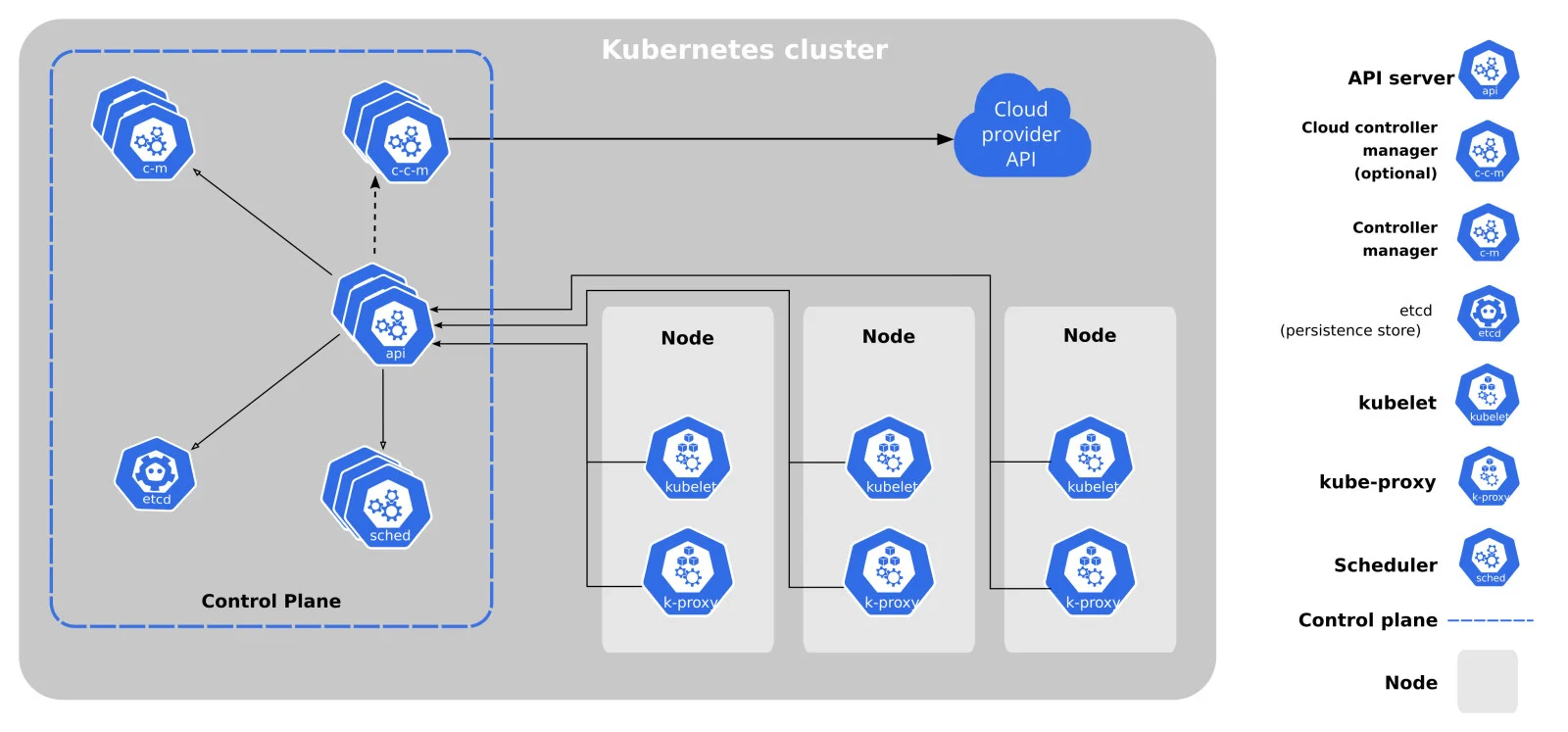
The Kubernetes architecture is very flexible and great for uncovering services within a cluster all the while maintaining loose connections. These clusters have a set of compute nodes and control planes.
The compute nodes run container runtimes (like Docker) with kubelet (a communication agent) and kube-proxy (for managing load balancing and networking). These nodes may have virtual machines, physical servers in cloud environments or on-premises settings. These come under the data plane and include the components and the infrastructure with the workloads.
The control plane oversees the complete cluster, manages computer node scheduling and exposes the API. It also encompasses different components like scheduler, etcd, API server and controller manager. These are only the core components while there are many add-ons too for additional functionality.
Here is a complete Kubernetes Tutorial For Beginners.
There are a few main components of its architecture that cannot be ignored when learning about it in detail. The clusters have different aspects that further have internal components. Kubernetes brings down the management overhead around running different containers in production. Different compute codes are pooled together into a logical platform named clusters. Deploying workloads to the cluster will automatically begin containers in one or even more Nodes.
The most common workload objects are -
It is the management surface of the cluster and stores its state, applies all important actions and monitors any changes. The control plane is automatically created when a cluster is deployed. It usually runs on a dedicated Node to isolate it from the workloads for better security and performance. It is also a collective term for multiple different components that offers everything for cluster administration.
Nodes are virtual or physical machines for hosting the Pods in a cluster. A cluster can also run in a single Node but production environments should still have a few for horizontal scaling of resources. Every Node has different components for maintaining communication and starting containers with the control plane.
Learn about the steps needed to install Kubernetes.
Read Also- Kubernetes Tutorial For Beginners
Understanding Kubernetes is easiest when you visualize a busy Shipping Port.
Kubectl is a command-line tool with which one runs commands against Kubernetes clusters. It is used for deploying applications, viewing logs, and managing and inspecting cluster resources. Here are a few popular kubectl commands:
| Scenario | Command | Purpose |
| Is my app alive? | kubectl get pods | Lists all pods and their status (Running, Error, etc). |
| Why did it crash? | kubectl logs <pod-name> | Shows the internal logs of the container to debug errors. |
| Checking capacity | kubectl top nodes | Shows how much CPU and Memory your nodes are using. |
| Digging deeper | kubectl describe pod <name> | detailed breakdown of events (e.g., why a pod failed to schedule). |
| Listing Services | kubectl get svc | Shows the internal and external IP addresses. |
There are endless commands one can learn to become a pro in using its architecture. However, there are certain weak points that must be considered too for optimal use.
Understanding Kubernetes architecture is not an overnight task. It might take a while to completely get around its working and fully understand its all aspects. A big topic of discussion here is its weak points. It does bring a few to the table and these can lead to operational challenges if there is not proper management.
1. Control Plane Dependency - All the operations around the clusters are highly dependent on the Control Plane. This means that any failure in managing its components can bring out a serious negative impact on the entire system.
2. Learning Curve - Learning Kubernetes can be a bit of a task and that means many get afraid to even enter it. One has to dedicate enough time and effort to learn to effectively manage deployments and all the components of its intricate architecture.
3. Complicatedness - Its architecture can undoubtedly be tagged as complicated because of its different moving parts. These make it quite a challenge to troubleshoot, manage and learn all the nooks and crannies of it. Extensive training and constant support becomes a must when stepping into this field.
4. Potential for Misconfiguration - Any misconfiguration in managing its components can cause operational issues and astray behavior.
5. Security Issues - There are a few vulnerabilities (like container escape) that can benefit the attacker. Attackers could also get access to the main host system with all linked privileges.
Related Article - Kubernetes for Dummies - A Comprehensive Guide to Container Orchestration
Understanding everything about the Kubernetes architecture is a complicated task. This itself is a complex machinery that scales the workloads to huge levels. The architecture has many different core components and microservices. All of these work together for a never-before-seen experience for the operations and development teams. A good understanding of the components is a must for successfully using the platform.
Kubernetes is an extensive, open-source, and portable platform that manages containerized services and workloads. It works with its different components like Nodes, clusters, Pods, etcd, and services.
They both build and manage containerized apps but are still a bit different from one another. Docker creates containers while Kubernetes manages the running of these containers.
Its main use is managing and automating the operation, scaling and deployment of containerized apps.
Course Schedule
| Course Name | Batch Type | Details |
| Kubernetes Training | Every Weekday | View Details |
| Kubernetes Training | Every Weekend | View Details |