In today’s data-driven world, businesses are generating a lot more data than ever before. According to Statista, the global datasphere is expected to grow to 527.5 zettabytes by 2029. That is a huge amount of data and yet, most organizations still struggle to make sense of it.
Now, you must be thinking Why? This is because their data is scattered across multiple systems like data warehouses, data lakes, analytics tools and BI platforms. Teams spend more time in integrating and managing data than actually using it to make decisions. If you have ever worked with fragmented tools, you already know how frustrating and expensive as well that can be.
This is exactly where Microsoft Fabric comes in. Microsoft Fabric is designed to bring everything together from data integration, data engineering to analytics and business intelligence into a single unified platform. Here you are not supposed to be juggling between multiple services. With Fabric, you get one ecosystem where your data flows seamlessly from raw ingestion to actionable insights.
In this article, I will break down everything you need to know about What is Microsoft Fabric from its core concept and architecture to its key components, real-world use cases, benefits, limitations and how it compares with traditional approaches and competitors. By the end, you will have a clear understanding of whether Microsoft Fabric is the right solution for your data needs. So, let’s begin.
What is Microsoft Fabric? Learn how this unified analytics platform, built on OneLake, eliminates data silos, reduces costs, and simplifies your entire data lifecycle.
Before we start directly with Microsoft Fabric, I want you to think about how companies used to work with data earlier. Like if a business wanted to turn raw data into insights, it had to depend on multiple tools. One tool was used to store data. Another tool to clean and transform that data. Then a different platform was required for analysis. For dashboards, there was yet another tool. And if machine learning was involved, that meant adding one more tool to this long list. In short, everything was separate.
This resulted in a messy and expensive ecosystem. Additionally, it is very hard to manage and maintain. Teams spent more time moving data between tools than actually extracting insights from it. Now, this is exactly the problem Microsoft Fabric is built to solve. It was launched on 15 November, 2023. Instead of using five different tools for five different tasks, Microsoft Fabric brings everything into one unified platform. It provides the following services, today:
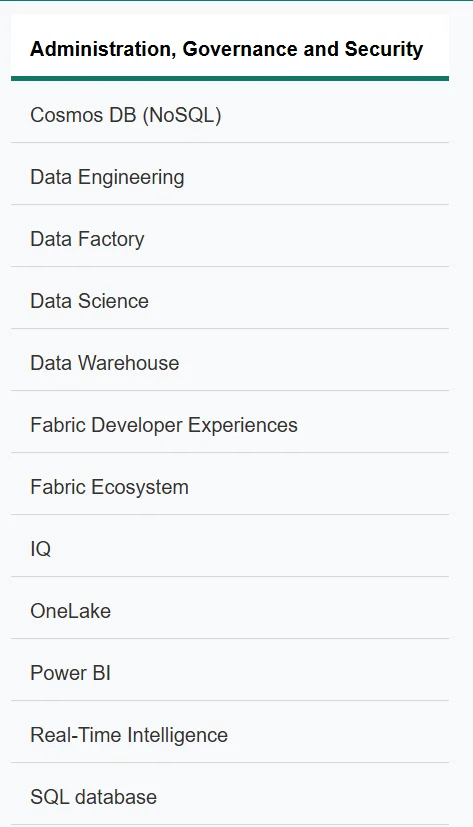
It is designed as an end-to-end data analytics solution, where the entire data journey happens in a single place. You do not need to do constant switching or no unnecessary complexity. Suppose you are a data engineer, analyst or business user, then Microsoft Fabric removes the friction and lets you focus on what actually matters i.e. turning data into decisions.
In short, Microsoft Fabric is not just another tool. It is a complete data platform that redefines how modern data analytics should work.
Read Also: Power BI Tutorial
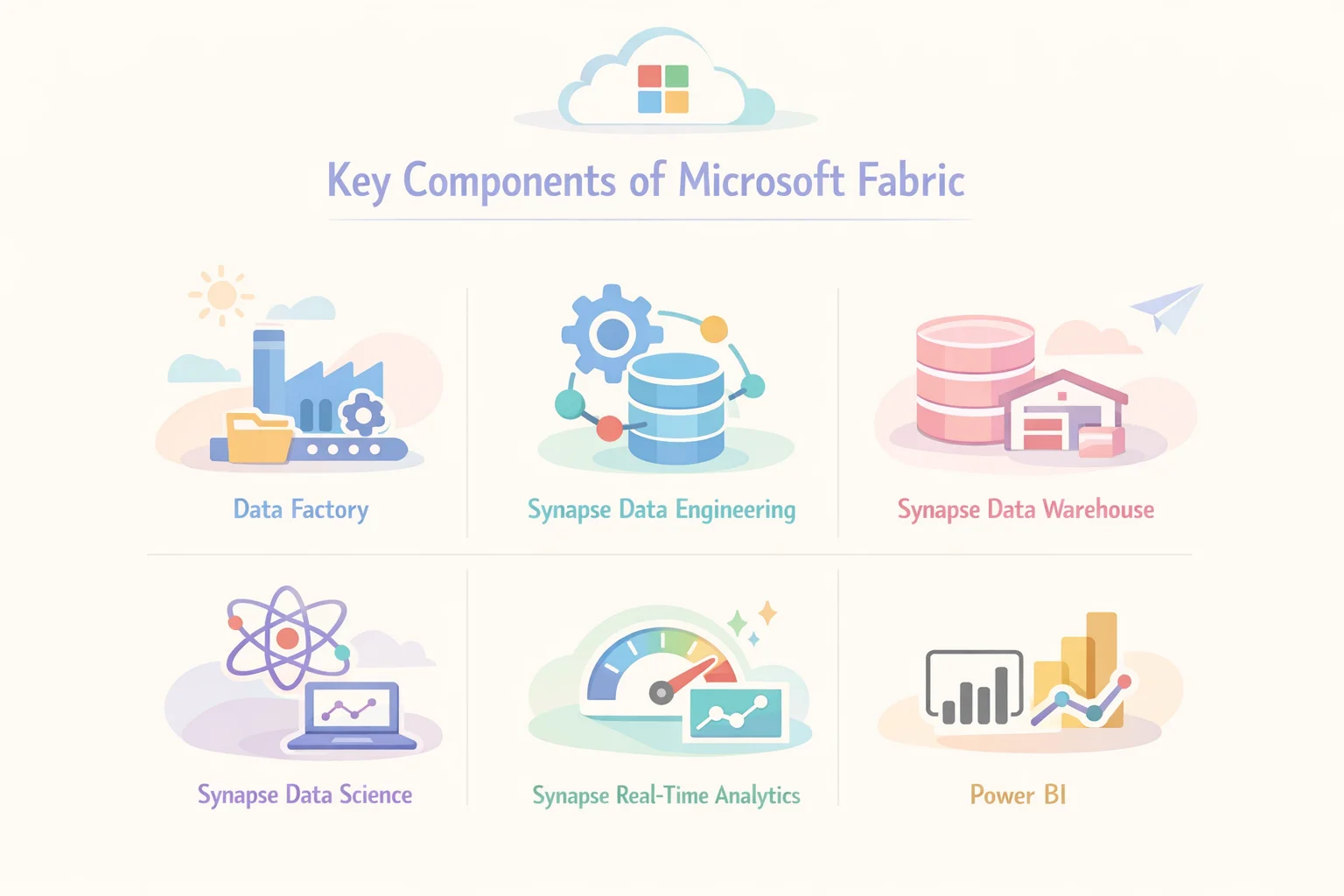
To understand how Microsoft Fabric actually works, you need to look at its core components. The best part is that all of these components are connected and work together inside one platform, so you do not feel like you are using separate tools. Here are the key components of Microsoft Fabric:
The Data Factory in Microsoft Fabric is responsible for collecting and moving data from different sources. It helps you build data pipelines so you can bring data from databases, apps, or cloud services into one place. The process is smooth and automated, which saves time and reduces manual work.
This component is used for preparing and transforming data. It allows data engineers to clean, structure, and process large volumes of data efficiently. It supports big data workloads and works well when you are dealing with raw and unstructured data.
Synapse Data Warehouse is designed for storing structured data in an optimized way for fast querying. It helps businesses run complex queries and generate reports quickly. This is where your processed data is organized and made ready for analysis.
This part focuses on machine learning and advanced analytics. Data scientists can build, train, and deploy models directly within Microsoft Fabric. It helps in predicting trends, identifying patterns, and making data-driven decisions.
As the name suggests, this component is used for analyzing real-time data. It is useful when you need instant insights from streaming data such as logs, IoT data, or live events. This helps businesses react quickly to changing situations.
Power BI is the visualization layer of Microsoft Fabric. It allows users to create dashboards and reports that are easy to understand. You can turn complex data into clear visuals, which helps teams and stakeholders make better decisions.
When all these components come together, Microsoft Fabric becomes a complete data platform. From collecting data to turning it into insights, everything happens in one place without unnecessary complexity.
Read Also: Power BI Interview Questions And Answers
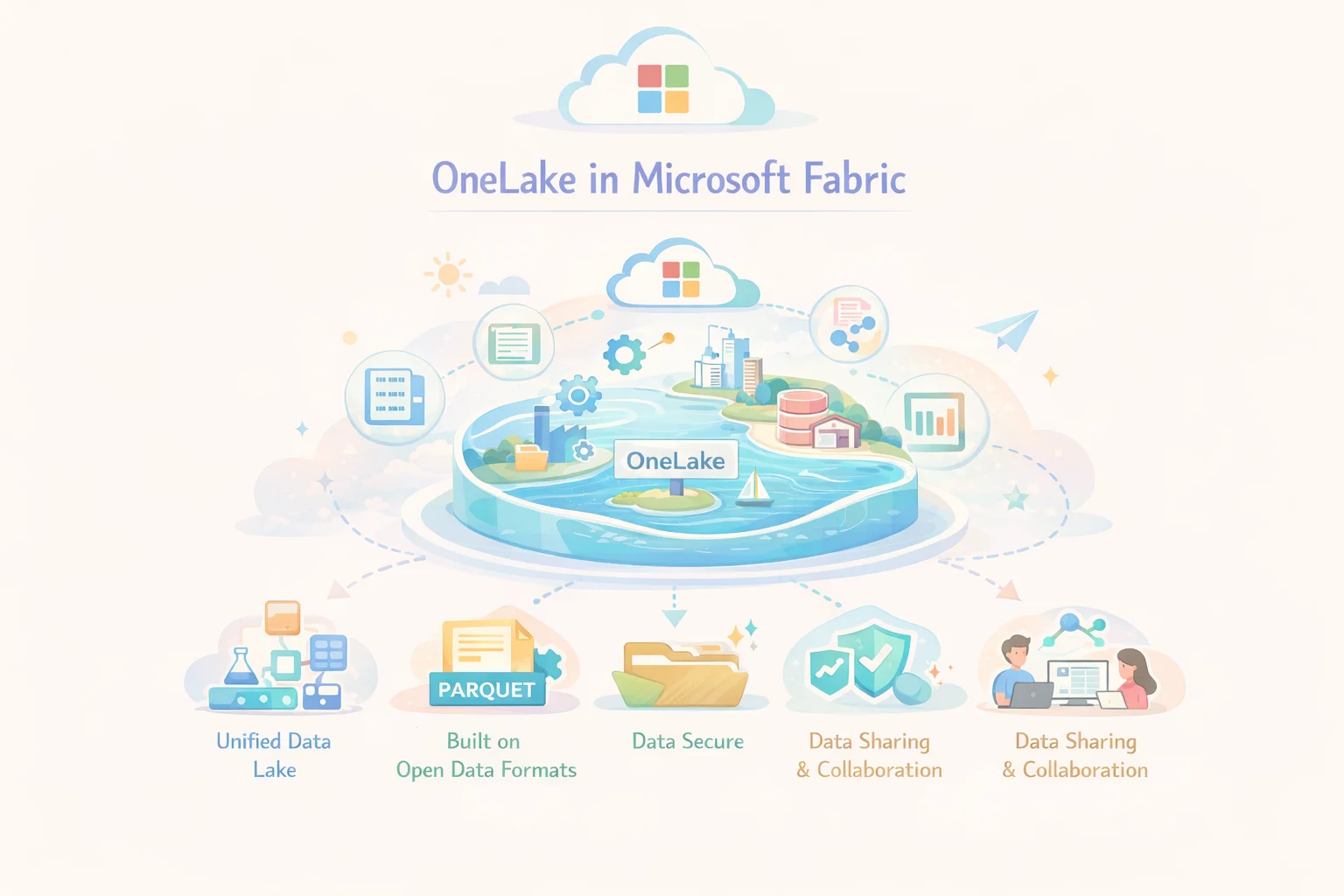
To understand Microsoft Fabric, you need to understand OneLake because this is where everything actually lives and connects. OneLake is a single and unified data lake that stores all your organization’s data in one place. So, you are not required to save data across multiple systems, everything is kept together in a structured and organized way. As a result of this access is now faster, simpler and more reliable.
Earlier, companies had different storage systems for different tools. Thus, it created confusion and duplication. But OneLake removes that problem by acting like one central storage layer for all Fabric services. So, now whether you are using data engineering, data science or reporting, everyone is working on the same data without creating copies. It improves consistency and reduces cost.
Another important thing about OneLake is that it is built on open data formats. That means your data is not locked into a single system and can be used easily across different tools when needed. Additionally, everything is stored once and shared across the platform, so teams can collaborate better, move faster, and trust that they are working with the same version of data every time.
In simple terms, OneLake is the foundation of Microsoft Fabric because it connects everything together and removes complexity. It also makes the entire data experience smooth and unified.
Read Also: Top Data Science Interview Questions and Answers
To understand the architecture of Microsoft Fabric, think of it as a layered system where each layer has a clear role but everything stays connected. These layers are:
This is the foundation of Microsoft Fabric where all data is stored in a single place. So instead of saving data in different systems everything lives in OneLake. This makes access simple, reduces duplication, and ensures all teams are working with the same data.
This layer is responsible for processing and analyzing data, it runs queries, transformations, and workloads. So users can turn raw data into meaningful information without needing separate systems for processing.
This includes all the tools like data engineering, data science, and Power BI. They are built into Fabric and allow users to perform different tasks within the same platform without switching between tools.
This is where users interact with the platform, create reports, build dashboards, and explore data in a simple and user-friendly way. It makes things easy for both technical and non technical users to work with data.
Lakehouse in Microsoft Fabric is like a smart combination of two traditional systems. They are a data lake and a data warehouse. These two are brought together into one simple and powerful solution.
Earlier, a data lake was used to store raw and unstructured data, while a data warehouse was used for structured data and reporting. Therefore, the companies had to manage both separately which made things complex and time consuming.
The Lakehouse approach in Microsoft Fabric removes this separation. It helps you in storing all types of data in one place while still being able to run fast queries and analytics on it. Therefore, you get the flexibility of a data lake and the performance of a data warehouse in a single system.
In Microsoft Fabric, Lakehouse is built on top of OneLake. In simple words, your data is stored just once and it can be accessed for different use cases without any duplication. Additionally, it supports open formats so that your data remains flexible and easy to use across tools.
This is making everything easier for data engineers to prepare data, for analysts to query it and for business users to generate insights, all without moving data between systems.
In short, a Lakehouse in Microsoft Fabric simplifies data storage and analytics by combining the best of both worlds into one unified experience.
One of the most powerful aspects of Microsoft Fabric is how deeply AI is built into the platform, not as an extra feature but as a core part of how you work with data every day, which means you do not always need advanced technical skills to get insights.
Fabric comes with Copilot, an AI assistant that helps you write queries, build reports, and understand data faster, so instead of figuring everything out manually you get intelligent suggestions and automated support while working.
It also provides auto insights, where the system automatically analyzes your data and highlights patterns, trends, or anomalies, saving a lot of time that would otherwise go into manual exploration.
Another important feature is natural language queries, which means you can simply type what you want in plain English, for example you can ask, “Show me sales trend,” and Fabric will generate the analysis and visuals for you without needing complex queries.
On top of that, Fabric supports machine learning model integration. It allows data scientists to build, train, and use ML models directly within the platform. This makes advanced analytics more accessible and practical.
In simple terms, AI in Microsoft Fabric makes data analysis faster, easier, and more intuitive, so instead of struggling with tools, you can focus on understanding your data and making better decisions.
Read Also: Databricks vs Snowflake
To really understand the value of Microsoft Fabric, it helps to see how it is used in real-world scenarios across different industries. Since Fabric brings data, analytics, and AI into one platform, it becomes useful in solving practical business problems in a simple and efficient way.
In e-commerce, Microsoft Fabric helps businesses understand customer behavior by analyzing browsing patterns, purchase history, and preferences, which allows companies to build smarter recommendation systems and improve customer experience while increasing sales.
In the banking sector, Fabric is used for fraud detection by analyzing transaction data in real time and identifying unusual patterns, it also supports risk analysis which helps financial institutions make better lending and investment decisions based on accurate data insights.
In healthcare, Microsoft Fabric can be used for disease prediction by analyzing patient data and identifying early warning signs, it also supports patient analytics which helps hospitals improve treatment plans and manage resources more effectively.
For general business use, Fabric is widely used to create sales dashboards and track performance metrics, it allows companies to monitor growth, identify trends, and make faster decisions using real time insights presented in an easy to understand format.
These use cases show how Microsoft Fabric is not just a technical platform but a practical solution that helps organizations turn data into real business value.
Understanding the benefits of Microsoft Fabric becomes much easier when you connect them to real problems teams face every day. Let’s break them down in a simple and practical way.
Microsoft Fabric brings everything into one platform, which means you do not have to learn or manage multiple tools, this makes the entire data workflow easier to understand and faster to execute, especially for teams that want to focus more on insights rather than setup.
One of the biggest challenges in traditional systems is data being scattered across different tools. Fabric solves this by keeping data in one unified system so everyone works on the same data which improves accuracy and avoids confusion.
Since you are using a single platform instead of multiple services, costs are easier to manage and often lower, you also save money by reducing data duplication and minimizing the need for complex integrations.
Microsoft Fabric allows you to analyze data as it is generated, which helps businesses react quickly to changes, whether it is tracking sales performance or detecting issues, decisions can be made faster with up to date information.
Fabric creates a shared environment where data engineers, analysts, and business users can work together, this improves communication and speeds up the overall process of turning data into useful insights.
These benefits clearly show how Microsoft Fabric is designed not just to handle data, but to make the entire experience simpler, faster, and more effective for everyone involved.
Read Also: Snowflake Tutorial For Beginners
While Microsoft Fabric offers a lot of advantages, it is important to understand its limitations as well so you can make a balanced decision based on your needs.
Microsoft Fabric is a relatively new platform, which means it is still growing and improving, some features may not be as mature as traditional tools and updates are happening frequently which can sometimes create uncertainty for long term planning.
Even though Fabric simplifies many things, beginners may still find it challenging at first, especially if they are not familiar with data concepts or Microsoft tools, it takes some time to understand how different components work together.
Microsoft Fabric works best when you are already using Microsoft services, so if your organization relies on other ecosystems, integration can feel limited or less flexible compared to open multi platform setups.
Fabric uses a capacity based pricing model, which can be difficult to understand initially, costs depend on usage and performance levels, so without proper planning it may become expensive for some organizations.
Before Microsoft Fabric, most organizations followed a traditional approach where different tools were used for each stage of the data process, which made the system complex, harder to manage, and slower when it came to generating insights, now with Microsoft Fabric everything is unified into a single platform which simplifies the entire workflow and improves efficiency.
| Aspect | Traditional Approach | Microsoft Fabric |
| Tools Used | Multiple separate tools for storage, processing, and visualization | Single unified platform for all data needs |
| Data Storage | Data stored in different systems | Centralized storage in OneLake |
| Data Movement | Frequent data movement between tools | Minimal data movement |
| Integration | Requires manual integration between services | Built-in integration across components |
| Cost Management | Separate pricing for each tool | Unified pricing model |
| Complexity | High, requires managing multiple systems | Low, everything in one place |
| Collaboration | Teams work in silos | Teams work on a shared platform |
| Performance | Slower due to disconnected systems | Faster due to unified architecture |
| Scalability | Depends on individual tools | Scalable within one ecosystem |
Read Also: Azure Databricks Tutorial For Beginners
When evaluating Microsoft Fabric, it is important to see how it compares with other popular data platforms in the market. Tools like Snowflake and Databricks are powerful in their own areas, but they focus on specific parts of the data journey, while Microsoft Fabric is designed as a complete end-to-end solution that combines everything into one unified platform.
| Aspect | Snowflake | Microsoft Fabric |
| Core Focus | Primarily a data warehouse platform | Complete end-to-end data platform |
| Scope | Strong in storage and SQL-based analytics | Covers data ingestion, engineering, analytics, and BI |
| Data Handling | Structured and semi-structured data | Structured, semi-structured, and unstructured data |
| Integration | Requires external tools for pipelines and BI | Built-in integration across all components |
| User Experience | More focused on data teams | Designed for both technical and business users |
| Visualization | Needs tools like Power BI or Tableau | Native Power BI integration |
| Approach | Warehouse-centric | Unified ecosystem approach |
| Aspect | Databricks | Microsoft Fabric |
| Core Strength | Strong in data engineering and machine learning | Balanced across analytics, BI, and data workflows |
| Target Users | Data engineers and data scientists | Engineers, analysts, and business users |
| Complexity | More technical and code-heavy | More user-friendly and low-code options available |
| AI/ML Capabilities | Advanced and highly customizable | Integrated and simplified AI features |
| Data Platform Style | Lakehouse-focused platform | End-to-end unified data platform |
| Business Intelligence | Requires external BI tools | Built-in Power BI for reporting |
| Ease of Use | Steeper learning curve | Easier adoption for beginners and teams |
Microsoft Fabric is not just another data tool, it is a complete shift in how organizations handle data. From solving the problem of scattered systems to bringing everything into one unified platform, Fabric simplifies what used to be a complex and time-consuming process.
With features like OneLake for centralized storage, built-in analytics, AI-powered insights, and seamless collaboration, it allows teams to move faster and focus more on decision-making rather than managing tools. At the same time, it is important to be aware of its limitations like its evolving nature and pricing model, so you can plan accordingly.
In simple words, if your goal is to reduce complexity, improve efficiency, and get real value from your data, Microsoft Fabric is a strong solution worth considering. And as the platform continues to grow, its impact on modern data analytics is only going to increase.
Explore Our Other Related Articles:
How to Remove Blank Rows in Excel?
What Is Microsoft Power Automate?
How to Freeze Multiple Rows in Excel
Microsoft Power Automate Tutorial
How to Remove Spaces in Excel?
How to Create a Dashboard in Excel?
FAQs
Yes, Microsoft Fabric is designed to be user-friendly with features like low-code tools and AI assistance, but beginners may still need some time to understand basic data concepts and how the platform works.
Unlike traditional approaches that use multiple disconnected tools, Microsoft Fabric provides a unified platform where everything works together, which reduces complexity and improves efficiency.
Yes, Microsoft Fabric supports real-time analytics, allowing businesses to analyze live data and make faster decisions based on up-to-date insights.