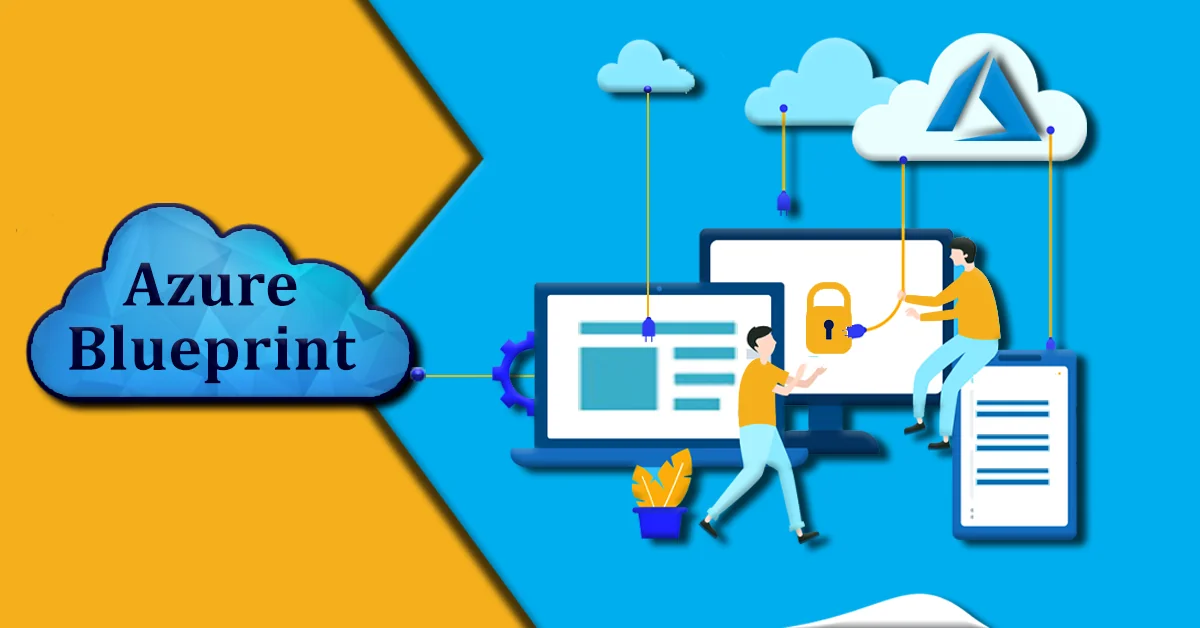
If an individual ever had to move data between different systems or change it into a usable format, they must know it can be a bit of a headache. That's where Azure Data Factory (ADF) comes in. Think of it as a cloud-based data integration service that helps build data pipelines without having to write tons of code. Whether one is pulling data from on-premises databases, cloud storage, or third-party services. Azure Data Factory makes it easier to connect, change, and load that data where it needs to go.
What's amazing is that it's designed to manage both simple tasks and complicated workflows. So whether one is just copying data from one place to another or orchestrating an entire ETL (Extract, Transform, Load) process. ADF has the tools to get it done. Plus, since it's part of the Azure terrain, it plays nicely with other Microsoft services like Azure SQL, Synapse Analytics, and even Power BI.
Azure Data Factory is basically Microsoft's cloud-based tool which is used for moving and changing data. Imagine one has data scattered all over different places, maybe some in an on-prem database, some in cloud storage, and maybe even in a SaaS app like Salesforce. This tool helps pull all that data together, clean it up, and get it where it needs to be.
It works kind of like a data delivery service. Build something called a pipeline, which is just a fancy word for a workflow that tells ADF what data to move, where to get it from, and what to do with it. Along the way it also does things like cleaning, converting formats, or combining it with other data.
You know what the best part is? You don't need to be a hardcore developer to use it. It has a drag-and-drop interface for creating these pipelines, but it also supports custom code for more control. It's super helpful for businesses that are working with big data or trying to set up modern data solutions in the cloud.
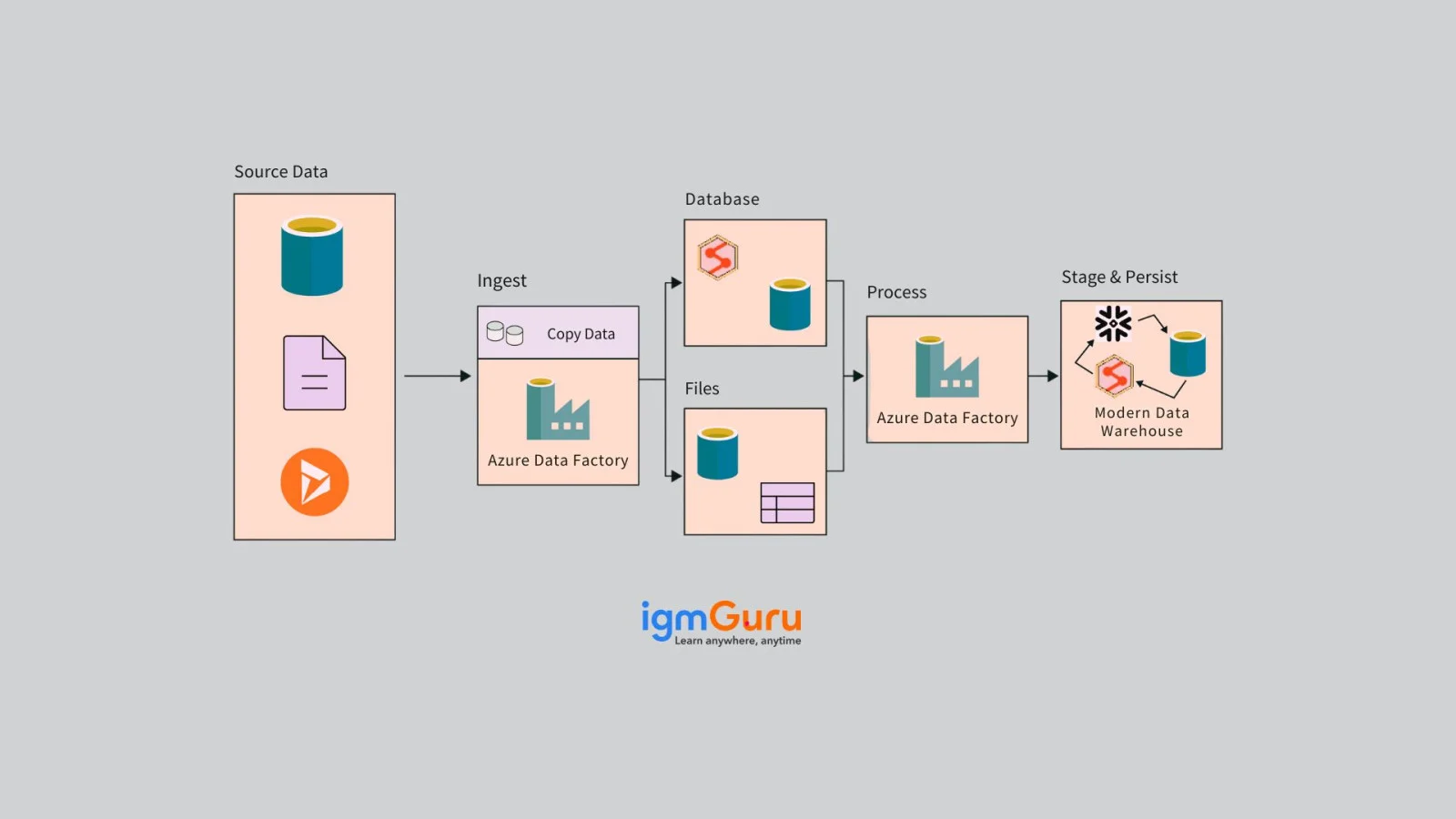
Alright, so how does it work? It is kind of like a smart data-moving and data-shaping assistant. Its main role is to help move data from one place to another and make sure it's in the right format when it gets there.
Here's how it goes down -
And as it's built on Azure, it matches the needs. Whether moving a few files or handling huge amounts of data daily, ADF can grow together.
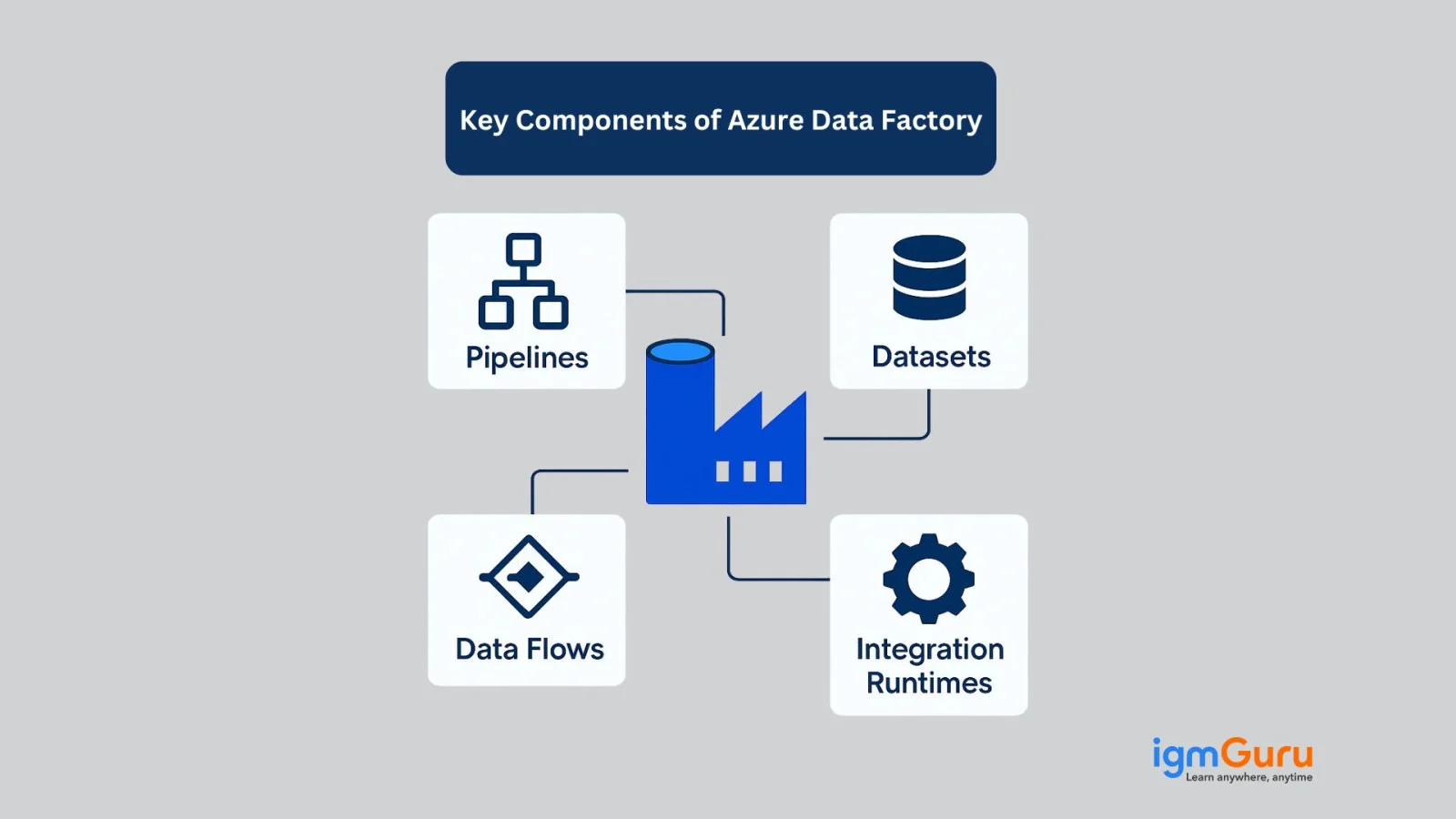
While understanding ADF, it helps to get familiar with its major building blocks. These components are what one uses to create, manage, and run data workflows. Let's take a look at the Azure Data Factory's key components-
Think of the pipeline as the overall game plan. It's a bunch of steps that tell ADF what to do like copying data from point A to point B, changing it, or running a script. It has different activities inside one pipeline.
These are the actual tasks inside a pipeline. For instance, copying data, running a stored procedure, or executing a data transformation. Every activity does one job, and can link them together to build complicated workflows.
A dataset is basically a pointer to the data. Whether it's a folder in Azure Blob Storage, a table in SQL Server, or a file in Amazon S3. It tells this tool about where the data is and what it looks like.
These are the connection settings. Just like one needs login info to access your email, it uses linked services to connect to different data sources and destinations.
Running a pipeline on a schedule is where triggers come in. They let a pipeline kick off at a particular time or in response to an event, like when a new file is dropped in a folder.
It is the behind-the-scenes engine that actually moves and changes the data. There are a few types (like Azure, Self-hosted, and Azure-SSIS), depending on where the data lives and what kind of processing power is required.
In short, this tool is like a data assembly line. And these components are the tools and parts that keep it running smoothly. After getting the hang of them, building data workflows becomes much easier.
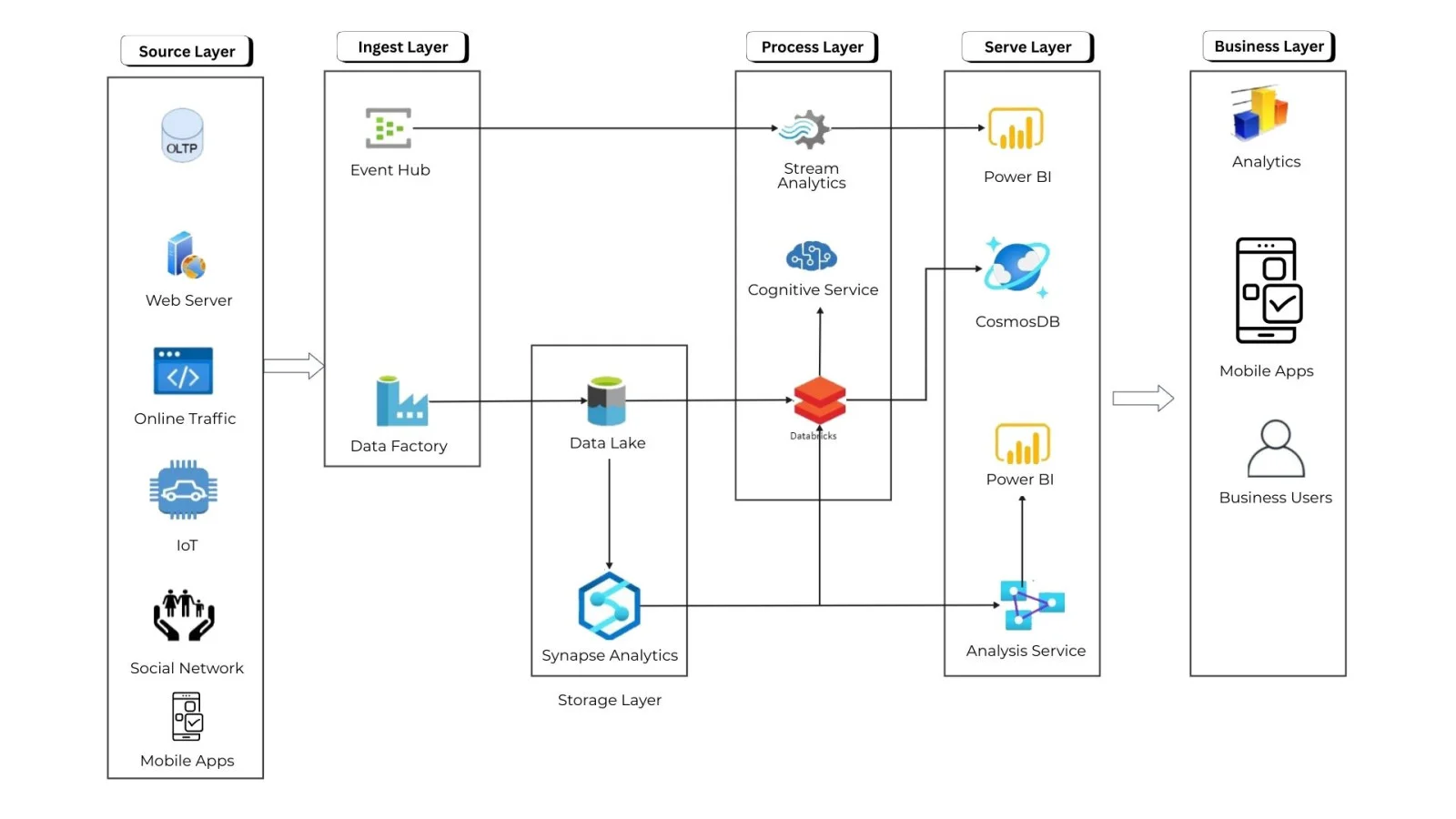
It's important to understand the Azure Data Factory (ADF) architecture before building data pipelines. The architecture describes how different components interact to connect, move, transform, and process data.
At a high level, Azure Data Factory architecture consists of four major layers that I have experienced below.
Together, these layers help organizations move and process data across cloud, on-premises, and hybrid environments.
This is where the data comes from and where it needs to go. ADF can connect to almost anything, including:
ADF uses Linked Services to securely establish these connections.
Purpose:
Define where the data is stored and where it needs to be delivered after processing.
This layer defines what ADF does with the data.
Pipelines can handle:
Purpose:
Coordinate the data flow from source to destination and apply required transformations.
This is the compute engine that runs activities inside pipelines. Depending on the environment, ADF provides:
Purpose:
Move and transform data while ensuring performance, security, and scalability.
ADF provides built-in monitoring features to track pipeline execution:
These insights help teams troubleshoot, optimize performance, and ensure reliable automation.
Purpose:
Provide visibility into operations and ensure smooth, error-free data flow.
To understand the ADF, you must know about some hands-on practices. Let’s discuss how you can set ADF in your system:
For this setup, you need to consider the following prerequisites:
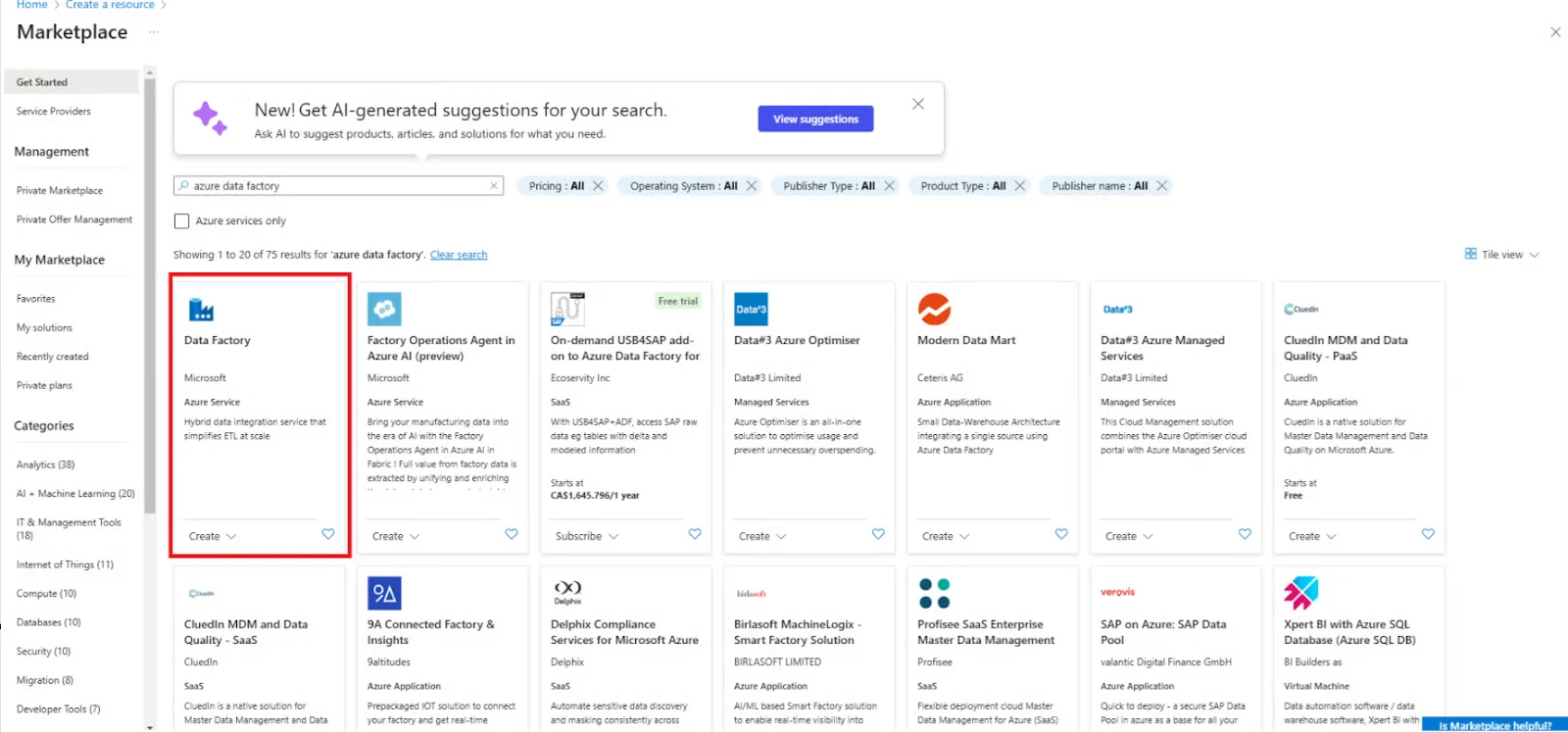
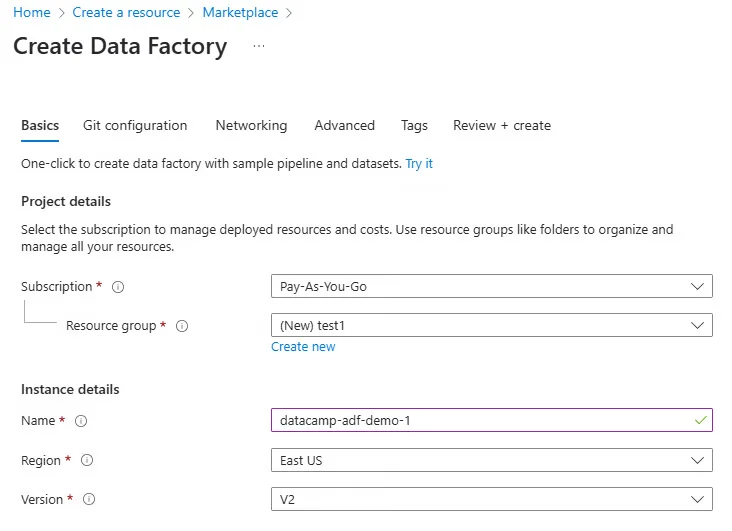
Creating an ADF involves the following steps:
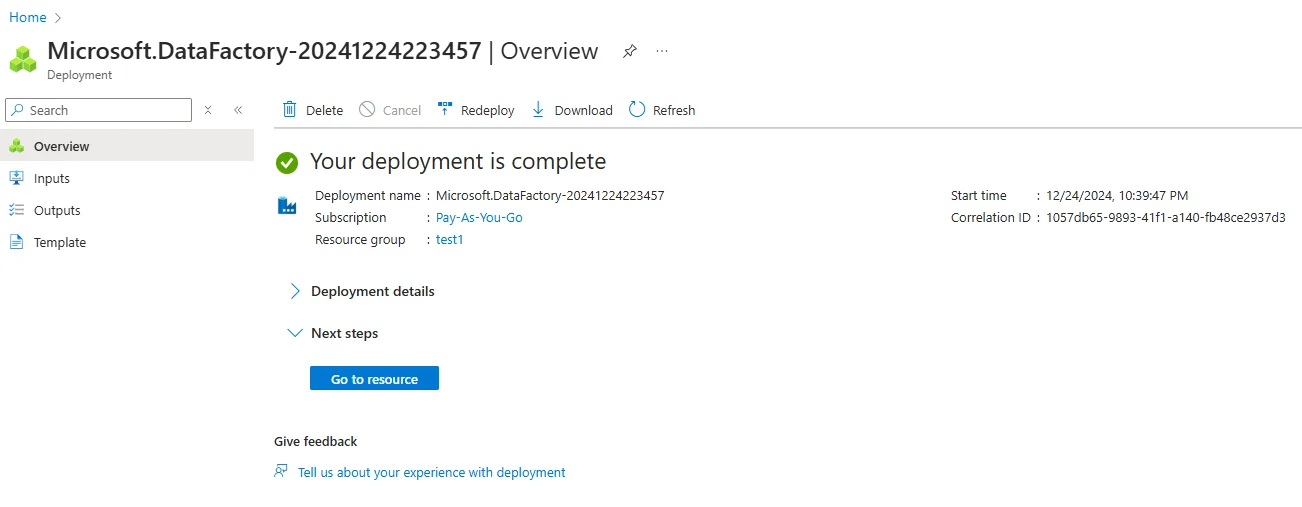
3. Navigating the ADF interface
The ADF interface includes three main sections:
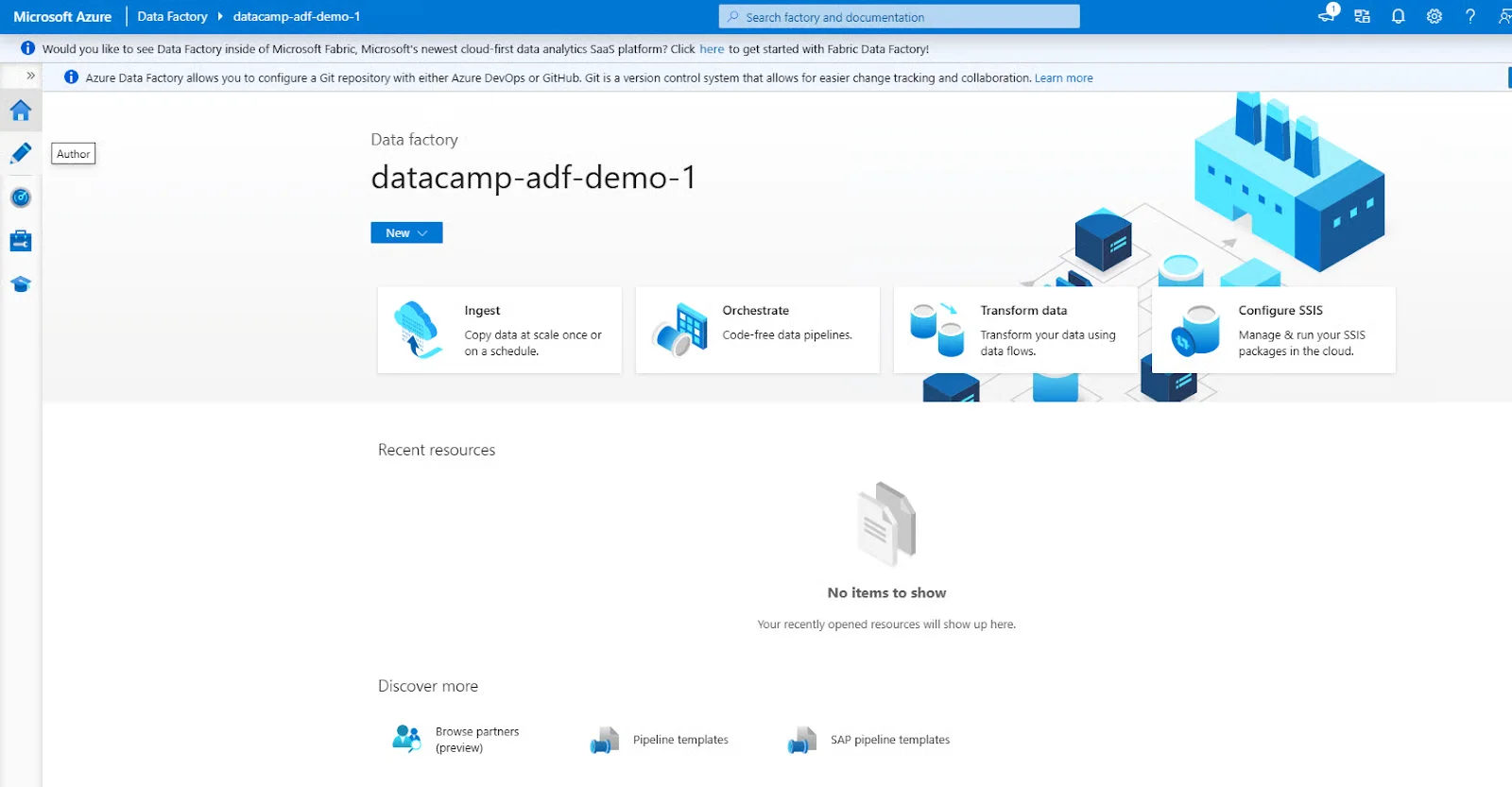
It provides some of the best data integration and transformation features. They assist in simplifying complicated workflows and improving productivity. Let’s explore these features:
| Capability | Description | Examples/Features |
| Data Ingestion | Connects to a wide range of data sources to pull data into a centralized pipeline. | - Azure Blob Storage, SQL Server, Salesforce, SAP, AWS S3 - Over 90+ connectors |
| Data Movement | Transfers data between cloud and on-premises sources with high throughput. | - Copy Activity - Integration Runtime (IR) for on-prem/cloud support |
| Data Transformation | Performs data cleansing, shaping, and conversion using various methods. | - Mapping Data Flows (code-free) - Wrangling Data Flows (Power Query-based) - Custom .NET or Python transformations |
| Orchestration | Schedules and manages complex workflows with dependencies. | - Triggers (schedule, tumbling window, event-based) - Pipeline chaining |
| Data Flow (Mapping) | Visually designed data transformations on Spark clusters. | - Joins, aggregations, derived columns, pivots/unpivots |
| Wrangling Data Flow | Power Query-like UI for data preparation, familiar to Excel users. | - Easy-to-use for business analysts |
| Custom Activity Execution | Runs custom scripts or executables (Python, .NET, etc.) | - Azure Batch, Azure Functions, HDInsight support |
| Data Monitoring & Logging | Monitors and logs pipeline activity for auditing and debugging. | - Azure Monitor Integration - Activity runs log - Alerting & Retry policies |
| Integration with Other Azure Services | Seamlessly integrates with storage, compute, analytics, and ML services. | - Azure Synapse Analytics, Azure Machine Learning, Azure Functions, Key Vault |
| CI/CD & DevOps Support | Enables version control and automated deployments. | - GitHub, Azure Repos, ARM Templates, Azure DevOps Pipelines |
| Hybrid Data Integration | Supports both cloud and on-premises environments. | - Self-hosted Integration Runtime |
| Real-time & Batch Processing | Supports both real-time and scheduled (batch) data pipelines. | - Event triggers + scheduled pipelines |
This tool isn't just about moving data from one place to another. But it's packed with features that make the whole process smoother, smarter, and much better. Here are the features of Azure Data Factory.
It doesn't require a hardcore developer to use this tool. ADF comes with a drag-and-drop interface that lets us build data pipelines without writing a single line of code.
This tool connects with pretty much everything, like Azure services, on-premises databases, cloud storage, SaaS apps, and more. So whether the data is in SQL Server, Salesforce, or a flat file in blob storage, this tool can handle it.
This tool allows shaping and cleaning the data before moving it. One can do basic changes directly or hook into services like Azure Databricks or HDInsight for more complex data wrangling.
This tool comes with built-in scheduling tools and triggers for fully automating workflows.
As it's built on Azure, this tool balances altogether. Whether processing a few records or millions of rows, it manages the weight without breaking a sweat.
One gets monitoring, logs, and alerts, so if something goes wrong, one knows exactly what happened and where. It is super helpful for troubleshooting.
This tool works with Azure's security features, like role-based access control (RBAC) and managed identities, to keep the data safe and limit who can do what.
This tool can bridge the gap with its Self-hosted Integration Runtime, allowing users to connect to on-premises systems safely. Azure Data Factory is like the ultimate data traffic controller. It is smart, flexible, and built for both beginners and experts. It's a perfect choice for anyone looking to smooth data movement and transformation in the cloud.
Azure Data Factory comes with several advantages that make it ideal for modern data integration and ETL workflows:
Even though ADF is powerful, it has some constraints to consider:
Here is a quick comparison of Azure Data Factory, SSIS, and Azure Databricks based on their core capabilities, usage, scalability, and cloud readiness.
| Feature/Parameter | Azure Data Factory (ADF) | SSIS (SQL Server Integration Services) | Azure Databricks |
| Deployment Model | Fully cloud-based | On-premises (can be cloud-hosted via Azure-SSIS IR) | Cloud-based big data & analytics |
| Primary Use | ETL/ELT orchestration & data movement | ETL on structured data | Big data processing, ML, Spark |
| Data Transformation | Low-code mapping data flows | SQL-based transformations | Spark-based transformations |
| Scalability | High (auto scale) | Limited to server availability | Very high (Spark clusters) |
| Cost Structure | Pay-as-you-use | Server license + storage | Pay per cluster usage |
| Learning Curve | Beginner-friendly | Moderate (SQL knowledge needed) | Higher (Spark/Python/Scala) |
| Execution Engine | Integration Runtime (cloud / self-hosted) | On-prem SQL Server engine | Spark clusters |
| Support for Big Data | Yes (via Databricks, HDInsight) | Limited | Excellent |
| Best For | Cloud ETL & hybrid data movement | On-premise ETL workflows | Advanced big data analytics |
| Code-Free Experience | Yes (drag-and-drop UI) | Partial | Mostly code-based |
| Monitoring | Built-in visual monitoring | SQL Agent, SSIS catalog | Notebooks, job run UI |
| Integration With Azure | Native | Requires SSIS IR | Native |
| Real-time Workloads | Event triggers supported | Limited | Strong streaming support |
| Typical Use Case | Data ingestion + orchestration | Traditional enterprise ETL | ML pipelines + huge workloads |
This tool is very versatile, and people use it for all kinds of data-related tasks. Whether working with small datasets or huge enterprise-scale data flows. This tool has got it covered. Let us take a look at the Azure Data Factory use cases.
This tool makes it easier to shift the data from local systems to Azure services. Services like Azure SQL Database or Azure Data Lake. It's like a moving truck for the data.
This tool is perfect for building ETL (Extract, Transform, Load) and ELT (Extract, Load, Transform) workflows. One can pull in data from different sources, clean it, apply changes, and push it to the destination, all in one smooth pipeline.
For instance, a company uses SQL Server, Salesforce, and flat files in blob storage. This tool can pull that data altogether and blend it into a unified format, so it's easier to analyze and work with.
This tool plays nicely with big data tools like Azure Databricks and HDInsight. One can make complicated data transformations and machine learning workflows with just a few clicks.
This tool supports both time-based schedules and event triggers, giving full control over the things that run.
It helps feed data into the data warehouse, like Azure Synapse Analytics. Azure Data Factory can prep and load data in a clean, organized way so analytics and reporting tools always have the latest information.
Through feeding clean, structured data into tools like Power BI. This tool plays a major role in making smarter business decisions. It makes sure that the dashboards and reports are built on accurate, up-to-date data. So basically, Azure Data Factory is like the glue that connects all the data systems. This tool keeps everything flowing smoothly, whether it is cleaning, moving, or combining data from all over the place.
Here is the detailed pricing plan of ADF.
| Pricing Component | Description | How It Is Charged | Notes |
| Pipeline Orchestration | Running pipeline activities (e.g., copy, transform) | Per activity run | Depends on the number of executions |
| Data Movement | Copying data between sources | Per Data Movement Unit (DMU) | Higher for cross-region transfers |
| Data Flow (Mapping) | Data transformation using Spark | Per vCore-hour | Charged based on compute usage |
| Self-hosted Integration Runtime | When used for on-premises sources | Per hour compute | You manage VM cost |
| Azure-SSIS IR Runtime | Running SSIS packages via Azure | Per vCore-hour | Separate cluster pricing |
| Scheduling & Monitoring | Trigger-based execution and log monitoring | No separate cost | Included in orchestration |
| Data Factory Operations | Creating, reading, updating objects | Free | Metadata operations are free |
| Data Transfer | Between Azure regions | Per GB transferred | Same as standard Azure bandwidth pricing |
| Pay-As-You-Go Model | Only pay for what you use | No upfront licenses | Improves cost efficiency |
| Free Tier | Limited low-frequency activities per month | Free | Good for testing & learning |
Azure Data Factory is among those tools that quietly does a lot of heavy lifting behind the scenes. Whether it is moving data, cleaning it up, or doing complicated workflows. This tool helps ease the procedure and keep everything running smoothly. This tool is adaptable, scalable, and fits into a ton of different data scenarios. Different data situations, from basic transfers to full-blown enterprise data solutions, are handled by this tool. What makes it stand out is how user-friendly this tool is. So if an individual is just getting started with cloud data or looking to level up their data pipeline game, then Azure Data Factory is definitely the tool for it.
Ans. Yes, ADF is an ETL tool. It is used to create
Ans. It primarily uses two programming languages, including JSON (JavaScript Object Notation) and an expression language based on JavaScript-like functions. JSON is used to define components such as pipelines, datasets, and linked services. Whereas, expression language is used for dynamic pipeline configuration.
Ans. It is not available for free, but its pay-as-you-go model offers free services. These services are limited to a few low-frequency activities per month.
| Course Name | Batch Type | Details |
| Microsoft Azure Training | Every Weekday | View Details |
| Microsoft Azure Training | Every Weekend | View Details |