Laravel is a powerful open-source PHP framework designed for developing modern, secure, and scalable web applications. Built on the MVC (Model-View-Controller) architecture, Laravel simplifies common development tasks such as routing, authentication, database handling, and caching, allowing developers to create applications more efficiently and with cleaner code.
Since its release in 2011 by Taylor Otwell, Laravel has become one of the most widely used PHP frameworks because of its elegant syntax, rich ecosystem, and developer-friendly tools. It offers features like Blade templating, Eloquent ORM, Artisan command-line interface, and built-in security mechanisms, making it suitable for both beginners and professional developers.
This article explores what Laravel is, how its architecture works, its major features, advantages, ecosystem, and why it remains a preferred choice for modern web development.
Laravel is a free PHP framework used for building modern web applications. It simplifies development by providing built-in tools for routing, authentication, and database management. With a clean syntax, it allows developers to write less repetitive code while ensuring high performance and security.
The framework also has useful features like the Artisan command-line interface, native authentication and MVC architecture. These features make it easy to use and are the main reason for its popularity. This framework is used to create full-stack applications.
To understand the working and use of this framework, you need to learn about the Model-View-Controller structure.
Read Also: Laravel Interview Questions and Answers
Laravel has become one of the most popular PHP frameworks because it helps developers build modern web applications faster without sacrificing code quality. Instead of writing everything from scratch, developers get many built-in tools for routing, authentication, database management, caching, security, and testing. This reduces development time while keeping applications clean, scalable, and easy to maintain.
Another reason behind Laravel's popularity is its rich ecosystem and excellent developer experience. Tools like Eloquent ORM, Blade Template Engine, Artisan CLI, and built-in security features simplify complex development tasks. Whether building a small business website or a large enterprise application, Laravel provides a structured approach that improves productivity and makes long-term project maintenance much easier.
Laravel follows a layered Model View Controller architecture that separates logic, data and design for cleaner and more manageable applications. Let's study them one by one:
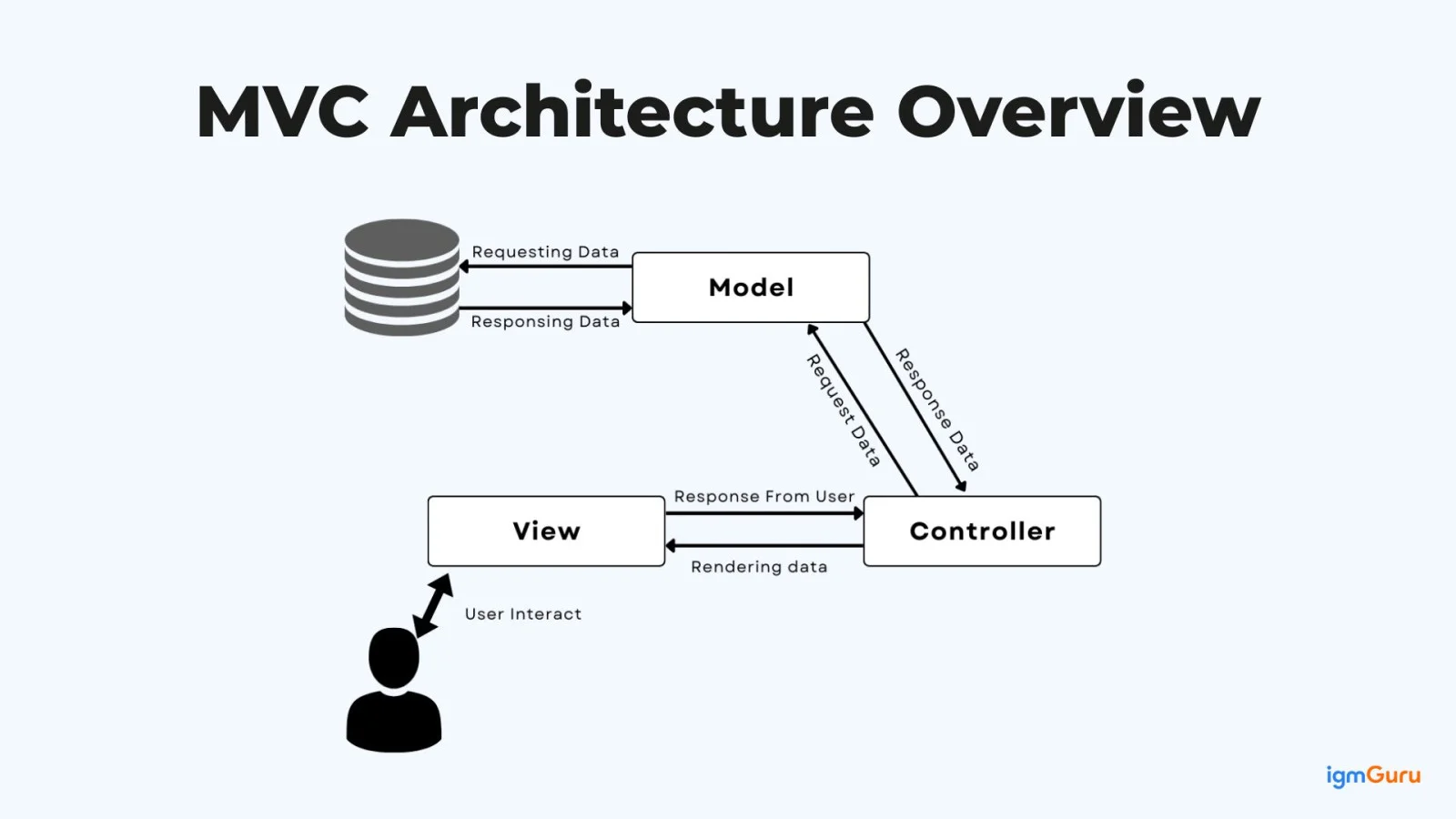
MVC Architecture is a design pattern that Laravel uses to organize code cleanly and logically. It mainly divides the whole application into three components: Model, Controller, and View. Let’s study them each in brief:
The model works like the data handler of an application. They connect directly to the database and take care of saving, updating, deleting and reading data. When a page needs user details or product information, the model provides that data. It does not worry about page design or user clicks. It stays focused only on keeping data correct, organized and manageable.
The view is the part that shows content to users. It displays pages, text, forms and data simply and cleanly. This part focuses only on how things look on the screen. It does not connect to the database and does not handle logic. It simply receives data and presents it properly so users can easily read and understand the information.
The controller receives user requests and decides what should happen next. It collects required data from the Model and passes the data to the View. This part does not store data or design pages. The controller also controls the flow of the system, meaning every action gives the correct result to the user.
Now you know what MVC is, and I know you must have wondered why we are discussing this, so let me tell you what its importance is. The following are some of them:
Every request enters the application through the public/index.php file. The request is then handled by the HTTP Kernel, which loads service providers and middleware. Middleware filters the request (authentication, security, logging) before passing it to the router.
This router decides where the user request should go. When someone opens a URL, the router checks the route file and connects that URL to the correct controller method.
Controllers handle the main logic of the application. As soon as they receive the request from routes, it checks user input, applies rules, and decides what action to take. Controllers also talk to models to get or save data and then pass that data to views.
The model layer represents tables and handles tasks like fetching records, inserting data, updating values, and deleting rows. This layer keeps all database-related logic in one place, making the application more organized.
Views show the final output to the user. They are written using Blade templates and focus only on design and display. This layer receives data from controllers and converts it into clean HTML pages.
It also uses service providers, facades, dependency injection and Artisan CLI. These tools help manage services, reduce complex code and automate tasks like migrations, caching and testing.
This example is a basic introduction to Laravel routing using a simple “Hello World” message:
|
Now, let me explain this code in brief for better understanding:
In early 2011, PHP development felt confusing and boring. That is why a developer named Taylor Otwell created Laravel to make web development easier and faster. It gave ready made tools for pages, data and safety. Many developers felt comfortable using it. Slowly, it became trusted and widely used for both small projects and big web applications. Let’s look at it complete evolutionary history:
| Version | Year | Description |
| Laravel 1 | 2011 | It is the very first version of Laravel that supported routing and simple page views. |
| Laravel 2 | 2011 | Introduced controllers and gave projects a better structure. |
| Laravel 3 | 2012 | This version came up with added command-line support and database migration features. |
| Laravel 4 | 2013 | They modified it with modern design and Composer support. |
| Laravel 5 | 2015 | Brought cleaner folders, an easy login system, and smoother syntax. |
| Laravel 6 (LTS) | 2019 | Their main focus was on stability with long-term support for users. |
| Laravel 7 | 2020 | It came up with improved speed and made routing more efficient. |
| Laravel 8 | 2020 | Changed application structure and improved background jobs. |
| Laravel 9 (LTS) | 2022 | Used newer PHP features and strengthened security. |
| Laravel 10 | 2023 | Made the framework faster and the code more organized. |
| Laravel 11 | 2024 | Simplified setup with minimal configuration and clean structure. |
| Laravel 12 | 2025 | Laravel 12 builds on Laravel 11.x with updated dependencies and new starter kits for React, Vue, and Livewire. |
Let's understand what makes Laravel such a popular PHP framework for modern, secure web development:
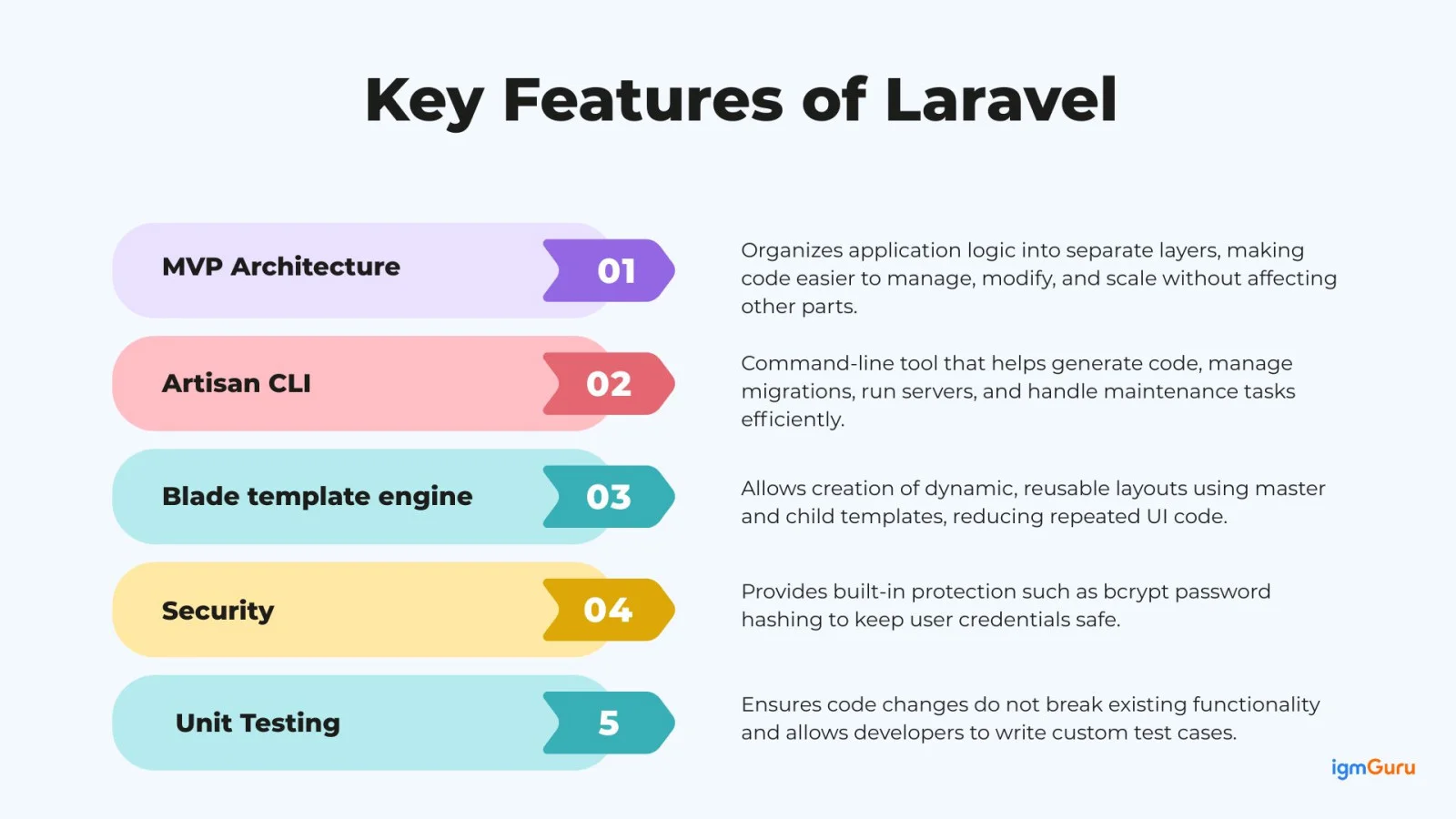
This PHP framework follows the MVC Architecture, which is a way to keep application code organized. Instead of putting everything in one place, the work is divided into three parts. This makes the code easier to read and easier to manage. When something needs to be changed, developers can update one part without affecting the rest of the application. It gives a clear structure; errors are easier to fix, and development becomes quicker and smoother.
Artisan tools are used to create skeleton code, database schemas and migration files as well as to execute those migration files. This made it easy to manage a system's database schema. It is used to start a local development server that provides a testing environment for the application and sees changes in real time. The following are the commands you can use in Artisan:
| Command | Description |
php artisan list: | It displays all available artisans' commands. |
php artisan serve: | This command starts the development server. |
php artisan make: model ModelName: | It creates a new Eloquent model. |
php artisan make: controller ControllerName: | Generates a new controller. |
php artisan migrate: | This command runs database migrations. |
php artisan db:seed: | Seed the database with test data. |
php artisan down: | It puts all the applications into maintenance mode. |
php artisan up: | It brings all the applications out of maintenance mode. |
Blade template engine (Dynamic Template) allows developers to create dynamic and reusable web pages. This feature simplifies the process of web building as it provides expressive syntax and features like inheriting templates or creating sections. You can refer to the following layout examples for better understanding:
|
|
The master layout acts like a common structure for the website. It contains fixed parts like HTML and placeholders using @yield(). The child Blade file uses @extends to connect with the layout and fills those placeholders using @section. This way the same layout can be reused for many pages.
Laravel includes strong built-in security features. It hashes passwords using bcrypt before saving them, so passwords are never stored in plain text and are very hard to break.
Unit Testing ensures that new updates in the code do not affect any other part of the code. It runs several test cases to check that the changes in the code do not affect other parts of the code. There is an interesting part, and that is that developers can also write their own test cases.
Eloquent ORM is Laravel's built-in Object-Relational Mapping system that simplifies database operations. Instead of writing lengthy SQL queries, developers can interact with database tables using simple PHP models. It supports relationships, filtering, eager loading, and CRUD operations, making database management cleaner, faster, and easier to understand, especially for large applications.
Laravel provides database migrations to manage database structure using PHP code instead of manual SQL scripts. Developers can create, modify, or roll back tables with version control. Seeders allow sample or default data to be inserted automatically, making development, testing, and deployment much more consistent across different environments.
Laravel includes built-in authentication and authorization features that simplify user login, registration, password reset, and access control. Developers can secure different parts of an application using roles, permissions, middleware, and policies without implementing complex security logic from scratch, reducing development effort while improving application security.
Middleware acts as a filter between incoming HTTP requests and the application. It performs tasks such as authentication, request validation, rate limiting, logging, and security checks before the request reaches the controller. This keeps business logic clean while ensuring every request follows the required security and processing rules.
Laravel is not just a framework. It has a complete ecosystem of tools that make development easier and more powerful. These tools extend the framework’s capabilities and support modern application needs. This ecosystem makes Laravel suitable not only for small websites but also for large and scalable enterprise-level applications.
| Tool | Purpose | How does it help developers? |
|---|---|---|
| Laravel Forge | Server management and deployment tool | Helps deploy and manage Laravel applications on cloud servers without complex manual configuration. |
| Laravel Vapor | Serverless deployment platform | Allows developers to run Laravel applications on serverless infrastructure for better scalability and reduced server maintenance. |
| Laravel Nova | Admin panel solution | Provides a ready-made administrative dashboard to manage users, content and application data easily. |
| Laravel Horizon | Queue monitoring dashboard | Offers a visual interface to monitor, manage and optimize background jobs and queue workers. |
| Laravel Sanctum | Lightweight API authentication | Secures single-page applications (SPA) and mobile APIs with simple token-based authentication. |
| Laravel Passport | OAuth2 authentication system | Provides full OAuth2 authentication support for secure API access in large applications. |
| Laravel Livewire | Dynamic frontend interaction tool | Helps build interactive and dynamic interfaces without writing complex JavaScript frameworks. |
When you install Laravel for the first time, you will see many folders and files. This may look confusing to you as a beginner. However, each folder has a specific purpose that helps keep the application organized. You have to understand their structure to know where to write code and how different parts of the system are connected.
After understanding MVC architecture, it becomes easier to see how this framework works by connecting MVC to handle requests and deliver responses smoothly. Here is a step by step process of its working:
When a user enters a URL in the browser, an HTTP request is sent to the application. The framework receives this request and starts processing it.
The routing system checks the requested URL and HTTP method, then maps it to a specific route definition.
Before the request reaches the controller, it passes through middleware. Middleware handles cross cutting concerns such as authentication checks, request logging, rate limiting and maintenance mode verification.
Once the middleware allows the request, the controller method is executed. The controller acts as the main coordinator and decides how the request should be processed.
If database access is required, the controller communicates with the model. The model performs database operations, such as retrieving, inserting or updating records.
After receiving data from the model, the controller formats or processes it as needed before sending it forward.
The controller passes the processed data to the view. The view generates the final HTML response that is returned to the browser.
Database structure changes are handled using migrations. Migrations provide version control for the database schema, allowing safe and repeatable updates across environments.
The framework applies built-in security features such as CSRF protection, input validation, SQL injection prevention and XSS protection to ensure secure request handling by default.
Deployment is the next step when you have already created an application. Users can only access the application after the deployment through the web server. Here are the steps you can follow for the same:
First, the application files are uploaded to the server using FTP or a deployment tool. After that, developers run the composer install command to install required dependencies. The .env file must be configured properly with production database credentials, mail settings and application environment values.
Next, database migrations are executed using the php artisan migrate command to create required tables. The web server such as Apache or Nginx must point to the public/ folder as the document root. This ensures that index.php handles all requests securely.
For larger applications, VPS or cloud servers provide better performance than shared hosting. Understanding deployment helps developers move from development stage to real-world application management smoothly.
Performance plays a very important role in any web application. There are many reasons behind it like poor user experience and search rankings. However, Laravel includes several built-in tools that help improve performance when used correctly. Knowing them can make you an efficient developer:
This MVC-based framework is used across many industries as it has a clean architecture, strong security and powerful built-in tools. The following are some areas where you can use this PHP framework:
Laravel is used by startups, educational institutions, healthcare organizations, financial companies, e-commerce businesses, and enterprises to build secure and scalable web applications. Its flexibility allows developers to create everything from simple content management systems to complex SaaS platforms and enterprise business solutions.
Professional business websites and internal systems are built via this PHP framework. It helps companies manage users, data and workflows cleanly and securely. There are some tools and technologies that a lot of corporations use:
| Tools | What it is used for |
| Blade Template Engine | It designs neat pages like dashboards, reports and company websites. |
| MVC Architecture | This helps code to get organized, so large business systems are easy to manage. |
| MySQL / PostgreSQL | Stores important business data. |
| Eloquent ORM | Makes working with databases simple without writing complex queries. |
| Middleware | This checks security and user access. |
Common examples include Customer Relationship Management (CRM) systems, Human Resource Management Systems (HRMS), Enterprise Resource Planning (ERP) software, employee portals, and inventory management systems used by businesses to streamline daily operations.
It can also be used to build online shopping websites that need strong security, good performance and a smooth user experience. For e-commerce development, the following tools and technologies are commonly used:
| Tools | What it is used for |
| Payment Gateways | This accepts online payments safely. |
| Laravel Cashier | It manages subscriptions and recurring payments. |
| Sessions and Cookies | Store cart and login data. |
| Queue Jobs | It runs tasks like emails in the background. |
| Redis / Cache | Gives speed to the whole website. |
Laravel is widely used for building online stores, multi-vendor marketplaces, subscription-based platforms, digital product stores, food delivery portals, and online booking systems that require secure payments and scalable architectures.
It is used in creating custom content management systems where admins can manage posts, pages and media. Following are some tools you can use for CMS:
| Tools | What it is used for |
| Blade Templates | It creates and manages website pages. |
| Role and Permission System | This controls user access and roles. |
| File Storage | Upload and manage files. |
| Migrations | Manage database changes. |
| Text editors | Write and edit content. |
Developers use Laravel to create blogging platforms, news portals, documentation websites, educational portals, knowledge bases, and custom content management systems where administrators can easily manage website content.
This PHP framework helps in building web portals like CRM, HR systems and booking platforms. You can refer to the following table for some tools and technologies used for the same:
| Tools | What it is used for |
| Controllers and Models | Handle business logic and manage data. |
| Livewire / AJAX | Update pages without reloading. |
| Validation System | They check and secure user input. |
| Task Scheduler | It makes the task run automatically in the background. |
| Logging | They record errors and system activity. |
Examples include project management software, analytics dashboards, customer support portals, appointment booking systems, healthcare management applications, and internal business dashboards used by organizations.
It is commonly used as a backend for mobile apps and frontend frameworks. You can use the following tools from the table for the same:
| Tools | What it is used for |
| API Routes | They define how different services and apps communicate with each other. |
| Laravel Sanctum / Passport | They manage secure user authentication for APIs. |
| JSON Responses | They send data in a simple format that other apps can understand. |
| Rate Limiting | They control request limits to protect the system from abuse. |
| Postman | It is used to test and check APIs during development. |
Laravel powers many Software as a Service (SaaS) products such as CRM platforms, accounting software, learning management systems, help desk software, marketing automation tools, and collaboration platforms that serve thousands of users.
MVC-based framework web development comes with many advantages, as it includes a wide range of powerful features right out of the box:
Laravel is powerful and easy to use, but it also has some limitations that developers should understand before choosing it for any project:
It is normal for beginners to make little mistakes while practicing coding for the first time. The issue is that it can create confusion or performance issues later. Therefore, it becomes important to know these mistakes, so you can write cleaner and more professional code.
All these are PHP frameworks, but understanding their differences helps us see what makes each unique, even within the same language:
| Parameters | Laravel | Symfony | CodeIgniter | Yii |
| Ease of Learning | It is easy to learn, especially for beginners. | It is harder to learn and better for advanced developers. | Just like laravel it is also easy to learn, especially for beginners. | It is both, as it can be moderate and sometimes hard. |
| Framework Type | This is a Full-stack framework with many built-in tools. | Component-based framework, very flexible. | Lightweight framework with basic features. | Full-stack framework focused on performance. |
| Performance | For most of the web applications, it works well. | Strong and stable performance for large systems. | Due to its lightweight features, it is fast. | Very fast and optimized for high traffic. |
| Built in Features | Many ready-made features like authentication, routing, and security. | Powerful components but needs more setup. | Fewer built-in features and more manual work. | Strong features with less coding needed. |
| MVC Support | Strict and beginner friendly MVC structure. | Very strict and professional MVC design. | It loosely follows MVC. | It has a strong MVC with clear separation. |
| Database Handling | With the help of Eloquent ORM this handle databases smoothly. | It has powerful database tools that are very complex. | It has the most basic database tool. | Due to its Active record, it makes the database work fast. |
| Best for | Beginners, startups and fast development. | Large enterprise and complex projects. | Small projects and simple applications. | High-performance and large-scale apps. |
| Development speed | Fast due to its built-in features. | Slower because it has a detailed setup. | Fast for small projects. | Fast and efficient for big projects. |
This article gives an idea of Laravel and how it works and where you can use it in the real world. It shows how MVC, built-in tools and simple structure make development easier. This tool suits beginners and experienced developers by helping them build secure, clean and scalable web applications smoothly. After reading this, you should try using it to apply your theoretical knowledge in practice.
The following are the top 7 websites/platforms built using the Laravel framework:
Laravel is mainly a back-end framework. It handles server-side logic, databases, routing and security.
They are very different, as PHP is a programming language and whereas Laravel is a framework written in PHP.
Do not use Laravel for tiny projects or simple scripts. It can be too heavy and slow for such cases.
Yes, Laravel is still worth learning in 2026. It remains popular for building modern web applications efficiently.
Laravel works well with modern frontend frameworks like React, Vue and Angular. It handles backend logic and APIs while the frontend manages user interfaces.
Course Schedule
| Course Name | Batch Type | Details |
| Laravel Training | Every Weekday | View Details |
| Laravel Training | Every Weekend | View Details |