Are you looking for the best Salesforce integration interview questions and answers? You have found them. In this article, I will cover commonly asked questions for freshers and experienced professionals to help you prepare for your next Salesforce integration interview.
It also includes technical, architect-level, and scenario-based questions, as interviewers often want to see how well you understand data flow, authentication, security, real-time integration, and how you would solve integration problems in real business scenarios.
Let's start.
In this section, we have combined some of the most asked Salesforce integration interview questions for freshers. Understanding them is crucial to begin your career.
It is a process of integrating the Salesforce CRM platform with other databases, systems, and applications. It allows businesses to unify their data, automate different processes and gain a complete view of their customers. As a result, they can streamline their operations to cater to customer requirements. Here are some of the most popular examples of this integration -
There are many tools available to perform this integration. Some of the most popular are MuleSoft Anypoint Platform, Dell Boomi and Jitterbit. Each of these has its own strengths and can be applicable to different integration instances.
The Salesforce AppExchange is an online store where we can find third-party apps suitable for this integration. It also creates and publishes extensions, helps to expand the platform capabilities and provides consulting services. It includes an extensive collection of solutions, segregated into the following sections -
It is a unique API developed by Salesforce. It can import or remove substantial data volumes. Developers generally use it to manage a large quantity of records (almost in millions). This capability comes from its asynchronous approach.
Web service is a way to communicate between Salesforce and other platforms in a web environment. This CRM platform has two web services also known as APIs, including SOAP API and REST API.
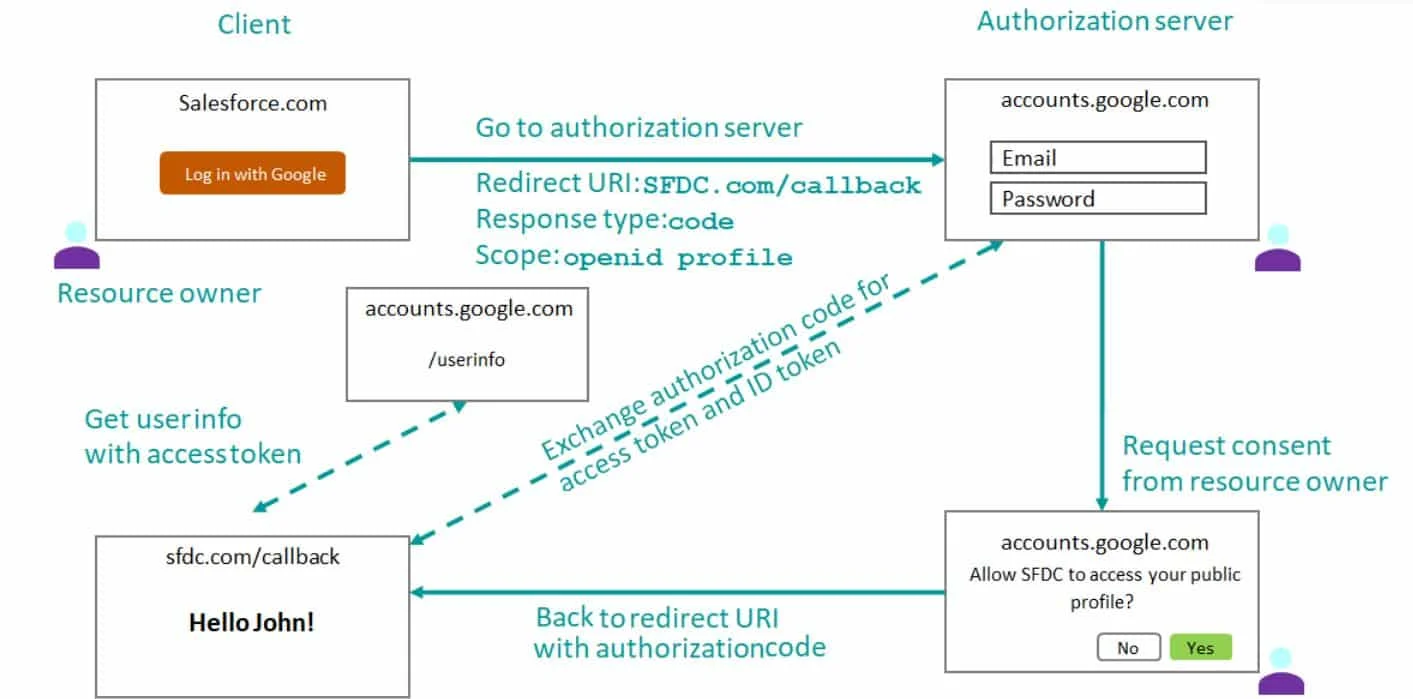
OpenID Connect is an identity layer just on top of the OAuth 2.0 protocol. This verifies the identity of the end user or customer on the basis of authentication performed by the authorization server. We can also extract the basic profile information of the same users using OpenID Connect.
Related Article- Salesforce Tutorial- A Complete Guide for Beginners
Experience is not the only factor that affects career growth; it demands continuous development of skills and knowledge. Here are some of the top Salesforce integration interview questions for experienced professionals.
System compatibility, data consistency and data security are some of the most common challenges of this integration. But it is also possible to neglect them. We can create a plan to check system compatibility, implement robust data security practices before starting the integration and use reliable middleware or a platform.
The data integrity is checked and approved using a multistep process. These steps include > cleaning and validating data before migration > mapping data fields effectively among the systems > regularly finding duplicates > and setting up an efficient bug-handling method for finding and resolving issues quickly.
Data security is always a major concern in any type of project so in the integration. We should adhere strictly to best practices to maintain data security and compliance. This includes checking secure data transmission, using different secure APIs, giving data access to only authorized personnel, and regularly auditing and monitoring the security measures.
Integrating this platform with an external database is performed via a multi-step process. These steps include defining the goals and requirements of the integration > selecting a suitable tool or middleware for integration > mapping the data fields between the platform and the external database > setting up the integration on the selected platform > and testing the integration to check data consistency and integrity.
Integrating a marketing automation tool into this platform can benefit companies in many ways. It can automate their lead management and upgrade the success rate of their marketing strategies. One approach used to perform this integration is a pre-built connector by the marketing automation tool vendor. Enterprises can use middleware that supports marketing and sales automation tools. They can also create custom integration methods using the API.
Authentication of external systems in this CRM platform is achieved by using OAuth tokens, certificates or credentials. OAuth is a key to secure authorization, where the external app will only access internal data if it has a token. This process does not store user credentials, which improves the trust and security of users.
Related Article- 30 Best Salesforce Admin Interview Questions
Some of the interviews may also check your skills in advanced concepts like non-web legacy systems, CDC, API gateway and more. The following are some of the most important Salesforce integration advanced interview questions you should prepare.
Performing this type of integration is very challenging due to a lack of API support. It requires using middleware tools like Informatica or MuleSoft. These tools act as a bridge between the platform and the legacy system.
They manage different data formats and communication protocols to achieve better data exchange. This integration generally includes setting up scheduled data synchronization and using event-driven triggers for actual updates.
Change Data Capture (CDC) is a kind of streaming product of the Lightning Platform. It provides features to integrate data with external systems efficiently. These features also notify about changes in records in real-time and synchronize corresponding records from an external dataset with the CDC. It publishes events for configuration in records related to build, update, remove and undo operations.
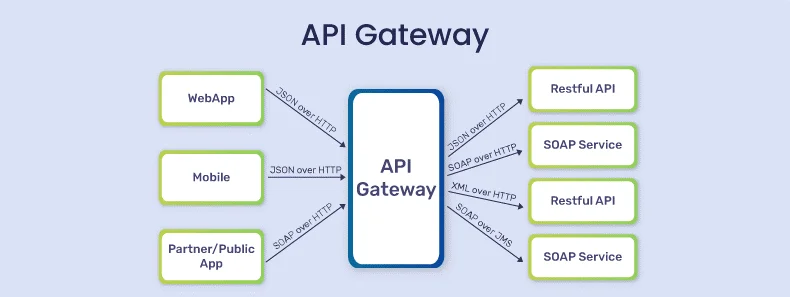
API gateway is basically a management tool available on the edge of a system. It works as a link between a collection of backend services and consumers. This acts like a single point of entry to predefined APIs. The consumer will be an application or device. The diagram given below shows how an API gateway generally sits between the demilitarized zone (DMZ) and the public internet.
There are many points to be considered when integrating large data volumes on this platform, including -
There are two methods to perform this integration. The first method involves using a pre-built connector by the customer support application vendor. Another approach is to use middleware that supports both platform and application. Businesses can also use API to create custom integration solutions to improve customer service operations.
The following are the security measures to consider in implementing this integration -
Related Article- Salesforce Service Cloud Interview Questions
Now, let's jump to some technical concepts and explore the top technical Salesforce integration interview questions. It will improve your technical knowledge.
It is a robust tool for integrating external data banks on this platform. This gives the benefit of extracting data from external sources without storing it in the system. External objects that are similar to standard objects but actually show the information stored in an outer database are used in this process. Salesforce Connect is especially beneficial in accessing huge data volumes from ERP and other CRM platforms.
Real-time integration is achieved through streaming APIs. This process gives real-time updates, tracking and outbound messaging. Here, the system sends SOAP messages to authenticate listener URLs in particular circumstances.
Upsert is a method to merge the functions that create and update records in one action. It uses a pre-mentioned field or record ID to decide what to do with the record. Developers have to create a new record or update the last one, depending on this process only. This feature is mostly beneficial when testers do not want to create any duplicate records.
An API, also referred to as Application Programming Interface, is a combination of routines, protocols and tools. These are used to establish a communication or connection between two software applications. This platform has a powerful API that benefits companies by connecting their CRM platform with third-party applications.
Salesforce integration with an ERP system is a complicated task. There are two methods to achieve this connection easily. One is to use a middleware that can support both ERP systems and Salesforce, like MuleSoft or Dell Boomi. Another is to use a pre-built connector of the ERP vendor. Additionally, we can also use different Salesforce API to build a custom integration solution.
Managing real-time integration in Salesforce using outbound messaging requires configuring workflow rules to trigger outbound messages when specific events occur. These events include record creation or update. Here, the SOAP messages designate listener URLs upon specific events. These messages are then sent to a designated endpoint, like a third-party system or an API, for further processing.
Related Article: Top Salesforce Testing Interview Questions
The following are some of the most asked scenario-based interview questions. Interviewers often ask them to check the problem-solving skills of the candidates. You might also face these types of questions in your next interview.
I will first find the problem affecting the working on the integration and then build a solution to remove that problem. I will start by assessing if any issues occur in the network connection or servers that host the system.
Then, I will review the integration setup for any errors, like unnecessary API calls. If the problem is still not found, then I'll use profiling tools. These tools can evaluate the performance of the system and find any bottlenecks.
I will start by checking what kind of security protocol the external system follows. If it supports the OAuth protocol, then I will apply it. In case it is not possible, I will use secure middleware solutions. It will manage the authentication method and use encrypted data transfer.
I will use the following steps to perform this integration.
I will first detect what methods I should use to integrate the POS system, like middleware support or file-based data exchange.
Then, I will use middleware tools like Informatica or MuleSoft to manage the logic.
Next, I will schedule batch jobs in order to transfer data at regular intervals. Event-driven triggers can also be useful for near-real-time updates.
Lastly, I will check data security and transformation by using the middleware platform.
I will follow the steps given below in this instance -
First, I will review the data mapping to detect the mismatched fields.
Then, I will collaborate with the team working on external systems and align data structures to ensure fields are communicating seamlessly.
Next, I will apply data validation rules in Salesforce to identify incomplete data within the process.
Lastly, I'll test the data exchange through the entire process to ensure that the issue is resolved.
Yes, I can achieve this integration with the following steps -
I will first use the streaming API in order to capture and boost all transaction events in real time.
Then, I will manipulate a listener from the compliance system that will consume these events instantly after occurrence.
I will also set up error handling to detect retries or alerts of failed data transmission.
At last, I will monitor the integration on a daily basis to ensure it meets the requirements.
It is essential that both of the systems have the same type of data model to perform this integration. Therefore, I will start by transforming the data from the external system. Let's say the external system is using a graphical data model. Now, we will use a middleware solution to translate the information between the systems. It will also require assistance from a developer for the same.
Related Articles- Salesforce Marketing Cloud Interview Questions And Answers (2026)
This section includes the top Salesforce integration architect interview questions and answers. These focus on designing and strategic planning.
A Salesforce integration architect designs and implements seamless integration between Salesforce and other enterprise systems. They take care of unique business requirements by creating different solutions to streamline data flow between systems. These systems include ERP, legacy databases and marketing automation platforms.
It is done by working closely with stakeholders from all departments, choosing the accurate integration patterns, and using the best tools and technologies. They also ensure that their integrations are robust, secure, and scalable. To do so, they manage data integrity, optimize performance and implement error-handling mechanisms.
Choosing the best data integration between real-time and batch is crucial to building efficient solutions. It requires consideration of several factors like requirements, goals and the situation we are dealing with.
I will choose the real-time data integration when it is important to maintain data consistency across different systems. It will be very beneficial in decision-making and project efficiency. The Platform Events or Streaming API would be the best option in this case.
Batch data integration is best when using large datasets that need to be processed in a particular interval. In this case, there is no requirement of instant data updates. This approach allows better and efficient handling of humongous data volumes without overloading the system.
To call a SOAP Web Service you will first need Apex Classes from the WSDL. Here is the Apex code:
public class SOAPWebServiceCaller { public void callSoapService() { try { // Create an instance of the generated service class MyWebServiceSoap service = new MyWebServiceSoap(); // Set endpoint URL (optional, only if you need to override) service.endpoint_x = 'https://example.com/soapendpoint'; // Create request parameters String customerId = '12345'; // Call the web service method MyWebService.CustomerInfoResponse response = service.getCustomerInfo(customerId); // Process response System.debug('Customer Name: ' + response.customerName); System.debug('Customer Email: ' + response.customerEmail); } catch (Exception e) { System.debug('Error calling SOAP web service: ' + e.getMessage()); } } } |
This requires setting up the remote site setting in Salesforce, creating a method using HttpRequest and Http classes, handling authentication and parsing the JSON response into Apex classes using JSON.deserialize.
public class RestApiExample { public void callRestApi() { // Define the endpoint for the REST API String endpoint = 'https://www.example.com/api/accounts/001xx000003DGbEAAW';
// Set up the HTTP request HttpRequest req = new HttpRequest(); req.setEndpoint(endpoint); req.setMethod('GET'); req.setHeader('Authorization', 'Bearer ' + getAccessToken()); req.setHeader('Accept', 'application/json');
// Make the callout and handle the response Http http = new Http(); HttpResponse res = http.send(req);
if (res.getStatusCode() == 200) { System.debug('REST Response: ' + res.getBody()); // Parse JSON response Map<String, Object> jsonResponse = (Map System.debug('Account Name: ' + jsonResponse.get('name')); } else { System.debug('REST call failed: ' + res.getStatusCode() + ' ' + res.getStatus()); } }
private static String getAccessToken() { // Logic to retrieve OAuth access token return 'mock_access_token'; } } |
It can be done with an Apex code.
public class OrderProcessingEvent { @InvocableMethod public static void handleOrderEvent(List<PlatformEvent__e> eventList) { for (PlatformEvent__e eventRecord : eventList) { // Create a new Order__c record from event data Order__c newOrder = new Order__c(); newOrder.OrderID__c = eventRecord.OrderID__c; newOrder.CustomerID__c = eventRecord.CustomerID__c; newOrder.Status__c = eventRecord.Status__c; insert newOrder; } } } |
This section explores some of the most asked SFDC Integration Interview Questions with answers, best suited for both beginners and experienced professionals.
Named Credentials store authentication details (like OAuth tokens, endpoints, and keys) securely inside Salesforce. They remove the need to hardcode credentials in Apex and automatically handle token refresh. This makes integrations more secure, maintainable, and compliant with best practices.
This flow allows an external system to obtain an access token using a signed JWT instead of a username-password login. It is ideal for server-to-server integrations because no user interaction is required, credentials remain secure, and token exchange is handled using certificates.
The Composite REST API bundles multiple operations (create, update, delete, fetch) into a single request. This reduces the number of API round-trips, helps stay within API limits, and maintains data consistency by allowing dependent operations to be processed in sequence.
Idempotency is achieved by using external IDs for upsert operations to implement deduplication logic in middleware, designing retry-safe flows, and validating payloads before insertion. This ensures the same request does not create duplicate records when retried.
Apex Continuation allows Salesforce to handle long-running HTTP callouts asynchronously without hitting standard timeout limits. It is used when an external system responds slowly or needs extended processing time, especially in Visualforce and Lightning Experience callout scenarios.
Platform Cache is a temporary storage mechanism in Salesforce that helps reduce repeated API calls and database queries during integrations. It stores frequently accessed data in memory, which improves response time and overall system performance. Developers often use it in high-volume integrations where quick access to reference data is required.
External Objects are objects that allow Salesforce to access data stored outside the platform without copying it into Salesforce databases. They are commonly used with Salesforce Connect to display external data in real time. This approach reduces storage requirements and ensures users always work with the latest external information.
SOAP API uses XML-based messaging and is best suited for enterprise-level integrations that require strict standards and formal contracts. REST API uses lightweight JSON-based communication and is easier to use for mobile apps and web services. REST generally offers better performance and flexibility, while SOAP provides stronger built-in security and error handling.
Platform Events allow Salesforce and external systems to communicate asynchronously through event-driven messaging. They help systems react instantly to business events such as order creation, payment confirmation, or case updates. This approach improves scalability, reduces system dependency, and supports near-real-time integrations.
API limits define the maximum number of API requests allowed within a specific time period in Salesforce. These limits help maintain platform stability and performance. Developers can manage them by optimizing API calls, using bulk operations, implementing caching mechanisms, and monitoring API usage regularly through Salesforce reports and system logs.
Q1. What is the primary role of MuleSoft in Salesforce's integration ecosystem?
Q2. Which Spring 2025 feature simplifies API discovery for Salesforce integrations?
Q3. What is the purpose of MuleSoft for AgentForce: Topic Center in 2025?
Q4. Which API versions will be deprecated in Salesforce's Summer ’25 release?
Q5. How does the MuleSoft AI Chain Connector enhance Salesforce integrations in 2025?
Q6. What is a key benefit of Salesforce Data Cloud for integrations?
Q7. Which tool supports real-time syncing between Salesforce and external systems?
Q8. What is the role of Salesforce Flow in integrations?
Q9. How does Einstein GPT enhance Salesforce integrations in 2025?
Q10. Why is upgrading to API version 31.0 or later critical in 2025?
The integration of Salesforce with different platforms has become a common choice for many businesses. It provides different features and functionalities that unlock new capabilities for them. With this use and these features, it is the right time to prepare Salesforce integration questions to build a career. You should also consider some other options like tutorials and training.
Middleware is a third-party software that connects Salesforce with other systems. It acts as a bridge that facilitates data exchange. Some of the middleware are MuleSoft, Dell Boomi, and Jitterbit.
Named credentials simplify authentication for external callouts by storing endpoint URLs and authentication details securely within Salesforce.
A Connected App enables external applications to integrate securely with this CRM platform with the help of OAuth authentication and APIs.
Integration helps businesses synchronize data across systems, reduce manual work, improve accuracy and streamline business processes.
Course Schedule
| Course Name | Batch Type | Details |
| Salesforce Certifications | Every Weekday | View Details |
| Salesforce Certifications | Every Weekend | View Details |