PHP is a free to use server side scripting language widely used for web development. It can build dynamic and data-driven websites. I have been using PHP for many years, and this experience has made my work much easier by allowing me to develop flexible, secure and user-friendly web applications with less effort.
Do you know what is PHP? This article will walk you through everything you need to know about this server-side scripting language. You will explore its history, how it works, core features, and why it continues to be a powerful choice for web development.
PHP stands for Hypertext Preprocessor and is a server side scripting language used to build and manage dynamic websites. It is used alongside HTML to create interactive web pages. It is widely used by popular platforms such as Facebook and content management systems like WordPress, Drupal, and WooCommerce.
This language works smoothly on different operating systems and connects easily with web servers such as Apache and Nginx, making it a reliable choice for web development. Before moving to any other topic. Let us check its basic example:
Here is the basic example with its detailed explanation:
|
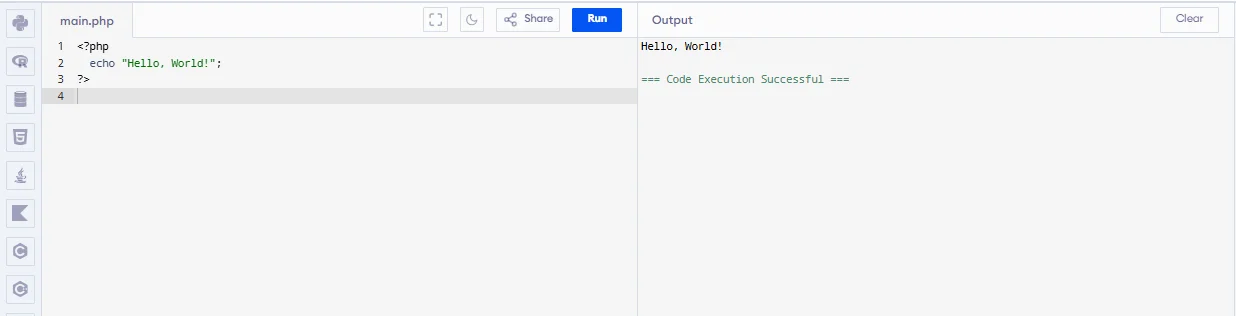
Test Your PHP Code on the Online PHP Compiler
PHP was first created in 1994 by Rasmus Lerdorf. It was called Personal Home Page Tools and used to manage his personal website. Then it was renamed as Hypertext Preprocessor because it was growing into a full scripting language.
With help from other developers, PHP became faster and more powerful and came up with various versions with improved performance to make developers’ work easier. Let's understand each of them and what makes them unique from the previous version:
| Version | Year | Explanation |
| PHP 1.0 | 1995 | This was the first version and it was used to create basic web pages. |
| PHP2.0 | 1997 | They added more features to it for website creation. |
| PHP 3.0 | 1998 | This version mamde the web development more easier. |
| PHP 4.0 | 2000 | It was introduced with Zend Engines that improved speed and performance. |
| PHP 4.1 | 2001 | They added some superglobal variables such as $_GET and $_POST. |
| PHP 4.2 | 2002 | Improved security and handling of superglobal variables. |
| PHP 4.3 | 2002 | Bugs were fixed. |
| PHP 4.4 | 2005 | This was the final stable version of PHP4 before heading towards the 5.0 version. |
| PHP 5.0 | 2004 | Object-Oriented Programming features were added. |
| PHP 5.1 | 2005 | Added more performance features and database systems. |
| PHP 5.2 | 2006 | PHP has become more secure and stable. |
| PHP 5.3 | 2009 | Added namespace and better error-handling feature. |
| PHP 5.4 | 2012 | Old features were removed and speed was improved. |
| PHP 5.5 | 2013 | This update added more password security and performance improvements. |
| PHP 5.6 | 2014 | This was the final version of PHP 5 that included more technical improvements. |
| PHP 6.0 | – | Cancelled version (never released). |
| PHP 7.0 | 2015 | This release reduced memory usage. |
| PHP 7.1 | 2016 | This version improved more error handling feature and added better declaration types. |
| PHP 7.2 | 2017 | They removed outdated features and improved security. |
| PHP 7.3 | 2018 | They improved their execution speed. |
| PHP 7.4 | 2019 | This version introduced typed properties and arrow functions. |
| PHP 8.0 | 2020 | The syntax was changed and they also introduced a JIT compiler. |
| PHP 8.1 | 2021 | Type safety was improved and they introduced enumerations. |
| PHP 8.2 | 2022 | Deprecated older features. |
| PHP 8.3 | 2023 | Their main focus was on better performance and stability. |
| PHP 8.4 | 2024 | It strengthens all the security features. |
| PHP 8.5 | 2025 | It came with better performance, new language features, improved error handling, and enhanced tools that make coding faster and more efficient. |
Read Also: Top PHP Interview Questions and answers
From my personal experience of using PHP for several years, these features have helped me work more efficiently and perform better. Here is an explanation of each feature:
PHP has a very simple syntax which makes it easy for developers to understand. It provides many built-in functions that help in creating web applications quickly.
It is compatible with various operating systems like Windows, Linux and macOS and with different databases.
The code runs on the server rather than on the user’s computer. It generates the web page in the background and then delivers it to the user’s browser. PHP also allows developers to process form data and manage user sessions, enabling websites to remember users and track their activities seamlessly.
PHP supports a wide range of databases and provides excellent interaction with each of them. It offers numerous built-in functions that make establishing and managing database connections simple and efficient.
It has a big global community of developers. Where they share knowledge, write tutorials, and help each other on forums.
It is a reliable language due to its memory management system and session management that avoids unnecessary memory allocation.
By now, you must have understood that this language has many features. But have you ever thought about where you can apply all these features? Let me tell you what are the uses of this OOP language:
It is used for creating dynamic web applications and websites by generating interactive content, handling user inputs, and interacting with databases. There are a few frameworks you can use:
These frameworks provide built-in tools for routing, authentication, validation, and MVC architecture.
These help in communicating and interacting with different websites. They process the request and directly sends them in a simple format like JSON or XML. They are mainly used for to connecting websites, mobile apps.
PHP offers extensive built-in functions for file handling, making it suitable for developing file management systems. This language is commonly used for managing documents, images, logs, and backups in web applications while ensuring proper access control and storage handling.
There are a few tools one can use for file management:
This server-side scripting language interacts with various image processing libraries such as GD Library and ImageMagick. Its main task is image creation, rotation, cropping, resizing, and generating thumbnails.
There are various CMS platforms, such as WordPress, Drupal, and Joomla built using PHP. They help users easily create, manage, and update website content without advanced coding. It also handles data processing, user management, and dynamic page creation on the server side.
PHP remains a cornerstone of web development due to its versatility, reliability and widespread adoption. Here are some of the most common ways PHP is used today:
PHP is the backbone of many world-leading content management systems (CMS) including WordPress, Drupal, Joomla, and Magento. In fact, WordPress alone powers over 40% of all websites globally, demonstrating PHP’s dominance in the CMS space.
Many popular e-commerce platforms such as WooCommerce (built on WordPress), Magento and PrestaShop, are PHP-based. This enables businesses of all sizes to create scalable, secure and customizable online stores.
PHP’s compatibility with most web servers and operating systems makes it the default choice for shared hosting services. This accessibility has contributed to its massive adoption among small businesses and individual developers.
Beyond CMS and e-commerce, PHP is widely used to build custom web applications. This ranges from membership sites and forums to learning management systems and business portals. Its large ecosystem of frameworks like Laravel, Symfony and CodeIgniter speeds up development and ensures maintainability.
With support for RESTful APIs and seamless integration with databases, PHP is frequently used to create backend services for web and mobile applications.
Despite the rise of newer languages, PHP continues to be one of the most widely used server-side languages worldwide:
PHP’s enduring popularity is driven by its active community, regular updates, and the vast number of resources available for learning and troubleshooting.
You can refer to the following steps to understand how php work:
When a user types the address on the website or they sometimes click on the link. The browser sends a request to the web server asking for that page.
The web server such as Apache or Nginx receives the request and then it is directed to PHP processing. These PHP scripts located on the server are executed.
The script processes any server logic such as handling form submissions, processing data, or making requests to a database. If these scripts require database interaction, an SQL query is sent to the database.
These scripts send a request to the database with an SQL query. After receiving the query, the database sends a response back to the script.
Based on the response sent by the database, the scripts are processed and prepare the output that is being sent back to the users’ browsers. These responses are returned as an HTTP response to the browser.
After the web browser receives an HTTP response that includes dynamic content. The final step includes where the browser shows results on the user’s screen.
There are various methods to implement PHP to your system. The most widely used or standard version is powered by the Zend Engine. This engine interprets PHP code and is responsible for running most of its applications today. The other alternatives are:
| Method | Description |
|---|---|
| HHVM (HipHop Virtual Machine) | It is developed by Meta that can convert PHP code into high-level bytecode and then to machine code using just-in-time (JIT) compilation for performance improvements. |
| PeachPie | It is a compiler that allows PHP code to run on the .NET platform, which enables integration with .NET libraries and tools. |
| Quercus and Parrot | It compiles PHP code to run on Java or Parrot virtual machines. |
The Zend Engine is the most basic and straightforward implementation that offers the highest compatibility. The alternatives provide specific benefits like performance boosts or cross-platform integration. So, the choice depends on what you need. Now, let’s discuss the common methods to run PHP. It can be executed in several ways depending on your needs:
The installation process varies depending upon the operating system you are using. Here is a general overview of what process you will have to go through.
After installing it on your system, you can verify the version by running php -v in your terminal or creating a simple PHP file. You can also access it via your web browser.
Configuration is the next and necessary step after the installation. You can configure it using the php.ini file. This file lets you adjust settings such as:
The location of php.ini may vary depending on your system and installation method. You can check your active configuration by creating a file with the phpinfo(); function, which outputs all current PHP settings.
This backend scripting language has numerous benefits. Let's go through each of them in detail:
1. As I have already discussed in the above topics, this OOP language has cross-platform compatibility, which means it can run on all platforms such as Windows,macOS and Linux.
2. It is an open source, which means that it is a free scripting language, so it won't require any additional costs when building any project.
3. This has a large community available for support, along with a vast amount of legacy code that helps developers get started with projects.
4. It easily be mixed with HTML and JavaScript.
5. It is a very easy language to learn, due to its simplicity.
6. There are plenty of tools available and they will help in writing code faster, finding mistakes, highlighting syntax, and connecting different parts of a project. As it has strong tool support.
7. This language is known for loading its web pages very quickly. Since it runs on the server and processes requests fast, websites built with PHP can open quickly for users.
PHP is not the only scripting language in the industry, and compared to them it has various limitations. Some of them are listed below:
1. It is not always ideal for building very large or complex web applications. Managing performance, scalability, and structure becomes difficult as the application grows.
2. It does not strictly check data types, which means it can sometimes mix up values without giving clear errors. This can lead to unexpected results if the developer is not careful while writing the code.
3. It does not provide very strong built-in tools for finding and fixing errors. Because of this, developers may find it harder to track bugs, especially in large or complex projects.
Read Also: 20 Best Programming Languages To Learn
When you are using PHP for web development, understanding and addressing its security risks to protect your applications and users become essential. It also has some security challenges like any other programming language. It also provides robust tools and best practices to help you write secure code.
PHP applications are vulnerable to various attacks such as SQL Injection, Cross-Site Scripting (XSS) and Cross-Site Request Forgery (CSRF). To prevent these, always validate and sanitize user inputs, use prepared statements for database queries and implement proper session management.
Older PHP versions included settings like register_globals and magic_quotes_gpc that could introduce vulnerabilities. These have been removed in newer versions, but it’s important to review your php.ini configuration:
PHP provides built-in functions for secure password hashing (password_hash(), password_verify()) and cryptographically secure random number generation (random_int(), available since PHP 7). Avoid older functions like md5() or sha1() for passwords.
Running outdated PHP versions puts your site at risk, as they no longer receive security updates. Always use a version of PHP that is actively supported—each version receives bug fixes for two years and security fixes for an additional two years. Upgrading ensures you benefit from the latest security enhancements.
PHP 8 and its subsequent releases (8.1, 8.2, 8.3, etc.) have introduced several modern features and performance enhancements that help developers write cleaner, faster and more secure code. Here are some of the most notable updates:
| Features | Description |
|---|---|
| Just-In-Time (JIT) Compiler | Introduced in PHP 8.0, the JIT compiler can improve performance for certain tasks by compiling code at runtime. While its impact on typical web applications is moderate, it opens new possibilities for computation-heavy tasks. |
| Union Types | PHP now supports union types, allowing functions and methods to accept multiple types for a single parameter or return value (e.g., int|string). |
| Named Arguments | With named arguments, developers can pass values to a function by specifying the parameter name, making code more readable and flexible. |
| Match Expressions | The new match expression is a more powerful and concise alternative to the traditional switch statement. |
| Nullsafe Operator | The nullsafe operator (?->) makes it easier to work with objects that might be null, helping to avoid errors. |
| Attributes (Annotations) | Attributes provide a native way to add metadata to classes, methods, and properties, improving code organization and making frameworks more robust. |
| Improved Error Handling | Error messages are now clearer and more consistent, making debugging easier for developers. |
| Readonly Properties and Enumerations (PHP 8.1) | Read-only properties ensure data integrity by preventing changes after initial assignment. Enumerations (enums) offer a safer way to work with a fixed set of values. |
| Disjunctive Normal Form Types and Standalone Types (PHP 8.2+) | These features allow for even more flexible and expressive type declarations. |
| Performance and Security Enhancements | Each new PHP version brings optimizations and security improvements, so upgrading ensures better speed and protection against vulnerabilities. |
Let's do a comparison between these three scripting languages and understand what makes them different from each other:
| Parameters | PHP | Python | JavaScript |
| Uses | It is used for developing basic web development. Especially for simple to dynamic websites. | It is a general-purpose language. | This is a Client-side scripting for web development, server-side via Node.js |
| Development Speed | Fast for web projects only. | Fast for so many domains like web and AI. | It is fast at building APIs and real-time applications. |
| Hosting | It is supported on most shared hosting services. | It is supported on major cloud providers and VPS. | Popular with cloud platforms such as AWS, Vercel, Heroku, etc. |
| Dependency Management | In this, a composer is used to help install and manage required libraries. | Pip for Python libraries. | NPM is used to manage libraries and modules for web applications. |
| Ideal for | Web applications and CMS such as WordPress. | Python is ideal for Artificial Intelligence and Machine Learning. | JavaScript is ideal for Game development (browser-based) and Web and mobile apps. |
This server-side scripting language has a strong and secure future in the world of web development. Here are a few reasons for it:
1. For so many years, 77% of websites globally such as Facebook and WordPress, have been using PHP. Despite the rise of modern languages, it still has its dominance in the web development world.
2. It is not limited to one particular platform but it has cross-platform features. Which makes the work easier on Windows, MacOS and Linux.
3. PHP is the foundation of WordPress that is being used by 75% of CMS-based websites.
4. This language is constantly upgrading its features and it has recently updated with PHP 8.5, released in November 2025, which introduced the pipe operator, a native URI extension, and several other developer-focused improvements
In this article, I have explained all the concepts of PHP, that are essential for all programmers who wants to learn PHP. It has what is PHP, how it works, and the areas where it can be effectively applied. To move forward, you should start practicing this language by writing and exploring real-world projects.
In starting it was called as Personal home page but then it grew into a full scripting language used by many developers then the creators thought to name it as Hypertext Preprocessor.
It was never released as the project failed during the time of development. They tried to add a lot of Unicode support, but as soon as they made some changes it caused many bugs, performance issues, and broke existing code. The developers eventually abandoned it and moved on to PHP 7.
A PHP file is a file that contains PHP code that is used to create dynamic web pages. It includes HTML, CSS, JavaScript, and PHP together, runs on a web server with PHP installed, such as Apache and Nginx, that sends the processed output to the browser as plain HTML, and is saved with a .php extension.
Explore Our Trending Articles-
Course Schedule
| Course Name | Batch Type | Details |
| PHP Training | Every Weekday | View Details |
| PHP Training | Every Weekend | View Details |


How To Learn DevOps in 2026? Benefits In Finding Remote Jobs
September 28th, 2026