
UNIX is one of the most powerful and widely used operating systems in the world. It is known for its stability, security and strong command-line capabilities. Because of these features, many companies still rely on UNIX systems for servers, enterprise applications, and development environments.
If you are preparing for a technical role in system administration, DevOps, or software development, then understanding UNIX fundamentals is very important. Interviewers mostly ask questions about UNIX architecture, file systems, processes, commands, and system management concepts.
This guide covers various UNIX interview questions and answers that are commonly asked in technical interviews. The questions are divided into beginner, intermediate, and experienced levels, along with a section on commonly used UNIX commands. Reviewing these questions will help you strengthen your understanding of UNIX concepts and prepare more confidently for interviews.
UNIX is a type of operating system, originally developed in the 1970s at Bell Labs. It provides a powerful environment for managing files, running programs and controlling system resources.
UNIX was designed to allow multiple users to work on the same system simultaneously while efficiently managing hardware resources like CPU, memory, and storage. It is widely used in servers, workstations, and enterprise environments due to its stability and security. The three main components of Unix are the kernel, file system and shell.
Many modern operating systems such as Linux and macOS are inspired by UNIX concepts and architecture.
Some key characteristics of UNIX include portability, strong security, hierarchical file systems, and powerful command-line utilities.
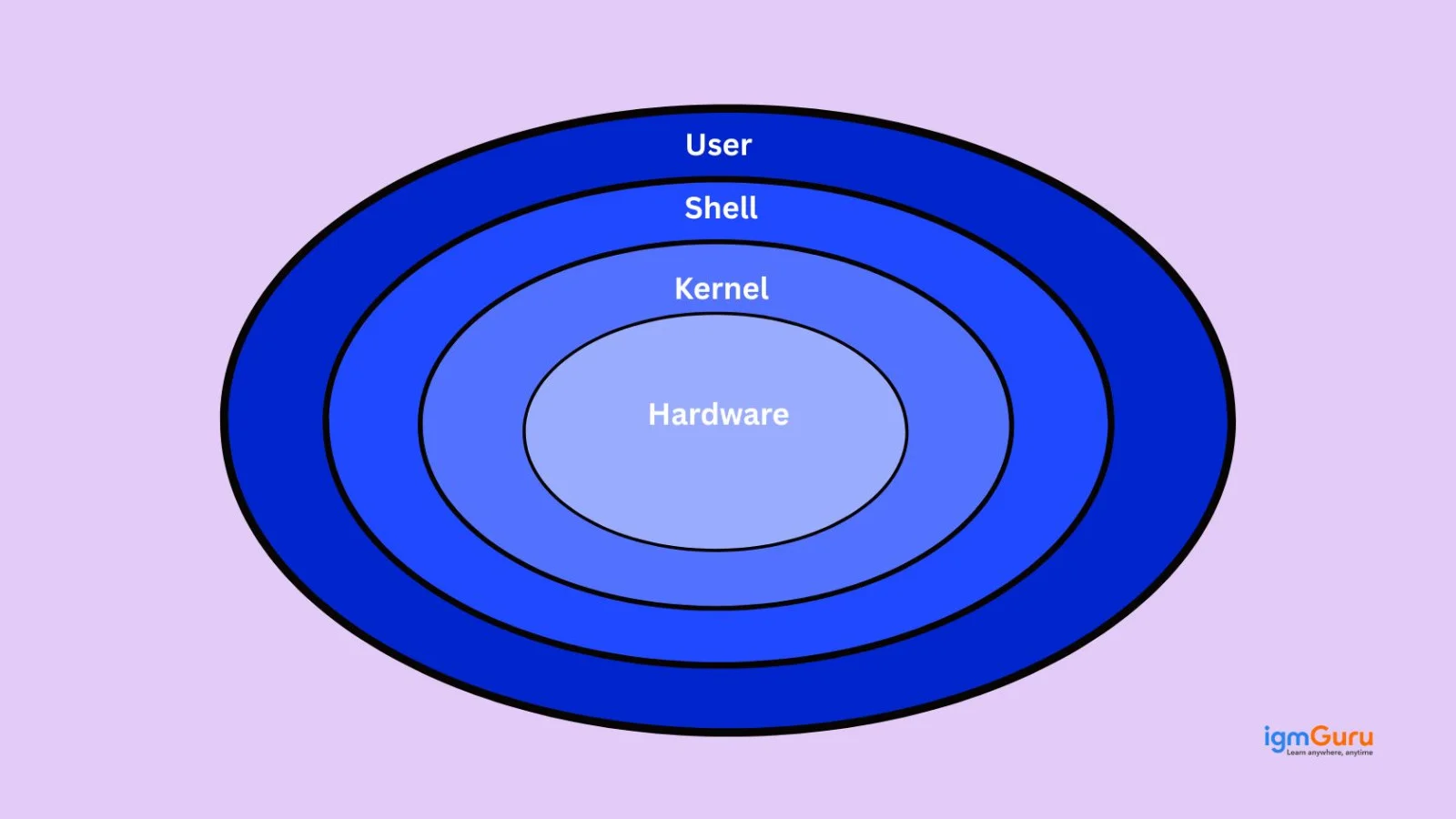
UNIX is known for its powerful design and reliability. Some of the most important features include:
1. Multiuser Capability
Multiple users can access and use the system at the same time without interfering with each other.
2. Multitasking
UNIX allows multiple programs to run simultaneously by efficiently managing system resources.
3. Portability
UNIX can run on different hardware platforms with minimal modifications.
4. Security and Permissions
It provides a strong permission system that controls who can read, write, or execute files.
5. Hierarchical File System
Files and directories are managed in a tree-like structure starting from the root directory.
6. Powerful Command-Line Interface
UNIX provides a command-line environment that allows users to automate tasks and manage systems efficiently.
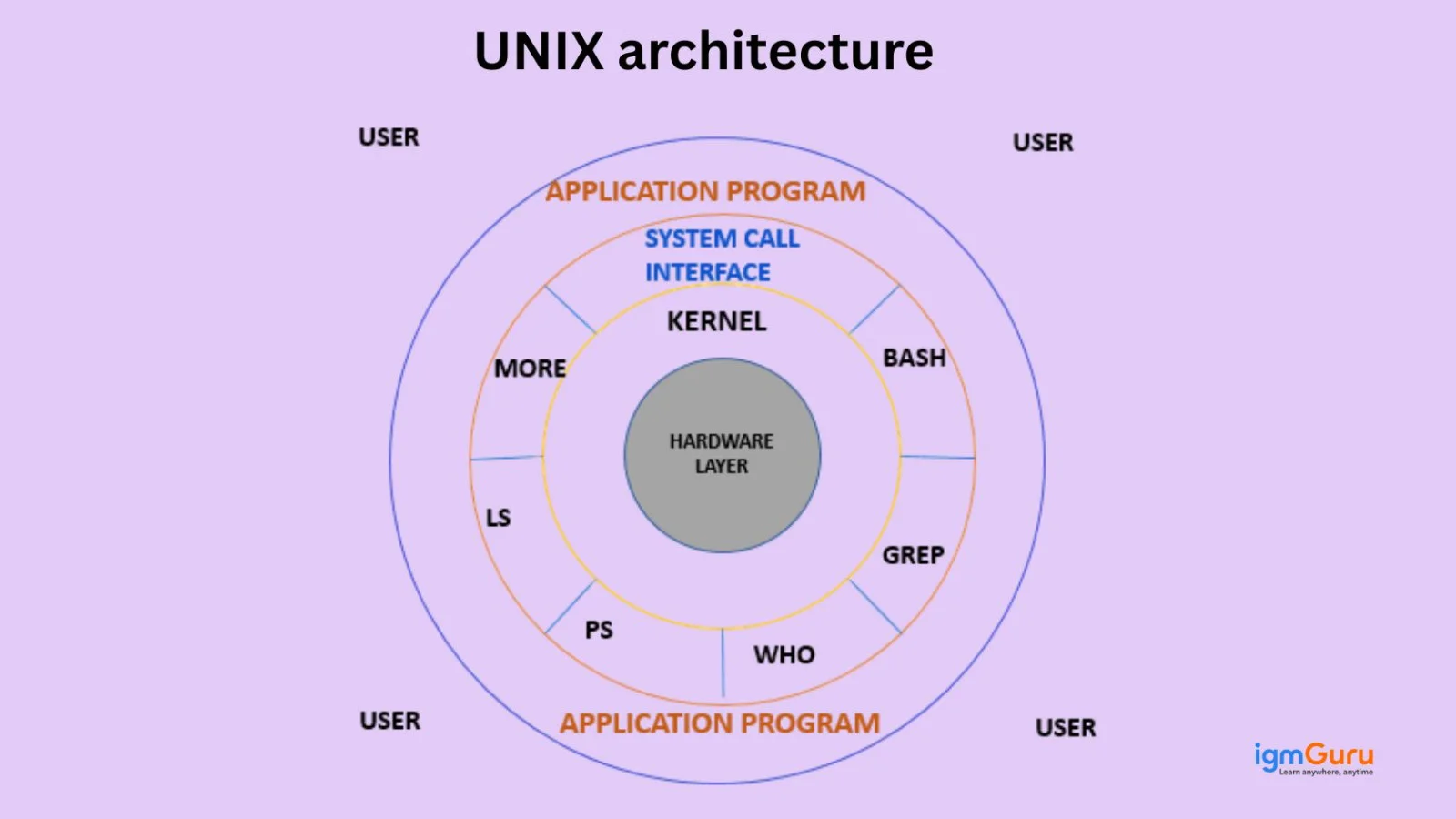
UNIX architecture refers to the layered structure that defines how different components of the operating system interact with each other.
The UNIX system is mainly divided into three major components:
1. Kernel
The kernel is the core of the operating system and directly interacts with the hardware. It manages system resources such as CPU, memory, and devices.
2. Shell
Think of a shell as an interface between the user and the kernel. It interprets and executes the commands entered by the user.
3. File System and Utilities
UNIX provides a hierarchical file system along with various system utilities and commands used to perform operations such as file management, process control, and text processing.
This layered architecture makes UNIX stable, flexible, and efficient.
The kernel is the core component of the UNIX operating system that manages system resources and acts as a bridge between the system hardware and software applications. It is responsible for handling critical operations such as process management, memory management, device management, file system management, and system calls. When a user enters a command through the shell, the shell sends that request to the kernel, which then interacts with the hardware to perform the required task. Since the kernel controls and coordinates all major system activities, it plays a crucial role in ensuring the stability, efficiency, and security of the UNIX operating system.
A shell in UNIX is a command-line interpreter that allows users to interact with the operating system.
It is basically a bridge between the user and the kernel. When a user enters a command, the shell interprets it and passes it to the kernel for execution.
Shells also support scripting, which allows users to automate repetitive tasks by writing shell scripts.
In addition to executing commands, shells provide features like command history, job control, and input/output redirection.
This makes the shell an essential tool for system administrators and developers working in UNIX environments.
UNIX supports several types of shells, each with its own features and syntax.
Some of the most commonly used UNIX shells include:
1. Bourne Shell (sh)
One of the earliest UNIX shells used for scripting and command execution.
2. Bourne Again Shell (bash)
An enhanced version of the Bourne shell that provides additional features such as command history and improved scripting capabilities.
3. C Shell (csh)
A shell that uses syntax similar to the C programming language.
4. Korn Shell (ksh)
Combines features of both the Bourne shell and C shell, making it powerful for scripting.
5. Z Shell (zsh)
An advanced shell with features like auto-completion, improved scripting capabilities, and customization. In many modern systems, especially Linux distributions and macOS, Bash or Zsh is the default shell used by developers and system administrators.
The UNIX file system is a hierarchical structure used to store and organize files and directories.
All files and directories are organized in a tree-like structure that starts from the root directory ( / ). Every file in UNIX is stored within this directory hierarchy.
The file system manages how data is stored, retrieved, and organized on storage devices. It also maintains file permissions and metadata.
Common directories in UNIX include:
This structured approach allows UNIX to manage files efficiently and securely.
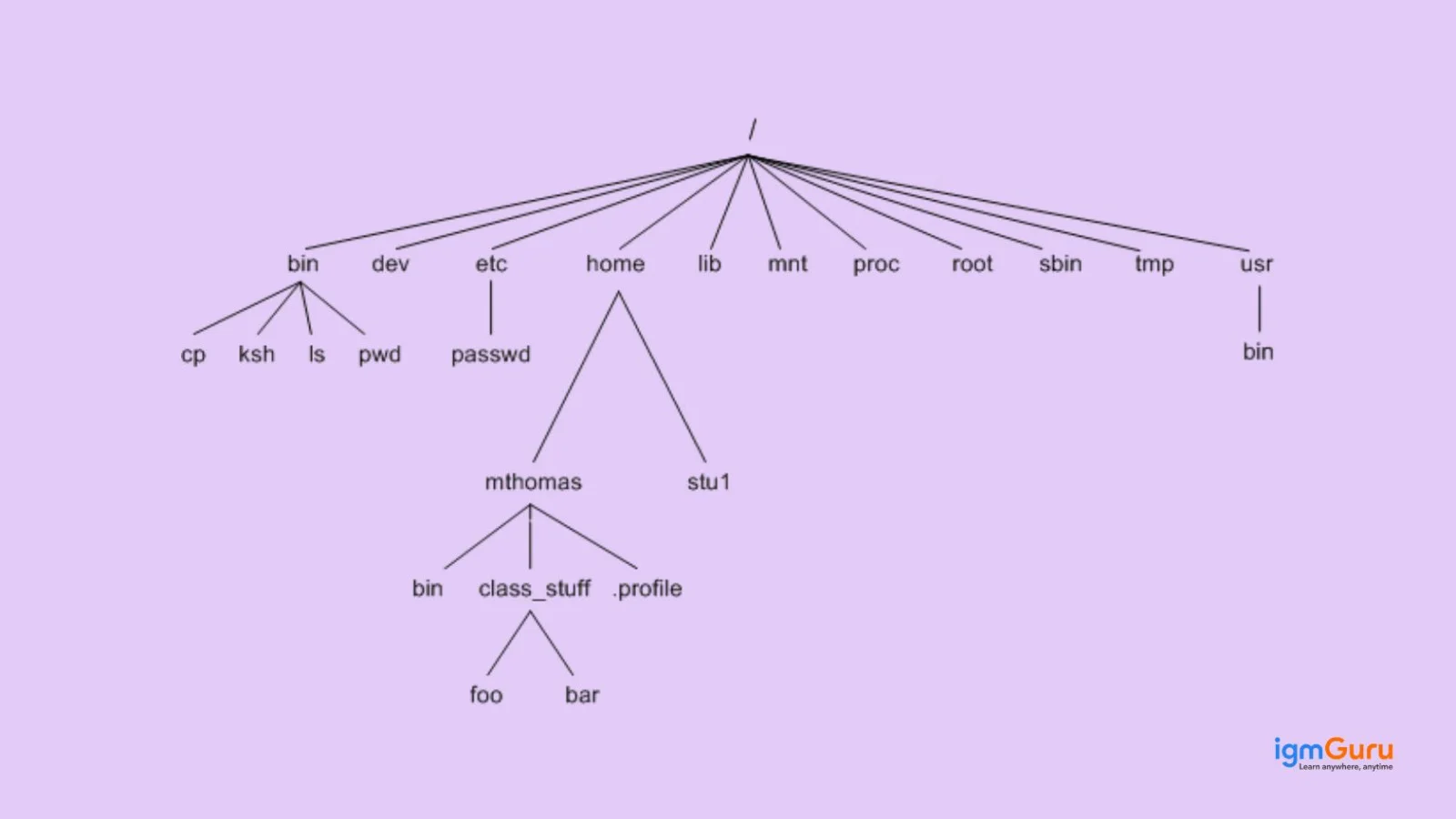
An inode or index node is a data structure used by the UNIX file system to store information about a file. Each file in UNIX has a unique inode number that contains metadata about the file, such as:
However, the inode does not store the file name or the actual file data. Instead, it stores pointers to the data blocks where the file content is located. The file name is stored separately in directory entries that reference the inode.
A process in UNIX is an instance of a program that is currently being executed.
Whenever a command or application runs in UNIX, the system creates a process for that program. Each process has a unique Process ID (PID) that helps the operating system track and manage it.
Processes may run in the foreground or background and can communicate with other processes.
The operating system manages processes through scheduling, ensuring that system resources such as CPU time and memory are efficiently allocated.
Process management is one of the core responsibilities of the UNIX kernel.
A daemon process in UNIX is a background process that runs continuously to perform system-related tasks without requiring direct user interaction. These processes typically start automatically when the system boots and continue running in the background to support various services. Daemon processes handle tasks such as managing web servers, printing services, email servers, and system logging. They usually have names that end with the letter “d”, such as sshd, httpd, and cron. Since daemon processes operate silently in the background and provide essential services to the system, they play an important role in maintaining the overall functionality and stability of a UNIX environment.
Read Also: How to Install Java on Windows, macOS and Linux. In modern Linux systems, many daemon processes are managed by system managers such as systemd, which controls service startup, logging, and background services.
UNIX is a family of proprietary operating systems originally developed in the 1970s, while Linux is an open-source operating system inspired by UNIX design principles and widely used today in servers, cloud platforms, and enterprise systems.
The main differences between UNIX and Linux include:
| Feature | UNIX | Linux |
| Source Code | Mostly proprietary | Open source |
| Development | Developed by companies like AT&T, IBM, and Oracle | Developed by a global open-source community |
| Licensing | Commercial licenses | Free and open-source |
| Examples | AIX, Solaris, HP-UX | Ubuntu, Debian, Fedora |
In modern IT environments, Linux distributions dominate server infrastructure and cloud platforms, while traditional UNIX systems such as AIX and Solaris are mainly used in large enterprise environments.
Filters in UNIX are programs that take input from standard input, process the data, and produce output to standard output.
They are commonly used in combination with pipes to process data step by step.
Filters allow users to manipulate text and files efficiently without modifying the original data.
Some common UNIX filter commands include:
For example:
|
This command filters lines containing the word error from the file.
A pipe (|) in UNIX is a mechanism used to connect the output of one command to the input of another command.
Instead of storing intermediate results in files, pipes allow commands to work together directly, improving efficiency.
For example:
|
In this command:
Pipes are commonly used in UNIX to build command pipelines, where multiple commands work together to process data step by step.
An absolute path is the complete path to a file or directory starting from the root directory (/), while a relative path is defined relative to the current working directory.
Example of an absolute path:
|
Example of a relative path:
|
Key differences include:
| Absolute Path | Relative Path |
| Starts from root directory (/) | Starts from current directory |
| Always specifies full location | Depends on current directory |
| Same regardless of location | Changes based on working directory |
Absolute paths are commonly used in scripts to avoid path errors.
File permissions in UNIX determine who can read, write, or execute a file or directory.
Each file has three permission categories:
There are three main permission types:
| Permission | Symbol | Description |
| Read | r | Allows viewing file contents |
| Write | w | Allows modifying the file |
| Execute | x | Allows executing the file |
Permissions are typically displayed using the ls -l command.
Example:
|
This string shows the permission levels assigned to the owner, group, and others.
Hard links and symbolic links are methods used in UNIX to reference files.
A hard link is another directory entry that points to the same inode as the original file, meaning both names reference the same file data.
A symbolic link (soft link) is a special file that contains the path to another file.
| Hard Link | Symbolic Link |
| Points directly to the inode | Points to the file path |
| Cannot link directories | Can link directories |
| Remains valid if original file is deleted | Breaks if original file is removed |
Symbolic links are commonly used to create shortcuts or references to files.
Environment variables are dynamic values that store system configuration information used by the operating system and applications.
They define settings that affect how programs run in the UNIX environment.
Some commonly used environment variables include:
| Variable | Purpose |
| PATH | Defines directories where executable files are located |
| HOME | Specifies the user's home directory |
| USER | Stores the current username |
| SHELL | Defines the default shell |
To view environment variables, the following command can be used:
|
Environment variables help customize user sessions and system behavior.
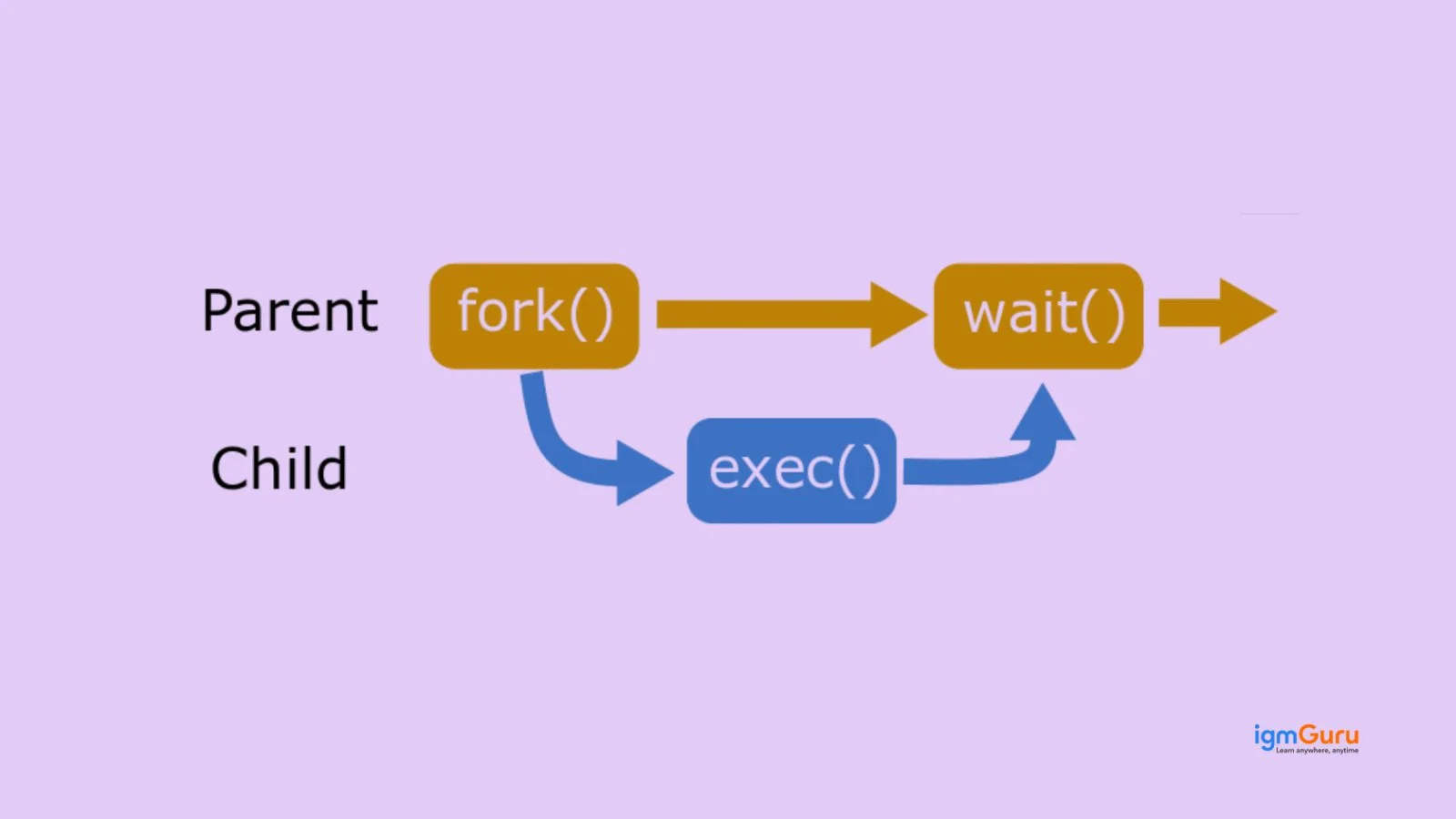
A zombie process is a process that has completed execution but still has an entry in the process table.
This occurs when a child process finishes execution, but the parent process has not yet read its exit status using the wait() system call.
Because the process has already terminated, it does not consume CPU or memory resources. However, its process ID and status remain in the process table until the parent collects the exit information.
Zombie processes are usually temporary, but large numbers of them can indicate issues with process management in the system.
In UNIX, a parent process is a process that creates one or more child processes, while a child process is the process that is created by another process.
This relationship is established using system calls such as fork().
When a parent process creates a child process:
Parent and child processes form a process hierarchy, which helps the operating system organize and manage running programs efficiently.
A process is a program that is currently executing, while a thread is a smaller unit of execution within a process.
Processes operate independently and have their own memory space. Threads, on the other hand, share the memory and resources of the process they belong to.
Key differences include:
| Process | Thread |
| Independent execution unit | Sub-unit of a process |
| Has its own memory space | Shares memory with other threads |
| Higher overhead | Lightweight |
| Communication is slower | Communication is faster |
Threads are commonly used in applications to improve performance through parallel execution.
Read Also: Bash Cheat Sheet
Standard streams in UNIX are predefined communication channels that programs use for input and output operations. They allow programs to receive input, display output, and handle errors efficiently.
There are three standard streams used in UNIX systems:
For example, when a command like ls runs, the list of files is displayed using standard output, while any errors (such as permission issues) are displayed using standard error.
These streams are important because they allow commands to work together using pipes and redirection, making UNIX extremely powerful for command-line operations.
Input and output redirection in UNIX allows users to change the default source of input or destination of output for a command.
By default, commands take input from the keyboard and display results on the terminal. Redirection allows users to send input from a file or store output in a file instead.
For example, the following command saves the output of the ls command to a file instead of displaying it on the terminal:
|
Similarly, input can be taken from a file using the < operator.
Redirection is commonly used in scripts and automation because it allows commands to process large amounts of data without manual interaction.
A cron job in UNIX is a scheduled task that runs automatically at specific times or intervals. It is commonly used to automate routine system operations.
Cron jobs are managed by a background service called the cron daemon, which continuously checks scheduled tasks and executes them at the defined time.
Users configure cron jobs using a crontab file, where they specify the schedule and the command to run.
A typical cron schedule contains five fields representing:
For example:
|
In modern Linux environments, scheduled tasks can also be managed using systemd timers, which provide more advanced scheduling and dependency management compared to traditional cron jobs. This command runs the script backup.sh every day at 2:00 AM.
Cron jobs are widely used for tasks like backups, system monitoring, database maintenance, and log cleanup.
The commands kill, killall, and pkill are used in UNIX to terminate running processes, but they differ in how they identify those processes.
The kill command stops a process using its Process ID (PID). It is the most commonly used method when the exact process ID is known.
The killall command terminates all processes with a specific name. This is useful when multiple instances of the same program are running.
The pkill command works similarly to killall, but it can terminate processes using patterns or partial names, making it more flexible.
For example:
|
This command terminates the process with PID 1234.
These commands are essential for managing processes in UNIX systems.
The /proc filesystem is a virtual filesystem that provides real-time information about system processes and kernel status.
Unlike regular filesystems, /proc does not store actual data on disk. Instead, it dynamically generates information about running processes and system resources.
Each running process has a directory inside /proc named after its Process ID (PID). These directories contain files that display detailed information about the process.
For example:
|
This directory may include information about memory usage, process status, open files, and execution details.
System administrators often use the /proc filesystem for system monitoring, debugging, and performance analysis.
Process scheduling in UNIX is the mechanism used by the operating system to decide which process should use the CPU and for how long.
Since multiple programs may run simultaneously, the UNIX kernel uses a scheduler to allocate CPU time efficiently among processes.
The scheduler ensures that all active processes receive CPU time while maintaining system responsiveness. It may prioritize certain processes based on their priority level or resource requirements.
Scheduling techniques used in UNIX systems include time-sharing and priority-based scheduling, where processes are executed in small time slices.
Effective process scheduling helps maintain system stability and ensures that applications run smoothly even when many processes are active.
Signals in UNIX are software interrupts used to notify a process that a specific event has occurred. They provide a way for the operating system or other processes to communicate with running programs.
Signals can be used to stop, pause, or control processes. For example, pressing Ctrl + C in the terminal sends an interrupt signal that stops the running program.
Some commonly used signals include:
| Signal | Purpose |
| SIGINT | Interrupts a running process |
| SIGTERM | Requests a process to terminate |
| SIGKILL | Forcefully stops a process |
| SIGHUP | Sent when a terminal session ends |
Signals play an important role in process control and system management in UNIX.
Swap space in UNIX is a portion of disk storage that is used as virtual memory when the system’s physical RAM becomes full.
When the system runs out of available memory, inactive memory pages are moved from RAM to swap space. This process frees up RAM so that active programs can continue running.
Although swap space helps prevent system crashes, it is slower than RAM because it relies on disk storage. Excessive use of swap space may indicate that the system needs additional memory.
System administrators often monitor swap usage to ensure optimal system performance.
System calls are interfaces that allow user-level programs to request services from the UNIX kernel.
Since user programs cannot directly access hardware resources, they use system calls to perform operations such as reading files, creating processes, and communicating with devices.
Some commonly used system calls include:
| System Call | Function |
| fork() | Creates a new process |
| exec() | Executes a new program |
| read() | Reads data from a file |
| write() | Writes data to a file |
System calls act as a bridge between applications and the operating system kernel, ensuring that system resources are accessed safely and efficiently.
Memory management in UNIX refers to the process of allocating and controlling system memory for running programs.
The UNIX kernel manages memory using techniques such as virtual memory, paging, and swapping. Each process is given its own virtual address space, which is mapped to physical memory.
When a program needs memory, the kernel allocates the required space and keeps track of how it is used. If memory becomes limited, inactive pages may be moved to swap space on disk.
The kernel also enforces memory protection, ensuring that one process cannot access the memory of another process. This improves system stability and security when multiple programs are running simultaneously.
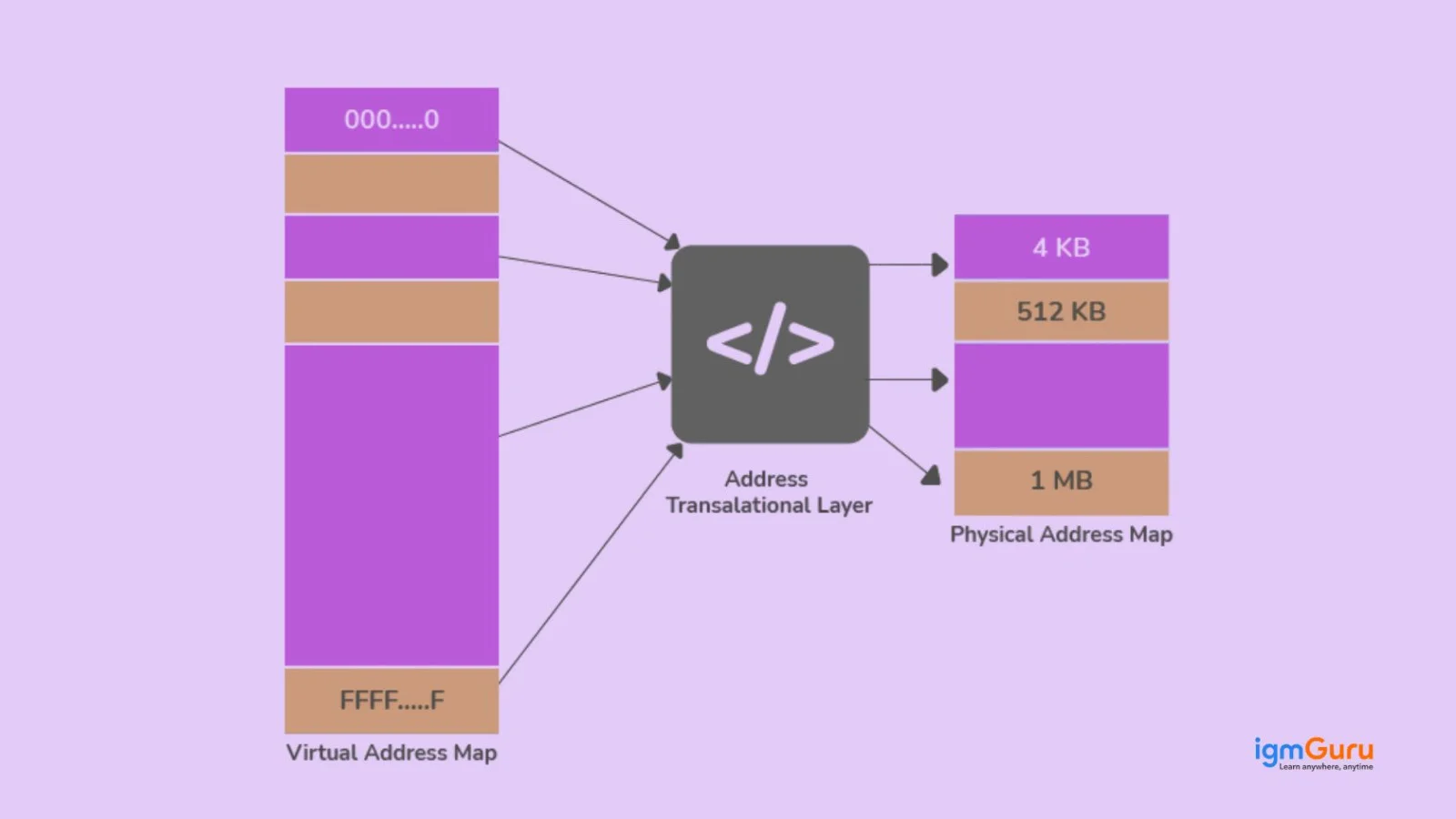
In UNIX, hidden files are files whose names start with a dot (.). These files are typically used for configuration purposes and are not displayed by default when listing directory contents.
To list all files, including hidden files, you can use the ls command with the -a option.
Example:
|
This command displays all files in the current directory, including hidden files.
If you also want to see detailed information such as file permissions, owner, and file size, you can use:
|
This command lists all files in long format along with hidden files.
An empty file in UNIX can be created using the touch command. This command creates a new file if it does not already exist.
Example:
|
This command creates an empty file named file.txt in the current directory.
The touch command is also used to update the timestamp of an existing file without modifying its contents.
Another way to create an empty file is by using output redirection:
|
However, touch is the most commonly used and recommended method.
The find command is used in UNIX to search for files and directories within a directory hierarchy.
It allows users to search based on various criteria such as file name, size, type, or modification date.
Example:
|
This command searches for a file named file.txt inside the /home directory and its subdirectories.
You can also search for files by type. For example:
|
This command lists all files in the current directory and its subdirectories.
The find command is widely used for system administration and file management tasks.
The grep command is used in UNIX to search for specific patterns or text within files.
It scans the contents of files and displays lines that match the specified pattern.
Example:
|
This command searches for the word error inside the file log.txt and displays all matching lines.
The grep command is often used with pipes to filter command output.
Example:
|
This command searches for running processes related to apache.
Because of its powerful pattern-matching capabilities, grep is one of the most frequently used commands in UNIX systems.
The commands cp, mv, and rm are used for managing files in UNIX systems.
Example commands:
|
Copies file1.txt to file2.txt.
|
Moves file.txt to another directory.
|
Deletes file.txt from the system.
These commands are commonly used for basic file management tasks.
The chmod command in UNIX is used to change the permissions of files and directories.
Permissions control who can read, write, or execute a file.
Example:
|
This command sets the permissions of script.sh so that:
The chmod command can also use symbolic notation.
Example:
|
This command gives execution permission to the file.
Managing permissions with chmod is important for maintaining system security.
The ps command is used in UNIX to display information about currently running processes.
It provides details such as the process ID (PID), terminal used, CPU usage, and command associated with each process.
Example:
|
This command displays processes running in the current terminal session.
To view all running processes in the system, you can use:
|
This command provides a detailed list of all active processes.
System administrators often use ps to monitor processes and troubleshoot system issues.
The top command in UNIX is used to monitor system processes and resource usage in real time.
It displays dynamic information about the system, including:
Example:
|
When this command is executed, it shows a continuously updating list of active processes sorted by resource usage.
The top command is commonly used by system administrators to identify processes that consume excessive CPU or memory resources.
The df command is used in UNIX to display information about disk space usage on file systems.
It shows how much disk space is available and how much is currently used.
Example:
|
The -h option displays the output in a human-readable format, showing sizes in KB, MB, or GB.
The df command helps system administrators monitor disk usage and ensure that sufficient storage space is available.
Both du and df are used to check disk usage in UNIX, but they serve different purposes.
The df command shows the amount of disk space used and available on the entire filesystem.
Example:
|
The du command shows the disk space used by specific files or directories.
Example:
|
This command displays the total size of a directory. In simple terms:
Both commands are useful for monitoring storage and managing disk space.
The htop command is an interactive process monitoring tool used in UNIX-like systems. It provides a more user-friendly and visually organized interface compared to the traditional top command.
It allows system administrators and developers to monitor system activity in real time, including CPU usage, memory consumption, and running processes.
Unlike the top command, htop supports interactive controls that allow users to manage processes directly from the interface.
Some key features of htop include:
Example:
|
Because of its interactive interface and improved visualization, htop is widely used by system administrators and DevOps engineers for monitoring system performance.
The awk command is a powerful text-processing tool used in UNIX systems for pattern scanning and data extraction. It is commonly used to analyze and manipulate structured text data such as log files, CSV files, and command output.
The awk command processes text line by line and allows users to perform operations on specific fields within each line. This makes it extremely useful for data filtering and reporting tasks.
For example:
|
This command prints the first column from each line of the file.
System administrators often use awk in combination with other UNIX commands such as grep, sort, and cut to process large datasets and automate system tasks.
UNIX plays a fundamental role in modern container technologies such as Docker. Containers rely on core UNIX concepts like process isolation, namespaces, and control groups (cgroups) to run applications in secure and isolated environments.
Scenario-based UNIX interview questions are commonly asked to test how well candidates can apply UNIX concepts in real-world situations. Instead of checking only theoretical knowledge, these questions evaluate troubleshooting ability, command-line thinking, process management skills, and practical system administration experience.
If a UNIX server suddenly becomes slow, the first step is to check system resource usage, such as CPU, memory, disk space, and running processes.
I would start with commands like top or htop to identify processes consuming excessive CPU or memory.
Then I would check disk usage using:
|
If disk space is full, the system can slow down significantly. I would also inspect memory and swap usage, review system logs inside /var/log, and identify whether any zombie or stuck processes are causing resource issues. Once the root cause is identified, I would either stop problematic processes, free resources, or restart affected services carefully.
If a process does not terminate using the normal kill command, it usually means the process is ignoring termination signals or is stuck in an unresponsive state.
First, I would identify the process ID using:
|
Then I would try using the SIGKILL signal:
|
This forcefully terminates the process. If the process still does not stop, I would check whether it is stuck in an uninterruptible state due to disk or hardware issues. In some rare cases, a system reboot may be required.
In UNIX, file access problems are commonly related to permissions or ownership issues.
First, I would check the file permissions using:
|
This helps identify whether the user has read, write, or execute permissions.
I would also verify:
If needed, I would update permissions using chmod or ownership using chown. I would always apply the minimum required permissions to maintain system security.
If disk usage reaches 100%, the system may become unstable or applications may stop working properly.
First, I would identify which filesystem is full using:
|
Then I would locate large files and directories using:
|
In many cases, log files, backups, or temporary files consume excessive space. After identifying unnecessary files, I would safely clean them, archive old logs, or extend storage if required. I would also monitor disk growth patterns to prevent the issue from happening again.
If a cron job is not executing properly, I would first verify whether the cron service is running on the system.
Then I would inspect the crontab entry carefully for syntax errors.
I would also check:
One common mistake is using relative paths inside cron jobs because cron runs with a limited environment. I would also manually execute the script from the terminal to confirm whether the issue is with the script itself or the cron scheduler.
Although applications run inside containers, the underlying container runtime relies heavily on UNIX concepts such as processes, namespaces, cgroups, file systems, and permissions. Understanding these fundamentals helps troubleshoot container issues more effectively.
I would use UNIX commands to inspect running processes, monitor resource utilization, analyze logs, verify file permissions, and troubleshoot networking issues. Since Kubernetes nodes typically run on Linux-based systems, strong UNIX knowledge is essential for diagnosing container failures, optimizing performance, and managing production environments.
I would first identify users with elevated privileges and review whether they genuinely require administrative access. Unnecessary root access would be removed by following the principle of least privilege.
Next, I would audit file and directory permissions using commands such as find, ls -l, and chmod, ensuring that sensitive files are accessible only to authorized users. I would also review SSH configurations, disable unused accounts, enable audit logging, and implement multi-factor authentication where possible. Finally, I would establish periodic security audits to continuously monitor user privileges and file permissions.
UNIX is a powerful operating system widely used in servers, enterprise systems, and development environments. UNIX knowledge remains valuable for system administrators, DevOps engineers, and developers because of its stability, security, and strong command-line tools.
In this guide, I have covered various important UNIX interview questions and answers. It starts from basic concepts like the kernel, shell and file system to advanced topics such as processes, signals, and memory management. We also explored commonly used UNIX commands that are frequently asked in technical interviews.
Reviewing these UNIX interview questions will help you strengthen your fundamentals and prepare more confidently for interviews. Practicing these concepts along with real command-line usage will further improve your understanding of UNIX systems.
Some of the most commonly used UNIX commands include:
Yes, UNIX is still widely used in enterprise environments. Many modern systems such as Linux distributions and macOS are based on UNIX principles and architecture. It makes UNIX concepts highly relevant today.
The main components of UNIX include:
UNIX can initially seem complex because it relies heavily on command-line operations. However, once users understand basic concepts such as file management, processes, and commands, it becomes much easier to work with and extremely powerful.
Explore Our Trending Articles-