Postman has become one of the most used API testing and development tools with its powerful capabilities to simplify the API testing processes. APIs are at the core of almost every technology. Therefore, Postman skills have become a valuable asset for professionals across industries, from software engineers to QA engineers and API enthusiasts.
Are you one of them? Bingo, you are in the right place. In this article, I have combined the most asked Postman interview questions with detailed answers. These questions cover various concepts from the very basics to the most advanced, making it a guide for both beginners and experienced professionals. Let’s get started!
To prepare for a Postman interview, you must know the basics, like definitions, components, types, etc. It builds your core foundational knowledge of the tool. Here are some of the most-asked Postman interview questions and answers on these topics:
Postman is a robust platform for API development and testing. It is used to send requests, analyze responses, automate tests, document APIs, collaborate in teams, and manage the complete API lifecycle. These tools have applications in various sectors, such as:
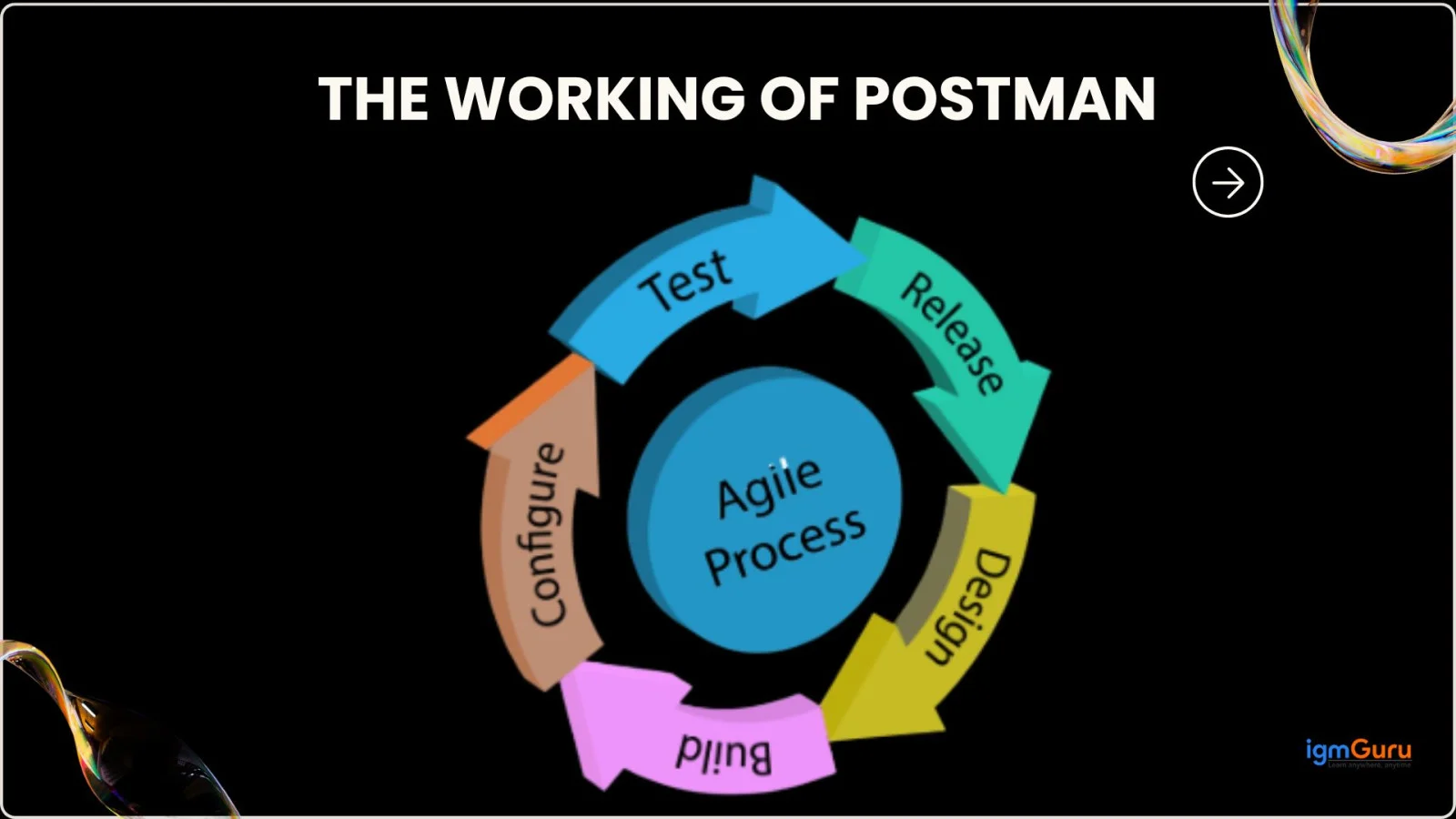
A Postman Collection is a structured group of API requests stored together. These groups help to manage, automate, document, and share API workflows. These act as reusable, portable units for testing and development across an API's lifecycle, from exploration to CI/CD. It helps organize endpoints, share them with teams, automate test flows, and run them in CI/CD pipelines.
An Environment in Postman is a set of key-value variables like base URLs, tokens, or credentials. These variables help switch between different stages like development, testing, staging, and production without modifying the requests manually.
A Workspace is a collaborative space where collections, environments, monitors, and documentation are shared among teams to improve version control and coordinated API work. This allows teams to design, build, test, and deploy APIs together with real-time syncing and permission control. Think of it as a project folder for APIs that enables seamless collaboration for internal teams, partners, and even the public.
Pre-request scripts are JavaScript code blocks executed before sending a request. They are mainly used to set up data, generate tokens, manipulate environment variables, or add custom logic. They run automatically before an API request is sent, which allows you to dynamically set variables, generate data, manipulate headers/body, or even abort the request. This makes it easy to operate the APIs.
Tests are JavaScript scripts written in Postman. They are used to verify whether the API response meets expected conditions like status code, response body values, headers, or schema. They also help to validate the API's behavior and ensure that the response meets the expected criteria.
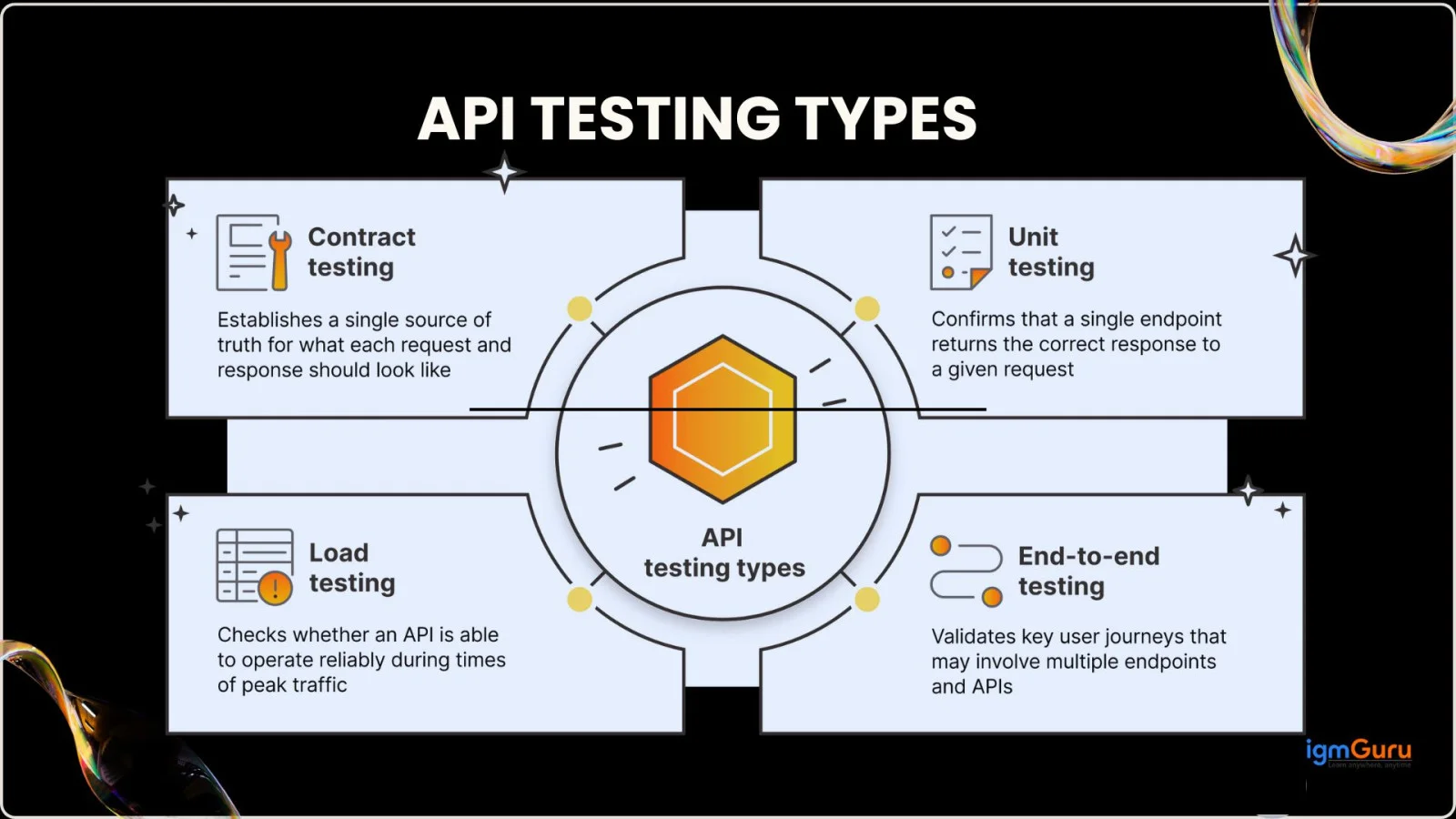
The tool is famous for API testing and the monitor is a core feature here. It continuously checks the health and performance of your APIs by running a collection of requests at regular intervals.
This helps to automate the testing, ensure they are functioning correctly, and can alert you to issues through notifications like email or Slack. You can use monitors to check complex workflows, test across different regions, and monitor security vulnerabilities.
The Collection Runner is another powerful feature used in API development tools like Postman. It allows developers to automate the execution of multiple API requests within a collection, run them in sequence, check test results, and simulate load for performance testing.
The best part, it is all done all without manual intervention. This way you use it to enable data-driven testing with CSV/JSON files, setting iterations, delays, and integrating into CI/CD pipelines, etc.
Spec Hub is a centralized workspace within this platform. It is best for designing, governing, and managing API specifications (like OpenAPI and AsyncAPI) at scale. It can enable teams to create high-quality APIs by keeping specs, collections, tests, mocks, and documentation automatically synchronized.
This helps to reduce the need of tool switching and ensures consistency. It also offers a visual editor, built-in validation, linting, live documentation previews, and seamless spec-to-collection sync. All these make API design a collaborative and efficient process.
Private API Runners allow organizations to run automated tests and validations inside their private networks. This helps enterprise teams test internal APIs securely without exposing them to the internet. This feature is particularly useful for testing and monitoring internal APIs that are not publicly exposed and reside behind firewalls or other security measures.

Now, let’s move to the most asked Postman interview questions for freshers. This section tests the fundamental knowledge of candidates regarding the platform.
There are various benefits of using this platform. Some of them are listed below:
Here are some of the best key features of this platform:
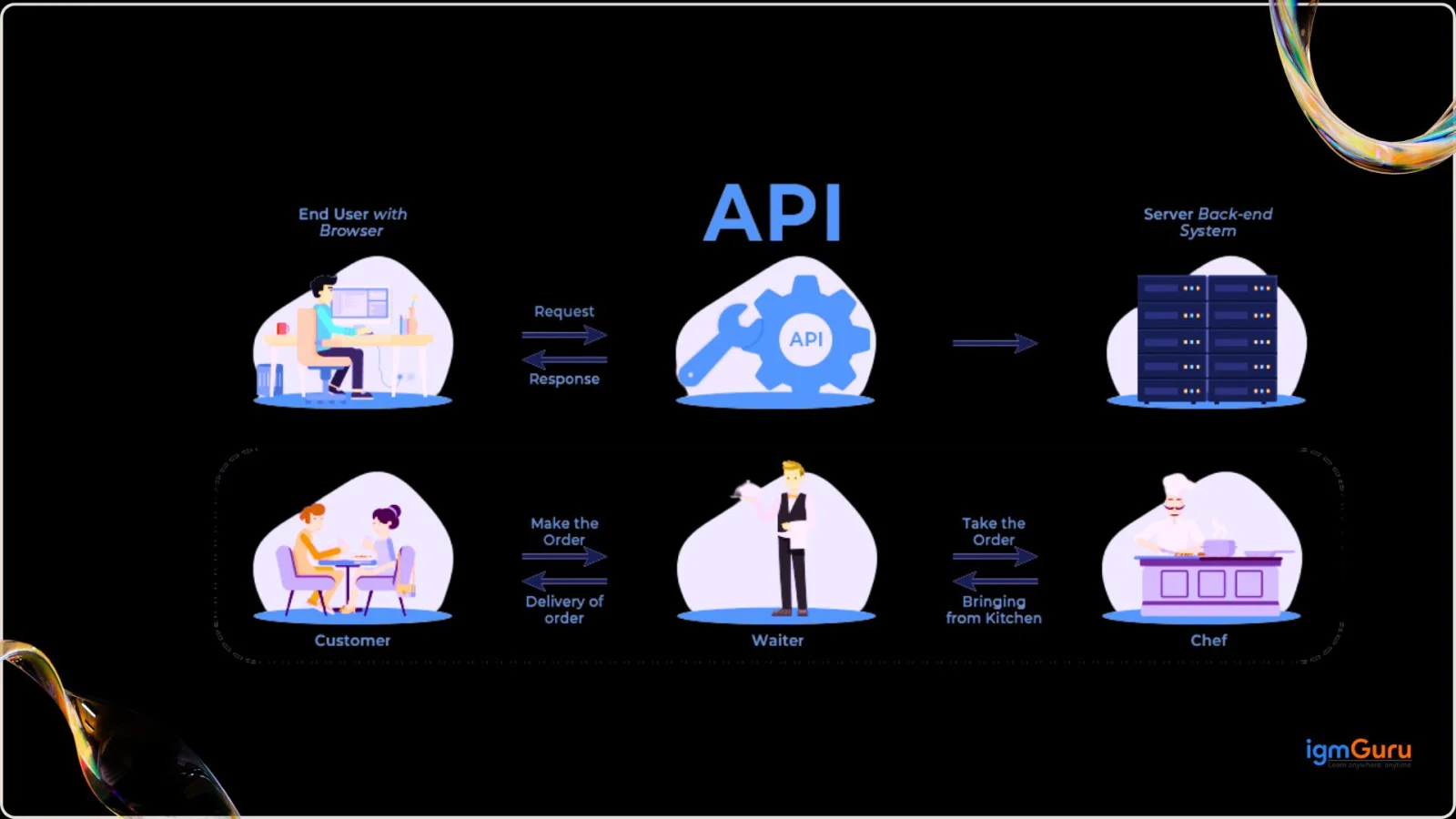
An API (Application Programming Interface) is a set of rules that lets one software application talk to another and exchange data. For example, when a weather app shows today's forecast, it requests that data from a weather service through an API.
API testing is required because it checks that the API works correctly before users ever see a problem. The main reasons are:
There are various Postman alternatives you can use based on your requirement, including:
| Tool | Best For |
| Postman | Complete API testing, collaboration, automation, and monitoring |
| Swagger / SwaggerHub | API design, documentation, mock servers in OpenAPI |
| Insomnia | Fast REST & GraphQL testing with lightweight UI |
| SoapUI | SOAP & enterprise-level functional API testing |
| Paw | macOS-native API testing with strong design features |
| JMeter | API performance and load testing |
| Hoppscotch | Quick online API testing (lightweight alternative) |
| REST Assured | Automated API testing in Java (CI/CD integration) |
| Katalon Studio | Automated testing across Web, Mobile, and APIs |
| RapidAPI Client | Centralized API marketplace and testing |
| ARC (Advanced REST Client) | Simple REST debugging and manual testing |
The core components of an HTTP request define how the client communicates with the server. They include the essential elements required to identify the desired action, the target resource, the optional data being sent, and the metadata required to process the request. The core components of an HTTP request are:
AI Requests is a feature of the platform that directly interacts with various AI models. It helps developers to integrate and test AI model API calls (like GPT or Claude) directly within Postman collections. This is much like traditional HTTP requests, but for language/generative models. It basically lets you use AI as part of workflows, testing, or automation.
Model Context Protocol support refers to the platform's native integration of the Model Context Protocol. It is an open standard that allows Large Language Models (LLMs) and AI agents to securely and consistently interact with external data sources and tools. This way, the platform acts as both an MCP client and an MCP server generator that streamlines the development and testing of AI agents.
The scripting environment of this platform now supports the direct import and use of external public packages. These packages are from npm and JSR registries in pre-request and post-response scripts. This significantly expands the capabilities of the scripts by allowing developers to use the vast JavaScript ecosystem. The best part is that they do not have to resort to workarounds like copying and pasting code or using eval().
Live Collaboration Editing enables multiple users to simultaneously edit collections, documentation, or flows. It is similar to Google Docs collaboration, which improves teamwork and minimizes conflicts. Most of the professionals use it when working on a project with a team.
Local Server Connectivity is a special concept that allows testing APIs running on local servers without exposing them publicly. It supports Unix domain sockets on macOS/Linux and named pipes on Windows.
Now we will move to some of the most asked Postman interview questions and answers. These are important for both freshers and experienced professionals.
There are various methods to automate auth in this platform. This way, you will not have to manually copy and paste tokens every time. I prefer to automate authentication using a token (JWT/Bearer). It includes the following steps:
1. Call Login API: Request your /login or /auth endpoint. You will get a token in the response.
2. Save the Token Automatically: Go to the Tests tab of the login request and paste:
|
This stores the token as {{token}}.
3. Use the Token in Other Requests: In any request requiring authentication:
|
4. Run Requests Automatically: Whenever token expires:
This platform uses JavaScript test scripts to validate API responses. The collection runner then executes them automatically to check functionality, performance, and reliability. Here is how it is done:
1. Create a Request: Send an API request (GET, POST, etc.).
2. Write Test Scripts: Go to the Tests tab and write JavaScript-based test cases.
|
3. Save the Request under a Collection: Collections allow multiple requests to be tested together.
4. Run Tests: Open the Collection Runner, select the collection, and click Run to execute all tests automatically.
5. View Results: Postman will show passed and failed test cases with response details.
It is possible to use the local variables inside the monitor. But there are various restrictions so you can not rely on them. They can not be retained after the run and you can not import local-only (unsynced) variables into a Monitor.
You can log variable values using the console.log() function inside the Pre-request Script or Tests tab. This will help you debug and verify what value a variable holds. Here is an example of logging a variable value:
|
|
|
This platform only allows accessing variables based on their scope. You use built-in methods to retrieve the variable values. Here is how you access different variables:
Access Environment Variables
|
Access Global Variables
|
Access Collection Variables
|
Access Local Variables (request-level)
|
There are multiple authorization methods you can use on this platform. Here are some of the most useful ones:
| Authorization Method | Description |
| No Auth | No authentication is used. |
| API Key | Sends a key (in Header or Query Params) for API access. |
| Bearer Token | Uses a token (JWT) in the Authorization header. |
| Basic Auth | Uses username and password (Base64 encoded). |
| Digest Auth | More secure version of Basic Auth with encrypted credentials. |
| OAuth 1.0 | Token-based authentication is used in older APIs. |
| OAuth 2.0 | Modern OAuth framework for token-based authentication. |
| Hawk Auth | Cryptographic authentication used for secured APIs. |
| AWS Signature | Used to authenticate AWS service requests. |
| NTLM Auth | Windows-based authentication for enterprise systems. |
| VMware Cloud Auth | Used to authenticate VMware cloud APIs. |
Status Codes are standardized numeric responses returned by a server to indicate the outcome of an API request. They help the client understand whether the request was successful, failed, redirected, or encountered an error. I have dealt with the following status codes:
| Status Code | Meaning | When I faced it |
| 200 OK | Request succeeded | Successful GET/POST APIs |
| 201 Created | Resource created | When inserting records |
| 400 Bad Request | Invalid input sent | Wrong JSON body or missing fields |
| 401 Unauthorized | Authentication failed | Wrong/expired token |
| 403 Forbidden | Access denied | User lacks required permission |
| 404 Not Found | Resource not found | Wrong endpoint or ID |
| 500 Internal Server Error | Server crashed | Server issue or unhandled exception |
| 502 Bad Gateway | Invalid server response | API gateway misconfiguration |
| 503 Service Unavailable | Server temporarily down | Maintenance or overload |
Local variables are already temporary variables created during a request run.
They only exist for that particular request and cannot be manually deleted. You can clear or unset them if required. You can remove a local variable using:
|
Authentication tokens can be reused for multiple API requests until they expire. Here are some of the common reasons behind their reusability:
Example of using authentication tokens for multiple requests:
|
I will test that the API accepts valid Basic Auth credentials and rejects invalid ones. The steps are:
1. Create a GET request to https://httpbin.org/basic-auth/user/pass
2. Open the Authorization tab and choose Basic Auth.
3. Enter the username user and the password pass.
4. Send the request and add this script in the Tests tab:
pm.test("Status code is 200", function () {pm.response.to.have.status(200); }); pm.test("User is authenticated", function () { const jsonData = pm.response.json(); pm.expect(jsonData.authenticated).to.be.true; pm.expect(jsonData.user).to.eql("user"); }); |
This section lists the most asked Postman interview questions for experienced professionals. These are often asked when you apply for a senior-level job interview, like a senior software developer or senior QA analyst.
Base64 converts data into a plain-text string made of letters, numbers and a few symbols. This lets binary data travel safely inside text-based formats such as JSON bodies, headers and URLs. Postman uses it in two common cases:
Important: Base64 is encoding, not encryption. Anyone can decode it, so always send Basic Auth over HTTPS.
The platform does provide robust security measures to secure the user’s data. It is definitely safe to store data on its cloud. But there are loopholes too. As a user, you have the authority to manage the sensitive data within your account. This means the security of data completely depends on the security measures you are following. As long as you are following the best practices, there is no danger.
It is possible to set common headers at the collection level by editing the collection and adding headers under the ‘Headers’ tab. They will be applied to all requests automatically. Here are the steps to do it:
It is possible to stop the execution of upcoming requests. All you have to do is to run one command inside the Tests tab. Here is how you do it:
|
This platform will always prefer the local variable over the global variable as local variables have higher scope priority. This is not it, be it any variable the local variable will always be preferred. The reason behind this preference is the default priority list:
1. Local Variable
2. Data Variable
3. Environment Variable
4. Collection Variable
5. Global Variable
The command line can not directly access Postman. You can do it by using tools like Postman CLI (Command Line Interface) and Newman. These tools help you to run collections, integrate with CI/CD pipelines and automate tests outside of the main application. Here are the steps to use the Newman tool:
|
|
I will use the given steps:
To get the cURL command in Postman, I would:
1. Create the Request
2. Open the Code Snippet Option
3. Select cURL
4. Copy the Command
It is an easy process. You just have to use the right formula using JavaScript. The formula is:
|
|
You can see or access the request history from the History tab available on the left panel. Here are the steps to do it:
1. Open Postman
2. Go to the Left Sidebar
3. Click on History
4. You will see all the previously executed requests listed with:
Postman is very capable, but I have found some limits, especially compared with other tools:
1. It is focused on API work. It cannot do UI or browser-based functional testing, so you need tools like Selenium or Playwright for that.
2. Complex workflows need scripting. Chaining requests, conditional logic and custom validations require JavaScript knowledge.
3. Variable updates are not saved permanently in Monitor runs. Values set during a monitor run do not persist after the run.
4. Built-in performance testing is basic. For heavy load and stress testing, dedicated tools such as JMeter or k6 are better.
5. Collaboration depends on the plan. Since the March 2026 plan changes, the Free plan is limited to one user and cannot create a team, so teams need a paid plan.
6. Version control is not as natural as code. Postman has Git integration, but reviewing collection changes is harder than reviewing code in a pull request.
7. Usage limits apply on cloud features. Monitors, mock servers and API calls have monthly limits that depend on the plan.
Removed from the old list: the line about HTTP-only support (Postman supports GraphQL, gRPC and WebSocket) and the line saying CLI runs work only through Newman (the Postman CLI also works).
Read Also- What is Google AI Studio? A Complete Guide for Beginners
Now we will discuss some of the most asked Postman interview questions and answers based on real problems. These questions are generally asked of professionals with more than 3 years of experience.
1. Set request method to POST and URL: https://reqres.in/api/users
2. In Headers, add: Content-Type: application/json
3. In Body → raw → JSON, add:
|
4. Go to the Tests tab and add:
|
Output / Result: Tests pass if status = 201, name and job match the request, and id + createdAt exist.
1. Create an Environment → add variable: token =
2. In your request, go to the Authorization tab:
3. Alternatively, set the header manually in Headers: Authorization: Bearer {{token}}
4. In Tests, validate that unauthorized responses are not received:
|
Output / Result: Request is sent with Bearer token from environment; test fails if API returns 401/403.
Steps:
1. GET Method - URL: https://reqres.in/api/users/2
2. In Tests, add:
|
Output / Result: If the backend removes or renames any of these fields, Postman tests will fail, flagging breaking changes.
Steps:
1. Method - URL example: https://jsonplaceholder.typicode.com/posts
2. In Tests, add:
|
3. Run the request multiple times or via Collection Runner.
Output / Result: Test passes only if responseTime < 500. This is commonly used for performance SLAs.
Steps:
1. Request 1: Login
|
2. Request 2: Get Users
|
Output / Result: Token from login is stored in authToken and used automatically in the second request. Both tests pass if token and auth are correct.
Steps:
1. POST Method - URL: https://reqres.in/api/register
2. Body (JSON) – intentionally incomplete:
|
3. Tests:
|
Output / Result: Verifies that the backend correctly validates input and returns error with a message.
Steps:
1. Create a request:
|
2. Prepare users.csv:
name,job
Alice,Engineer
Bob,Manager
Charlie,Designer
3. Open Collection Runner → select the collection → choose file users.csv.
4. In Tests:
|
Output / Result: Each CSV row becomes a separate run. Tests assert that API echoes the correct name and job per row.
Steps:
1. GET Method - Example URL: https://api.github.com/users/octocat
2. In Headers, add: User-Agent: Postman
3. In Tests:
|
Output / Result: Confirms the presence of rate limiting info, which is a very common real-world need.
Steps (high-level):
1. In Postman, create a new collection with a GET /products request.
2. In the example response for that request, define:
|
3. Right-click the collection → Mock Collection → choose environment (or none) → create.
4. You’ll get a mock URL like: https://
5. Send a GET request to this mock URL and add Tests:
|
Output / Result: You can integrate this mock endpoint with the frontend until the real backend exists.
Steps:
1. Use any endpoint that may return errors (e.g., a staging URL).
2. In Tests:
|
Output / Result: If a 5xx happens, detailed logs appear in Postman Console, and the test fails, highlighting server-side issues.
Let's explore some of the most asked scenario-based Postman interview questions and answers often asked to check your practical skills.
I would create a request that generates or refreshes the OAuth 2.0 access token and stores the new token in an environment or collection variable. The secured API requests would reference this variable instead of using a hard-coded token. Before executing protected requests, I would check whether the token is missing or expired and trigger the authentication flow when required. This allows automated collection runs to continue without manually updating the access token and reduces failures caused by expired credentials.
I would create separate Postman environments for development and staging and define variables such as {{baseUrl}}, {{token}}, and other environment-specific values. The same collection would use these variables instead of hard-coded values. When testing a different environment, I would simply switch the active Postman environment. This approach avoids duplicating requests, keeps the collection easier to maintain, and ensures that the same API tests can run consistently across development, staging, and other environments.
I would not rely only on the HTTP status code to determine whether the API request was successful. I would add Postman tests that validate important fields in the response body, such as success status, error codes, expected data, and required properties. For example, if the response contains a field such as success, I would verify that its value is true. I would also validate the response structure so the test fails whenever the API returns an application-level error, even if the HTTP response status is 200.
I would organize the API tests into reusable Postman collections and run them automatically through Postman CLI or Newman as part of the CI/CD pipeline. The pipeline could execute the collection whenever new code is committed, a pull request is created, or a deployment is triggered. Environment-specific variables and credentials should be supplied securely through the CI/CD environment rather than hard-coded in the collection. If any critical API test fails, the pipeline can report the failure and prevent the application from progressing to the next deployment stage.
I would create automated tests that validate the API response time against an expected threshold and include them in a Postman Collection. I would then configure a Postman Monitor to execute the collection at regular intervals. This would provide historical results that can help identify when response times begin to increase. I would monitor response times alongside status codes and test failures to detect recurring performance problems. For deeper load and stress testing under heavy concurrent traffic, I would complement these checks with a dedicated performance testing tool.
I would implement contract validation tests in Postman to verify both the response schema and the required response fields instead of checking only the HTTP status code. I would validate that mandatory properties, data types, and response formats remain unchanged after each deployment. These tests would be added to a Postman Collection and executed automatically using Postman CLI or Newman as part of the CI/CD pipeline.
To prevent future regressions, I would integrate the collection into every pull request or deployment pipeline so that any breaking API contract change immediately fails the build. If the API specification is maintained using OpenAPI in Postman Spec Hub, I would also compare the implementation against the latest API specification to ensure the deployed API remains compliant with the approved contract.
I would create a Postman collection covering the AI API, authentication flow, prompts, model responses, and MCP tool interactions. I would use environment variables for API keys and other sensitive configuration, then add automated tests to validate response status codes, required fields, tool-call parameters, and expected response structures. I would also test invalid inputs, unauthorized requests, unexpected tool responses, and error-handling scenarios to identify security and reliability issues. For repeatable validation, I would run the collection through Postman CLI or Newman as part of the CI/CD pipeline. This approach helps ensure that both the AI model integration and connected tools behave reliably before reaching production.
We have discussed various Postman interview questions and answers for different experience levels throughout this article. By exploring them you will be completely ready to crack any type of interview. Just remember the key: Answer each question with confidence and clarity. Then you will easily get the job of your dreams.
It is not a CI/CD tool itself. It integrates with other CI/CD tools like Jenkins for API testing in the pipeline. This allows a continuous quality check on different code changes.
The average salary of these professionals is 20.7 LPA in India and $46k - $85k per annum in the USA.
This platform does provide a free subscription account to individuals and teams of less than 3 people. It comes with limitations of features and runs (25 runs/month).