Cascading Style Sheets are basically a style sheet language used for web development. It is for describing the presentation and formatting of a document which is written in a markup language, most known is HTML. This describes how HTML elements are shown on screen, paper or other media. This blog will provide you with an in-depth understanding on what is CSS, why use CSS, its syntax, ways to apply CSS and so much more. So let's start!
The CSS language was basically designed to ease the procedure of making web pages presentable. It lets you apply styles to HTML documents through prescribing colors, fonts, spacing and positioning. The major advantage of this language is the separation of content in HTML and styling in CSS and similar rules can be applied all over the pages and aren't required to be rewritten. The HTML makes use of tags and CSS makes use of rule sets. The CSS styles are applied to the HTML element through selectors. Here are the main aspects of CSS.
Read Also: Top 8 Frontend Languages - A Beginner's Guide
Cascading in CSS basically mentions how styles are applied to elements according to the prioritised rules. While multiple CSS rules aim at the same element, the browser decides which styles is to be applied by following the cascading order- inline styles, internal styles and external stylesheets. The particularity of selectors, the sequence of CSS rules and the use of important tags further explain which styles take precedence. It permits developers to layer styles and develop more complex designs without overriding other rules for effective and well-organized styling.
The CSS has style rules that are explained by the browser and applied to the corresponding elements. Basically, a style rule set involves a selector and a declaration block.
// HTML Element <h1>igmGuru</h1> |
// CSS Style
h1 {
    color: blue; font-size: 12px;
}
|
Here, the CSS code aims at the h1 element with the sector h1. The declaration {color: blue; font-size: 12px;} sets the color of the text to blue and the font size to 12 pixels.
Let us take a look at an example to make things easier for you to understand.
/* CSS Example */
p {
  color: blue;
  font-size: 16px;
}
|
Here is the Explanation of the given example:
So basically, this CSS makes all the '<p>' paragraphs in your webpage blue and 16px in size.
There are three main types in which CSS can be applied, so here they are given below.
Basically, CSS is the language that makes web pages visually appealing and is user-friendly through controlling their layout and design.
You might be wondering, why use CSS? It is put to use for your web pages involving design, layout and variations in display for various devices and screen sizes. Here are the reasons to use CSS given below:
This separates the visual presentation from the structural content (HTML). It makes the code cleaner, structured and easier to handle and maintain.
Even a slight change in a CSS file can instantly update the style all over various web pages, saving notable time and effort as compared to refining styles in each and every HTML file.
This language permits us with the consistent application of styles all over an entire website and making sure of a unified look and feel for all the pages and elements.
It allows advanced styling features like animations, transitions and responsive design which leads to a more engaging and user-friendly design.
It is basically with features such as media queries, Flexbox and Grid. CSS permits websites to adapt their layout and appearance to various screen sizes and devices like tablets, desktops and smartphones, giving an optimal viewing experience for all its users.
By externalizing styles into separate CSS files, browsers can cache these files, lessening the amount of data that needs to be loaded while locating between pages on the same website, which results in faster load times.
Read Also: Top Backend Languages For Web Development
Cascading Style Sheets offer a wide variety of functionalities for styling and laying out web pages. Its major use cases are-
It controls font families, sizes, weights and colors. It sets text alignment, line height, letter spacing and word spacing. It applies text decorations such as underlines, overlines and strikethroughs.
It creates responsive layouts through Flexbox and CSS grid for arranging elements in rows and columns. The positioning elements make use of properties like position, top, right, bottom and left. Controls element dimensions with width, height, min-width, max-width and more.
It adds background colors, images and gradients to elements. And also applies borders, shadows and rounded corners. CSS develops visual effects such as animations and transitions for strong and dynamic user interfaces.
The CSS adapts layouts and styles to different screen sizes and devices making use of media queries. This also makes sure of optimal viewing experiences on desktops, tablets and mobile phones.
The CSS can be put to use for improving accessibility through offering visual cues for users with disabilities like high contrast themes, focusing on indicators for keyboard navigation and adjustments to font sizes for readability.
It can be used for creating different visual themes for a website or application, letting users customize the appearance or offering variations for different contexts.
Related Article: Object-Oriented Programming
The Cascading Style Sheets provides multiple advantages in web development, basically by separating the presentation of a document from its structure. Here are the main advantages of CSS.
There are basically three main ways to apply CSS, and they are:
<p style="color: red; font-size: 18px;">This is inline CSS</p> |
This only affects this single paragraph.
<!DOCTYPE html>
<html>
<head>
  <style>
    p {
      color: blue;
      font-size: 16px;
    }
  </style>
</head>
<body>
  <p>This is internal CSS</p>
</body>
</html>
|
The styles are written inside the HTML file and apply to all the '<p>' elements.
HTML file (index.html) -
<!DOCTYPE html> <html> <head> <link rel="stylesheet" href="styles.css"> </head> <body> <p>This is external CSS</p> </body> </html> |
CSS File (style.css) -
p {
  color: green;
  font-size: 20px;
}
|
The styles are kept in a separate file, which is best for large projects.
In short, Inlines are for quick and one-time changes, Internal is for styling one page and Externals are for reusing the style all over various pages.
Also Explore: 20 Best Programming Languages To Learn in 2026
I made a signup page using the three main parts, which are HTML structure, CSS styling and JavaScript validation. Now, I will be briefly explaining how this works.
It's practically the skeleton, acting as the framework of the signup page. It involved a <form> with input fields like - Full name, email, password and confirm password. The 'submit button' was also added so that users can make their accounts. The labels and placeholders assisted users in knowing exactly what to type. Basically, HTML acts as the building blocks of your signup form and it describes what appears on the page.
CSS is the personality as it gives the page a modern and attractive design. It basically centered the signup form, implemented rounded corners, soft shadows and spacing for a professional look. The button included hover effects to make it interactive as it changes color when the user hovers over it. The fonts and colors were chosen to feel clean and welcoming. CSS is the one who made my signup page eye-catching and user-friendly.
It is practically the brain, as it adds a layer of intelligence to the form. Before submitting the form it checked whether the password and confirm password matched, validated whether the email format was right or not and made sure no field was empty. If something goes wrong, the users get a helpful alert instead of a broken signup. Basically, JavaScript made my page smart and secure by preventing mistakes before the data reaches your server.
<!doctype html>
<html lang="en">
<head>
<meta charset="utf-8" />
<meta name="viewport" content="width=device-width,initial-scale=1" />
<title>Sign Up — Acme</title>
<style>
:root{
--bg:#0f1724; /* deep navy */
--card:#0b1220;
--accent:#6ee7b7; /* mint */
--muted:#9aa4b2;
--danger:#ff6b6b;
--glass: rgba(255,255,255,0.04);
--radius:12px;
font-family: Inter, ui-sans-serif, system-ui, -apple-system, "Segoe UI", Roboto, "Helvetica Neue", Arial;
}
*{box-sizing:border-box}
html,body{height:100%;margin:0}
body{
background: linear-gradient(180deg, #071024 0%, #07121a 60%);
color:#e6eef6;
-webkit-font-smoothing:antialiased;
display:flex;align-items:center;justify-content:center;padding:32px;
}
.container{
width:100%;max-width:980px;display:grid;grid-template-columns:1fr 420px;gap:32px;align-items:center;
}
.hero{
padding:40px;border-radius:var(--radius);background:linear-gradient(180deg, rgba(255,255,255,0.02), rgba(255,255,255,0.01));
box-shadow: 0 6px 30px rgba(2,6,23,0.6);border:1px solid rgba(255,255,255,0.03);
}
.hero h1{font-size:28px;margin:0 0 8px}
.hero p{color:var(--muted);margin:0 0 18px;line-height:1.5}
.features{display:flex;gap:12px;flex-wrap:wrap}
.feature{display:flex;align-items:center;gap:12px;background:var(--glass);padding:10px 12px;border-radius:10px;border:1px solid rgba(255,255,255,0.02);}
.feature b{font-size:14px}
.feature small{display:block;color:var(--muted);font-size:12px}
/* Card / form */
.card{
background:linear-gradient(180deg, rgba(255,255,255,0.02), rgba(255,255,255,0.01));
border-radius:16px;padding:28px;border:1px solid rgba(255,255,255,0.03);
box-shadow: 0 10px 40px rgba(2,6,23,0.6);
}
form{display:grid;gap:12px}
.row{display:flex;gap:12px}
.row .field{flex:1}
label{display:block;font-size:13px;margin-bottom:6px;color:var(--muted)}
input[type="text"], input[type="email"], input[type="password"]{
width:100%;padding:12px 14px;border-radius:10px;border:1px solid rgba(255,255,255,0.04);background:transparent;color:inherit;font-size:14px;
outline:none;transition:box-shadow .18s, border-color .12s;
}
input:focus{box-shadow:0 6px 20px rgba(14,165,233,0.08);border-color:rgba(14,165,233,0.3)}
.help{font-size:12px;color:var(--muted)}
.actions{display:flex;gap:8px;align-items:center;margin-top:6px}
.btn{display:inline-flex;align-items:center;justify-content:center;padding:10px 14px;border-radius:10px;border:0;background:linear-gradient(90deg,var(--accent), #3ee1c3);color:#042022;font-weight:600;cursor:pointer}
.btn.ghost{background:transparent;border:1px solid rgba(255,255,255,0.06);color:var(--accent)}
.socials{display:flex;gap:8px}
.social{flex:1;padding:10px 12px;border-radius:10px;border:1px solid rgba(255,255,255,0.04);background:transparent;color:var(--muted);display:inline-flex;align-items:center;justify-content:center;gap:10px}
.muted{color:var(--muted);font-size:13px;text-align:center;margin-top:10px}
.terms{display:flex;gap:8px;align-items:center;color:var(--muted);font-size:13px}
.error{color:var(--danger);font-size:13px}
/* small screens */
@media (max-width:880px){
.container{grid-template-columns:1fr;}
.hero{order:2}
}
</style>
</head>
<body>
<main class="container">
<section class="hero" aria-labelledby="heading">
<h1 id="heading">Create your free account</h1>
<p>Join Acme to save projects, collaborate with teammates and unlock advanced features. No credit card required.</p>
<div class="features" aria-hidden="true">
<div class="feature"><div style="font-size:18px"></div><div><b>Quick setup</b><small>Sign up in under a minute</small></div></div>
<div class="feature"><div style="font-size:18px"></div><div><b>Secure</b><small>Encrypted passwords & MFA-ready</small></div></div>
<div class="feature"><div style="font-size:18px"></div><div><b>Fast</b><small>Optimized for performance</small></div></div>
</div>
<p style="margin-top:18px" class="help">Already have an account? <a href="#" style="color:var(--accent);text-decoration:none">Sign in</a></p>
</section>
<aside class="card" aria-labelledby="formTitle">
<h2 id="formTitle" style="margin:0 0 4px">Sign up</h2>
<p class="help" style="margin:0 0 18px">Start with your details or use a social account.</p>
<div class="socials" style="margin-bottom:12px">
<button class="social" aria-label="Sign up with Google">G Sign up</button>
<button class="social" aria-label="Sign up with GitHub">GH Sign up</button>
</div>
<form id="signup" novalidate>
<div class="row">
<div class="field">
<label for="first">First name</label>
<input id="first" name="first" type="text" autocomplete="given-name" required />
</div>
<div class="field">
<label for="last">Last name</label>
<input id="last" name="last" type="text" autocomplete="family-name" required />
</div>
</div>
<div>
<label for="email">Email address</label>
<input id="email" name="email" type="email" autocomplete="email" required />
</div>
<div class="row">
<div class="field">
<label for="password">Password</label>
<input id="password" name="password" type="password" minlength="8" required />
</div>
<div class="field">
<label for="confirm">Confirm password</label>
<input id="confirm" name="confirm" type="password" minlength="8" required />
</div>
</div>
<div style="display:flex;justify-content:space-between;align-items:center">
<label class="terms"><input id="show" type="checkbox" style="transform:scale(1.05)"/> Show passwords</label>
<div class="help"><a href="#" style="color:var(--muted);text-decoration:none">Need help?</a></div>
</div>
<div id="error" class="error" role="alert" aria-live="polite" style="display:none"></div>
<div class="actions">
<button type="submit" class="btn">Create account</button>
<button type="button" class="btn ghost" onclick="document.getElementById('signup').reset()">Reset</button>
</div>
<div class="muted">By signing up you agree to our <a href="#" style="color:var(--muted);text-decoration:underline">Terms</a> and <a href="#" style="color:var(--muted);text-decoration:underline">Privacy Policy</a>.</div>
</form>
</aside>
</main>
<script>
(function(){
const form = document.getElementById('signup');
const error = document.getElementById('error');
const pass = document.getElementById('password');
const confirm = document.getElementById('confirm');
const show = document.getElementById('show');
show.addEventListener('change', ()=>{
const t = show.checked ? 'text' : 'password';
pass.type = t; confirm.type = t;
});
function showError(msg){ error.style.display='block'; error.textContent = msg }
function clearError(){ error.style.display='none'; error.textContent = '' }
form.addEventListener('submit', (e)=>{
e.preventDefault(); clearError();
const f = form.first.value.trim();
const l = form.last.value.trim();
const em = form.email.value.trim();
const p = pass.value;
const c = confirm.value;
if(!f||!l) return showError('Please enter your full name.');
if(!em || !/^[^@\s]+@[^@\s]+\.[^@\s]+$/.test(em)) return showError('Please enter a valid email address.');
if(p.length < 8) return showError('Password must be at least 8 characters.');
if(p !== c) return showError('Passwords do not match.');
// Example: create a JSON payload and (in real app) send to server.
const payload = {first:f,last:l,email:em};
console.log('Would send payload:', payload);
// show success state
form.innerHTML = '<h3 style="margin:0 0 8px">Welcome, '+(f||'friend')+'!</h3><p class="help">Your account has been created — check your email to verify your address.</p>';
});
})();
</script>
</body>
</html>
|
Here is the output when you compile the code in the browser.
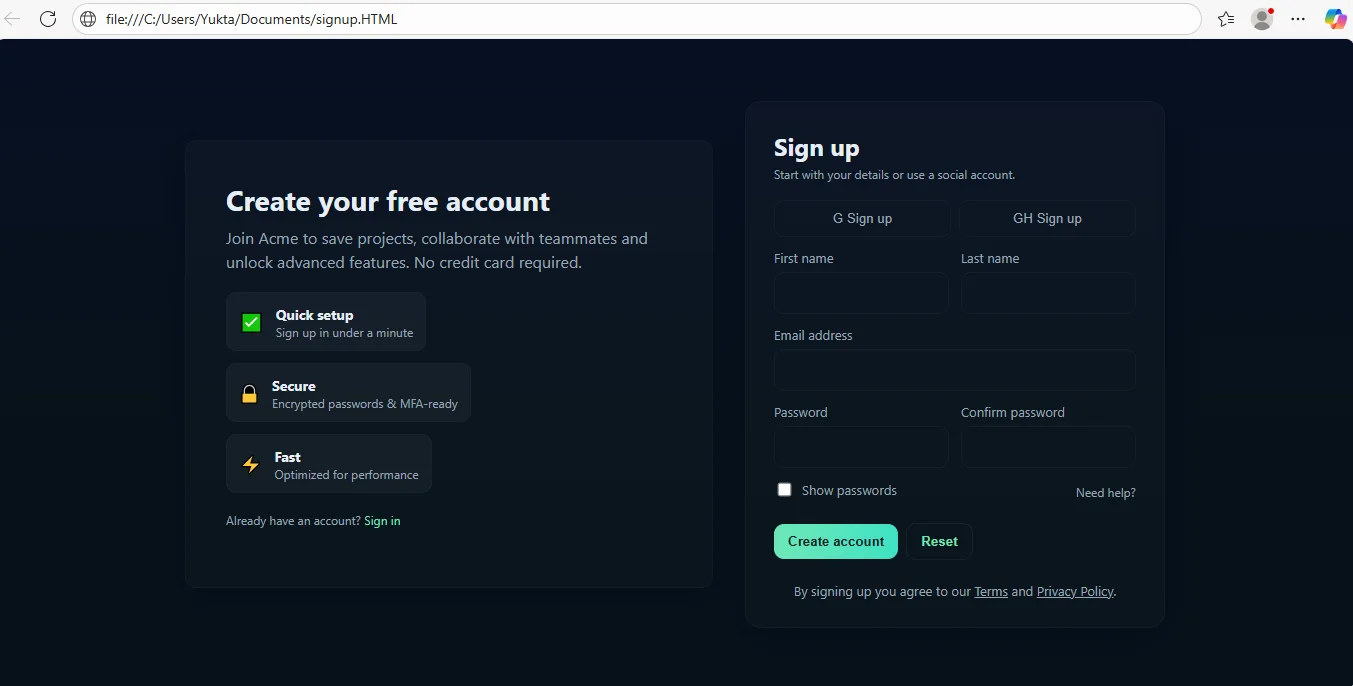
As you can see, the signup page looks attractive, right? All because of CSS as it made it an impressive signup page. It includes-
In short, HTML develops the structure, CSS makes it beautiful and JavaScript makes it intelligent.
Cascading Style Sheets or CSS, is basically the language that brings life to the web pages. While HTML builds the structure and the CSS adds color, layout and personality, changing plain content to an engaging design. CSS is basically what makes a website look attractive, modern, and keeps its users hooked.
As HTML is pretty easy to learn and work with, CSS has a steeper learning curve. But do not let that discourage you, as long as you have basic computer skills, you will be able to learn CSS easily.
No, it can't be possible to use CSS without HTML, as CSS is a stylesheet language that is for describing the visual presentation of HTML documents. It paves the way to define the layout, formatting and styling of the elements within an HTML document.
CSS is best for styling and designing web pages by controlling layout, colors, fonts, and responsiveness. It transforms plain HTML into visually appealing and user-friendly websites.
Hakon Wium Lie, a Norwegian technologist first proposed CSS in 1994, was then working at the European Organization for Nuclear Research (CERN) with Berners Lee. After 2 years, the World Wide Web Consortium (W3C) adopted the first standardized specifications for CSS also known as CSS1.
CSS makes websites look attractive and user-friendly by controlling the design and layout of web pages.
Couse Schedule
| Course Name | Batch Type | Details |
| CSS Course | Every Weekday | View Details |
| CSS Course | Every Weekend | View Details |




Top Advantages And Disadvantages of Artificial Intelligence (AI)
October 16th, 2026
File Handling in Python: Understand Step-by-Step With Examples
October 16th, 2026