Are you preparing for Docker interview questions? Well, Docker is extremely popular in the software development industry, with a large market share of 87.71% in containerization technology. And why not? It can streamline software development and deployment by using containers. Its scalability and features are also another reason, making it an in-demand skill among many professions, like developers, data scientists, engineers, and more.
Meaning you are moving towards a rewarding career. To help you with this journey, I am here with the most-asked Docker interview questions and answers. These questions are curated with deep research around the core concepts and real-world scenarios. They will help you to stand out in your next interview and get an impressive job. Let's get started.
This section includes the most asked basic Docker interview questions, covering the fundamental concepts.
Docker is a container-based platform that provides developers with the ability to manage all dependencies of an application using packages (containers). This ability streamlines the performance of that application among different environments. These containers are shared on the same OS Kernel, but operate in isolated environments. This practice reduces delays, minimizes compatibility issues and streamlines communication between the teams.
Containers are basically small packages that hold the dependencies of application code. It is used to deploy applications in a fast and efficient way across different computing platforms. Docker uses these containers to smooth the process of developing, testing, deploying, and running applications. It is one of the most lightweight, secure and scalable methods.
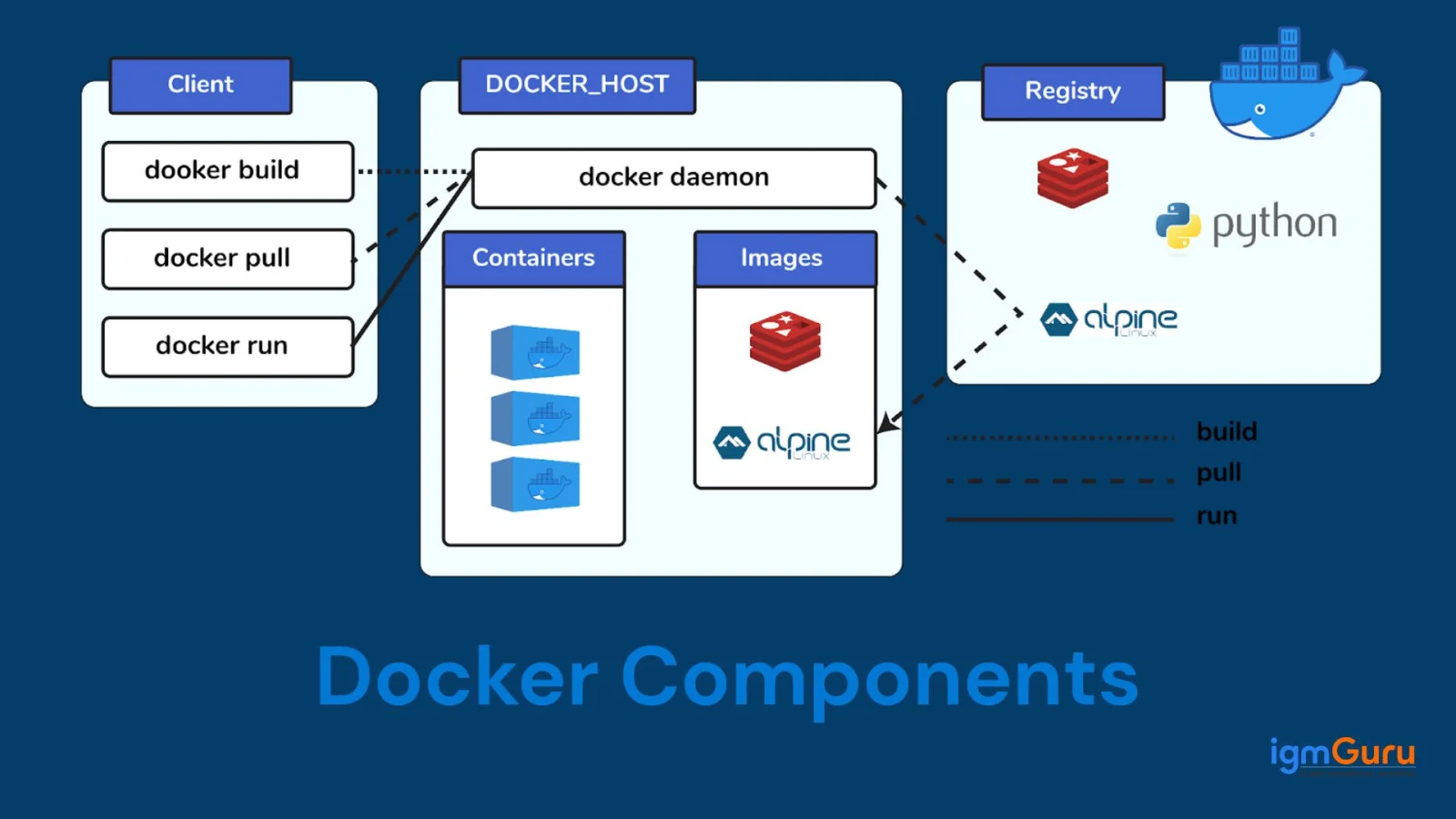
Docker provides three main components including client host and registry:
Docker images are small software packets that store the code and dependencies of an application. It acts as a blueprint or template for building Docker containers. Think of it as a read-only template containing all the instructions and files necessary to execute an application.
Docker Compose is a tool used for defining and managing applications with multiple containers. It uses a YAML file to configure the services, networks and volumes of that application. It can create and start all the services defined in the configuration file with a single command.
Docker Compose simplifies the process of running complex applications with multiple interconnected containers. It is commonly used in development, testing, and staging environments.
Now, we will discuss the most asked docker interview questions for intermediate professions. These questions can be very beneficial when considering switching jobs with some experience.
Dockerfile is a script that contains a set of instructions on how to build an image. These instructions are like a recipe for building a containerized application, specifying the base image, software to install, files to copy and more. Each instruction defines a special part of the environment. On running these commands, the image is created layer-by-layer.
Here is an instance with steps:
# Step 1: Choose a base image FROM python:3.9-slim # Step 2: Specify the working directory WORKDIR /app # Step 3: Copy project files into the container COPY . . # Step 4: Install dependencies RUN pip install -r requirements.txt # Step 5: Expose the port the app runs on EXPOSE 5000 # Step 6: Define the default command CMD ["python", "app.py"] |
Namespace is a feature of Linux that helps to create isolated environments in Docker. With this feature, containers can operate with their own set of system resources without directly affecting the host system or other containers. Namespaces provide a layer of isolation that prevents containers from accessing or modifying resources outside their designated space. Popular Namespaces supported in Docker include PID, Mount, IPC, User, Network, etc.
The life cycle of a Docker container includes:
I would use the following command to check their version:
| $ docker version |
Docker Swarm does not have a native support for autoscaling. To achieve it, we have to use scripts and integrate monitoring tools. They will adjust the number of instances manually. Here is how it is done:
First, install a monitoring tool to track resource usages like Prometheus or Grafana.
Then, set scaling triggers.
Next, build a script on the docker service scale command for adjusting the number of replicas.
Read Also- Kubernetes vs Docker: What's the Difference
This section lists the most asked Docker interview questions for experienced professionals. These revolve around the most advanced concepts.
Docker orchestration manages the deployment, scaling and lifecycle of containerized applications across multiple hosts. It involves tools like Docker Compose and Docker Swarm for simpler scenarios and Kubernetes for more complex and scalable deployments. These tools automate tasks like scheduling, load balancing and resource allocation to ensure high availability and performance.
Contalier isolation is a core principle of containerization in Docker. It ensures that each container runs in an individual environment without depending on the other containers and the host machine. It is achieved through a combination of different techniques including namespaces, control groups (cgroups) and different kernel-level features.
cgroups are a feature provided by the Linux kernel for restricting resource availability and allocating system resources. These resources include memory and CPU (Center Processing Unit) for Docker containers. These are used for avoiding noisy neighbour issues by other containerization tools.
Docker security scan is a practice for identifying potential vulnerabilities and security issues within images and containers. It involves analyzing the image's components, such as base images, dependencies and configurations. It helps to detect known vulnerabilities, misconfigurations and other potential risks. This helps ensure that secure images are deployed, which reduces the risk of security breaches and vulnerabilities.
Docker Plugins are extensions that help to integrate different third-party components to the platform. This improves features like networking, storage and authorization. The best part of these plugins is there is no requirement of modifying the underlying host machine.
Read Also- Docker Tutorial For Beginners
Docker and Kubernetes are very similar in functionality. Therefore, there are chances when you may face Kubernetes related interview questions, specially in DevOps related roles.
Docker comes as a containerization platform allowing experts to build, share and run containers on different environments. These containers are built and managed separately without relying on underlying infrastructure. Kubernetes comes as an orchestration platform that can create and manage containers at scale. It manages deployment, load balancing, scaling and self-healing among clusters of nodes.
Both of these are used to manage containers but in different ways. Kubernetes is designed to manage large and complicated setups. Its built in features like self-healing and monitoring makes it the best platform for complex application development.
Docker Swarm, on the other hand, is built for small and simple setups. It does not have any built-in features and requires integration with other tools like Docker CLI and Docker Compose.
Neither Docker nor Kubernetes is inherently better for containerization. They serve distinct purposes and are often used together. Docker provides the tools to package and run applications in containers. Kubernetes helps to manage and schedule these containers across a cluster of servers.
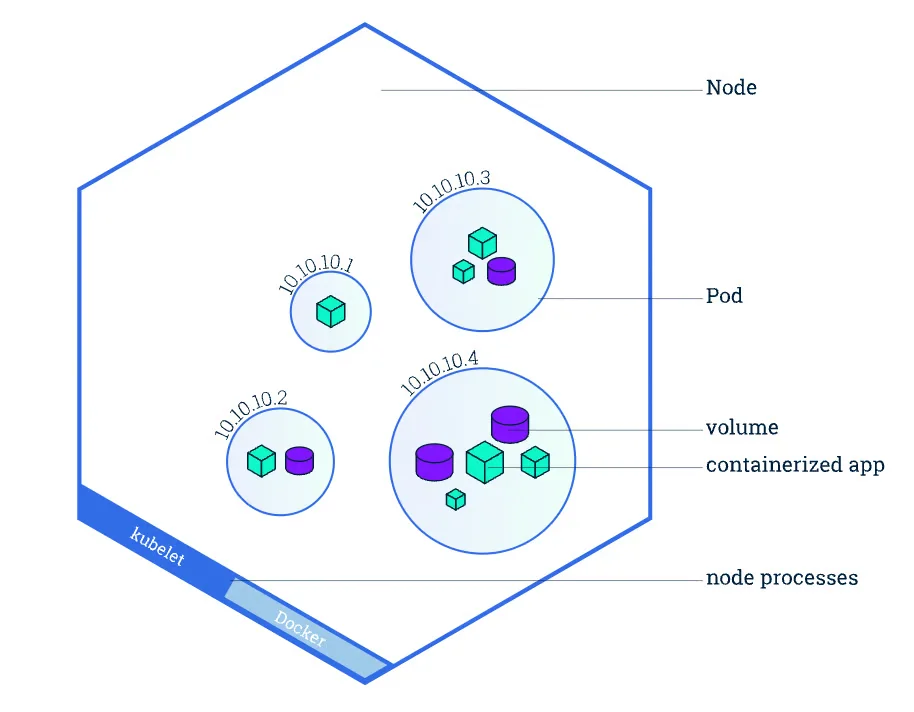
A Pod represents the smallest deployable unit or a group of one or more containers. These units share resources and network connectivity. Pods are ephemeral and can be replaced by Kubernetes if they or their host node fail.
They serve as the building block for running applications within the Kubernetes cluster. Unlike separate containers, Pods can multiple tightly coupled containers to make them work together as a single unit.
Image Source: Kubernetes
Docker provides a secret to encrypt sensitive data, which is only accessible to authorized professionals in running state. Kubernetes use secret objects to hold sensitive data like passwords, API keys and tokens. Here is an instance of how Kubernetes secure sensitive data:
apiVersion: v1 kind: Secret metadata: name: my-secret type: Opaque data: password: cGFzc3dvcmQ= # Base64-encoded "password" |
Interviewers also ask scenario-based Docker Interview Questions to check your problem-solving and leadership skills. They want to know how you would approach real-world problems. Let's take a closer look in these types of questions:
There are various methods to reduce the size of a Maven-based API Docker image. You can focus on minimizing the number of layers, use multi-stage builds, remove unnecessary files or choose a minimal base image. You can also consider optimizing the build process itself by caching dependencies and using a .dockerignore file to exclude irrelevant files.
The choice mostly depends on the situation and its requirements. I would prefer the Multi-stage Builds method. It involves creating a builder image with all the necessary tools (like Maven) to compile and package the application. Then, copy only the necessary artifacts into a runtime image. This avoids the entire build environment in the final image.
Example:
# Stage 1: Build the application FROM maven:3.8.4-openjdk-17 AS builder WORKDIR /app COPY pom.xml . RUN mvn dependency:go-offline COPY src ./src RUN mvn package # Stage 2: Create the runtime image FROM openjdk:17-jdk-slim WORKDIR /app COPY --from=builder /app/target/*.jar app.jar ENTRYPOINT ["java", "-jar", "app.jar"] |
Pushing a Docker container image using Jenkins involves the following steps:
1. Setting up a Jenkins pipeline: The first step involves building a multi-branch pipeline job in Jenkins. It will be then linked to the repository, which contains the Dockerfile and Jenkinsfile.
2. Defining the pipeline: Not this pipeline should be defined to the Jenkinsfile using the given steps:
3. Run the pipeline: The final step involves triggering the Jenkins job.
The best way to manage multiple applications with Docker is to use Docker Compose. It will define and orchestrate multi-container applications within a single YAML file. This centralizes configuration, simplifies management and allows to define service dependencies, network, and volumes for each application.
I would start by checking the container logs using the docker logs command to identify startup errors. Then I would verify whether environment variables, configuration files, secrets, and network settings in production match the local setup.
Next, I would inspect the container using, docker inspect confirm image versions, validate mounted volumes, and check resource limitations such as memory and CPU allocation. If necessary, I would run an interactive shell inside the container using docker exec to debug the application directly.
This systematic approach helps identify configuration mismatches, dependency issues, and infrastructure-related problems quickly.
The first step would be monitoring container resource consumption using tools such as Docker Stats, Prometheus, or Grafana. I would analyze memory usage trends and determine whether the issue is caused by memory leaks, inefficient application code, or insufficient container limits.
To resolve the issue, I would:
This ensures better stability and prevents unexpected service interruptions.
I would begin by scanning images using tools such as Docker Scout, Trivy, or Clair to identify vulnerable packages and dependencies.
Then I would:
These practices significantly reduce the attack surface and improve overall container security.
I would implement a Blue-Green Deployment or Rolling Update strategy.
With Blue-Green Deployment, I would maintain two identical environments. The new application version would be deployed to the inactive environment and thoroughly tested before switching traffic.
For Rolling Updates, I would gradually replace existing containers with new ones while keeping the service available. Load balancers would distribute traffic only to healthy containers.
This approach minimizes downtime, reduces deployment risk, and allows quick rollback if problems occur.
I would avoid containerizing the entire monolith at once. Instead, I would perform a phased migration.
This incremental strategy reduces risk and simplifies troubleshooting throughout the migration process.
I would create custom Docker bridge networks instead of using the default network. Containers belonging to the same application would be connected to dedicated networks while unrelated services remain isolated.
Additionally, I would:
This architecture improves both security and maintainability.
I would first analyze which build stages consume the most time and then optimize Docker layer caching.
Some improvements would include:
.dockerignore file.These optimizations can dramatically reduce build times and improve deployment efficiency across development and production environments.
Read Also: Top Docker Alternatives
Modern Docker interviews for senior DevOps Engineers, Platform Engineers, SREs, and Cloud Architects often focus on cloud-native technologies, container security, automation, and production-scale deployments. The following advanced Docker interview questions cover some of the latest industry trends and enterprise best practices.
A Software Bill of Materials (SBOM) is a complete inventory of all packages, libraries, dependencies, and components included in a Docker image. It helps organizations identify vulnerable software, meet regulatory compliance requirements, and improve software supply chain transparency. Modern security tools can automatically generate SBOMs during image creation, making vulnerability management faster and more reliable.
Docker image signing verifies that an image was created by a trusted publisher and has not been modified after publication. Technologies such as Docker Content Trust, Notary, and Sigstore Cosign allow organizations to digitally sign container images before deployment. Image verification helps prevent supply chain attacks, unauthorized image modifications, and accidental deployment of untrusted containers.
GitOps manages infrastructure and application deployments through Git repositories as the single source of truth. Every Docker deployment configuration is stored in version control, reviewed through pull requests, and automatically synchronized with production environments. This approach improves auditability, rollback capabilities, collaboration, and deployment consistency across multiple environments.
eBPF (Extended Berkeley Packet Filter) enables deep kernel-level monitoring without modifying application code. In Docker environments, it provides detailed visibility into network traffic, system calls, security events, and container performance with minimal overhead. Modern observability platforms use eBPF to troubleshoot production issues, detect anomalies, and improve runtime security more efficiently than traditional monitoring methods.
AI is increasingly used to optimize Docker environments by analyzing container performance, predicting resource requirements, identifying security vulnerabilities, and recommending infrastructure improvements. AI-powered platforms can detect abnormal container behavior, optimize image sizes, automate root cause analysis, and assist in troubleshooting production incidents. These capabilities improve operational efficiency while reducing manual intervention in large-scale containerized environments.
I optimize Docker images by selecting lightweight base images such as Alpine or Distroless whenever possible and removing unnecessary packages from the final image. I also use multi-stage builds so that build tools and temporary files are excluded from the production image.
To further improve performance, I arrange Dockerfile instructions to maximize layer caching, combine related commands to reduce the number of image layers, and use a .dockerignore file to exclude unnecessary files from the build context. Finally, I regularly remove unused images and containers and scan images for vulnerabilities to ensure they remain secure and efficient for deployment.
SLSA provenance provides information about how a Docker image was built, including its source, build process, and other metadata. I would use Docker BuildKit to generate provenance attestations during the image build process.
I would configure the CI/CD pipeline to build the image with provenance enabled and push the resulting image and its attestations to a trusted registry. For example:
docker buildx build --provenance=mode=max --push -t myapp:latest . |
I would then use the provenance information to verify where the image came from, which source code was used, and how it was generated. This improves software supply chain security and makes it easier to detect unauthorized or unexpected build artifacts.
I would consider using Docker Rootless mode, which allows both the Docker daemon and containers to run without root privileges. This reduces the impact of vulnerabilities that could otherwise provide an attacker with privileged access to the host system.
Before implementing it, I would verify application compatibility, storage requirements, networking requirements, and any workloads that depend on privileged operations. I would then configure Rootless mode and validate container performance and functionality in a non-production environment.
This approach provides an additional security layer by reducing the privileges available to the Docker daemon and containers.
I would first identify whether the problem is caused by network latency, dependency downloads, inefficient Dockerfile instructions, or missing build cache. I would inspect the build stages and determine which layers are being rebuilt unnecessarily.
To improve the build process, I would:
buildx for modern builds..dockerignore file to reduce the build context.I would measure build times before and after each optimization to ensure that the changes actually improve the pipeline rather than simply increasing its complexity.
I would use Docker Buildx to create a multi-platform image instead of maintaining separate Dockerfiles for each architecture. This is particularly useful when applications need to run across traditional x86 servers as well as ARM-based cloud instances or developer machines.
For example, I could build and push both architectures using:
docker buildx build --platform linux/amd64,linux/arm64 -t myapp:latest --push . |
I would also verify that the base images and application dependencies support both architectures. Finally, I would test the generated images on their respective platforms before promoting them to production.
I would first inspect the image attestations and determine whether the rejection is related to vulnerabilities, missing provenance information, an untrusted build source, or a policy violation.
I would use Docker Scout or other supply chain security tools to inspect the SBOM and identify vulnerable or unauthorized dependencies. I would also verify the provenance information to confirm that the image was built from the expected source repository and CI/CD process.
If the issue is caused by a vulnerable dependency, I would update the dependency or base image and rebuild the image. If the problem is related to provenance or signing, I would correct the CI/CD configuration and regenerate the required attestations.
This approach ensures that the image is not simply allowed through the security policy without understanding the underlying risk.
Preparing for a Docker interview requires a solid understanding of both the fundamental concepts and their practical application. You will likely be tested on your knowledge of core components, hands-on command-line skills and your ability to use Docker in real-world scenarios. Here are some tips that can help you stand out in each criteria:
The top Docker interview questions and answers listed in this blog covers the most important concepts on this platform. These are best suitable for each level of candidates. Furthermore, you should consider working on real time projects to get actual hands-on experience. It will not only improve your knowledge but also will be a good addition to your resume.
It requires to use minimal base images, minimize layers, multi-stage builds and caching effectively.
While there are many ways, using multi-stage builds and combining RUN instructions with cleanup in a single layer is most preferable. It can drastically reduce Docker image layers and size.
The dangling is an image that is not tagged or referred to by any container.
Docker is mainly used to create a consistent environment so applications run the same on any system.
Not always. Docker mainly requires understanding commands and configuration but basic programming knowledge is helpful.