Web development is one of the most in-demand skills in today’s tech industry. Companies are constantly looking for developers who understand both frontend and backend development. They are also looking at whether you understand core technologies that power modern websites and web applications. Because of this, technical interviews usually focus on important topics like HTML, CSS, JavaScript, APIs, databases, frameworks and web architecture.
In this guide, you will go through 40 commonly asked web developer interview questions and answers. It covers essential concepts used in real-world development. The questions include topics related to frontend development, backend development, JavaScript, React, Node.js, databases and HTTP protocols. This quick guide will help you revise key web development concepts and prepare effectively for developer interviews. Let’s begin.
Web development is the process of creating, building and maintaining websites and web applications that run on the internet. It includes everything from designing a simple static webpage to developing complex dynamic platforms like e-commerce websites, social media apps and web portals. Web development is generally divided into three parts:
1. Frontend Development
This is the part users see and interact with directly in the browser. It includes layout, design, buttons, forms, navigation and responsiveness. Technologies used here are HTML, CSS, JavaScript and frameworks like React, Angular and Vue.js.
2. Backend Development
A backend developer handles the server-side of a website. It manages databases, business logic, authentication, APIs and server communication. Common backend technologies include Node.js, Express.js, Python, PHP, Java, MySQL, PostgreSQL and MongoDB.
3. Full Stack Development
This combines both frontend and backend development. A full-stack developer can work on both the user interface and the server-side logic of a web application.
In simple words, web development is the complete process of making a website functional, interactive and accessible to every users on the web.
Example:
When a user clicks “Login” on a website, the frontend shows the login form, the backend checks the credentials and the database stores the user information. All of this together is part of web development.
HTML stands for HyperText Markup Language. It is the standard markup language used to create and structure content on web pages. HTML defines the basic structure of a webpage using elements such as headings, paragraphs, images, links, tables and forms. It works together with CSS for styling and JavaScript for interactivity to build modern websites. In web development, HTML acts as the foundation or skeleton of every webpage.
HTML tags are special keywords used to define and structure elements on a web page. They tell the web browser how to display content such as headings, paragraphs, images, links and lists. Most HTML tags come in pairs, with an opening tag and a closing tag and the content is written between them.
For example, the <p> tag is used to create a paragraph and the <h1> tag is used for a main heading. HTML tags are the basic building blocks used to structure content in web development.
HTML and XHTML are both markup languages used to create web pages, but XHTML is a stricter and more structured version of HTML. HTML is flexible and browsers can still display pages even if some syntax rules are not followed.
XHTML follows strict XML rules, where all tags must be properly closed, written in lowercase and correctly nested.
In simple terms, HTML focuses on flexibility for web development, while XHTML emphasizes strict syntax and well-structured code.
Semantic HTML elements are HTML tags that clearly describe the meaning and purpose of the content they contain. They help browsers, developers and search engines understand the structure of a webpage.
Examples include <header>, <nav>, <article>, <section> and <footer>. Using semantic HTML improves SEO, accessibility and code readability in modern web development.
The <!DOCTYPE html> declaration tells the web browser that the document is written in HTML5 and should be rendered using the standard HTML rules. It is placed at the top of an HTML document and helps the browser display the webpage correctly.
Without this declaration, browsers may switch to quirks mode, which can cause layout and compatibility issues in web development.
CSS stands for Cascading Style Sheets. It is used to style and design web pages by controlling the layout, colors, fonts, spacing and responsiveness of HTML elements. While HTML provides the structure of a webpage, CSS is responsible for its visual appearance and user interface design. It plays a key role in creating modern, responsive and attractive websites in frontend web development.
|
A block-level element takes up the full width of the webpage and always starts on a new line. It is mainly used to structure sections of a webpage. Examples include <div>, <p> and <h1>.
An inline element only takes the space required by its content and does not start on a new line. It is mainly used to style or modify small parts of text. Examples include <span>, <a> and <strong>.
There are three main ways to include CSS in a webpage. They are Inline CSS, Internal CSS and External CSS.
Inline CSS is applied directly inside an HTML element using the style attribute.
Internal CSS is written inside a <style> tag within the <head> section of the HTML document.
For instance,
|
External CSS is written in a separate .css file and linked to the HTML file using the <link> tag. External CSS is the most commonly used method because it keeps the code organized and reusable.
For instance, HTML file
|
CSS file (style.css)
|
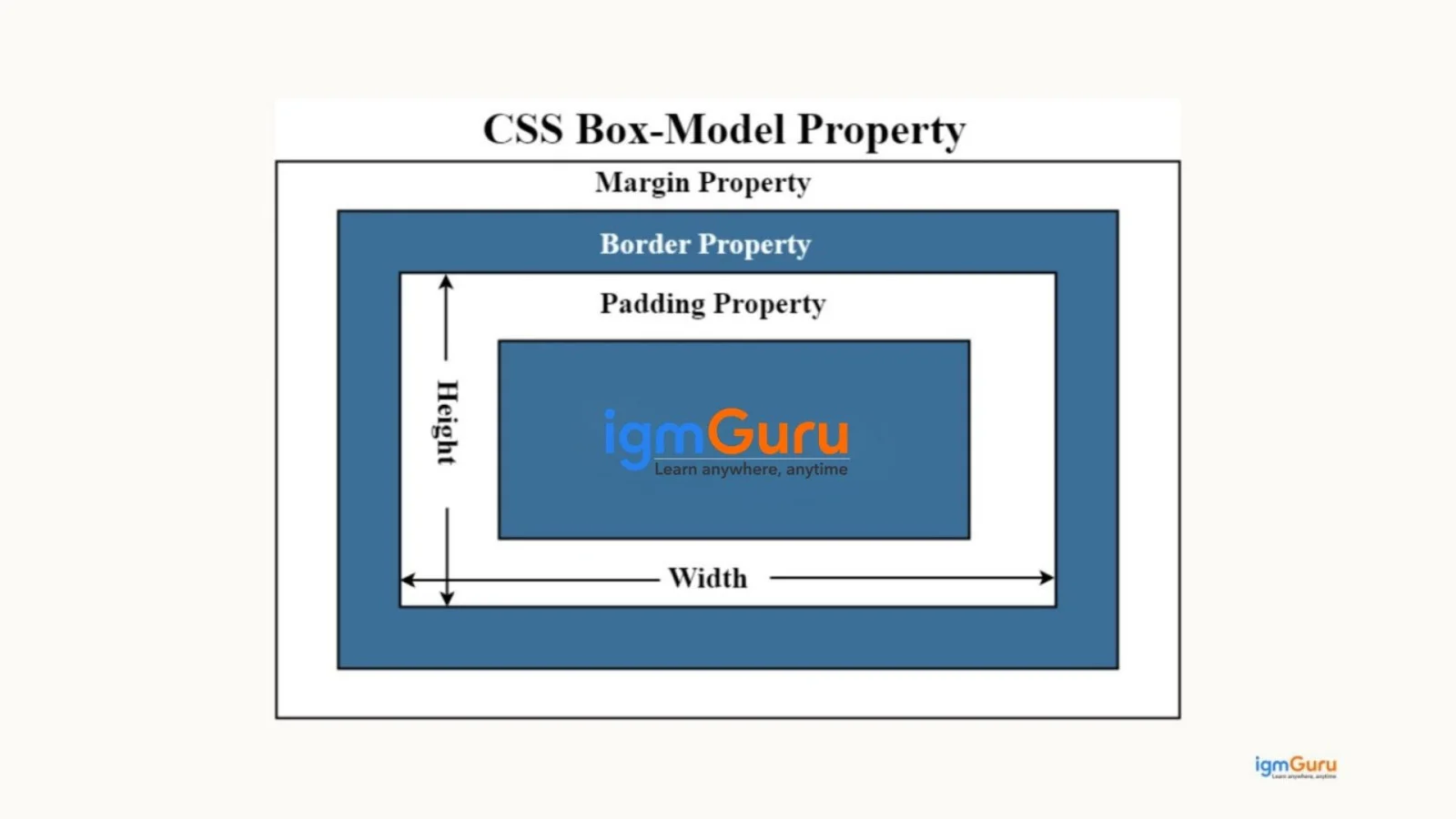
The CSS Box Model describes how the layout and spacing of elements are calculated on a webpage. Every HTML element is treated as a rectangular box made up of four parts: content, padding, border and margin.
The content is the actual text or image, padding is the space inside the element around the content, border surrounds the padding and margin is the outer space between elements. Understanding the box model is important for controlling layout and spacing in CSS web design.
Class selectors are used for styling multiple elements, while ID selectors are used to target a single unique element in a webpage.
| Feature | Class Selector | ID Selector |
| Symbol Used | Uses a dot (.) before the name | Uses a hash (#) before the name |
| Usage | Can be applied to multiple HTML elements | Used for only one unique element |
| Reusability | Reusable across many elements | Not reusable on the same page |
| CSS Example | |
|
| HTML Example | |
|
CSS Flexbox and CSS Grid are modern layout systems used to design responsive web pages. Flexbox is mainly used for one-dimensional layouts. It means it arranges elements in a single row or column and helps align and distribute space efficiently.
For instance, HTML
|
CSS
|
CSS Grid is a two-dimensional layout system that allows developers to create complex layouts using both rows and columns. Flexbox is commonly used for components like navigation bars, while Grid is used for full webpage layouts.
For instance, HTML
|
CSS
|
Padding controls space inside an element, while margin controls space outside the element.
| Feature | Padding | Margin |
| Definition | Space inside an element, between the content and the border | Space outside an element, between the element and other elements |
| Position | Inside the border | Outside the border |
| Purpose | Controls the inner spacing of content | Controls the distance between elements |
| Background Color | Background color applies to padding area | Background color does not apply to margin |
| Example | |
|
JavaScript is a programming language which is used to make websites interactive and dynamic. It allows developers to add functionality such as form validation, animations, interactive buttons and real-time content updates. JavaScript works alongside HTML and CSS to build modern web applications and runs directly in the web browser. It is one of the core technologies used in frontend web development.
|
The DOM or Document Object Model, is a programming interface that represents an HTML or XML document as a tree structure of objects. It allows JavaScript to access, modify and update webpage content, structure and styles dynamically. Using the DOM, developers can change text, add or remove elements and respond to user actions like clicks or form submissions in real time.
|
Read Also: Java Tutorial for Beginners
Event delegation is a JavaScript technique where a single event listener is attached to a parent element instead of multiple child elements. The parent listens for events that bubble up from its children and handles them accordingly. This approach improves performance, reduces memory usage and makes it easier to manage dynamic elements added to the DOM.
Example of Event Delegation
HTML
|
JavaScript
|
In this example, the event listener is attached to the parent <ul> element and it handles click events for all <li> items using event delegation.
A JavaScript Promise is an object that represents the result of an asynchronous operation that may be completed in the future. It is commonly used when working with tasks like API requests, data fetching or file operations. A promise has three states: pending, fulfilled and rejected. Promises help handle asynchronous code more efficiently compared to traditional callbacks.
For instance, this example creates a Promise that returns a success message if the task is completed and an error message if it fails. The result is handled using .then() and .catch().
|
== compares only the value, while === compares both value and data type, which makes it safer in JavaScript programming.
| Feature | == (Loose Equality) | === (Strict Equality) |
| Comparison Type | Compares values after type conversion | Compares both value and data type |
| Type Checking | Does not strictly check data type | Strictly checks data type |
| Accuracy | Can sometimes give unexpected results | More accurate and reliable |
| Example | 5 == "5" → true | 5 === "5" → false |
A closure in JavaScript is a function that remembers and can access variables from its outer function even after the outer function has finished executing. Closures are commonly used for data privacy, maintaining state and creating function factories. They allow functions to retain access to their lexical scope, which is an important concept in JavaScript programming.
For instance, in this example, innerFunction remembers the variable count from outerFunction, even after the outer function has finished executing. This behavior is called a closure in JavaScript.
|
The this keyword in JavaScript refers to the object that is currently executing the function. Its value depends on how the function is called. For example, inside an object method, this refers to that object, while in the global scope it usually refers to the global object or window in the browser. It is commonly used to access properties and methods of the current object.
Example of this Keyword in JavaScript.
|
An IIFE (Immediately Invoked Function Expression) is a JavaScript function that runs immediately after it is defined. It is commonly used to create a private scope and avoid polluting the global namespace. IIFEs are useful when developers want to execute code instantly without affecting other variables in the program.
Example of IIFE in JavaScript
|
Arrow functions are a shorter syntax for writing functions in JavaScript, introduced in ES6. They use the => syntax and allow developers to write cleaner and more concise code. Unlike regular functions, arrow functions do not have their own this context and instead inherit this from the surrounding scope. They are commonly used in callbacks, array methods and modern JavaScript applications.
Example of Arrow Function in JavaScript
|
AJAX means Asynchronous JavaScript and XML. It is a technique used in web development to send and receive data from a server without reloading the entire webpage. This allows websites to update content dynamically by improving user experience and performance. AJAX is commonly used in features like live search suggestions, form submissions and real-time updates.
|
Web APIs are interfaces provided by browsers that allow JavaScript to interact with web browser features and external services. They enable developers to perform tasks like fetching data from servers, accessing device features, manipulating the DOM or storing data in the browser. Common examples include the Fetch API, Geolocation API and Local Storage API, which help build modern interactive web applications.
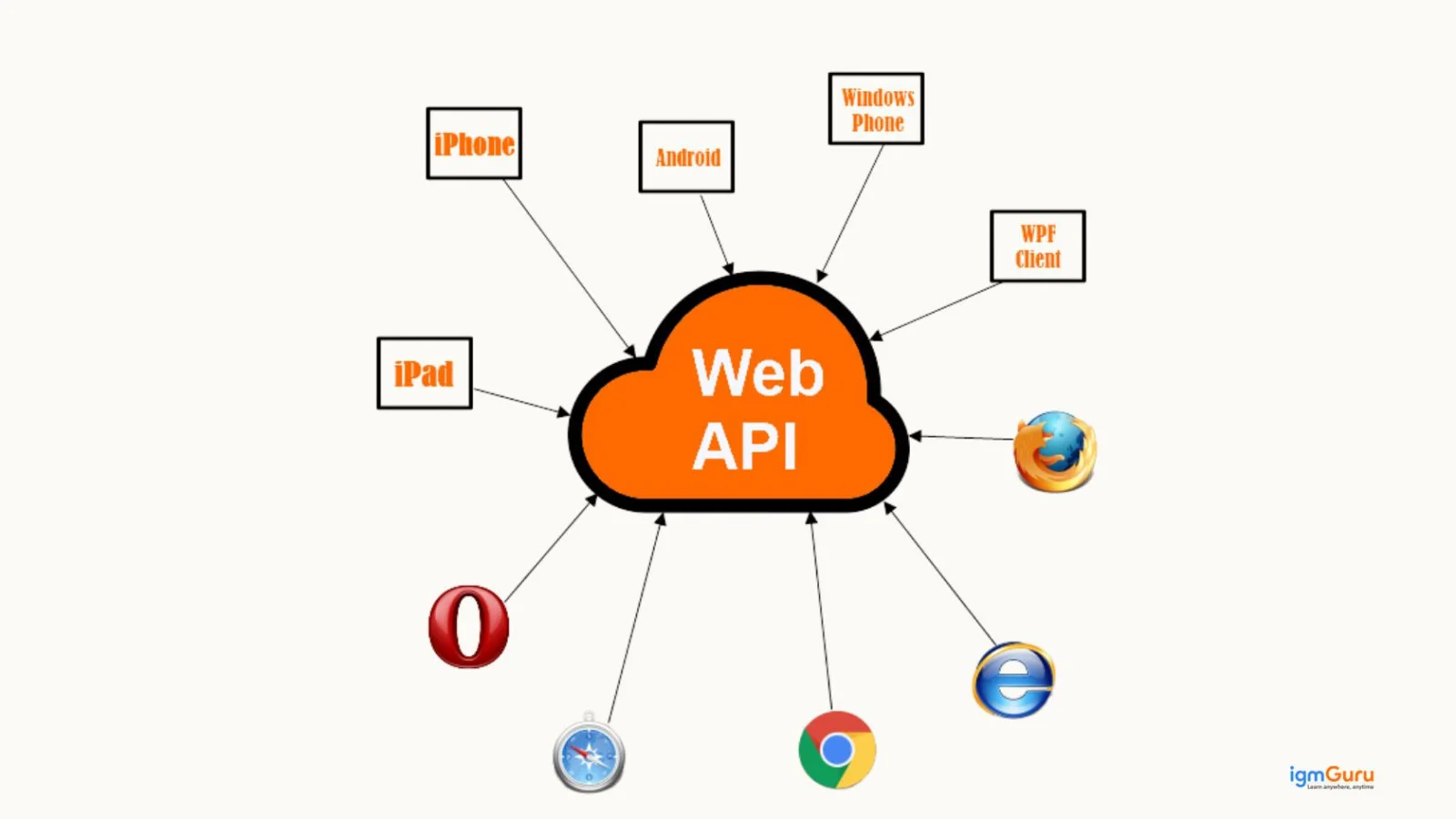
CORS stands for Cross-Origin Resource Sharing. It is a security mechanism used by web browsers to control how resources are requested from a different domain than the one that served the web page. CORS allows servers to specify which origins are permitted to access their resources. It helps protect web applications from unauthorized cross-origin requests.
|
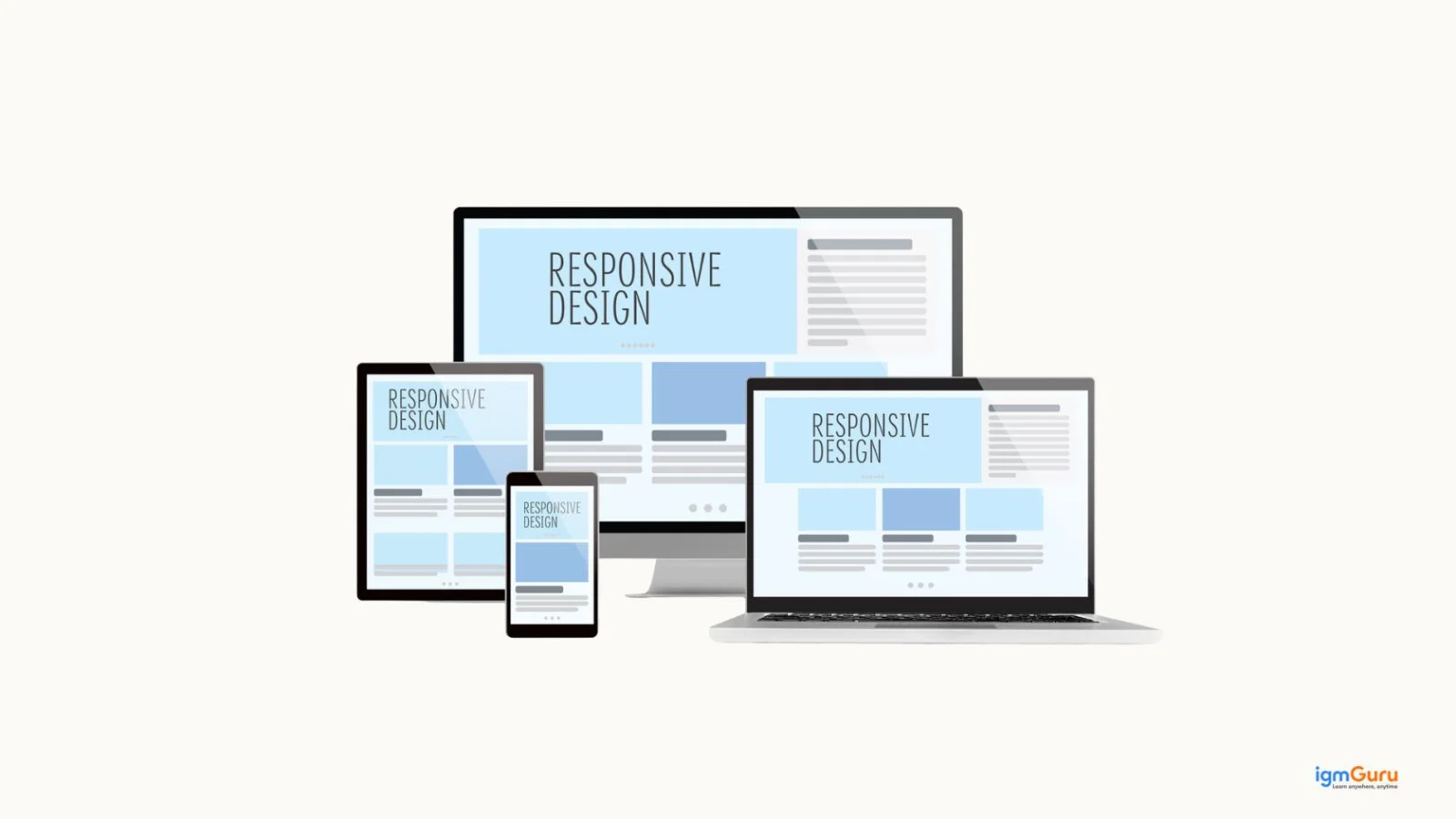
Responsive web design is an approach in web development that ensures a website adapts and displays properly on different screen sizes and devices, such as mobiles, tablets and desktops. It uses techniques like flexible layouts, media queries and responsive images to adjust the design automatically. This improves user experience and accessibility across all devices.
For instance, this example uses a CSS media query to change the layout or style when the screen size is 768px or smaller. It makes the website adapt to mobile devices and tablets.
|
React is a JavaScript library used for building user interfaces, especially for single-page web applications. It allows developers to create reusable UI components and update the webpage efficiently using a virtual DOM. React is widely used in modern frontend development to build fast, interactive and scalable web applications.
Example of React
|
Angular is a TypeScript-based frontend framework developed by Google for building dynamic web applications. It provides a structured way to create single-page applications (SPAs) using features like two-way data binding, components and dependency injection. Angular helps developers build scalable and maintainable client-side web applications.
For instance, this example shows a simple Angular component where data from the component (message) is displayed in the template using data binding.
HTML (Template)
|
TypeScript (Component)
|
Vue.js is a progressive JavaScript framework. It is used for building user interfaces and single-page applications. It focuses on the view layer of web development and allows developers to create interactive and reactive UI components easily. Vue.js is popular because it is lightweight, easy to learn and highly flexible for modern frontend development.
Example of Vue.js
|
Higher-Order Components (HOCs) in React are functions that take a component as input and return a new enhanced component. They are used to reuse component logic, such as authentication, data fetching or state management. HOCs help make React applications more modular, reusable and maintainable.
Example of Higher-Order Component (HOC) in React
|
Read Also: Java Interview Questions and Answers
SVG (Scalable Vector Graphics) and Canvas are both used to display graphics on web pages. SVG is vector-based, which means graphics are defined using shapes and XML and they remain sharp when scaled. Canvas is pixel-based, where graphics are drawn using JavaScript. It makes it better for complex animations and game graphics. SVG is commonly used for icons and scalable graphics, while Canvas is used for dynamic graphics and real-time rendering.
REST (Representational State Transfer) is an architectural style used to design web APIs and web services. It allows different systems to communicate over the internet using standard HTTP methods like GET, POST, PUT and DELETE. REST APIs are widely used in web development because they are simple, scalable and stateless. It makes them ideal for building modern web and mobile applications.
|
Node.js is a JavaScript runtime environment that allows developers to run JavaScript on the server side. It is built on Chrome’s V8 JavaScript engine and is commonly used to build fast, scalable backend applications and APIs. Node.js uses a non-blocking, event-driven architecture, which makes it efficient for handling multiple requests in web applications.
|
Express.js is a lightweight web framework for Node.js used to build web servers and APIs. It simplifies backend development by providing features like routing, middleware and request handling. Express.js is widely used in Node.js web applications to create fast and scalable server-side applications.
|
SQL and NoSQL are two types of database systems used to store and manage data. SQL databases are relational and store data in structured tables with predefined schemas by using SQL queries. Examples include MySQL and PostgreSQL. NoSQL databases are non-relational and store data in flexible formats like documents, key-value pairs or graphs. Examples include MongoDB and Cassandra. NoSQL databases are often used for large-scale and flexible data storage in modern web applications.
| Feature | SQL Databases | NoSQL Databases |
| Database Type | Relational database | Non-relational database |
| Data Structure | Data stored in tables (rows and columns) | Data stored in documents, key-value pairs, graphs or wide-columns |
| Schema | Fixed schema | Flexible schema |
| Query Language | Uses SQL (Structured Query Language) | Uses various query methods depending on the database |
| Scalability | Mainly vertical scaling | Designed for horizontal scaling |
| Examples | MySQL, PostgreSQL oracle | MongoDB, Cassandra, Redis |
SQL databases are relational databases that store data in tables with rows and columns and follow a fixed schema. They use Structured Query Language (SQL) to manage and query data.
MongoDB, on the other hand, is a NoSQL database that stores data in JSON-like documents called BSON. It has a flexible schema, which makes it suitable for applications that handle large volumes of unstructured or rapidly changing data.
| Feature | SQL Databases | MongoDB |
| Database Type | Relational database | NoSQL document database |
| Data Storage | Data stored in tables with rows and columns | Data stored in JSON-like documents (BSON) |
| Schema | Fixed schema (structured data) | Flexible schema |
| Query Language | Uses SQL queries | Uses MongoDB query language |
| Scalability | Mostly vertical scaling | Supports horizontal scaling |
| Examples | MySQL, PostgreSQL oracle | MongoDB |
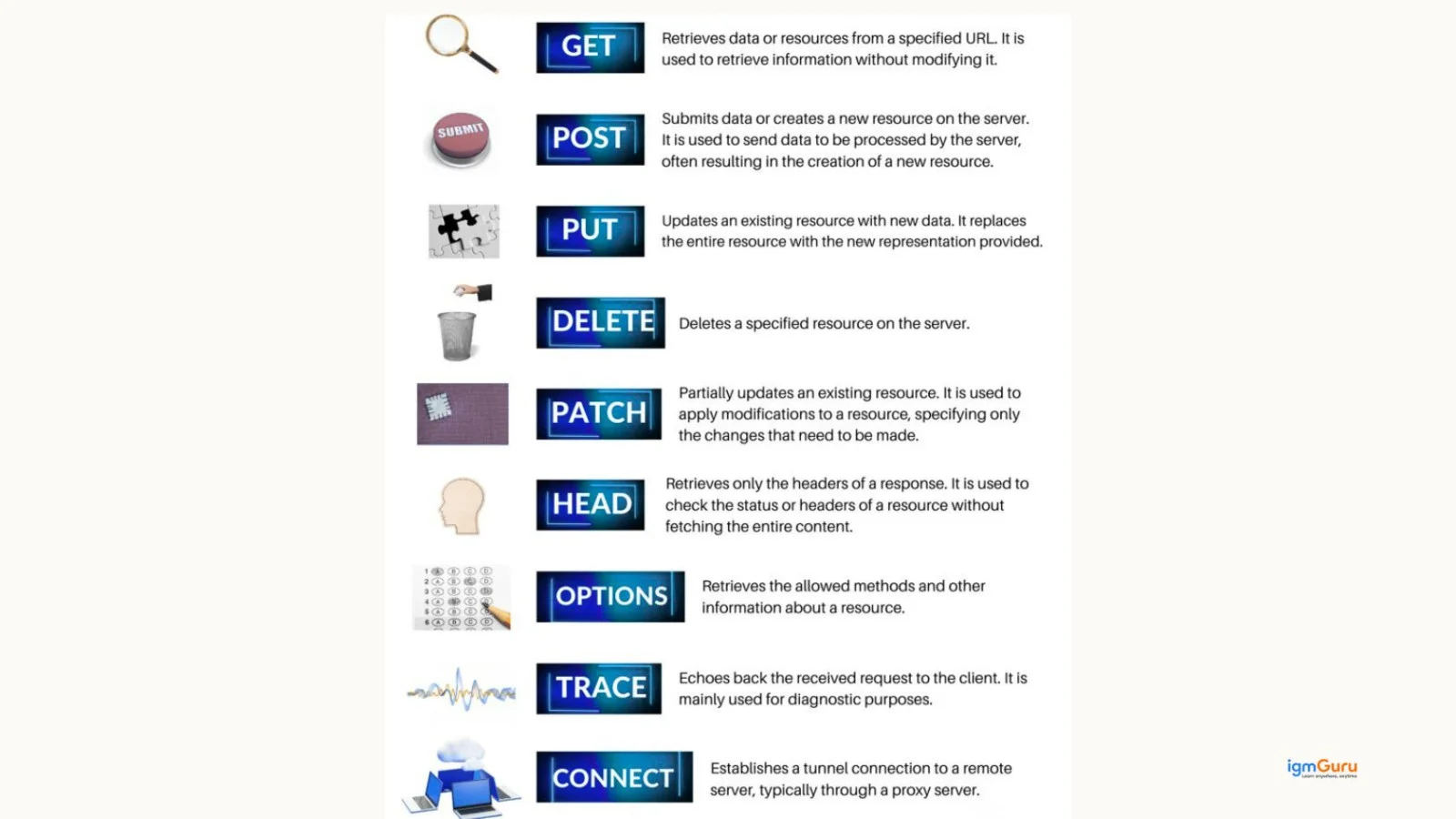
HTTP requests are methods used by a client, such as a web browser, to communicate with a server. The most common types are GET, POST, PUT, PATCH and DELETE.
GET is used to retrieve data from a server, POST is used to send new data, PUT or PATCH is used to update existing data and DELETE is used to remove data from the server. These HTTP methods are widely used when working with web APIs and RESTful services.
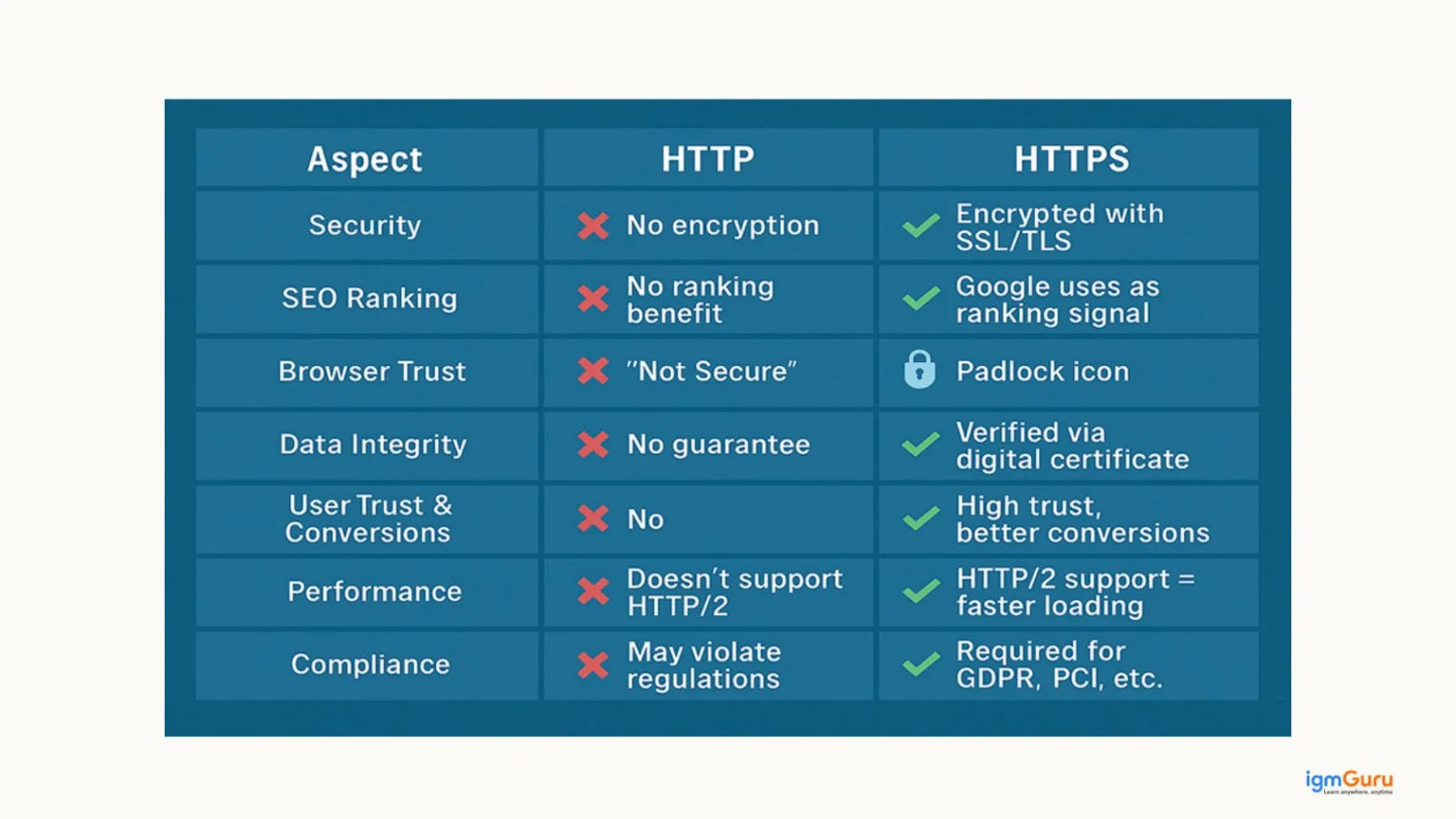
HTTP (HyperText Transfer Protocol) is used to transfer data between a web browser and a web server, but the data is not encrypted. HTTPS (HyperText Transfer Protocol Secure) is the secure version of HTTP that encrypts data using SSL/TLS. It makes communication between the browser and server safer. HTTPS helps protect sensitive information such as login credentials, payment details and personal data.
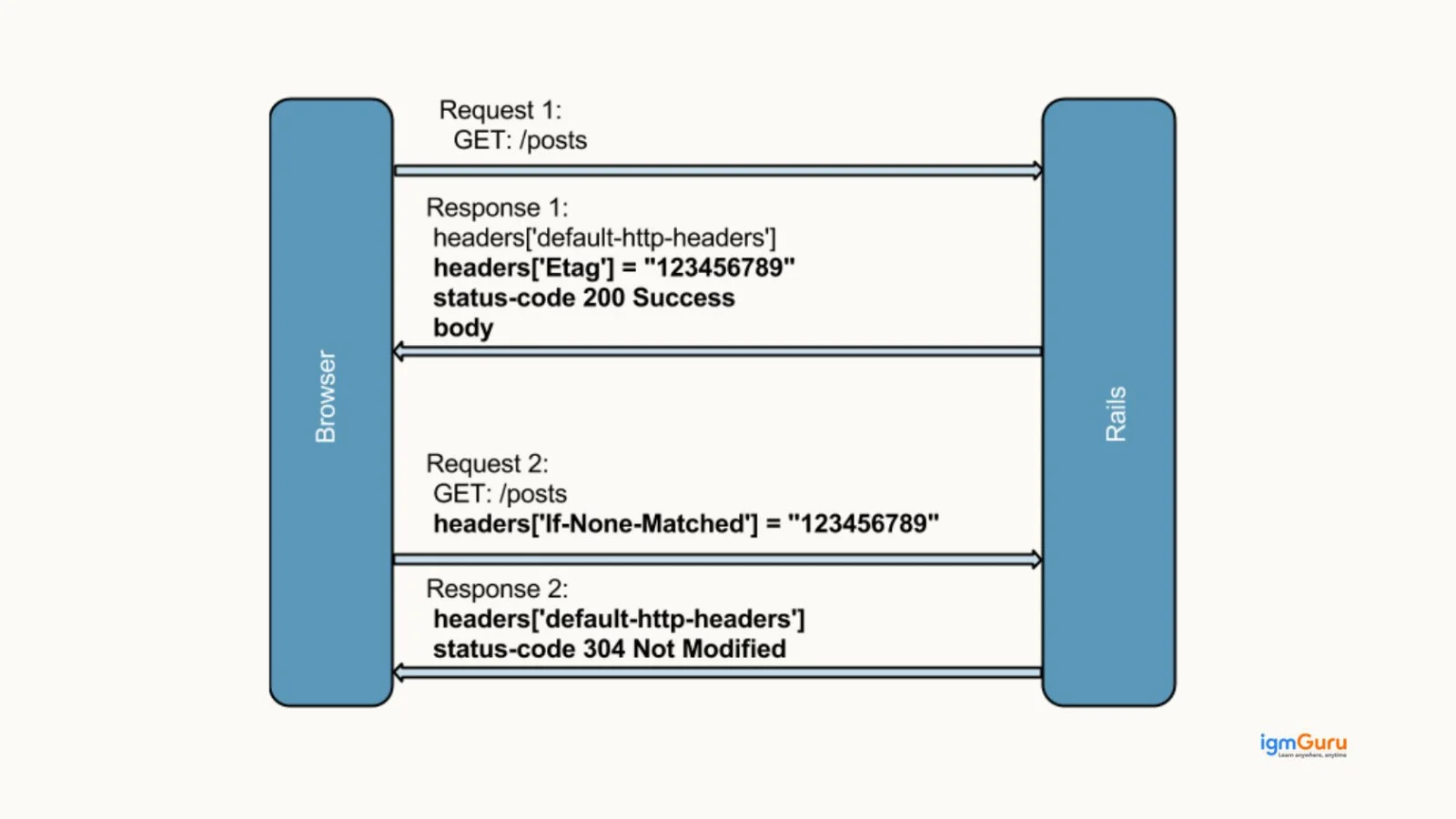
ETag (Entity Tag) is an HTTP response header used for web caching and resource validation. It acts like a unique identifier for a specific version of a web resource. When a browser requests the same resource again, the server compares the ETag to check if the content has changed. If it hasn’t changed, the server returns a 304 Not Modified response, which helps improve website performance and reduce bandwidth usage.
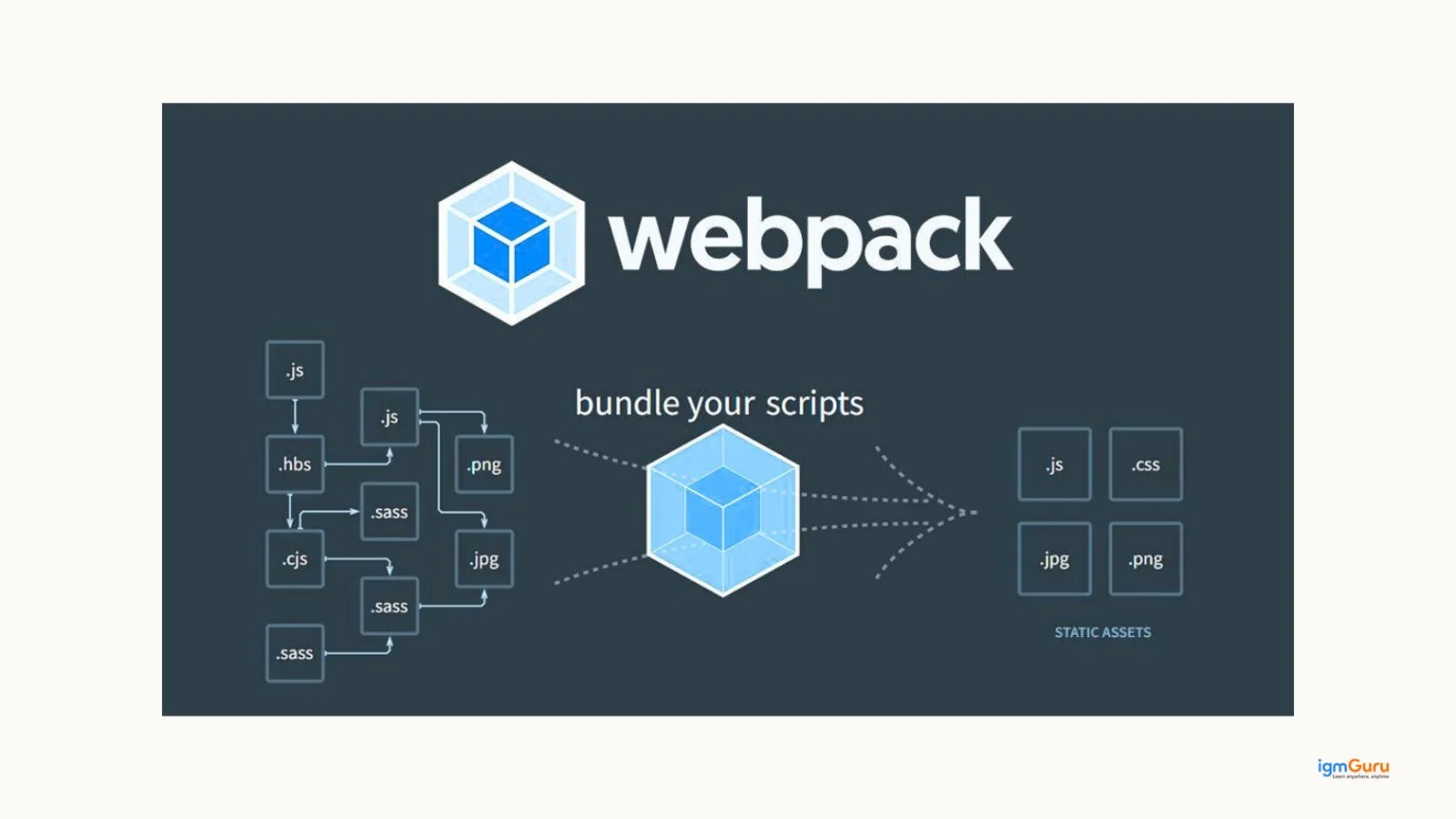
Webpack is a JavaScript module bundler used in modern web development. It takes multiple files like JavaScript, CSS and images and bundles them into optimized files for the browser. Webpack helps improve website performance, code organization and dependency management in frontend applications, especially in frameworks like React and Angular.
I would first inspect the page using the browser's responsive development tools to identify elements that are causing the layout problem. Then I would check the CSS for fixed widths, inappropriate positioning, overflowing content, and missing media queries. I would use responsive units, Flexbox or Grid, and appropriate breakpoints to make the layout adapt to different screen sizes. Finally, I would test the application on multiple mobile and desktop screen sizes to ensure the changes work consistently.
I would first use browser developer tools and React performance tools to identify unnecessary renders and slow operations. I would check whether components are re-rendering unnecessarily, whether API requests are being repeated, and whether large amounts of data are being processed on the client side. I would optimize component rendering, reuse API results where appropriate, load data when required, and avoid unnecessary work during rendering. I would then test the application again to confirm that the performance has improved.
I would first identify whether the bottleneck is caused by CPU-intensive operations, database queries, external API calls, or inefficient server-side logic. Since Node.js uses a non-blocking, event-driven architecture, I would avoid blocking operations and optimize expensive tasks. I would also review database queries, introduce caching where appropriate, and use load balancing or multiple application instances when required. Monitoring the application would help identify the exact bottleneck before making further changes.
I would first verify the origin of the frontend application and check the API's CORS configuration. Instead of allowing every origin, I would configure the server to allow only trusted domains and the required HTTP methods and headers. I would also verify whether credentials are required and configure them correctly. The important point is that CORS should be fixed on the server-side configuration rather than trying to bypass browser security from the frontend.
I would configure HTTPS using a valid TLS certificate and ensure that sensitive communication between the browser and server is encrypted. I would also redirect HTTP traffic to HTTPS, update API endpoints and external resources to use secure connections, and configure appropriate security headers. After deployment, I would verify that login credentials, payment information, and other sensitive data are never transmitted through unencrypted HTTP connections.
These web developer interview questions and answers cover the most important concepts that companies expect in real interviews. By going through this guide, you have already revised key topics from frontend and backend development including HTML, CSS, JavaScript, APIs, databases and modern frameworks like React and Angular. This makes your preparation more focused and practical.
To get better results, I’d suggest don’t just read these answers. Try to practice coding, build small projects and apply these concepts in real-world scenarios.
If you are preparing for frontend, backend or full-stack developer roles, then this guide can definitely act as a quick revision resource to help you perform better in technical interviews.
The most important web developer interview topics include HTML, CSS, JavaScript, React, Node.js, databases and REST APIs.
Just focus on core concepts, practice coding questions and revise common interview questions regularly.
Yes, JavaScript is essential. It is especially for frontend and full-stack roles because it handles interactivity and logic in web applications.
It depends on the role. Yet, having basic knowledge of both frontend and backend development is always beneficial.
Projects are very important as they show your practical skills and real-world experience to the interviewer.
Explore Our Trending Articles-