C# (C Sharp) is a robust and versatile programming language used to build a wide range of applications that run across multiple platforms. From web and desktop applications to cloud services and games, it is trusted by developers worldwide. It consistently ranks among the top five programming languages on the TIOBE Index, highlighting its strong demand and industry relevance. With a clean syntax and powerful built-in features, C sharp is also easy to learn, making it an excellent choice for beginners.
If you are wondering what C# programming language is and why it is so popular, this article will walk you through everything you need to know. You will explore its history, core features, applications, architecture, frameworks, and much more. Let’s begin with an introduction to C Sharp.
TL;DR
C# (C Sharp) is a modern, object-oriented programming language developed by Microsoft for building web applications, desktop software, mobile apps, cloud services, enterprise solutions, and games across multiple platforms. This blog, from the Programming and Software Development category, explains what C# is, its history and version evolution, object-oriented programming concepts, key features, architecture within the .NET environment, popular frameworks, real-world applications, advantages and limitations, comparisons with Java and C++, career opportunities, salary prospects, and practical projects that beginners can build using C#.
C# is one of the most widely used programming languages in the modern software world, especially in applications built for the Microsoft ecosystem. Whether it is desktop software, web applications, cloud services, or even games, C# plays a key role in powering reliable and scalable solutions. It is designed to be simple, structured, and object-oriented, which helps developers write clean code while handling complicated tasks efficiently.
It is also an Object Oriented Programming (OOP) language that is very reliable these days. Before moving to any other topic, let us see a simple basic example of C# for beginners to understand more about it.
|
Every C# program follows the same basic structure. Here's what each part of the Hello World example above actually does:
Understanding this structure early makes it much easier to read and write any C# program going forward.
C# was released by Microsoft in 2000. After its release, C# has gone through a lot of versions and each version has added new features and improved performance. Here is an overview of its versions:
| Version | Year | Description |
| C# 1.0 | 2002 | It came with basic features such as automatic memory management, type safety, and error handling. |
| C# 2.0 | 2005 | This helped programmers write less repeated code that made their work easier. |
| C# 3.0 | 2007 | This version made codes shorter and easier to understand. |
| C# 4.0 | 2010 | C# became more flexible and easier to work with different types of data. |
| C# 5.0 | 2012 | This made the long program run faster without freezing. |
| C# 6.0 | 2015 | This version's main focus was to make clean, simple and readable code. |
| C# 7.0 | 2017 | In this, they improved program structure and logic. |
| C# 8.0 | 2019 | This version helped programmers avoid errors and made their work with async data easier. |
| C# 9.0 | 2020 | They removed all the unnecessary code by introducing records and cleaned the syntax. |
| C# 10.0 | 2021 | This version made coding faster and simpler with fewer lines of code. |
| C# 11.0 | 2022 | This version was built to make coding easy by adding some helpful rules. |
| C# 12.0 | 2023 | Reduced extra code even more by simplifying object creation and class. |
| C# 13.0 | 2024 | It improved speed and made the program more manageable. |
| C# 14.0 | 2025 | This is the latest version, which came with more smart features, that is AI ecosystem tools for beginners to code easily. |
Object-Oriented Programming (OOP) in C# is a way of writing programs by using objects. These objects are like real-life things. Each object stores data and also knows what actions it can perform with that data. This makes the code neat, clear, and easy to understand.
Instead of writing large or confusing programs/code, it lets developers split them into small and manageable parts. This makes programs easier to fix, update, and reuse later. Typically, OOP languages share four main features: encapsulation, inheritance, abstraction, and polymorphism. Here’s a detailed explanation of each:
If you are planning to start your programming journey or add a new skill to your profile, it is natural to ask why you should learn C#. This question comes up frequently among students and professionals exploring career-oriented technologies. Below are some key reasons that explain why learning this programming language can be a smart and practical choice.
Also Read: What is C Programming Language?
Are the reasons mentioned above convincing? Well, its diverse range of applications is also another reason to learn it. There are basically these six main areas where C# is being used:
C# provides two frameworks, including ASP.NET and ASP.NET Core, which are best for web development. You can easily use them to build secure, scalable, and high-performance web applications. It also provides many other features and components that are used in web development like:
This language is used heavily in game development with the help of Unity game engine, which is also one of the most popular engines for creating 2D and 3D games. When you create games you can have all control over:
There are various tools and technologies for game creation:
This programming is also used to build Windows-based desktop applications that run on personal computers. With tools like Windows Forms and WPF, you can design simple and easy-to-use screens with buttons, forms, and menus. These applications are commonly used in offices for tasks like managing data, billing, or keeping records. There is one more tool you can use, and that is .NET Framework / .NET Core.
Not only for web and games, but this OOP language also builds apps for both Android and IOS. You can use it to create a program that can run on various platforms or operating systems. These are created using the following platforms:
With the help of these tools, you write the main part of the app just once. You decide how the buttons work, how pages move, and how data is saved. The app automatically adjusts to fit different phones and screen sizes. You just have to make sure that the app is easy, fast and works without crashing.
C Sharp is also used in building cloud-based applications that run over the internet instead of being limited to one system. Using cloud platforms, developers can build systems that handle online data storage, user authentication, real-time processing, and secure communication between different services. Here are the tools you can use for cloud-based applications:
It is used by various big companies and offices for their database and finance management due to its security, scalability, and integration capabilities. You can also it for:
Here are the components that provide these capabilities:
Companies That Use C#
C# doesn’t just have fame in tutorials; some of the leading tech companies use it as well. Here are a few of these companies:
1. Microsoft: C# is widely used across several Microsoft products, including Visual Studio and Azure application development.
2. Stack Overflow: C# and .NET are used to build Stack Overflow’s backend.
3. Trustpilot: Engineers from both the front-end and full-stack teams are implementing C# in their coding.
4. ServiceTitan: ServiceTitan’s Android and DevOps teams implement C# into their arsenal as well.
Thus, witnessing companies use C# in this scale can be an assurance of career success in the future for those who are planning to study it.
Features of C#
C# has so many unique features that make it more useful for programmers as compared to other programming languages:
Now you must be wondering how C# programs are written, compiled, executed, and managed inside the .NET environment. You can understand this by learning about its architecture. Let’s dive in:
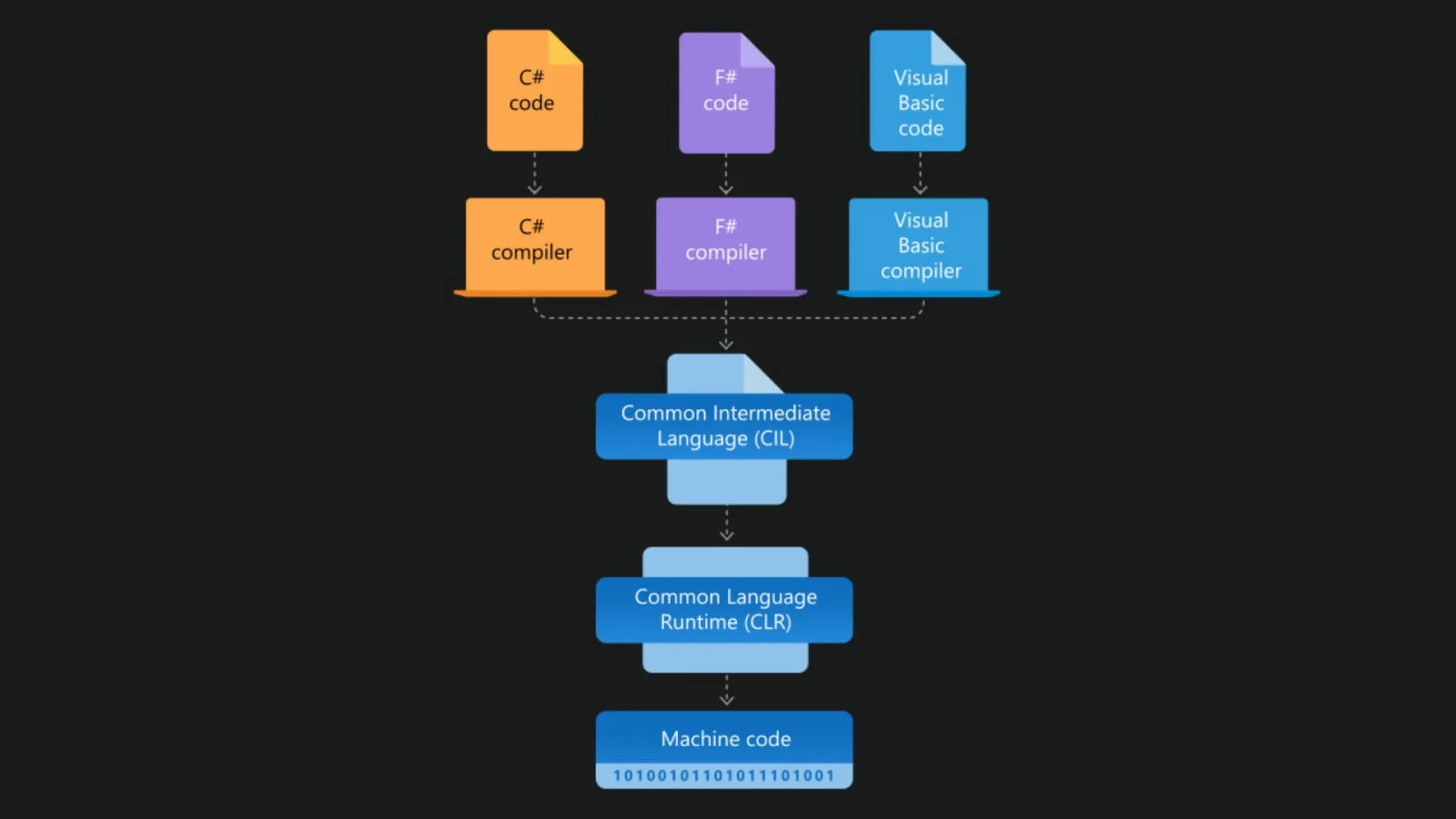
An application is a software program developed using the C# programming language. It is built using core programming concepts such as classes, objects, methods, and variables, which help organize the code and define how the application works.
For Example:
|
The compiler checks whether your code has an error. If not, then it converts C# code into Intermediate Language and saves it as a .exe or .dll file, but it does not directly create machine code.
It is a middle language between C# and machine code. It is used to make a program platform-independent by allowing the same compiled code to run on different platforms.
CLR manages everything while the program is running as it is the core part of .NET Framework. Its job is to:
One important thing is that without CLR, C# cannot run.
It is a part of CLR. Its job is to convert IL code into machine code and this all process is completed while the program is running. JIT compiles only the part of the code that is needed at that moment, which makes execution faster and efficient.
This executes the machine code, manages CPU, memory, files and devices. It also connects software to hardware.
Hardware is the final part where the CPU runs the program, memory stores the data, and the screen shows the final output to the user.
Also Read: 20 Best Programming Languages To Learn
Frameworks are a collection of pre-written code libraries and tools with a runtime environment that help you build applications efficiently. You get a variety of different frameworks with this programming language. Some of them are explained below:
| Framework | Description |
| NET Framework | These are used to create desktop apps like a calculator or software that run your PC. |
| .NET Core / .NET (Modern Version) | It is a faster and modern version of .NET Framework, and it works on all platforms such as Microsoft, macOS and Linux. |
| ASP.NET / ASP.NET Core | When creating websites and apps, this framework is used. |
| Entity Framework (EF / EF Core) | It helps you work and connect with databases without writing too much SQL. |
| Xamarin / .NET MAUI | They are being used to create mobile apps for Android and IOS. |
| Unity | They help in creating games (2D,3D or VR) |
| Blazor | These help create web pages instead of JavaScript. |
C# has many benefits that will help you build many applications, some of them are:
Everything has its benefits and limitations. As discussed its advantages, let's discuss some of its limitations as well:
Java and C++ are among the popular alternatives to C# programming language. They are used to build different types of software for computers and applications. Let's see what makes them different from each other:
| Parameters | C# | C++ | Java |
| Learning | It is easier to learn if you know C or Java very well. | Due to its hard syntax it can be very hard to learn. | Easy to learn and beginner-friendly. |
| Platform used | It works mainly on Windows (.NET) | Can be used on various platforms. | This run system like a JVM. |
| Speed | It is fast but slightly slower than C++. | It is very fast. | A bit slower than C++ but faster than Python. |
| Memory Management | It has automatic garbage collection. | You have to manage memory manually. | It has automatic garbage collection. |
| Object-Oriented Programmings | It is fully object-oriented as everything is based on classes and objects. | It supports both object-oriented and procedural programming, which makes it partial OOP. | It is fully object-oriented as it follows a strict class-based structure. |
| Common uses | It is commonly used in building games, web applications, for large MNCs, etc. | It is being used for System software and games. | Used for Web apps, Android apps, and enterprise software. |
| Difficulty level | Medium | Hard | Medium |
C# is not going anywhere as it has a very strong and stable future. Here are some reasons why C# has a future in the upcoming years:
As you know C# is created and maintained by Microsoft, one of the biggest technology companies in the world. Microsoft uses C# in many of its own products and keeps improving it every year.
C# is being used by companies for many tasks, such as handling databases, banks and financial systems, corporate software, and many more tasks like this. These companies need reliable and long-term software.
As discussed above, companies use C# programming language for their tasks. They also require programmers to handle all these. C Sharp provides long-term stability, a good package and less competition compared to other popular languages.
This programming language is moving forward with new technologies which means it supports:
Working on a real-world project is the best thing you can do as a beginner to learn this programming language. It helps you implement your learning, experimenting new things and building skills. Here some of the common projects you can work on:
You can build a desktop management system that allows users to add, edit, delete and search records like students, patients or products. You can also add functionalities like generating bills or reports. This project helps you learn how forms work, how buttons perform actions, and how C# connects with databases like SQL.
Inventory management is another best option to work on. These systems are built to help businesses track products and stock levels. C# will help you create software that stores product details, quantities, and sales records. The system can show alerts when stock is low and generate simple reports.
This project is very practical and commonly used in shops and warehouses. It helps you learn business logic, database handling, and how to build applications that solve real problems faced by companies every day.
A chat application built using C# allows users to send and receive messages in real time. It can be created as a desktop or web application. This project helps you understand how communication between users works, including message sending, receiving, and displaying instantly.
It also teaches basic networking concepts and real-time data handling. Building a chat app looks impressive on a resume and gives a clear idea of how messaging applications work behind the scenes.
A simple game project using C# is a fun way to learn programming concepts. You can create a basic 2D game with player movement, scoring, and levels. This project improves logical thinking and problem-solving skills.
It helps you understand how events, conditions and loops work in a practical way. Game projects are great for beginners because learning feels enjoyable and you can clearly see how your code controls characters and actions.
This programming language is mainly used for building web applications, desktop software, mobile apps, cloud solutions and games. Due to its versatility and strong support from the .NET ecosystem, it offers many career opportunities for developers. Let me explain you one by one for your better future:
Developers build software that are used in offices, companies and in any online systems. Their work is to write code, fix errors and improve existing applications. They also work with databases to store and manage data. This role is common in IT companies that build business or enterprise software.
A backend developer works on those parts of the application that a user is not able to see. Their work is to make sure that the data is saved correctly, systems are secure and everything works fast. When a user logs in or submits a form, the backend handles it.
Those software that run directly on your computer and not on browser. They build these apps as they are used in offices for billing, reports or data entry. These developers design screens, buttons and features that users interact with.
A game developer creates games for both computers and mobile phones for all operating systems such as Windows, Linux and macOS. This job has a mixture of creativity and coding as it includes working on game rules, characters, movement and scoring systems.
A software engineer or a full stack developer works on both the front side and back sides of applications. They build complete software systems from start to finish. With the help of this programming language, they work with user interfaces, databases and servers. For this role, a person should have good problem solving skills and the ability to work with different technologies.
Salaries for this programming language depend on experience, skills and the location you will choose. Below is the table that will help you understand how earnings grow as you gain more experience in a C# career:
| Experience Level | India (INR) | United Kingdom (GBP) | USA (USD) |
| Entry-Level (0–2 yrs) | ₹3.9 L – ₹6.5 L | ~£25,000 – £35,000 | ~$72,000 – $99,000 |
| Mid-Level (3–5 yrs) | ₹6 L – ₹9 L+ | ~£30,000 – £45,000 | ~$90,000 – $120,000 |
| Senior (6+ yrs) | ₹9 L – ₹12 L+ | ~£40,000 – £55,000+ | ~$120,000 – $150,000+ |
In this article, I have explained what C# is and how it helps developers build different types of applications easily. It also shows why C# is important today and how it continues to be useful in the growing world of technology. Continue to explore our study materials to learn more about this programming language.
In the beginning, C# was called COOL, which stood for “C-like Object Oriented Language.” Later, Microsoft had to change the name because of trademark issues.
There are so many apps that are created using C#. But I will tell you the top 5 most popular that have used this programming language:
In November 2025, the latest version, that is C# 14.0 came up with more smart features for beginners to code easily and also came up with AI ecosystem tools for beginners to code easily.
The four pillars of C#, also known as the pillars of Object-Oriented Program are Encapsulation, Abstraction, Inheritance, and Polymorphism.
You should not use C# for simple scripts, lightweight tasks or projects needing cross-platform support on non-Windows systems as it can be too heavy or limited outside Windows.
Course Schedule
| Course Name | Batch Type | Details |
| C# (C Sharp) Training | Every Weekday | View Details |
| C# (C Sharp) Training | Every Weekend | View Details |