A web crawler is an automated program that discovers, visits, and analyzes your web pages so search engines and other services can understand the information available on them. Web crawling is the process a crawler uses to discover URLs, fetch their content, follow links, and send information for further processing, like indexing.
Every time you Google something, the result pages shown on your screen are eventually discovered by Googlebots (Google's crawler). These crawlers do not just come once to the page. They crawl the same page again and again at different frequencies to discover new and updated content on the page. It is the same for every search engine.
Everything you do to rank your pages, like internal linking, content updates, SEO and Digital Marketing practices, etc only works if the crawler explores the page after the change. The reason is simple: the search engine needs to know about the change that is made by crawlers. However, the ranking and citations are decided in the subsequent process; it remains important. Do you know how it works?
In this guide, you'll learn what a web crawler is, how web crawlers work, the different types of crawlers, real-world examples, how crawling affects SEO, and how you can control crawlers on your website.
Read Also: 12 Best SEO Tools You Should Know About
A web crawler is an automated software program that discovers and explores different web pages, follows links, and collects information. Their ultimate goal is to discover information or changes on the web pages so the next process can decide if it should be shown to other users.
Web crawlers are also related to SEO because they are the first layer of content discovery. They are also known as web spiders, spiders, bots, search engine bots, or search engine crawlers. Google describes crawling as the process of using automated software to discover new web pages and understand them. Googlebot is the best-known example of a search engine crawler.
A crawler generally starts with known URLs, downloads pages, discovers links within those pages, and adds new URLs to the set of pages it may visit. This process can continue as the crawler discovers more content.
Many individuals think that crawlers and bots are the same thing, which is a misconception. A web crawler is a type of bot, but not every bot is a web crawler.
For example:
Search crawler: Discovers and processes web pages for a search engine.
Monitoring bot: Checks websites for uptime or changes.
Research crawler: Collects publicly available web data for research.
Malicious bot: May scan websites for vulnerabilities, scrape content, or perform abusive activity.
Basically, a bot is a broader term for software that performs automated tasks on the web. A crawler is a specific type of bot that discovers and retrieves web content. Its primary goal is to discover new pages and revisit old pages to detect changes or updates. The retrieved content is then processed and indexed by the search engine.
Also Read: What is Content Marketing?
Web crawling is a simple process that includes the steps given in the image below:
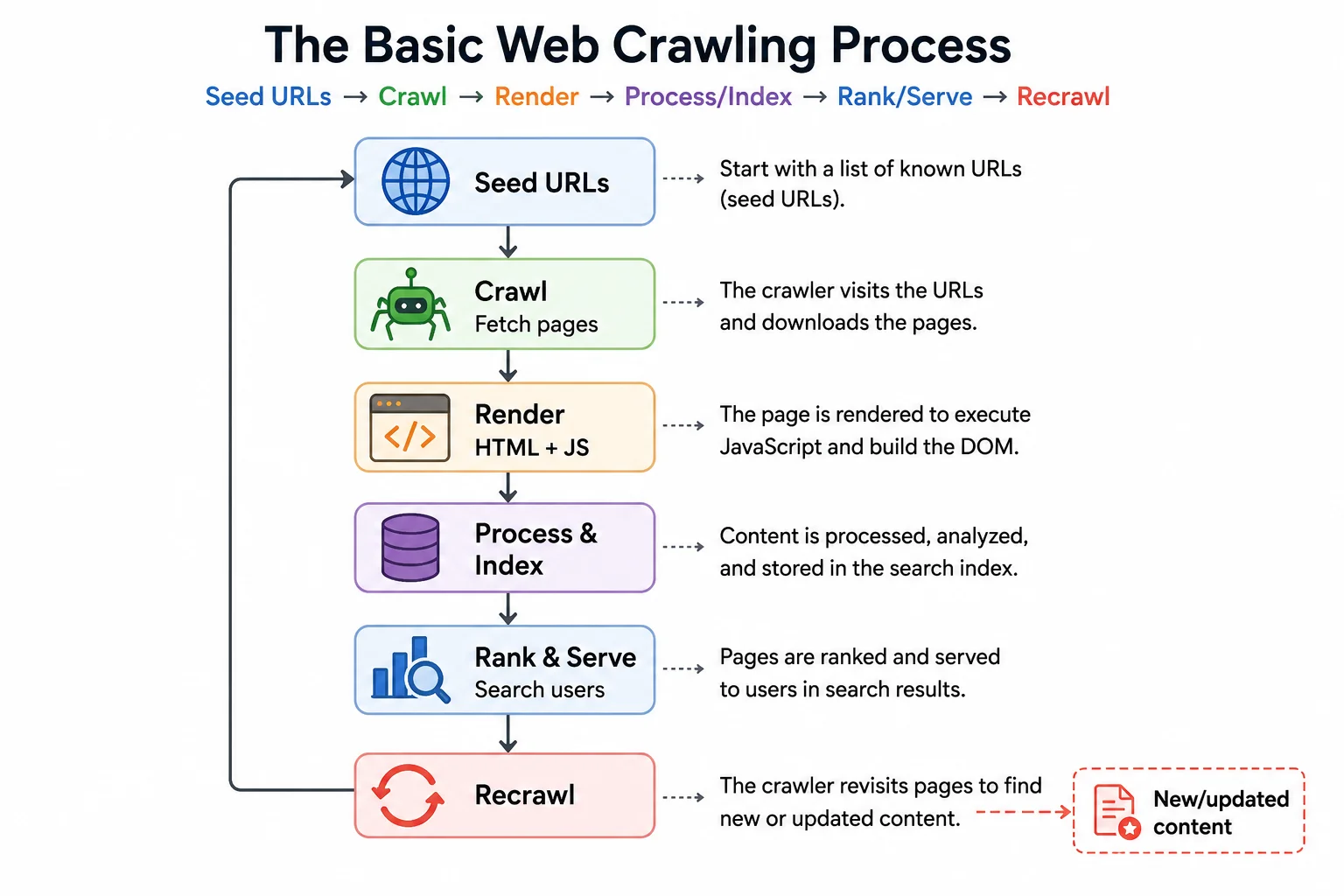
This diagram represents the general relationship between crawling, processing, indexing, and serving search results. In practice, search engines have much more complex systems and do not simply crawl every URL and immediately rank it.
A crawler needs URLs to begin its work. These are often called seed URLs. A search engine can discover URLs through several sources, including:
Links from pages it already knows about
Sitemaps
Previously crawled URLs
Other discovery mechanisms
Google says Googlebot discovers new URLs primarily through links embedded in pages it has already crawled. For website owners, an XML sitemap can also help Google discover URLs, although submitting a sitemap does not guarantee that every URL will be crawled or indexed.
Once a crawler accesses a page, it discovers the internalinked URLs.
For example:
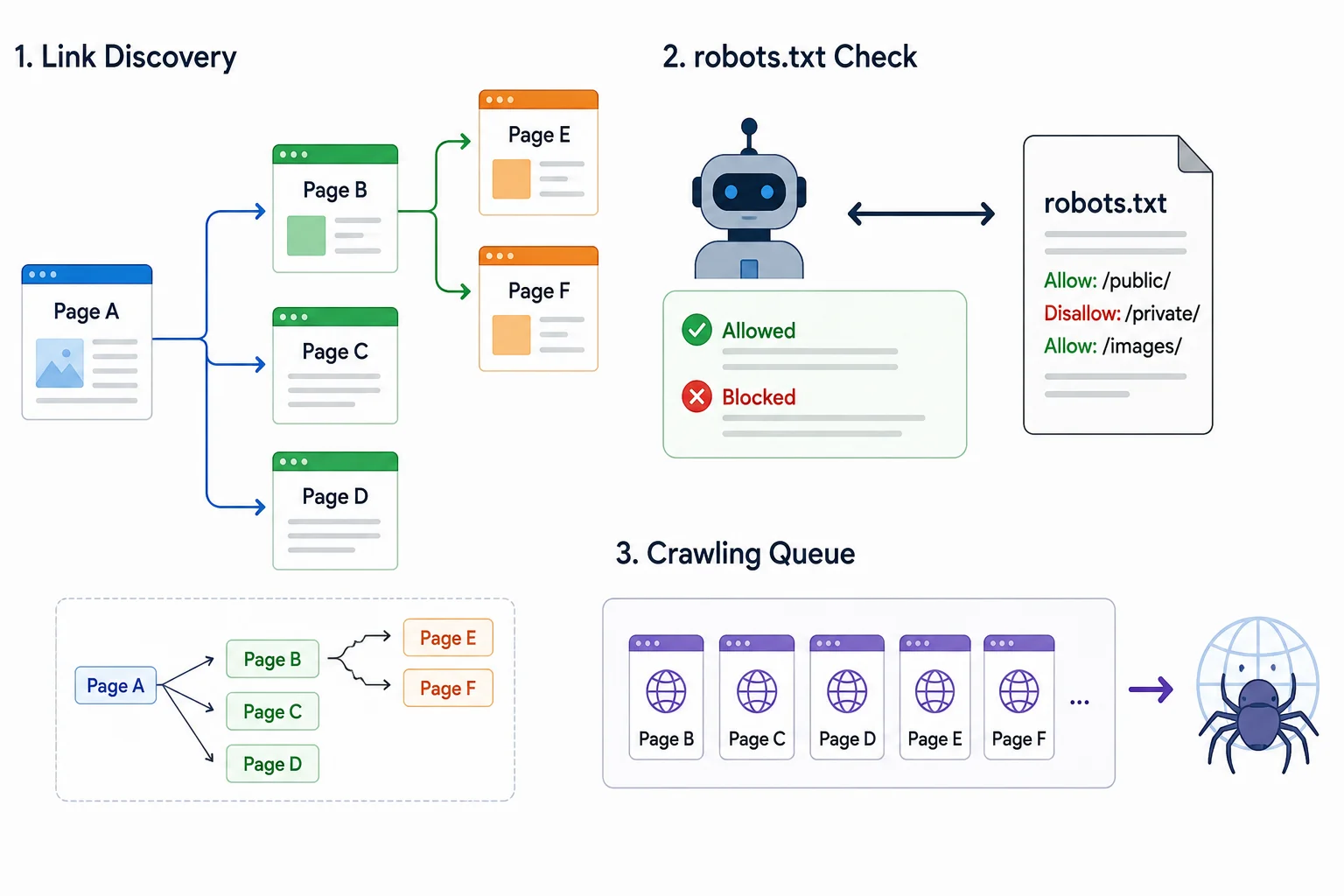
The crawler can add previously unknown URLs to its crawling queue and eventually request those pages. Before crawling, crawlers that follow the Robots Exclusion Protocol can check the site's robots.txt rules. Google's automated crawlers download and parse robots.txt to determine which parts of a site they are permitted to crawl.
Modern websites are not always made up of static HTML. They may rely heavily on JavaScript to generate or modify page content. Search engines can therefore need to render pages so they can understand content that depends on client-side JavaScript.
For SEO, this means that a page can technically be accessible to a crawler while still presenting challenges if important content or links depend on resources that cannot be properly fetched or rendered.
Website owners should avoid unnecessarily blocking important JavaScript, CSS, or other resources because Google notes that blocked resources can make it harder for its systems to understand pages.
Crawling and indexing are related, but they are not the same thing. Here is how they are different:
Crawling just retrieves and analyzes a URL.
Search engines then process the information and determine whether the page should be included in their index.
This means not every page that Google crawls will be necessarily indexed. Google's crawl-budget documentation explicitly distinguishes crawling from the later evaluation and indexing process.
Websites change constantly to get more visibility and traffic. They may update, delete, redirect, or replace their pages for any reason. Search engines therefore return to pages they already know about. The frequency of these visits can vary depending on factors such as the site, its content, and Google's assessment of when pages need to be crawled again.
There is no universal rule such as "Google crawls every website every X days." Google says it cannot predict or guarantee when or whether a particular URL will be crawled or indexed. However, they give you an option to forcefully crawl a page using Google Search Console.
Also Read: GEO vs SEO: Understanding the Differences
The terms crawler, scraper, and index are often confused, but they describe different concepts. Here is an at-a-glance difference:
| Term | Main purpose | Typical output | Example |
| Web crawler | Discover and access web pages | URLs and page data for further processing | Googlebot |
| Web scraper | Extract specific data from websites | Structured data such as prices, names, or product details | Scrapy-based scraper |
| Search index | Store and organize processed information | Searchable collection of content and signals | Google Search index |
The primary job od a crawler is discovery and retrieval. It systematically requests URLs and can follow links to discover additional pages.
A scraper focuses on extracting particular information. For example, a scraper might visit an e-commerce website and extract:
Product names
Prices
Ratings
Availability
Product URLs
A crawler and scraper can use similar technologies, but their goals are different. Crawling is primarily about discovering and accessing content, while scraping focuses on extracting particular data.
A search index is not a crawler. It is the organized collection of information that a search engine has processed and decided may be useful for answering searches. Crawling helps a search engine discover content; indexing is the subsequent processing step I was talking about earlier.
A useful way to remember the difference is:
Crawler = discovers and fetches
Indexer = processes and organizes
Search engine = retrieves and ranks results for a query
Read Also: Top 10 Social Media Management Tools in 2026
Web crawlers can be categorized according to their purpose. Here are some of the common ones:
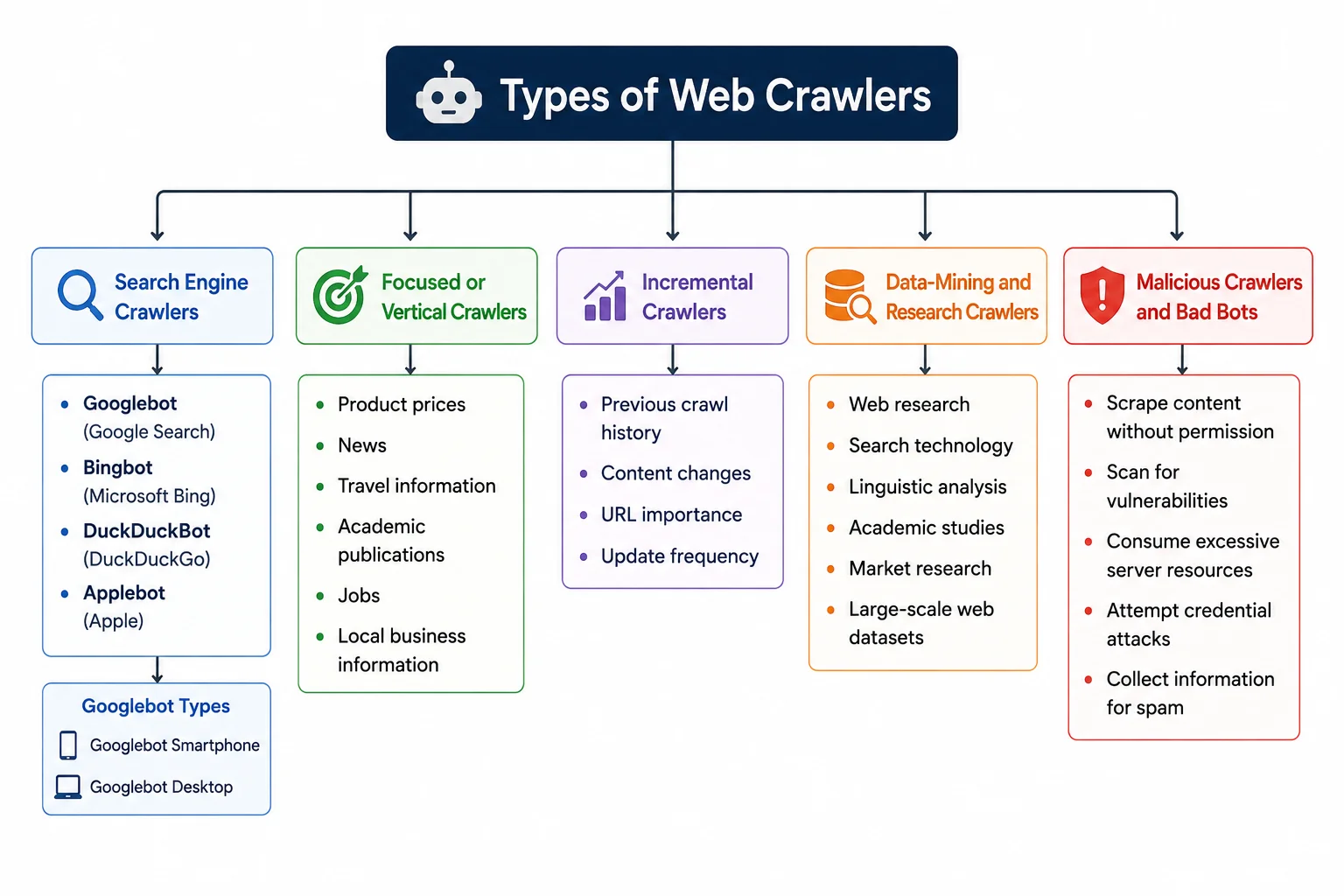
Search engines use crawlers to discover and process web content. Here awesome of the best examples of them:
Googlebot: Google's primary crawler for Google Search
Bingbot: Microsoft's Bing crawler
DuckDuckBot: DuckDuckGo's crawler
Applebot: Apple's web crawler
Google currently describes Googlebot as two main crawler types used by Google Search, which are Googlebot Smartphone and Googlebot Desktop. For most websites, Google primarily indexes the mobile version of content.
Some crawlers concentrate on a particular topic, industry, or type of information.
For example, a specialized crawler might focus on:
These crawlers generally do not need to crawl the entire web. They can focus their resources on a specific category or collection of websites.
An incremental crawler prioritizes content that is new or has changed since a previous crawl. Instead of treating every URL as equally new, an incremental approach can prioritize URLs based on signals such as:
Previous crawl history
Content changes
URL importance
Update frequency
This can make crawling more efficient, particularly when dealing with large websites.
Read Also: What is GEO? Generative Engine Optimization Guide
These crawlers are mostly used by researchers and organizations to collect publicly accessible web information for analysis. These crawlers may support projects involving:
Web research
Search technology
Linguistic analysis
Academic studies
Market research
Large-scale web datasets
Their crawling policies and technical behavior can vary considerably depending on the project.
Not every crawler has a useful purpose. Some automated bots may:
Scrape content without permission
Scan for vulnerabilities
Consume excessive server resources
Attempt credential attacks
Collect information for spam
For website owners, distinguishing legitimate crawlers from unwanted automated traffic can be important for security, performance, and content protection.
Here are some well-known web crawlers and automated fetchers.
| Crawler | Organization | Main purpose |
| Googlebot | Google Search crawling | |
| Bingbot | Microsoft | Bing search crawling |
| DuckDuckBot | DuckDuckGo | DuckDuckGo search crawling |
| Applebot | Apple | Apple services and search-related crawling |
| GPTBot | OpenAI | OpenAI-related web crawling |
| Google-Extended | Controls certain use of content for Gemini-related applications |
It is one of the most asked questions among individuals new to crawling. One practical way to understand crawler activity is to examine your website's server logs. A log entry can contain information such as:
Requested URL
Timestamp
HTTP status code
IP address
User-agent
Response size
For example, a request may identify itself with a user-agent containing Googlebot. However, do not trust a user-agent string alone. Google explicitly warns that user-agent strings can be spoofed. To verify Googlebot, Google recommends reverse DNS verification or checking the source IP against its published crawler IP ranges.
Read Also: What Is AI Optimization?
Web crawling is fundamental to technical SEO because search engines need to discover and access your pages before they can properly process them for Search. You need to understand the following concepts to know how it affects your SEO:
Crawlability describes how easily search-engine crawlers can access the URLs and resources they need. Common crawlability problems include:
Incorrect robots.txt rules
Server errors
Broken internal links
Redirect chains
Poor site architecture
JavaScript-dependent navigation
Crawl traps
Excessive URL parameters
Important pages with no internal links
A page that cannot be discovered or accessed efficiently can have difficulty entering the search engine's processing pipeline.
Crawl budget refers to the resources a search engine like Google allocates to crawling a particular site. Google defines crawl budget using two main concepts:
Crawl capacity limit: The capacity limit helps prevent crawling from overwhelming a site's servers.
Crawl demand: It reflects Google's need to crawl a site.
Crawl budget is particularly relevant to large websites. It is generally less of a concern for small websites unless they have significant technical problems or inefficient URL generation.
A robots.txt file can tell compliant crawlers which URLs or paths they should not access.
For example:
|
User-agent: * Disallow: /private/ |
This tells crawlers that follow the rule not to crawl URLs under /private/. The Robots Exclusion Protocol is standardized in RFC 9309, while Google documents how its crawlers interpret the specification.
An XML sitemap provides search engines with a list of URLs that you consider important. Sitemaps can help search engines discover new or updated pages, but they are not a guarantee that those URLs will be crawled or indexed. For large websites, keeping XML sitemaps accurate and up to date is especially useful for communicating the site's preferred URL set.
Some technical problems can make crawling less efficient, including:
I. Blocked Resources: Blocking important CSS, JavaScript, or other resources can interfere with how search engines understand a page.
II. Orphan Pages: An orphan page is a page with no useful internal links pointing to it. Even if a sitemap contains the URL, strong internal linking can make site discovery and navigation easier.
III. Infinite Crawl Traps: Some websites generate virtually endless combinations of URLs through:
Filters
Faceted navigation
Sorting parameters
Calendars
Session parameters
Search pages
These can consume crawler resources without creating meaningful new content.
Also Read: How to Become a Digital Marketing Specialist?
Website owners can use several mechanisms to influence how search-engine crawlers access or process content. The important point is that crawling control and indexing control are different.
robots.txt is primarily a crawling control mechanism.
For example:
|
User-agent: * Disallow: /admin/ |
This tells compliant crawlers not to crawl the specified path.
But robots.txt is not a security mechanism. Google specifically recommends authentication or another access-control method for genuinely private information.
It also does not reliably prevent a URL from appearing in search results. Google explains that a disallowed URL may still be discovered and indexed without its content being crawled, for example, when other pages link to it.
The noindex directive is used to tell supported search engines not to include a page in their search results.
For example:
| <meta name="robots" content="noindex"> |
For Google, the crawler needs to be able to access the page and see the noindex directive. If the page is blocked by robots.txt, Googlebot cannot see the directive, so noindex cannot work as intended.
The X-Robots-Tag HTTP response header provides another way to communicate indexing directives. It is particularly useful when you need to control indexing for resources where an HTML <meta> element cannot be placed.
The broader principle remains the same: Use robots.txt to manage crawling. Use noindex to control indexing. Use authentication when content must actually be private.
Read Also: What is Social Media Optimization (SMO)?
You don't need to build a crawler from scratch to analyze a website. Many tools give you what you need, including:
Screaming Frog's SEO Spider is a popular desktop crawler used for technical SEO audits. It can crawl websites and surface issues involving links, redirects, metadata, status codes, and other technical elements.
Google Search Console's URL Inspection functionality helps site owners understand how Google sees and processes individual URLs. It can be useful when investigating questions such as:
Can Google access this URL?
Is the URL indexed?
What canonical URL did Google select?
Are there indexing issues?
Can Google retrieve the page?
Google provides Search Console as a free tool for site owners and specifically describes it as a way to understand crawling and diagnose issues.
Scrapy is an open-source Python framework for building web crawlers and extracting data. It is more development-oriented than typical SEO crawling software and can be used when you need custom crawling and data-extraction logic.
Depending on your goal, other tools can help with:
Broken-link discovery
Technical SEO auditing
Sitemap validation
Robots.txt testing
Log-file analysis
URL discovery
Site architecture analysis
The best tool depends on whether your objective is SEO auditing, search-engine troubleshooting, research, monitoring, or custom data extraction.
Read Also: What Is E-E-A-T in SEO? A Complete Guide
Web crawlers are the foundation of how search engines discover and revisit content across the web. They find URLs, follow links, fetch pages, and send the information they collect for further processing and indexing. Understanding this process helps you see why technical SEO issues can directly affect whether search engines can discover and access your content created by a content writer.
From seed URLs and internal links to rendering, recrawling, and crawl-budget management, every stage can influence how efficiently your website is explored. Maintaining a crawlable site architecture, using robots.txt and XML sitemaps correctly, fixing broken links and crawl traps, and ensuring important resources are accessible can make it easier for search engines to discover your content. It is also important to remember that **crawling is not the same as indexing or ranking**. A crawler accessing a page does not guarantee that the page will be indexed or appear prominently in search results. Crawling is the discovery and retrieval stage, while indexing and ranking happen later in the search process.
Ultimately, you don't need to understand every detail of a search engine's infrastructure to manage crawling effectively. By monitoring crawl activity, keeping your site's technical structure clean, and using tools such as Google Search Console and SEO crawlers, you can identify barriers that prevent important pages from being discovered and processed.
Not exactly. A web crawler is a type of bot designed to systematically access and discover web content. A bot is a broader term that can include monitoring bots, chatbots, security bots, and many other automated programs.
There is no fixed crawling schedule that applies to every website. Google says crawling and indexing depend on many factors and that it cannot predict or guarantee when a particular URL will be crawled or indexed.
Yes, you can use robots.txt to request that compliant crawlers avoid specific paths. However, robots.txt is not an access-control mechanism, and malicious crawlers may ignore it.
Some modern search crawlers can process JavaScript and render pages. However, websites should not assume that every crawler behaves identically.
Crawling is the process of discovering and accessing web content. Indexing is the subsequent process of analyzing and storing information about content that a search engine may use in its search results.