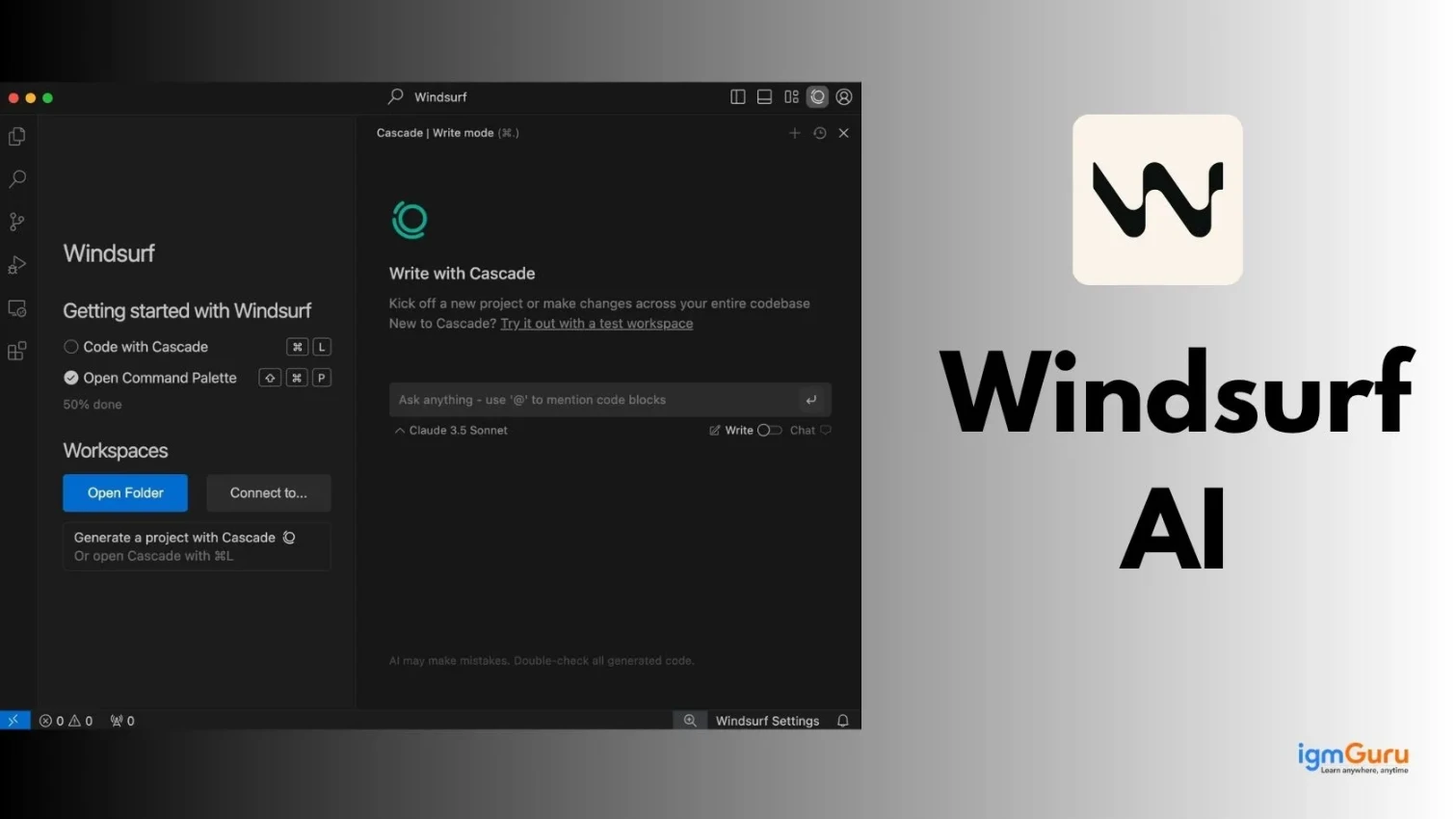
Windsurf AI (2026) is the first genuine self-sufficient IDE that provides Cascade, an AI assistant capable of programming, debugging errors, and carrying out multiple jobs, while still keeping full control in your hands. In contrast with classic AI programming assistants (such as GitHub Copilot, Cursor), Windsurf is an independent agent that is able to develop complicated processes and deal with many various situations automatically.
I personally used this tool to develop a simple Python calculator and test a user login system. This AI assistant produced most of my code instantly and when there were errors, it offered suggestions for correcting those mistakes. Although I still had to review and modify some of the code for its accuracy, I was able to complete both projects much faster.
This AI Assistant Tool provides intelligent suggestions for improving the quality of code you create, allows you to identify coding errors at an early stage of development and improves the efficiency of creating and improving code within your own workflow.
Therefore, the overall coding experience you gain from using this AI tool will ultimately provide you with a faster, more efficient coding experience while still allowing you to maximize your productivity.
Let’s start!
Windsurf is a Codeium-developed IDE (integrated development environment) that utilizes artificial intelligence is an “agentic” environment whereby one can work collaboratively with an AI coding partner. Windsurf functions as a flow-state editor using AI agents (Cascade) to analyze your codebase and generate code, repair errors and run terminal commands over multiple files while allowing you to maintain oversight and control of the project.
For example: If you wanted to create a login system that was secure, you could type “Create a login system with security features” into Windsurf and it would search through your entire codebase, generate the needed front-end and back-end code, correct any syntax or data-related errors and run any commands needed automatically. It truly feels as if you have a very intelligent and experienced coding partner who can execute all or most of the technical aspects of developing an application while still allowing you to manage the project.
Read Also: Top Artificial Intelligence Interview Questions
Windsurf is an AI-native IDE founded in 2021 by Varun Mohan and Douglas Chen under Codeium. Initially focused on GPU virtualization, the company pivoted to AI coding and reached a $3B valuation by early 2025. As of August 2026, Windsurf continues to lead the agentic coding space with multiple funding rounds and enterprise adoption.
Timeline:
The name Windsurf reflects achieving "flow state"—where AI (wind) propels developer velocity (surfer), emphasizing seamless human-AI collaboration beyond traditional copilot limitations.
There has been a significant development in AI coding tools over the years. Previously, developers were required to compose it all by themselves using a text editor. Now, thanks to AI-assisted tools, the developer can only type what they want and get suggestions on how to write code. Presently, AI understands what you are trying to do, creates a complete program, finds and fixes any errors and will also respond like a coding companion. This is comparable to how you would go from using a calculator to having an intelligent assistant who can help you to use your brain to think faster and to construct things more quickly.
| Stages | What It Was Like | How It Worked | Explanation |
| 1. Manual Coding Era (Before AI) | Developers wrote all the code themselves. | No AI help, only basic editors like Notepad. | You had to do everything on your own, like writing an exam without any hints. |
| 2. Basic Code Editors | Tools like VS Code, Sublime | Syntax highlighting, formatting | These tools made coding cleaner but didn’t “think” for you |
| 3. Autocomplete Tools | Early IntelliSense features | Suggested words or code snippets | Like your phone suggesting the next word while typing |
| 4. AI Code Assistants | Tools like GitHub Copilot | AI suggests full lines/functions using trained models | Now the tool helps you write code faster by predicting what you need |
| 5. Context-Aware AI Tools | Tools like Cursor AI | Understands your whole project and context | It is like having a smart assistant who reads your entire file before helping |
| 6. Agentic AI Coding Tools (Modern Stage) | Tools like Windsurf AI | Can plan, write, debug and execute tasks | This is like a coding partner who can do tasks for you, not just suggest |
| 7. Future AI Development | Fully autonomous AI systems | End-to-end app building with minimal input | Soon, you may just describe an app and AI will build it completely |
Windsurf offers a range of advanced features that streamline development and enhance productivity. From automated coding and debugging to intelligent context handling, it enables developers to work more efficiently with less manual effort. These capabilities make it a powerful tool for both beginners and experienced programmers.
Cascade is a coding partner that will write and/or change code in your project and give you an opportunity to approve/cancel the changes before implementation so that you remain in control of your project.
Inline AI allows you to request assistance from inside your code by providing you with only the changes you need to make or providing assistance with error corrections instead of making the entire change, only the specified change will be made.
Super Complete is like an intelligent assistant. It doesn’t just complete one line of code; it also understands the task that you are performing and then it will automatically create the next few code lines for you.
You can provide simple instructions to the AI with an understanding that it will follow your instructions and provide you with feedback.
While coding, Windsurf can search the web for the most current and accurate answers/solutions to your questions, thus it will eventually reduce the time spent on your coding project.
Advanced codebase indexing with support for:
Windsurf's memory system now includes:
You can specify to the AI the rules it is to follow (for example, coding styles) and the tools that you want to use with that particular coding style.
With this feature, you can upload a screenshot/design and Windsurf will provide code for it. This is extremely beneficial for creating designs because now you can simply provide designs and it will generate the design with code.
Real-time code pairing with teammates:
Read Also: What is Black Box AI
Getting started with Windsurf is quick and beginner friendly. Follow these simple steps to download, install and launch the software smoothly on your Windows system without any confusion or technical hassle.
Go to the official website and hit “Download for Windows” (the green button on your screen)

A .exe file will start downloading (usually in your Downloads folder)

Double-click the downloaded .exe file
Select “I accept the agreement” and click Next
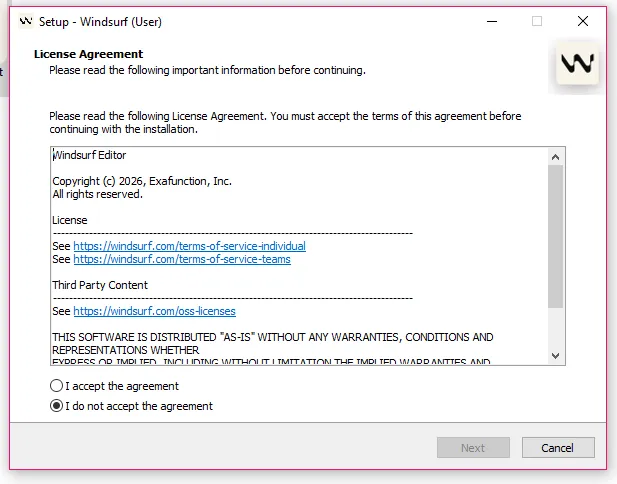
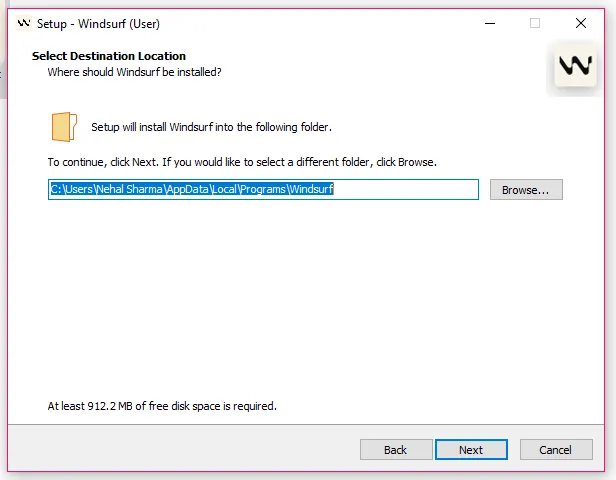
Keep the default folder (recommended) and click Next
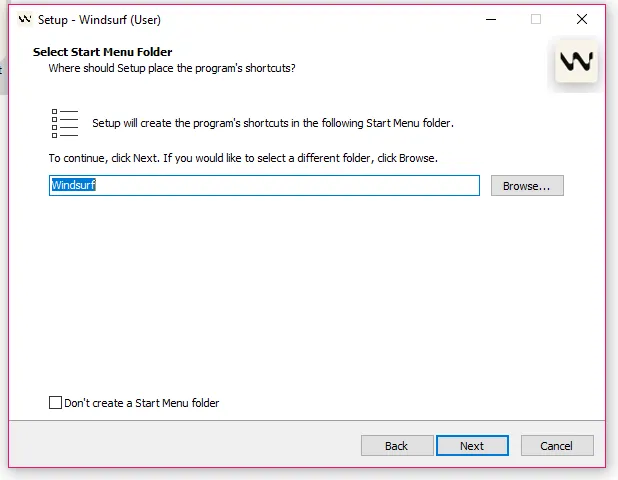
Leave it as Windsurf and click Next
Keep these options checked:
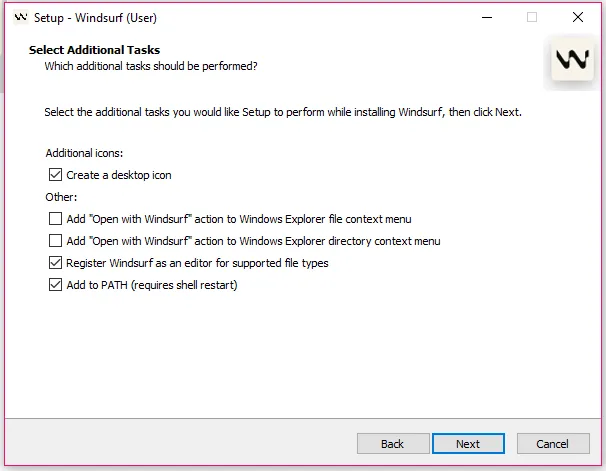
Then click Next, review the settings and click Install
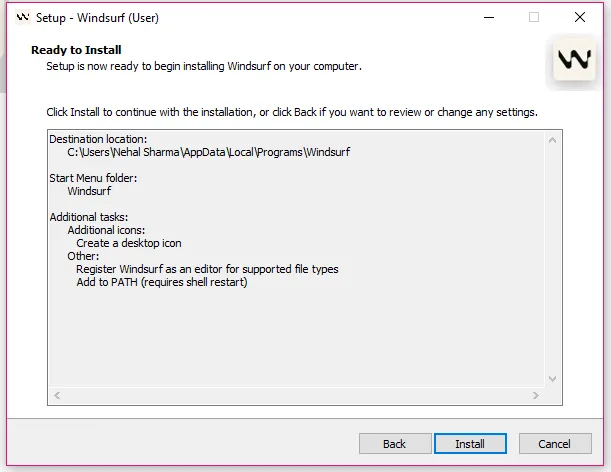
Wait while Windsurf installs (don’t close the window).
If Windows shows a popup asking for permission, click Yes.
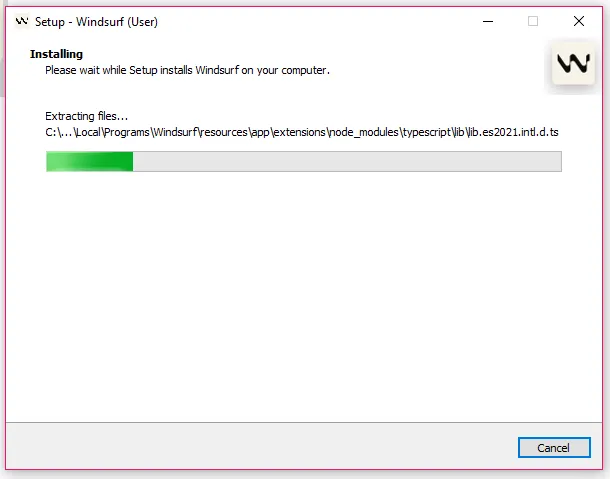
Click Finish (keep “Launch Windsurf” checked if available) and Windsurf will open automatically.
If not, open it from your Desktop or Start Menu.
Read Also: Claude vs. ChatGPT
If you are new to this AI assistant tool, then imagine that it is similar to having a smart computing assistant who is able to write programs for you, while at the same time understanding the goals of your project. Rather than suggesting random lines of code, it analyzes your program as well as the intent behind it and then will help you create your code in a much quicker manner by providing contextualized support as well as relevant information. Here how it works:
When you enter a prompt or start typing, it will analyzes your inputs, project files and code patterns to understand the functionality that needs to be built and not just what you typed.
Windsurf will review your entire codebase - this includes functions, variables and any edits that you have made and then it will present some suggestions that match your project and not generic code.
Based on both your intent and context, Windsurf will generate code snippets relevant to what you are trying to complete or entire functions or a series of files will be generated, all with the proper logic and structure.
As you are continuing to code, Windsurf will update its suggestions for you in real-time, adapting the suggestions to your work and providing better recommendations based on your work.
You can ask questions right next to where you are coding (for instance by saying "fix this bug" or "optimize this function") and Windsurf will provide actionable edits.
Windsurf will assist you through complex processes in a step-by-step manner such as debugging, refactoring and feature building through automatically splitting complex tasks into smaller tasks.
Windsurf learns from your interactions and coding style to become more accurate and tailored to your preferences over time.
It is basically like an intelligent coding assistant; it is more than just writing code; it can help you build your program, fix problems and reduce the complexity of your job, so it can help you develop quicker than you would if you were learning to code yourself. Here is what Windurf can do:
With Windsurf, you can simply tell the system what type of code you want to create and the application will produce your code in the form of functions, scripts, or complete modules. This greatly reduces the amount of time and effort required to write out source code, especially for those who are just beginning to learn about coding and programming.
You can easily find bugs in code as well as recommend ways to fix those bugs. Instead of spending hours trying to locate a bug in your code, you can rely on it to tell you exactly what went wrong and provide solutions for how to correct it.
Windsurf improves existing computer code by creating more efficient and cleaner code. It can restructure and organize confusing code so that it is more easily read and remove redundancy while not compromising the intended performance.
For those who are new to programming, Windsurf can be an excellent learning resource. Using a step-by-step approach, this program is able to teach you how to write code, as well as recommend improvements to your code and assist you in developing an understanding of programming fundamentals.
Windsurf allows you to create automation scripts for repetitive tasks such as data processing, handling files and performing system-related operations. You do not need to be an advanced programmer to use it for creating automation scripts.
Windsurf gives you a sort of assistance with constructing Machine Learning (ML) models, writing training scripts and handling data sets. As such, it can be very beneficial to both data scientists and AI researchers.
Windsurf can also assist with writing scripts for testing the vulnerabilities of software, analyzing security-related concerns and learning ethical hacking strategies and techniques.
Read Also: ChatGPT Atlas
Windsurf caters to all types of users, from novices learning how to create code to seasoned pros working on intricate projects. Its capability to help, automate and quicken development provides value regardless of the role. Listed below are the main user groups of Windsurf and why they depend upon it:
Developers utilise Windsurf to develop, test and enhance their coding processes in a much less labor-intensive manner than without it. This includes: suggestion, error correction & refactoring; resulting in diminished manual labour.
When developers are working on both small scripts or at the opposite end of the spectrum, enormous systems, they all benefit from shorter turn-around times, greater accuracy & much greater opportunities to focus on problem-solving rather than repetitive coding tasks.
Startups and tech companies utilize Windsurf I to accelerate product development and enhance team productivity. Windsurf manages large code bases, automates repetitive tasks and facilitates developer collaboration. Thus, it helps companies accelerate their development time and resources, enabling them to release products quickly and iterate rapidly in highly competitive technology industries.
Students and other novice developers can use Windsurf as an educational resource while learning how to program. In addition to providing suggestions for programming code. It also provides explanations and real-world examples. Due to its support and guidance, new developers with little or no experience can build small projects, giving them greater confidence and less anxiety as they experiment with programming through hands-on experience.
Data scientists and AI engineers rely on Windsurf to write scripts, analyze data and create machine learning models quickly and efficiently. By using this to automate repetitive coding tasks and speed up experimentation, data scientists and AI engineers can dedicate more time to analyzing data, enhancing their models and generating insights from their work instead of spending a majority of their time configuring and writing boilerplate code for experiments.
Windsurf manages complicated and large software systems like the use of current cloud solutions, using it to maintain, update and refactor their existing code bases over long periods of time. Automation of tedious tasks, assisting with several tools, will allow for greater productivity, fewer mistakes and more effective management of long-term technical projects across the enterprise level.
Windsurf in real-time is best demonstrated through an example. We will set up a basic Python program, from your project folder through to generating and enhancing your code using the AI assistant; that allows us to create the first program together. By the time you have successfully run your first program, you will have experienced the time savings and simplicity of coding by taking advantage of Windsurf's AI capability.
Go to your Desktop (or any location)
Right-click → New → Folder
Name it something like:
|
In the left sidebar:
|
At the top bar, you will see two things:
Click on Agent to open the AI assistant panel. This opens the AI assistant (your main tool).
In the Agent panel, type:
|
Press Enter and Windsurf will:
Click Apply / Insert (if Windsurf suggests it) or manually copy the code into app.py
You should now have:
|
Now run it:
Option A (inside Windsurf)
Option B (best method)
|
Note: Make sure Python is installed on your system before running the code.
Go back to Agent and type:
|
Updated code:
|
You can now see suggestions on your screen:
Useful shortcuts:
Now try prompts like:
|
|
|
This helps you understand where everything is in Windsurf.
Left Panel: Files & folders
Center: Code editor
Top (Agent): AI assistant
Bottom: Terminal
Read Also: Perplexity vs. ChatGPT
Setting up Windsurf for data science involves installing the editor, configuring your environment, enabling AI features and preparing tools to build, analyze and improve projects with intelligent assistance efficiently.
Open your browser, navigate to the Windsurf site, download the installer and complete the installation on your system.
You can either bring in your existing setup from tools like VS Code or Cursor or begin with a completely new configuration.
Sign up or log in to Windsurf to get access to free credits, which let you use its AI capabilities for an initial period without paying.
After setup, check that important extensions, preferences and features are already installed or enabled for your workflow.
Open your data science project and interact with the Cascade chat panel to get suggestions, improvements and help with your code.
By automating coding tasks as well as debugging and workflow management, developers can spend more time developing better projects. The use of intelligent modes and tools will allow you to substantially increase the speed of coding and improve productivity.
Cascade can automatically create files, run scripts, test those scripts, identify any errors that may have occurred during testing and correct those errors without requiring much input or interaction from you. You will have to approve the actions, while most of the workflow will be handled by Cascade. Because of this, fully automated write mode is the best option for speed and efficiency when developing software.
Cascade can generate code for any script and provide a description of how to use it. You would need to edit, run and debug the generated code manually. This is a very useful option for learning how to code and is a controlled environment for developing code.
Cascade functions as a traditional chat-based assistant in this mode. You must provide all details required. This is the most suitable option if you have a general question, don't need the context of a question, or do not have any specific request.
You can upload an image of your UI and Windsurf will automatically convert it into HTML, CSS and JS files. You will be able to quickly generate a fully functioning frontend code for your UI and have it run locally.
By adding files, documentation and/or links, you can significantly enhance the AI's ability to provide accurate and useful code-generation results.
Windsurf provides many options for AI model use. Claude 3.5 is the best choice for accuracy and for writing long code.
You can use Ctrl + I to edit the order that AI will edit individual lines of code, instead of having it rewrite an entire file.
You can use AI inside of the terminal to quickly fix errors or run commands.
Windsurf retains all information about previous interactions with you.
Read Also: Best AI Browsers You Need to Know
Windsurf was created to help developers improve their productivity by writing, understanding and managing code efficiently. It serves as an AI-based coding companion or assistant that can improve development speed, while at the same time decreasing manual effort.
Saving many hours of development time by generating code snippets, completing functions and providing suggestions for code improvements.
By providing an understanding of what all the code means across all your files, it makes it easier for you to work with large and complex codebases.
It will help identify bugs and provide suggestions for fixing them and explaining errors, especially if you are a new programmer.
Automation of repetitive tasks for coding, such as refactoring, creating documentation and boilerplate code, can help reduce fatigue on developers.
Improving coding knowledge through the explanations of code and providing suggestions for best practices.
Windsurf has countless advantages to improve productivity while coding quickly; providing intelligent suggestions and seamless workflow; however, its unique capability compared to other tools is its deep understanding of your whole development project rather than just the current file.
Most AI coding assistants focus only on the code snippet being worked on at that moment. Windsurf, on the other hand analyzes the entire codebase so that it can provide better suggestions, enforce consistency between files and help with code changes that fit within the context of your entire development project.
Essentially, it does not just autocomplete code, it thinks like an experienced developer who has knowledge of your whole project, making Windsurf an incredibly powerful coding tool when comparing to any other coding tool.
Though Windsurf is highly beneficial, it's still not infallible, just like all other types of AI tools ; they all come with their own limitations that a user needs to consider while depending on use of that AI tool.
The AI may not fully comprehend requests made to it when each of those request contains more criteria than normal (or requires more specific types of criteria than normal), or when the requests are worded in a way that isn't immediately clear to most human beings.
As more users rely on using the AI tool(s), their ability to think independently and solve problems will decrease significantly.
Giving AI tools any form of sensitive code/data can generate a violation of confidentiality security problems.
If poor-quality inputs (i.e., poorly written prompts/unclear instructions) are supplied to the AI tool, the AI tool's output (when generated) is likely going to be poor as well.
Read Also: Top Applications of Artificial Intelligence
Whether you are looking for private use or group use, there are two different plans offered by Windsurf, Individual and Team plans. You can explore the Windsurf pricing to choose what fits best.
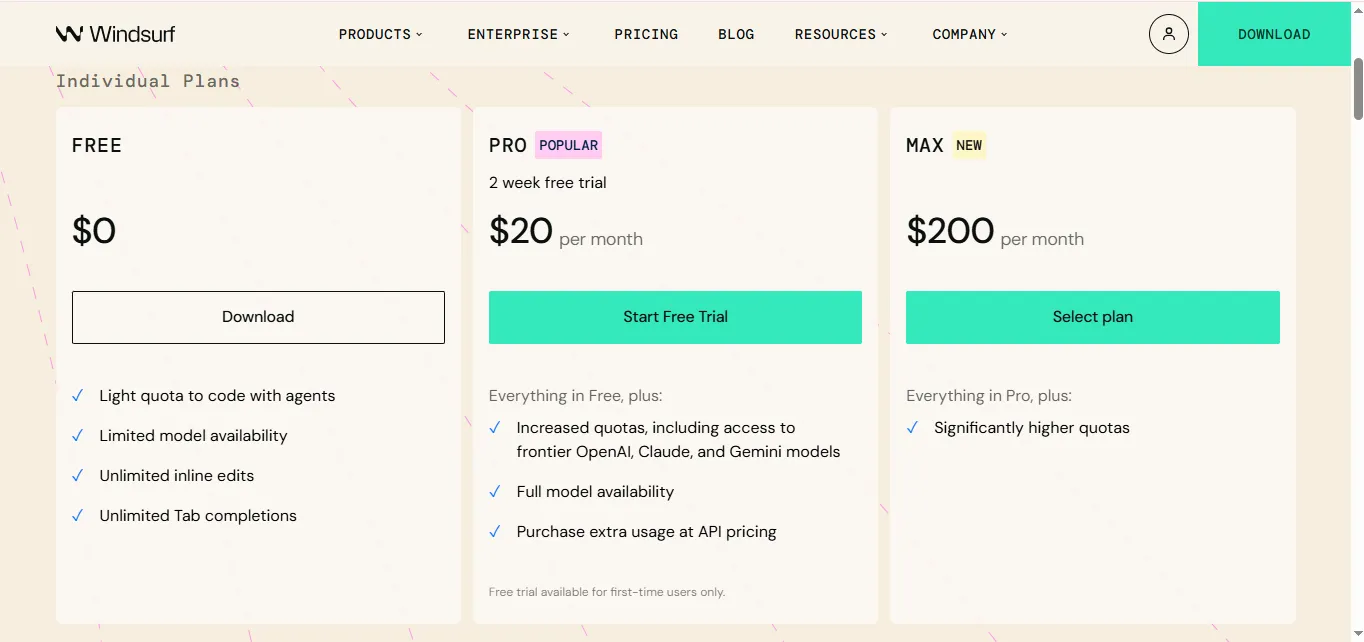
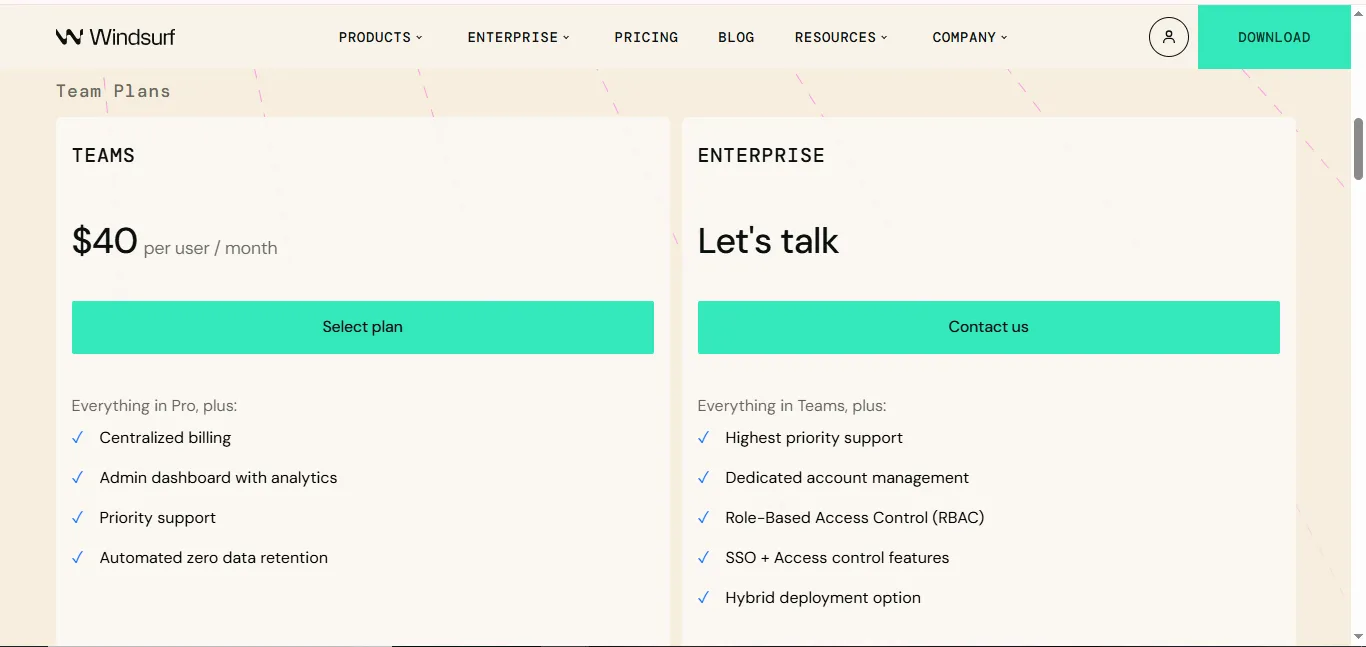
While Windsurf provides an intuitive flow throughout the coding process, thus creating a comfortable transition from click one to coding, Cursor uses a more contextual solution and places greater emphasis on accuracy and completeness. If you are looking for speed and simplicity, you will definitely find Windsurf is easier to use; however, those who would like a more thorough solution will likely use Cursor.
| Feature | Windsurf | Cursor AI |
| Description | An AI coding assistant that emphasizes automation | A code editor that prioritizes AI |
| Beginner Friendly | Very beginner friendly | Slightly technical for beginners |
| Appearance | Clean and simple | Similar to VS Code |
| Coding Support | Provides recommendations and can automate tasks | Strong inline code editing |
| Automation Focus | Focused on workflow automation | Focused on complete knowledge of code |
| Basic Speed | Fast for basic tasks | Fast and powerful for complex edits |
| Functionalities | Automatically debugging, explaining and generating code | Edit full files using AI |
| Customization | Limited customization | Highly customizable |
| Intended Use | Intended for beginners and productivity users | Intended for developers and advanced users |
| Learning Curve | Easy | Moderate |
Read Also: How To Use ChatGPT
While both Windsurf and GitHub Copilot help developers develop software on a clean user interface, GitHub Copilot excels with its ability to suggest code in addition to providing a vast amount of assistance through its large database of examples. Windsurf allows developers to work in a concentrated way without distractions, while GitHub Copilot offers developers a higher level of productivity through its extensive amount of information available to them in addition to suggestions for codes.
| Point | Windsurf | GitHub Copilot |
| Type of tool | Full AI Coding Tool | An AI Autocomplete Assistant |
| Integration mode | Standalone | In-Editor (VS Code, etc.) |
| Ease of use | Very easy | Easy if you have basic coding knowledge |
| Coding style used | Generates complete solutions | Suggests code completion one line at a time |
| AI interaction method | Chat + automation/scripting | Mostly inline suggestions |
| Features | Debug, explain, automate | Autocomplete, chat (limited) |
| Flexibility | Less flexible | Flexible across multiple IDEs |
| User control | More work done by AI | User retains control |
| Best suited for | Beginners, fast workflow | Developers coding manually |
| Learning curve | Low | Low to moderate |
Windsurf is your intelligent partner, assisting with your coding by providing assistance with writing, fixing and improving the code you are currently working on as well as helping you to learn throughout the process. Although it has some limitations, Windsurf generates significant savings by saving time and reducing effort and making it easier and more fun for developers.
Windsurf AI has a free plan; however, you may need to upgrade for advanced features.
Yes! Windsurf AI can generate complete applications; however, you should always verify and test the code before production.
For most purposes, using Windsurf AI is safe and provides you with reasonable protection from unauthorized access to your code. However, we discourage you from providing Windsurf AI with any sensitive or private information.
Yes! Windsurf AI helps new programmers by simplifying their coding tasks.