Django has remained a popular choice for Python developers who want to build web applications without having to handle every part of the development process from scratch. Its built-in features for URL routing, database access, authentication, administration, security, and other common web development tasks make it useful for everything from smaller applications to large production systems.
But knowing how to build a Django application is different from being ready for a Django interview. Interviewers may start with basic questions about models, views, templates, and URLs for freshers, while experienced candidates can be asked to explain ORM optimization, caching, security, asynchronous processing, APIs, deployment, and how they would troubleshoot problems in a production application.
The expectations have also changed as modern Django applications increasingly involve APIs, cloud platforms, real-time communication, background processing, and AI-powered features. That means preparing only definitions is not enough. You should understand how Django works internally, why you would choose a particular approach, and how you would handle real development and production problems.
This is where practicing questions at different difficulty levels can help. It allows you to revise the fundamentals, strengthen your understanding of Django's core features, and prepare for the practical situations an interviewer may use to evaluate your problem-solving skills.
In this article, I will cover Django interview questions and answers for freshers, intermediate professionals, experienced developers, and advanced candidates. You will also find scenario-based questions, modern Django topics, production-focused problems, and Django MCQs to test your knowledge. Whether you are preparing for your first Django interview or targeting a senior-level role, these questions will help you prepare more effectively. Let’s begin!
Explore igmGuru's Django training program to boost your career growth.
Let's begin with the most basic Django interview questions and answers. It will help you to quickly crack your first interview and land a good job.
Django is a Python-based open-source web framework designed for web development. It was introduced in 2005 by a team of developers at the Lawrence Journal-World newspaper to simplify the process of building complicated and database driven websites.
It has a Model-View-Template (MVT) architectural pattern that follows reusability, pluggability, rapid development and the Don't Repeat Yourself (DRY) principles. It also has a variety of features, including admin interface, ORM (Object-Relational Mapping), form handling, authentication and more. Many developers use it to build secure and scalable web applications.
Both of these are both popular web frameworks in python that differ in design philosophy, complexity and use cases. Here is a comparison overview:
| Feature | Django | Flask |
| Type | Full-stack web framework | Micro web framework |
| Philosophy | "Batteries-included" - comes with everything built-in | Lightweight and flexible - add only what you need |
| Built-in Features | Admin panel, ORM, authentication, routing, forms, etc. | Minimal built-in - needs external libraries |
| Project Structure | Enforces a standard structure | Lets you design your own structure |
| Learning Curve | Steeper, due to many built-in components | Easier for beginners |
| Flexibility | Less flexible - follows Django conventions | More flexible - you make more architectural choices |
| Best For | Large applications with built-in tools | Small to medium apps, APIs, quick prototypes |
Django URLs is a way to route incoming web requests to the appropriate view functions. This routing is defined in a urls.py file using the path() or re_path() functions. Each URL pattern maps a specific URL to a view. You can also include variables in URLs (like <int:id>) to pass data to the view.
This framework also allows URL patterns to be grouped by app and included in the main project URL configuration. This system helps manage and organize how different parts of the application respond to user requests. Here is an example of its basic syntax:
from django.urls import path from . import views urlpatterns = [ path('data/2020/', views.data_2020), path('data//', views.data_year) ] |
Model is basically a Python class that represents a single table in a database. Think of it as a definitive source of information about your data that defines the structure of the data. It shows how data will be stored like field types, constraints or relationships with other models. Here is an example of model:
from django.db import models class SampleModel(models.Model): field1 = models.CharField(max_length = 50) field2 = models.IntegerField() class Meta: db_table = "sample_model" |
The Django Template Language (DTL) is an in-built templating engine. It is used to create dynamic web pages by separating presentation logic from Python code. Many developers use it to embed Django-specific tags and variables within HTML or other text-based formats for generating rich and data-driven content. The syntax on DTL includes four constraints including:
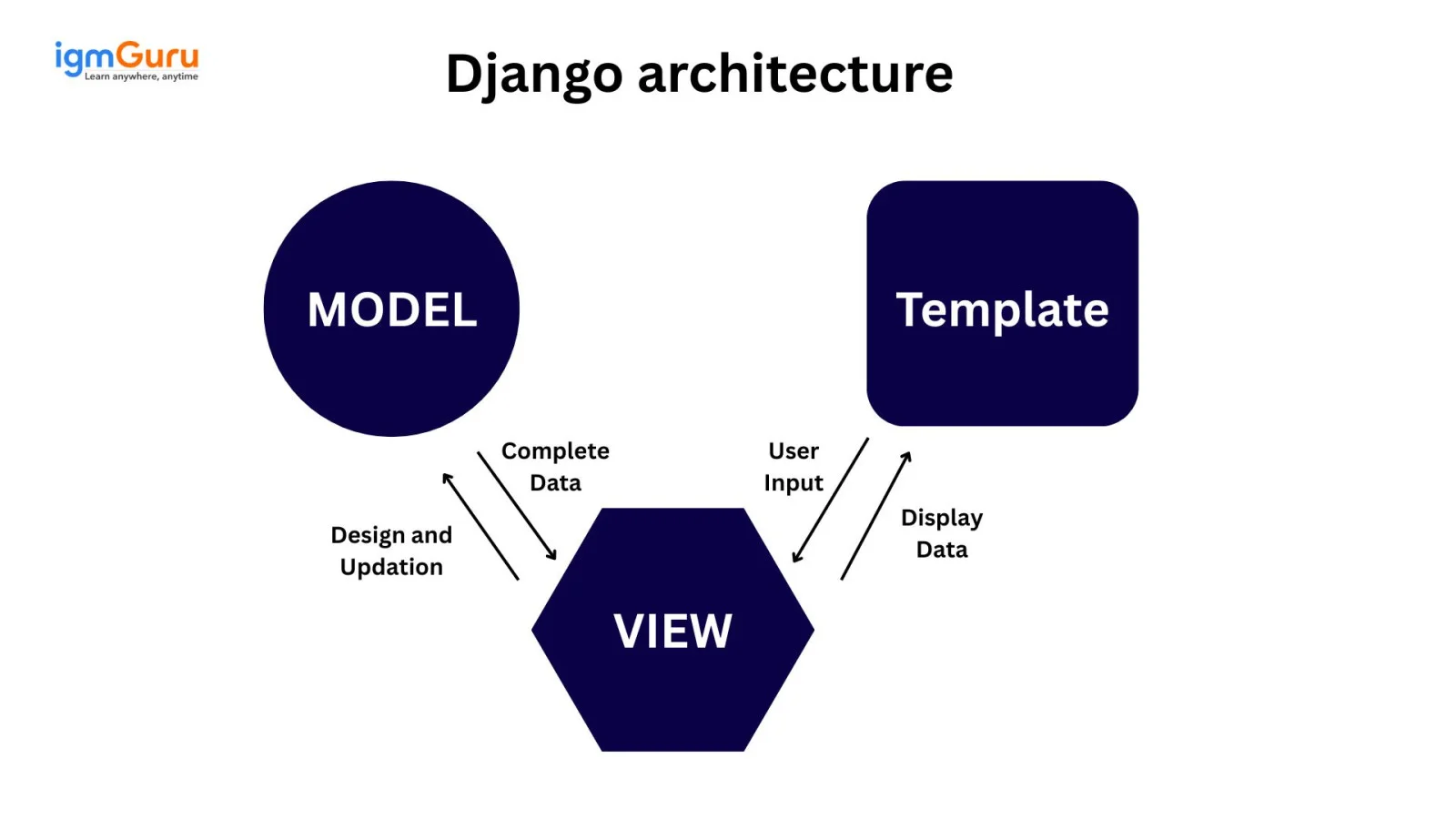
Its architecture is designed on the basis of Model-View-Template (MVT) pattern, which is a variation of the Model-View-Controller (MVC) pattern. The difference that snakes its architecture differs from MVC is management of its own conventions.
This means there is no need to manage the controller. It also has a presentation layer known as template, which is a HTML file mixed with DTL. This architecture divides an application into three interconnected components including model view and template as shown below.
There are three model inheritance styles in this open source web framework including:
It provides the following feature:
It requires to use the following command:
| django-admin startproject projectname |
It requires to use the following command:
| python manage.py startapp appname |
Related Article- Python Interview Questions
This section lists the most asked Django interview questions and answers for intermediate professionals. It will help you to get a senior post with a better salary.
Setting up a virtual environment in Django is important for various reasons. Including:
The admin interface is a powerful feature of this web framework that automatically generates a web-based interface for managing the data stored in its application's database. It is designed to be a quick and easy way for trusted users (site administrators) to perform common data management tasks.
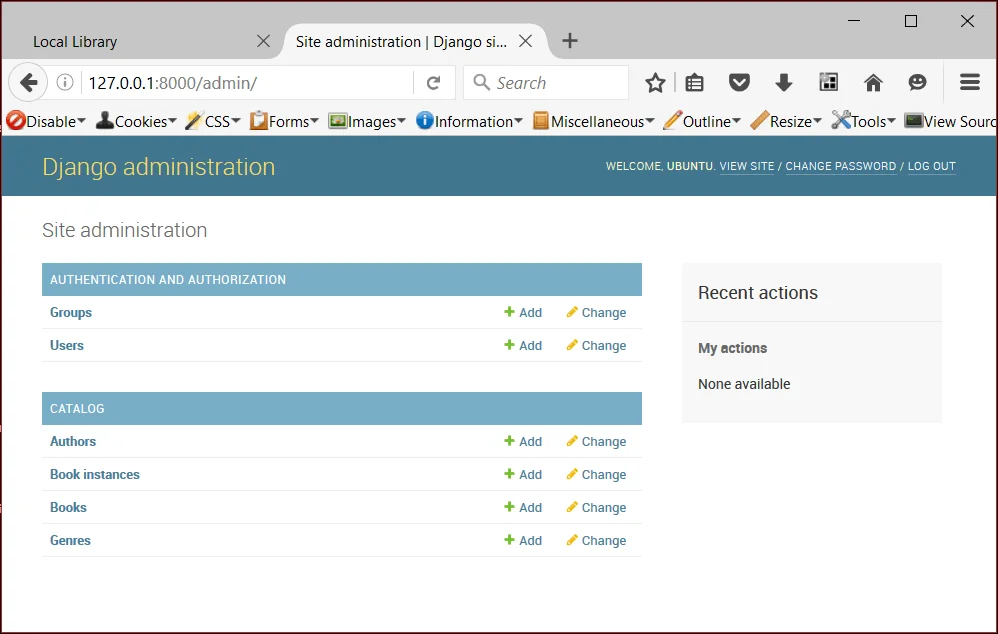
Image Source: Django admin interface
The settings.py file in Django is the central configuration hub for its project. It is used for many reasons including:
Here's a clear comparison between MVC and MVT design patterns:
| Aspect | Model-View-Controller | Model-View-Template |
| Used in | General web frameworks (e.g., Ruby on Rails, ASP.NET) | Django (Python Web Framework) |
| Model | Manages data and business logic | Same: Handles data and business logic |
| View | Displays data (UI), receives input | Responsible for rendering HTML using the template |
| Controller | Handles user input, updates model and view | Handled by Django itself (internally) |
| Template | Not part of MVC; UI handled via view | Replaces controller's output; renders dynamic HTML |
| Developer writes | Model, View, Controller | Model, View, Template |
| Responsibility split | Controller explicitly routes logic | Django's framework handles routing between view/template |
ORM (object relation model) is the key to interact with the database. It allows developers to include, customize, delete and query objects. It is done by using Python code, which eliminates the need of creating complicated SQL queries. This makes database management more efficient, secure and developer-friendly.
Middleware is used to provide a system of hooks into the request (response) processing cycle. This allows for global modification of its input or output. It is a lightweight and low-level plugin system that sits between the web server and the core Django application. Some of other benefits of using Middleware are:
The django.shortcuts.render function is one of the best ways to streamline the process of combining a template with a context dictionary and returning an HttpResponse object containing the rendered HTML. It simplifies common operations in Django views by encapsulating the steps of loading a template. This renders it with provided data and creates the HTTP response.
These tasks are done with the help of the following commands:
| ModelName.objects.all() |
| ModelName.objects.filter(field_name="term") |
Django signals are a built-in mechanism that allows different parts of an application to communicate and respond to specific events. It allows decoupled applications to get notified when certain events occur in the framework. They are used to perform actions automatically in response to events such as model saves, deletions, user logins, etc.
They operate on the principle of the Observer design pattern, where senders dispatch signals when certain actions occur and receivers listen for these signals and execute predefined functions in response.
| Signal | Description |
| pre_save | Sent before a model's save() method is called. |
| post_save | Sent after a model's save() method is called. |
| pre_delete | Sent before a model's delete() method is called. |
| post_delete | Sent after a model's delete() method is called. |
| m2m_changed | Sent when a many-to-many relationship is changed. |
| class_prepared | Sent when a model class is prepared (just after its creation). |
| request_started | Sent when Django starts to process an HTTP request. |
| request_finished | Sent when Django finishes processing an HTTP request. |
| got_request_exception | Sent when an exception is raised during request processing. |
| user_logged_in | Sent when a user logs in via the login() function. |
| user_logged_out | Sent when a user logs out via the logout() function. |
| user_login_failed | Sent when a login attempt fails. |
Django provides a robust caching framework that can improve application performance by storing frequently accessed data. This reduces the need for repeated computations or database queries. Various caching strategies and backends are available to suit different requirements.
Read Also- Python Tutorial
This section includes the most asked Django interview questions and answers for experienced professionals. These questions include the most robust and recent topics that will help you to get better job roles.
Permanent redirection involves issuing an HTTP 301 Permanent Redirect status code to a client. This signals to browsers and search engines that the requested URL has permanently moved to a new location. It is achieved by setting the permanent=True argument while using the redirect() shortcut function.
The use of permanent redirection depends on the situation. It is mostly used when a resource's location has permanently changed and one wants to ensure that both users and search engines are consistently directed to the new. Avoid their uses in temporary changes or when URL targets are likely to fluctuate.
Field class defines a specific type of data that can be stored in a model and subsequently in a database table column. Think of it as a descriptor that can manage how data is stored, retrieved and validated.
Here is a detailed comparison between OneToOneField and ForeignKey Field:
| Aspect | OneToOneField | ForeignKey |
| Relationship Type | One-to-One | One-to-Many |
| Database Constraint | Enforces unique relationship (1 record maps to 1 record) | Allows multiple records to relate to one record (many-to-one) |
| Use Case | Extend models (e.g., User and Profile) | Relate multiple items to a single parent (e.g., Post and Author) |
| Uniqueness | Always unique (like unique=True) | Not unique (can repeat same foreign key) |
| Reverse Access | Returns a single object | Returns a queryset of related objects |
| Example | Profile linked to User | Post linked to Author |
| Reverse Lookup | user.profile (single object) | author.post_set.all() (multiple objects) |
Customizing the admin interface of this framework is a common and powerful way to improve the user experience for site administrators. This web framework provides various ways to customize how models are displayed, searched, filtered and interacted with in the admin panel. The following are the most common ways one should use:
Q objects are powerful tools used by developers in creating flexible, readable and efficient database queries. It helps in managing OR, AND and NOT conditions easily. Here is an example of how it is done:
from django.db import models from django.db.models import Q >> objects = Models.objects.get( Q(tag__startswith='Human'), Q(category='Eyes') | Q(category='Nose') ) ```Query Executed SELECT * FROM Model WHERE tag LIKE 'Human%' AND (category='Eyes' OR category='Nose') ``` |
This python based framework can support various relational database management systems (RDBMS) including:
When we talk about web designing, data security becomes a primary concern. This web framework provides various robust features to secure data against various common threats. The features are listed below:
Serializer is another in-built component of this web framework that helps developers to transform objects into data types. These data types are easy to understand with javascript or front-end frameworks. It also enables deserialization once the incoming data is validated. This allows developers to transform parsed data into complicated types.
Both select_related and prefetch_related optimize database queries when dealing with related models. Their relationship based working is what makes them different from each other:
# Without select_related: One query for books, N queries for authors books = Book.objects.all() for book in books: print(book.author.name) # Hits DB for each book's author # With select_related: Single query with JOIN books = Book.objects.select_related('author') for book in books: print(book.author.name) |
# Without prefetch_related: One query for authors, N queries for books authors = Author.objects.all() for author in authors: print(author.books.all()) # Hits DB for each author's books # With prefetch_related: 2 queries total authors = Author.objects.prefetch_related('books') for author in authors: print(author.books.all()) |
The Django response lifecycle explains the sequence of events that occur when a web request (HttpRequest) is made to an application and a response is returned to the client. This HttpRequest contains metadata about the request. Let's understand the complete process step-by-step:
This section includes the most asked advanced Django interview questions and answers with real-world example. These are based on the latest topics and will help you to excel your next senior level interview.
Asynchronous views in Django 5.x are introduced via ASGI (Asynchronous Server Gateway Interface) support. It allows handling concurrent requests efficiently using Python’s async/await syntax. Define a view with the async def keyword and use an ASGI server like Uvicorn to define it.
Example:
from django.http import HttpResponse async def async_view(request): await asyncio.sleep(1) # Simulate async I/O return HttpResponse("Async response") |
Django integrates with GraphQL using libraries like Graphene-Django. It is defined by a schema with types and resolvers, mapping to Django models and exposing a single endpoint (e.g., /graphql).
Example:
import graphene from graphene_django import DjangoObjectType class UserType(DjangoObjectType): class Meta: model = User class Query(graphene.ObjectType): users = graphene.List(UserType) def resolve_users(self, info): return User.objects.all() schema = graphene.Schema(query=Query) |
Django Channels extends Django to handle asynchronous and real-time communication protocols like WebSockets. This replaces WSGI with ASGI. It uses consumers (async or sync) to process events like chat messages or live notifications.
Example:
from channels.consumer import SyncConsumer class ChatConsumer(SyncConsumer): def websocket_connect(self, event): self.send({"type": "websocket.accept"}) def websocket_receive(self, event): self.send({"type": "websocket.send", "text": event["text"]}) |
Optimizing Django for cloud-native deployments involves using ASGI servers (e.g., Uvicorn) for scalability, containerizing with Docker and configuring for Kubernetes or serverless platforms like AWS Lambda via Zappa. Key steps are:
1. Setting environment variables in settings.py for dynamic configurations.
2. Using managed databases (e.g., AWS RDS with PostgreSQL)
3. Integrating with cloud storage (e.g., S3) for static/media files.
Example Docker setup:
FROM python:3.11 COPY . /app WORKDIR /app RUN pip install -r requirements.txt CMD ["uvicorn", "project.asgi:application", "--host", "0.0.0.0"] |
Django integrates AI/ML models using libraries like TensorFlow or PyTorch, served via APIs or background tasks (e.g., Celery).
For example: A Django app can expose a REST endpoint to serve predictions from a pre-trained model:
from django.http import JsonResponse import tensorflow as tf model = tf.keras.models.load_model('model.h5') def predict_view(request): data = request.POST.get('input') prediction = model.predict([data]) return JsonResponse({'prediction': prediction.tolist()}) |
You start with a full dependency scan using pip-tools and pip-check. Spin up a staging clone of production, run python manage.py check --deploy, then test migrations with django-test-migrations. Squash safe ones, fix deprecations step-by-step, and verify third-party packages against the Django 5.x compatibility matrix. Roll out behind a feature flag, monitor error rates in Sentry, and only declare victory after 24 hours of green metrics.
Use async for I/O-bound work—external API calls, WebSockets via Channels, or streaming large responses. Skip it for CPU-heavy tasks or simple ORM reads. Remember: ORM queries need await with sync_to_async in mixed code. Profile with django-silk or locust to prove the gain. Watch out for connection leaks, timeout misconfigurations, and overusing async just to look modern.
Trigger your incident playbook. Assess CVE impact, then canary-deploy to 5% of traffic via Kubernetes. Run automated smoke tests on /healthz and critical flows. Watch error rate in Sentry, latency in Prometheus, and user behavior in PostHog. Green for 15 minutes? Roll forward in waves. Document in changelog. Schedule post-mortem—even if nothing broke.
Multi-stage Dockerfile: builder for assets, slim runtime for speed. Kubernetes manifests with liveness/readiness probes hitting /healthz (DB, Redis, external APIs). Horizontal Pod Autoscaler on CPU + custom request latency. Blue-green releases via Argo Rollouts. Secrets from AWS Secrets Manager. Structured JSON logs to CloudWatch.
I would first check monitoring tools like New Relic, Prometheus, or Django Debug Toolbar to identify whether the issue is related to database queries, API latency, caching, or server resources. Then I would inspect slow SQL queries, add indexing where needed, enable Redis caching, and optimize ORM queries using select_related or prefetch_related. If traffic is extremely high, I would scale the application horizontally using Kubernetes or load balancers.
I would begin by checking session configurations in settings.py, including session expiry time, secure cookies, and cache/session backends. Then I would verify whether multiple servers are sharing the same session store correctly. I would also inspect middleware, HTTPS settings, load balancer configuration, and browser cookie policies. Logging and monitoring session activity would help isolate the root cause.
I would avoid processing the file directly inside the request-response cycle. Instead, I would upload the file to cloud storage like AWS S3 and trigger a background task using Celery with Redis or RabbitMQ. The task would process the CSV in chunks to reduce memory usage. Users would receive progress updates through WebSockets or polling APIs.
I would implement rate limiting using django-ratelimit or API gateway throttling. CAPTCHA can be added after repeated failed attempts. I would also enable JWT expiration, IP blocking, login attempt monitoring, and two-factor authentication for sensitive accounts. Additionally, I would review logs continuously and configure alerts for suspicious traffic spikes.
I would first identify tightly coupled modules such as authentication, payments, notifications, or analytics. Then I would gradually extract independent services using REST APIs or gRPC while keeping the monolith stable. Shared authentication can be handled using JWT or OAuth2. Database separation, centralized logging, API gateways, and container orchestration with Kubernetes would also be planned carefully to avoid downtime during migration.
I would first profile the page using Django Debug Toolbar or Silk to inspect the SQL queries executed for a single request. If the same query is repeated multiple times, I would optimize the ORM using select_related() for ForeignKey and OneToOne relationships and prefetch_related() for ManyToMany or reverse relationships. If required, I would also reduce unnecessary queries using annotations, aggregation, caching, or pagination to improve response time.
I would immediately stop the deployment and assess whether the migration partially modified the database. If necessary, I would restore the latest database backup or roll back the deployment. After identifying the root cause, I would test the migration thoroughly in a staging environment before redeploying. For large schema changes, I would prefer backward-compatible migrations and to perform data migrations separately to minimize downtime.
I would never send emails directly from the request-response cycle. Instead, I would use Celery with Redis or RabbitMQ to execute email tasks asynchronously. Bulk emails would be processed in batches with retry mechanisms for failed deliveries. Monitoring tools would track queue health, while providers such as Amazon SES or SendGrid would handle reliable email delivery at scale.
I would enforce HTTPS across the application, encrypt sensitive data at rest, enable secure and HttpOnly cookies, rotate secret keys securely, and implement role-based access control. I would also review CSRF, XSS, and SQL injection protections, enable security headers, configure audit logging, and perform dependency vulnerability scans to ensure compliance with security best practices.
I would separate the business logic from presentation by exposing it through well-documented REST APIs using Django REST Framework. Authentication would use OAuth2 or JWT, while API versioning would maintain backward compatibility. I would also implement rate limiting, request validation, centralized logging, and OpenAPI documentation to ensure the APIs remain secure, maintainable, and easy for multiple clients to consume.
Q1. What is the core architectural pattern of Django's framework?
Q2. Which Django 5.x feature enhances asynchronous query support in 2025?
Q3. What is the primary function of Django's ORM?
Q4. Which component in Django handles URL routing?
Q5. What is a key benefit of Django 5.1's simplified template rendering in 2025?
Q6. Which Django REST Framework feature supports secure API authentication in 2025?
Q7. How does Django support cloud-native deployment in 2025?
Q8. Why use Django's admin interface?
Q9. Which Django 5.x feature improves form handling in 2025?
Q10. What is a benefit of using Django with PostgreSQL in 2025?
This article has provided a comprehensive list of most asked Django interview questions and answers along with the top MCQs. These are perfect for each level of individuals from freshers to intermediate and experienced professionals. Keep practices, explore additional resources, gain all the essential skills to build a successful career as a developer or software engineer.
Explore our trending articles-
The freshers are often asked basic interview questions. Employers always check their theoretical and soft skills as they often do not have real-time experience.
You should use the relevant resources and study material like tutorials, installation guides and interview questions. Further install it in your system, work on a real time project and gain hands-on experience.
It is used by the following framework:
Django is not harder than Python but it requires understanding of web development concepts. If you know Python basics, learning Django becomes much easier.
The main components of Django include Models (database structure), Views (business logic), Templates (user interface) and URLs (routing system). These components follow the MVT (Model-View-Template) architecture.
Couse Schedule
| Course Name | Batch Type | Details |
| Django Course | Every Weekday | View Details |
| Django Course | Every Weekend | View Details |