The upward movement in the popularity of artificial intelligence and deep learning has instigated the growth of TensorFlow. It's an open-source AI library employed by companies to enable data flow graphs for building models. Knowing about the basics of TensorFlow has become crucial to pursue a career in Artificial Intelligence. In this 2026 guide, I'll cover everything you need to know about TensorFlow- from its history and components to real-world use cases, advantages, and limitations.
Let's get started.
TensorFlow is an open-source machine learning framework developed by Google that helps developers, data scientists, etc., build AI models using data flow graphs.
TensorFlow is a widely used machine learning framework that processes data in the form of tensors- multi-dimensional arrays capable of handling large volumes of information efficiently. By representing data in multiple dimensions, tensors make it easier to manage complex datasets. TensorFlow operates on the key concept of data flow graphs, where computations are represented as interconnected nodes and edges, showing how data moves through the system.
Since the implementation method is in graphs and tables, expanding TensorFlow code across a group of GPU-equipped machines is pretty straightforward. It supports many programming languages, among which Python and JavaScript (JS) are the most popular ones. It also supports Swift, Go, C, Java, and C#.
TensorFlow's first public appearance was in 2015 and its first stable version came out in 2017. Created and maintained by Google, it has risen to become one of the leading frameworks for DL and ML projects globally. It encompasses a gigantic library for large-scale ML as well as numerical computation. Here is a brief history of TensorFlow's biggest milestones-
After discussing 'what is TensorFlow', another common question here- what is TensorFlow used for. This section answers this question and throws light on the varying nature of this platform.
This machine learning framework is used for image processing and video detection. One great example is the airplane manufacturing giant Airbus, which uses it for extracting and analyzing details from satellite images. This helps in delivering important real-time information to clients.
Businesses can use this platform for classifying text and determining the true intent of clients upon receiving calls.
It's another impeccable use of this platform. Kakao is one name that uses it for predicting the completion rate and speed of ride-hailing requests.
This machine learning framework is heavily used for generative modeling and deep transfer learning. It helps companies recognize complex and temporarily varying fraud patterns. Experience of legitimate customers is improved via expedited customer identification.
Twitter is known to have utilized this open-source framework for building its Ranked Timeline. This ensured that its users didn't miss any of the most important tweets even while following a plethora of users.
Related Article- Machine Learning Interview Questions
Another important question for now is- why is TensorFlow popular? Its popularity is a result of its unique and global uses. It has become a chosen platform among businesses of all kinds and sizes today.
There are plenty of components of TensorFlow that aid in the creation and execution of programs.
The term TensorFlow comes from its core structure- tTensor. All computations in this machine learning framework need tensors to execute a program. A tensor refers to an n-dimensional matrix or vector that may comprise all data types. Every tensor value carries the same data type with a known (or partially known) form. The shape of the input data defines the dimensionality of the matrix. It can be derived from either the input data or even the outcome of a process. All methods or functions are carried out in a graph that is defined by utilizing the TensorFlow library. A graph refers to a sequence of functions carried out consecutively. Every single operation that's represented in a graph is called an op node.
A graph refers to an important component of this platform. It helps the graphical representation of all the programmed processes. The graph framework is utilized for representing complex AI or ML processes. These also aid the user in collecting and describing the sequence of computations that the model intends to perform. The top advantages of using graphs are-
When developing complex Deep Learning models, they comprise plenty of complicated processes with the input data that's stored in tensors. The flow of execution is defined to correctly perform the computations while using the data in tensors. A dataflow graph is used that aids in visualizing the flow of data. Dataflow graphs comprise edges and nodes.
TensorFlow has become a well-known platform in the world of machine learning, generating rivalry and excitement among similar systems at the same time. It simplifies the machine and deep learning calculations, yet makes some other aspects a bit complex. Let's examine a few pros and cons of TensorFlow.
TensorFlow offers many advantages and some of them are given below:
This platform operates on an open-source basis, meaning its source code is freely accessible to everyone. This accessibility allows users from all over the world to use it and begin constructing various systems based on it. Consider it as a digital playground equipped with all the foundational tools you would need to bring your creations to life.
TensorFlow works well with Keras, letting people use Keras to write certain parts of their code in a simpler way. Keras gives TensorFlow some features that are specific to different systems. These features include things like setting up pipelines, using estimators, and running code right away with eager execution.
TensorFlow offers a more intuitive method for data visualization through its graphical structure. Instead of sifting through lines of code, you can see a visual representation of your data flow.
One particularly useful tool is TensorBoard. It simplifies the debugging process for individual nodes in your neural network. Instead of tracing through the entire code base, TensorBoard lets you examine specific areas of concern. This can help you pinpoint problems and resolve issues more quickly.
Deep learning relies on TensorFlow during its development phase. This is because it provides a way to create neural networks through the use of graphs. These graphs show operations as different nodes, which makes the whole process easier to understand and manage.
This system is built to work well with quite a few computer languages. You can use it with C++, JavaScript, Python, C#, Ruby, and Swift. Because it supports so many options, people can choose the language they know best. This makes it easier for them to use the system.
Here are some of the disadvantages as given below:
TensorFlow is a tool that gets updated often, about every couple of months or so. Because it changes so frequently, keeping it up-to-date and working smoothly with your current setup can be a bit of a hassle for users.
Google's TensorFlow system has a special chip called a Tensor Processing Unit, or TPU. The way these TPUs are built, they are good at doing one thing really well: running a model that has already been created. TPUs are great for using a model after it's trained. They're not so great at doing the actual training of the model.
TensorFlow, while a well-known name in machine learning, has some drawbacks when compared to other options. One area where it lags behind is speed. Certain other frameworks can simply perform computations and model training faster than TensorFlow.
TensorFlow, a well-known tool for machine learning, can be a bit tricky when it comes to certain terms. Sometimes, it uses different functions that sound alike but work in slightly different ways. This can be confusing, especially when you're trying to remember which one to use.
TensorFlow is built to work really well with NVIDIA GPUs, and that is usually the go-to setup for most people doing serious GPU-accelerated work. While there are other options out there, TensorFlow's support for them is not as fleshed out or as actively maintained as the NVIDIA + Python setup.
TensorFlow lets people build dataflow graphs. Think of these as structures that show how data moves through a network of processing points. Each point in the graph does a math operation, and the lines connecting the points represent tensors, which are multi-layered arrays of data.
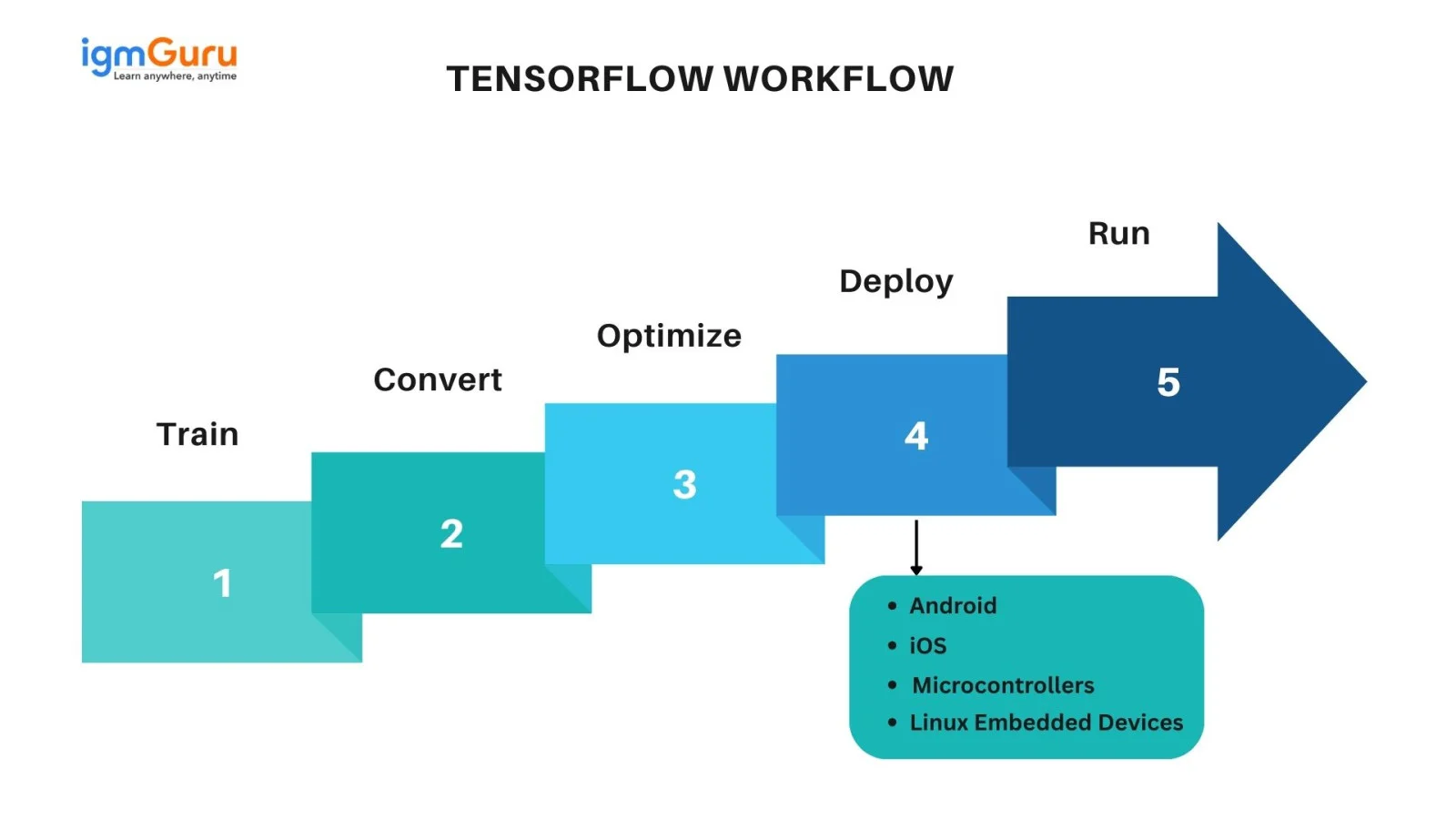
What's neat is that TensorFlow apps can run on almost anything you have around. This includes your computer, a cloud setup, iPhones and Android phones, CPUs, and GPUs. If you're using Google's cloud, you can use Google's Tensor Processing Unit (TPU) hardware.
This can make things even faster. But the models you create with TensorFlow can be put on pretty much any machine where you want to use them to make predictions. TensorFlow's structure can be broken down into three major parts:
The name TensorFlow comes from how it handles information. It takes inputs in the form of tensors, which are basically multi-dimensional arrays. You can create a diagram that looks like a flowchart, which shows the steps you want to take with the input.
The input goes in one side, goes through a bunch of actions, and comes out the other side as output. So, it's called TensorFlow because a tensor goes in (flows through processes), and something comes out.
Once you have a trained model, you can use it to provide predictions. This can be done with REST or gRPC APIs in a Docker container. For bigger, heavy-duty situations, you can use Kubernetes. Here are the main things that make TensorFlow work the way it does:
TensorFlow is built on a graph-based system. The graph gathers all the calculations done during training. Graphs have a few advantages. It was designed to run on multiple CPUs or GPUs, as well as mobile operating systems. Also, graphs can be moved around, so you can save calculations for later. You can save a graph and run it when you need it.
The calculations in the graph are done by linking tensors. Tensors have a point and an edge. The point does the math and makes output endpoints. The edges show how the points are connected.
TensorFlow gets its name from tensors, which are very important. All calculations in TensorFlow use tensors. Tensors are vectors or matrices with many dimensions that represent data. Each piece of data in a tensor is the same type and has a shape that is known (or partly known). The shape is the dimension of the matrices or array.
A tensor can come from raw data or be the result of a calculation. All actions in TensorFlow happen inside a graph. The grid is a list of calculations that happen in order. Each action is called an op node and is linked to others.
The graph displays the actions and how the points connect. However, the values aren't displayed. The edge of the nodes is the tensor, which sends data to the operation.
As mentioned earlier, TensorFlow takes input in the form of tensors, which are multi-dimensional arrays or matrices. This input goes through a series of steps before becoming output. For example, you might feed it a bunch of numbers representing the bits of an image, and it outputs text like- This is a dog.
TensorFlow has a tool called TensorBoard that lets you see what's happening in your graph. It's a web page where you can check its settings, node connections, and so on. To use TensorBoard, you have to mark the graphs with the settings you want to look at, like the loss value. Then, you have to make each summary.
Other important parts that help TensorFlow do what it does are:
TensorFlow and PyTorch are the two most popular deep learning frameworks, each offering unique strengths for building and training AI models. Here's a quick comparison between TensorFlow and PyTorch:
| Feature | TensorFlow | PyTorch |
| Developer | Meta (Facebook) | |
| Ease of Use | Moderate | Easy |
| Performance | High with TPU | High with GPU |
| Best For | Production | Research & Prototyping |
Read Also- TensorFlow Tutorial
Let's look at a simple yet real-world example of how TensorFlow works behind the scenes- predicting house prices based on size.
Let's say you're building a system that predicts the price of a house based on its size (in square feet). You have past data showing that price increases roughly linearly with size.
| Size (Square Feet) | Price (in $1000s) |
| 1000 | 150 |
| 1500 | 200 |
| 1800 | 230 |
| 2400 | 300 |
Your goal: Train a model that learns this relationship and predicts the price of a new house.
| import tensorflow as tf |
# Input (size in square feet) X = tf.constant([1000, 1500, 1800, 2400], dtype=tf.float32) # Output (price in thousands) Y = tf.constant([150, 200, 230, 300], dtype=tf.float32) |
Here, both X and Y are tensors - the fundamental data units that TensorFlow uses for computation.
We'll define variables for the slope (W) and intercept (b), which TensorFlow will adjust during training.
w= tf.Variable(0.1) b= tf.Variable(0.1) |
def model(x) : return W * x + b |
This defines a simple linear model that predicts price = (W × size) + b.
Step 5: Define Loss Function
The loss function measures how far off the predictions are from actual values.
def loss_fn(y_pred, y_true): return tf.reduce_mean(tf.square(y_pred - y_true)) |
optimizer = tf.keras.optimizers.SGD(learning_rate=0.000001) for epoch in range(1000): with tf.GradientTape() as tape: y_pred = model(X) loss = loss_fn(y_pred, Y) gradients = tape.gradient(loss, [W, b]) optimizer.apply_gradients(zip(gradients, [W, b])) print(f"Trained weight (W): {W.numpy():.2f}") print(f"Trained bias (b): {b.numpy():.2f}") |
Here's what's happening:
This mimics how real-world neural networks learn patterns in data.
new_house_size = tf.constant(2000.0) predicted_price = model(new_house_size) print(f"Predicted price for a 2000 sq ft house: ${predicted_price.numpy():.2f}k") |
Output:
Trained weight (W): 0.12 Trained bias (b): 25.00 Predicted price for a 2000 sq ft house: $265.00k |
Let’s explore some of the most impactful and practical use cases of TensorFlow across industries.
TensorFlow is widely used in image recognition systems, where machines learn to identify and categorize objects within images. This technology is essential in areas like healthcare, security, and autonomous vehicles.
Real-World Example:
Beyond static images, TensorFlow excels in analyzing videos - detecting moving objects, identifying activities, and even tracking motion over time.
Real-World Example:
TensorFlow plays a major role in voice recognition and speech-to-text conversion technologies - powering virtual assistants, chatbots, and transcription tools.
Real-World Example:
TensorFlow powers recommendation engines that suggest products, movies, or content based on user behavior. This is one of the most common commercial applications of machine learning today.
Real-World Example:
TensorFlow is one of the most widely used deep learning frameworks in 2026, competing closely with PyTorch for dominance in AI research. It encompasses various tools and libraries in Python and Java. It is crafted with the purpose of training machine learning as well as deep learning models on the data. This blog has explained 'what is TensorFlow', along with its uses, components, and reasons for popularity.
Explore These Trending Articles:
This machine learning platform refers to a framework for defining and running computations, including tensors. Tensor, on the contrary, is a generalization of matrices and vectors to exceptionally higher dimensions.
It can simply be defined as an open-source platform for Machine Learning (ML), offering tools for both research and production environments.
TensorFlow can be labeled as both a framework and a library.
It's needed to implement best practices around model tracking, model retraining, data automation and performance monitoring.
Course Schedule
| Course Name | Batch Type | Details |
| TensorFlow Training | Every Weekday | View Details |
| TensorFlow Training | Every Weekend | View Details |