Over the years TypeScript has transitioned from a specialized form of JavaScript into one of the primary languages that is used today to develop web applications. During my professional time developing web apps, I have noticed that the use of strong typing and maintainability can greatly reduce the number of bugs in your code as well as increase the overall quality of communication between multiple teams working on the same project.
As I have worked through job postings for developer positions, TypeScript is being listed as a primary requirement, rather than an optional series of skills.
In this blog, I will provide you with some of the most commonly asked TypeScript interview questions that are suitable for all levels, whether you are a fresher or an experienced professional. I have also given some code examples as it becomes easier for them to connect theory with real usage. Let’s begin!
Following are some TypeScript Interview Questions for Freshers that are asked to candidates to check how strong their basic knowledge is:
TypeScript is a superset of JavaScript created by Microsoft. It adds static typing, interfaces and better tooling to JavaScript. TypeScript code is compiled into normal JavaScript before running in a browser or Node.js. This helps catch errors during development and improves code readability and maintainability.
For example:
|
TypeScript includes several basic data types such as string, number, boolean, null, undefined, any, void, arrays and tuples. These types define the kind of data a variable can store. Using these types improves code readability and helps prevent errors during development.
For example:
|
Type inference means TypeScript automatically determines the type of a variable based on the value assigned to it. Developers do not always need to specify the type manually. This feature makes coding faster while still maintaining type safety and reducing mistakes.
Type annotations are used to explicitly define the type of a variable, function parameter or return value. They help developers clearly specify what type of data should be used, which makes the code easier to understand and reduces the chances of errors.
Any type allows a variable to hold any kind of value, which disables TypeScript’s type checking. It should be avoided because it removes type safety and may lead to unexpected errors in the program. It should only be used when the type of data is unknown.
An interface in TypeScript is used to define the structure or shape of an object. It specifies the properties and their types that an object should have. Interfaces help ensure consistency in objects and make code more organized and easier to maintain.
In TypeScript, both interfaces and types are used to describe how data should look, but they differ in how flexible they are and how they are used.
| Parameters | Interface | Type |
| Purpose | Used mainly to define the structure of objects. | Can define objects, primitives, unions, tuples and more. |
| Flexibility | Less flexible as it is mostly used for object shapes. | More flexible because it can represent many kinds of types. |
| Declaration Merging | Supports declaration merging (multiple interfaces with same name combine). | Does not support declaration merging |
| Extending | Can extend other interfaces using extends. | Can extend using intersection (&) types. |
| Common Usage | Mostly used for OOP and APIs. | Used when you need complex or advanced type combinations. |
Union types allow a variable to store more than one possible type of value. Rather than restricting a variable to a single type, union types provide flexibility while still maintaining type checking in TypeScript.
A tuple is a special type of array where the number of elements and their data types are fixed. Each position in the tuple has a specific type. Tuples are useful when storing multiple related values with different data types.
Optional properties are properties in an interface that are not required when creating an object. They are marked using a question mark. This allows objects to be created even if some properties are missing, making interfaces more flexible.
Read Also: Java Tutorial for Beginners
Following are some TypeScript questions for intermediate-level candidates and these questions are asked to test what you learned in your previous job role:
Generics allow developers to create reusable components that can work with different data types while maintaining type safety. Instead of using a fixed type, a type parameter is passed when the function, class or interface is used.
For example:
|

Code Explanation:
Type guards are techniques used to narrow down the type of a variable within a conditional block. They help TypeScript identify the correct type during runtime checks using conditions such as typeof, instanceof or custom checking functions.
keyof is a TypeScript operator that creates a union type of all property names of a given object type. It is commonly used with generics to safely access object properties.
For example:
|
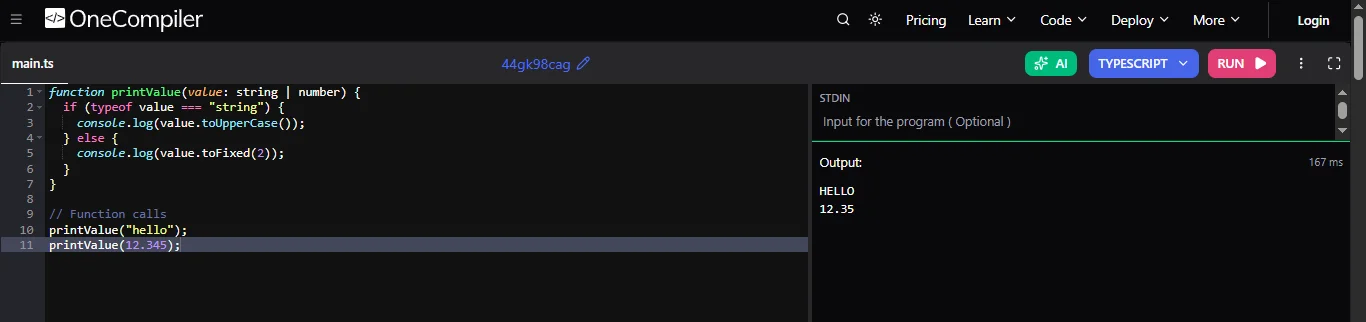
Code Explanation:
Utility types are built-in generic types that help transform existing types. They allow developers to easily modify properties, such as making them optional, required or read only, without rewriting the entire type.
Partial <T>
For example:
|
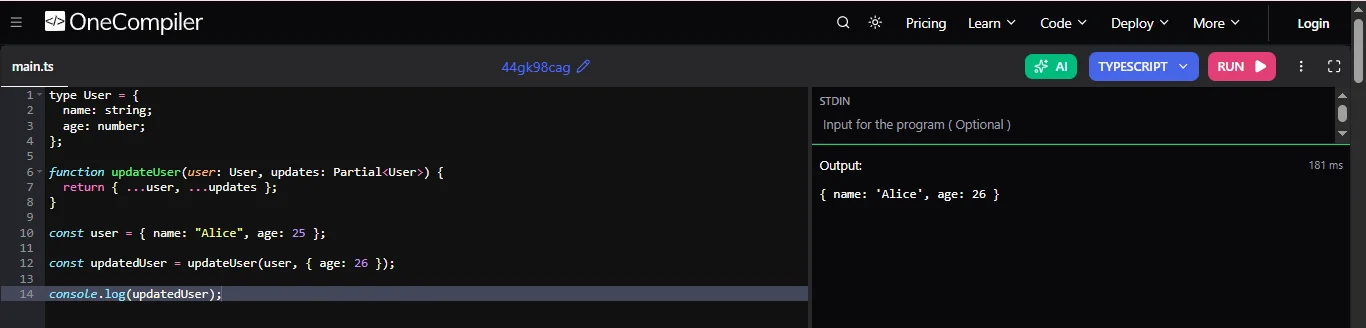
Code explanation:
Any allows a variable to hold any type and disables type checking. Unknown is safer because TypeScript requires the type to be checked before performing operations on the variable.
Here is a brief differentiation of them:
| Parameters | any | unknown |
| Type Safety | Disables TypeScript type checking. You can perform any operation without errors. | Type safe TypeScript requires you to check the type before using it. |
| Purpose | Used when you don't want type checking. | Used when you don’t know the type yet but want safety. |
| Usage | Can be used directly without validation. | Must be type-checked or type-casted before using. |
| Risk Level | Risky because it may cause runtime errors. | Safer because TypeScript forces validation. |
| Assignment | Can be assigned to any other type without restriction. | Can only be assigned to unknown or any unless you narrow the type. |
For example:
|

Code explanation:
Mapped types allow developers to create new types by transforming the properties of an existing type. They iterate over each property in a type and apply changes such as making them readonly or optional.
typeof is used to get the type of a variable or object and reuse that type elsewhere in the code. It helps maintain consistency between values and their types.
Namespaces are used to organize code into logical groups within the same file. Modules organize code across multiple files using import and export, making the code more modular and maintainable.
Namespace Example:
|

Code explanation:
Decorators are special functions used to add metadata or modify the behavior of classes, methods, properties or parameters. They are commonly used in frameworks like Angular for adding functionality.
Read Also: Java Interview Questions and Answers
The following are the interview questions for TypeScript that are asked to those candidates who have 4+ years of work experience, to make sure that they can handle complex tasks easily:
Conditional types allow you to define types based on a condition, similar to ternary operators in JavaScript. They are used in dynamic type transformation based on input type.
They follow a certain pattern and that is:
|
infer is used within conditional types to extract and infer a type from another type. It provides capturing parts of complex types, such as return types or array elements, dynamically.
For example:
|
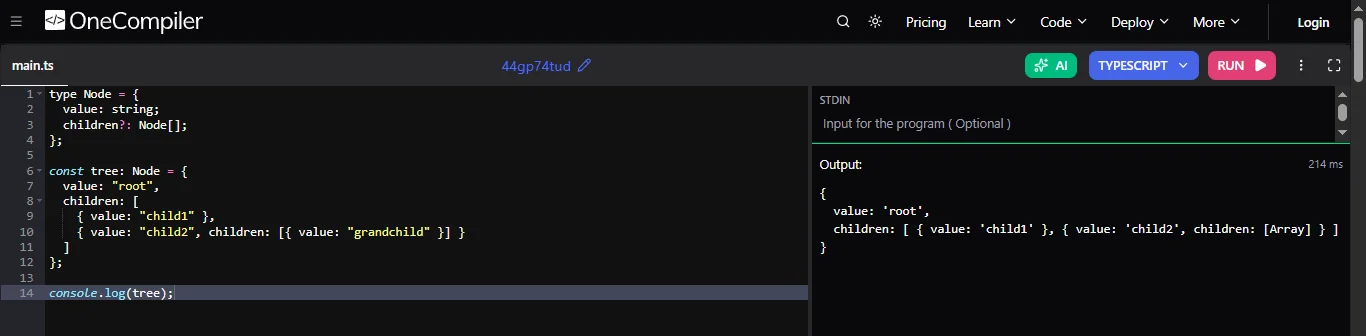
Code explanation:
Recursive types are types that refer to themselves. They are useful for defining data structures that are nested, like trees or JSON objects.
For example:
|
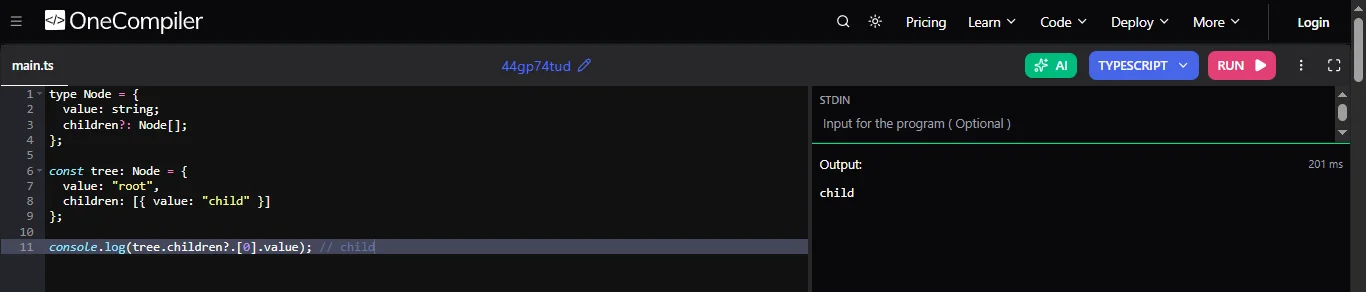
Code Explanation:
Template literal types let you create string types using a pattern, just like JavaScript template strings. You can combine strings and even modify them using built in helpers like Capitalize. This is useful for creating consistent naming patterns like event names or API routes and helps avoid mistakes in string values.
For example:
|

Code explanation:
Module augmentation is a way to extend existing modules or libraries without changing their original code. You can add new properties or methods to already defined types. This is especially useful when working with third party libraries where you want to customize or enhance their type definitions safely.
Discriminated unions are a way to handle multiple related types safely. Each type has a common property, like type or kind, which helps TypeScript identify which type is being used. Based on that value, TypeScript can automatically understand the correct structure and give better type checking.
For example:
|
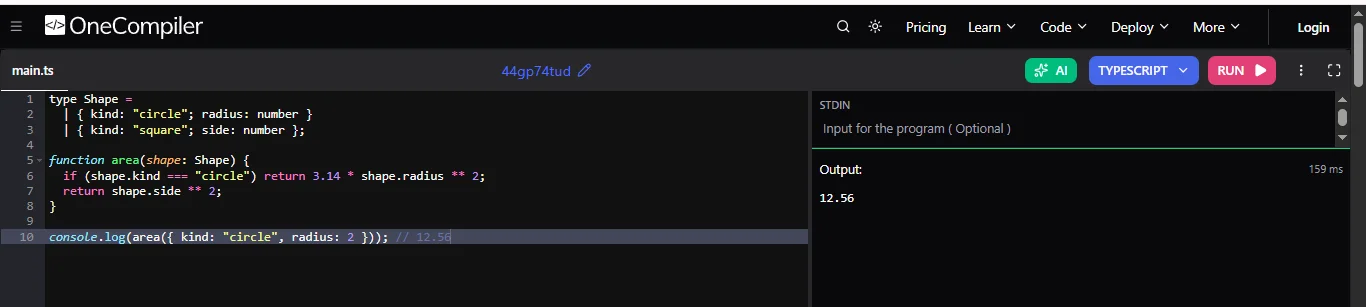
Code explanation:
Type erasure means that TypeScript removes all type information when converting code to JavaScript. Types are only used during development for checking errors. After compilation, only plain JavaScript remains. This ensures there is no extra runtime cost while still getting the benefits of type safety during coding.
TypeScript helps manage large applications by providing strong typing, modules and reusable components. It makes code more organized and easier to maintain. Features like interfaces, generics and strict settings help catch errors early. It also supports splitting projects into smaller parts which makes the development faster and more scalable.
For example:
|
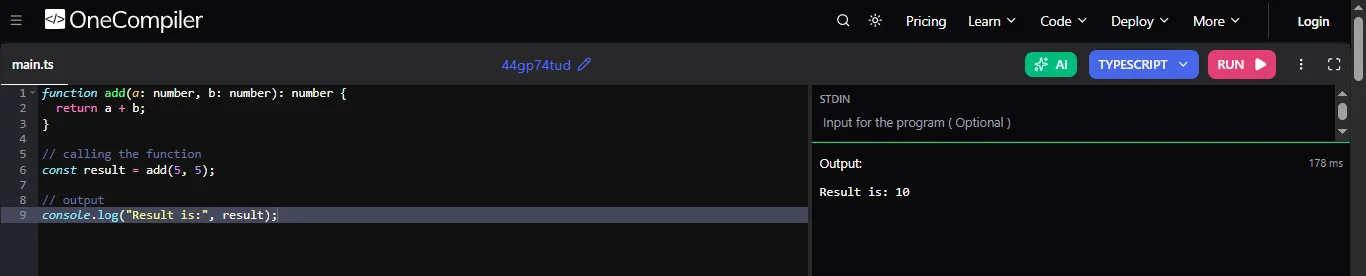
Code explanation:
You can create reusable utility types using generics, which work with different types instead of one fixed type. This helps avoid repeating code. By combining generics with mapped and conditional types, you can build flexible tools like making properties optional or read only.
To ensure type safety, you should use strict TypeScript settings and avoid using any. Define clear interfaces and use generics where needed. Type guards and unions help handle different cases safely. Follow good coding practices, use linters and write tests. This reduces bugs and keeps the code reliable and easy to maintain.
For example:
|
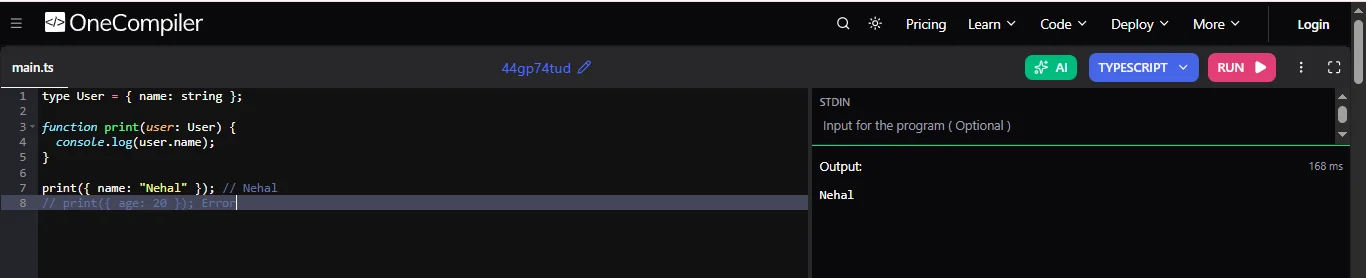
Code explanation:
If you are interviewing for senior, lead or architect-level TypeScript roles, you should be comfortable with advanced type manipulation, performance optimization and designing scalable applications. The following questions test your understanding of TypeScript's most powerful features and how they are used in large production systems.
Higher-order generic types are generic types that accept other generic types or produce new generic types. They allow developers to build reusable type utilities that work across multiple data structures while maintaining complete type safety. These types are commonly used in libraries, frameworks, and large enterprise applications to reduce code duplication and create flexible APIs.
Recursive conditional types repeatedly evaluate themselves until a condition is satisfied. They are useful for manipulating deeply nested objects, flattening arrays, extracting nested property types or transforming complex JSON structures. While they are powerful, excessive recursion can increase compile time and hit TypeScript's recursion limits, so they should be designed carefully.
Phantom types are types that exist only during compilation and have no runtime representation. They are commonly used to distinguish values that share the same underlying type but represent different concepts. For example, both UserId and ProductId may be strings, but phantom types prevent developers from accidentally using one in place of the other, improving compile-time safety.
For large TypeScript projects, I would enable project references to split the codebase into smaller compilation units. I would also use incremental compilation, avoid unnecessary deep conditional types, enable strict compiler settings, reduce the use of any, and leverage modern build tools such as SWC, Turbopack or Rspack. Regularly upgrading TypeScript and optimizing tsconfig settings also helps reduce build times and improve developer productivity.
When designing a type-safe SDK, I would create well-defined interfaces, generic request and response models, reusable utility types and meaningful error types. Public APIs should expose only stable abstractions while hiding implementation details. Strong documentation, autocomplete support, strict type checking, backward compatibility and comprehensive testing ensure that developers can integrate the SDK confidently with minimal runtime errors.
Type-level programming is the practice of performing computations using TypeScript's type system instead of runtime JavaScript code. It combines conditional types, mapped types, template literal types and generics to build reusable type utilities that validate data structures during compilation. This approach is widely used in enterprise libraries and frameworks to improve type safety while eliminating many runtime errors.
Variance determines how generic types behave when subtype relationships exist between their type parameters. Understanding covariance, contravariance and invariance helps developers design safer generic APIs and prevents invalid type assignments. Although TypeScript infers variance in most cases, knowing how it works is essential when building complex libraries and reusable frameworks.
The TypeScript Compiler API allows developers to parse source files, inspect abstract syntax trees (ASTs), analyze types and generate or transform code programmatically. It is commonly used to build custom linters, documentation generators, code migration tools, static analysis utilities and IDE extensions. This makes it an important tool for organizations that automate large-scale development workflows.
Custom transformers modify TypeScript's Abstract Syntax Tree during compilation before JavaScript is generated. They can automatically rewrite code, inject metadata, optimize output or implement framework-specific behavior. Because transformers increase build complexity and require deeper compiler knowledge, they are typically used only in advanced tooling, frameworks and enterprise build systems.
A scalable shared type system should centralize common models in reusable packages while keeping domain-specific types isolated. Versioning strategies, project references, strict compiler settings and automated compatibility testing help prevent breaking changes across services. This approach ensures consistency, improves developer productivity and enables multiple teams to evolve distributed applications with confidence.
Your interviewer will ask you these questions just to test how you think and apply concepts in real situations, not just whether you remember syntax. Here are some of them:
I would create a custom method decorator in TypeScript that wraps the original function. Inside the decorator, I would capture the method name, arguments and execution time. Before the method runs, I would log that the method is being called and after execution, I would log the result or completion message.
This way, I don’t need to add logging manually in every service method. I can simply apply the decorator wherever needed. This approach keeps my code clean, avoids repetition and makes logging reusable across different services in my NestJS application.
I would use the satisfies operator when defining my configuration object. This helps me ensure that the object matches the required interface, so all necessary properties are present and correctly typed.
This means I get strict type checking and better auto-completion in my code. It also helps catch errors early if I use incorrect values. Overall, it gives me both validation and precision without losing the benefits of literal types.
I would use const type parameters to tell TypeScript to keep the exact values of the array instead of converting them into a general type. When I give TypeScript an array of specific text values, it remembers each exact value instead of seeing them all as just general “strings.” This helps maintain strong type safety and allows me to use those exact values later in my code.
It is especially useful when I want precise control over allowed values. This approach improves accuracy, prevents unexpected errors and makes my utility function more reliable and predictable.
I would use the using declaration to manage resources like file handles or database connections. TypeScript always makes sure that once the resource goes out of scope, it is automatically cleaned up. This means I don’t have to manually close connections every time.
Even if an error happens, the cleanup will still run properly. This reduces the risk of memory leaks and improves application stability. It also makes my code cleaner and easier to maintain because I don’t need to write extra cleanup logic everywhere.
I would use variadic tuple types to allow my function to accept any number of parameters while enforcing that the last value must always be a number. This means I can take flexible input, like multiple values of different types, but TypeScript will still ensure that a numeric value is always present at the end.
This gives me both flexibility and type safety. It helps prevent mistakes where the required number might be missing. Using this approach makes my function more structured while still being flexible for different use cases.
I would use conditional types to check the input type and decide the return type based on that condition. For example, if the input type is a string, the return type would be true; otherwise, it would be false. This allows my function to behave differently depending on the type of data it receives.
It improves type safety and makes my function smarter because TypeScript can predict the output type. This is very useful when building reusable libraries where behavior depends on input types. It helps catch errors early and improves developer experience.
I would use mapped types to loop through all properties of the object and mark each one as read-only. This means once the object is created, no one can modify its values. It is especially useful when sending data to the frontend, where I want to protect the original data from accidental changes.
This approach ensures data integrity and makes my application more predictable. It also helps other developers understand that the object should not be modified. Overall, it improves code safety and enforces better practices.
I would use tools like tRPC, Zod or GraphQL Codegen to ensure that the same types are shared between frontend and backend. These tools help define API contracts in one place and automatically use them everywhere. This means if I change something in the backend, the frontend will immediately reflect that change.
It reduces bugs caused by mismatched data and improves developer productivity. Zod helps with runtime validation, while tRPC and GraphQL Codegen ensure strong type safety. Overall, these tools make my application more reliable and easier to maintain.
I would switch to tools like SWC, Rspack or Turbopack because they are designed for high performance. These tools are written in faster languages like Rust, which makes them much quicker than Babel. They can process large codebases efficiently and reduce build times significantly.
This improves the developer experience because I don’t have to wait long for builds or reloads. It also helps in faster testing and deployment. Overall, these modern tools make development smoother and more efficient compared to traditional setups.
I would use platforms like Cloudflare Workers or Vercel Edge to run my server logic closer to users in different regions. This reduces the distance between the user and the server, which makes responses much faster. Using TypeScript ensures type safety while building these edge functions.
It also improves scalability because requests are handled at multiple locations instead of a single server. This approach reduces latency, improves performance and gives a better user experience globally. It is especially useful for applications with users from different parts of the world.
I would use a runtime validation library such as Zod to validate the API response before using it in the application. TypeScript checks types during development, but it cannot validate data received from an external API at runtime. I would define a schema for the expected response and parse the API data against that schema.
If the response does not match the expected structure, I would handle the validation error instead of allowing invalid data to flow through the application. This approach provides both compile-time type safety and runtime validation, making the application more reliable when working with external or untrusted data.
This article has covered a list of TypeScript interview questions with detailed answers. When you start exploring them, you get ready to tackle your next interview with full confidence. Keep practicing and exploring new trending technologies to stay updated with the real time knowledge.
To understand problem solving skills and how features like types, interfaces and generics are used to write clean and maintainable code.
Mostly scenario based questions about type safety, API handling, error management and application structure to test practical knowledge.
You should start by understanding main concepts, practicing real examples and explaining ideas clearly instead of memorizing definitions.
Explore Our Trending Articles-