Imagine building websites, mobile apps, desktop tools, games, and cloud systems using just one unified platform. That’s the power of .NET. It gives developers a flexible, fast, and reliable way to create applications that run almost anywhere, from Windows and Mac to Linux, or even inside the cloud.
Are you aware of this technology? This .NET cheat sheet will provide everything you need to know to get started with this technology. This beginner-friendly guide is also important for experienced professionals who want a quick revision of each concept. Let’s begin!
What is .NET?
.NET is a modern, open-source developer platform backed by Microsoft that allows developers to build web, desktop, mobile, cloud, and AI applications using languages like C#, F#, and VB.NET. Multiple programming languages,x including C#, F#, and VB.NET are supported on this platform. It also offers built-in libraries for networking, database handling, UI, security, API development, and more. Because of its speed, stability, and cross-platform nature, it has become one of the most widely used development platforms in the world.
You can use it to build:
- Web applications
- Mobile apps
- Desktop software
- APIs & microservices
- Cloud-native systems
- AI and machine learning applications
- IoT applications
- Game development (Unity)
Here are the running versions of .NET platform:
| Version | Type | Support |
| .NET 8 | LTS | Supported until 2026 |
| .NET 9 | Current Release | Short-term support |
| .NET 10 | Upcoming | Expected 2025 |
.NET Architecture & Components
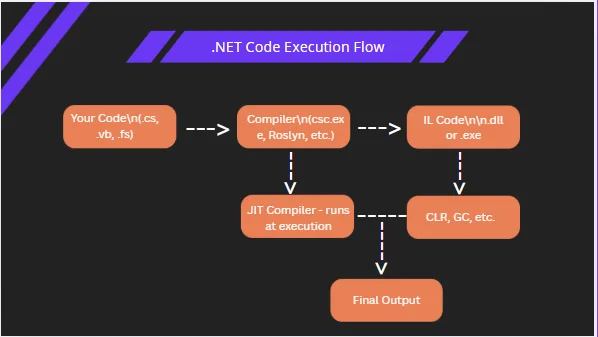
.NET runs on a well-structured execution environment that compiles your C# code into machine-level instructions. It contains essential building blocks that handle memory, security, execution flow, and code compilation behind the scenes. This helps developers focus more on writing logic rather than managing hardware-level complexities.
Key Components of .NET Architecture
| Component | Description |
| CLR (Common Language Runtime) | Executes .NET applications, manages memory, and handles garbage collection. |
| BCL (Base Class Library) | Pre-built classes for file handling, networking, database access, collections, math, and more. |
| .NET Runtime | Core execution environment that includes CLR, JIT compiler, and garbage collection services. |
| JIT Compiler (Just-In-Time) | Converts Intermediate Language (IL) code into machine code at runtime. |
| CTS (Common Type System) | Ensures data types are consistent across languages like C#, F#, and VB.NET. |
| Assemblies | Output files (.exe or .dll) that contain IL code, metadata, and resources after compilation. |
Imagine you write a small C# program. The code first gets compiled into IL code, then the JIT compiler converts it to machine code at runtime, and the CLR executes it by allocating memory, handling exceptions, and running the output smoothly.
To start building applications with .NET, you need the .NET SDK. It includes the compiler, runtime, libraries, and command-line tools required to write and run C# applications. The installation process is simple and then you can create projects using either an IDE or the terminal. Here are the steps to download it:
- Download and install the latest .NET SDK from the official Microsoft website.
- Choose a code editor — Visual Studio is great for beginners.
- After installation, open the terminal/command prompt and run the version command below.
dotnet --version // Confirms .NET is ready to use
|
You can work with .NET using Visual Studio, Visual Studio Code (with the C# Dev Kit extension), or JetBrains Rider. Visual Studio is feature-rich and beginner-friendly, while VS Code is lightweight and works well for cross-platform development. The .NET CLI is also useful for quickly creating projects, restoring packages, building solutions, and running applications.
C# Syntax & Program Structure
C# is one of the most used programming languages in .NET development. Its syntax is clean, readable, and similar to languages like Java or C++. A C# program is made of namespaces, classes, methods, and statements that run inside the Main() method. This is where the execution begins.
A typical C# program includes using statements for importing libraries, followed by a namespace that organizes code, and a class that contains methods and logic. Every console application starts from the Main() method, which acts like the program’s entry gate.
Basic Structure Example
using System; // Importing library

namespace SampleApp // Namespace for code grouping
{
class Program // Class declaration
{
static void Main() // Entry method
{
Console.WriteLine("Hello .NET!"); // Output to console
}
}
}
|
Modern C# Features
Modern C# versions introduce powerful features that simplify coding and improve performance. Developers commonly use features like records, pattern matching, nullable reference types, and top-level statements to write cleaner and safer applications.
These features reduce boilerplate code and improve maintainability in modern .NET applications.
Types & Variables in .NET
Data types define the kind of values a program can store, while variables act as containers that hold those values in memory. In .NET, every variable must have a data type, which helps the compiler understand how much memory to allocate and what operations can be performed on that value.
C# supports two major type groups: value types, which store actual data in memory, and reference types, which store references to data. Choosing the correct type improves performance and avoids errors.
Built-in Data Types with Quick Meaning
| Type | Description | Example |
int | Whole numbers | int age = 21; |
double | Decimal numbers | double price = 99.99; |
bool | True/false values | bool isActive = true; |
char | Single character | char grade = 'A'; |
string | Sequence of text | string name = "James"; |
DateTime | Date and time | DateTime today = DateTime.Now; |
Example: Declaring & Using Variables
int score = 95; string user = "Michael"; bool passed = true;

var country = "India"; // Type auto-detected as string
|
Operators & Expressions in .NET
Operators in C# are symbols used to perform actions on values, such as calculations, comparisons, logic checks, or data assignments. They help you create expressions that produce meaningful results.
Arithmetic operators perform math, comparison operators check equality or difference, logical operators evaluate true/false conditions, and assignment operators store values into variables.
Common Operator Groups
| Operator Type | Symbols | Example |
| Arithmetic | + - * / % | total = a + b; |
| Comparison | == != > < >= <= | if (num > 10) |
| Logical | &&, ||, ! | if (isAdmin && isActive) |
| Assignment | =, +=, -=, *= | score += 10; |
| Null Coalescing | ??, ??= | name = userName ?? "Guest"; |
| Null Conditional | ?. | user?.ToUpper() |
Examples in Action
int a = 10; int b = 5;

int sum = a + b; // Arithmetic
bool result = a > b; // Comparison
bool check = result && true; // Logical

string name = null;
string finalName = name ?? "Unknown"; // Null-coalescing example
|
Control Statements (if, switch, loops)
Control statements help your program make decisions and repeat actions. They allow you to execute code only when certain conditions are true or run a block of code multiple times without rewriting it.
.NET mainly uses conditional statements, switch statements, and loops for controlling program flow.
Conditional Statements (if, else, else-if)
int age = 18;

if (age >= 18)
Console.WriteLine("You can vote.");
else
Console.WriteLine("You cannot vote.");
|
Switch Statement Example
int day = 3;

switch (day)
{
case 1: Console.WriteLine("Monday"); break;
case 2: Console.WriteLine("Tuesday"); break;
case 3: Console.WriteLine("Wednesday"); break;
default: Console.WriteLine("Invalid"); break;
}
|
Loops (for, foreach, while)
for (int i = 1; i <= 5; i++) Console.WriteLine(i); // Prints 1 to 5

string[] names = { "Ana", "John", "Mark" };
foreach (var n in names)
Console.WriteLine(n); // Iterates through each name

int count = 3;
while (count > 0)
{
Console.WriteLine(count);
count--;
}
|
Methods & Functions
Methods in .NET are reusable blocks of code designed to perform a specific task. Instead of rewriting the same logic again and again, you call the method whenever you need it.
A method may or may not return a value. If it returns something, its type is defined before the name; if not, the void keyword is used. Methods can also accept parameters.
Basic Method Examples
void Greet() { Console.WriteLine("Welcome to .NET!"); }

int Add(int a, int b)
{
return a + b;
}

// Calling methods
Greet();
int total = Add(5, 7); // total = 12
|
Optional & Named Parameters Example
void PrintMessage(string message = "Default Text") { Console.WriteLine(message); }

PrintMessage(); // Output: Default Text
PrintMessage("Hello Developer!"); // Output: Hello Developer!
|
OOP Concepts in .NET
Object-Oriented Programming (OOP) is one of the core pillars of .NET development. It allows you to structure applications using classes and objects instead of scattered code.
.NET follows four main OOP principles: Encapsulation, Inheritance, Polymorphism, and Abstraction.
Example Showing Basic OOP Usage
class Car { public string Model; public int Speed;
public void Drive()
{
    Console.WriteLine($"{Model} is running at {Speed} km/h");
}


}

Car obj = new Car();
obj.Model = "BMW";
obj.Speed = 120;
obj.Drive();
|
Collections & Generics
Collections allow you to store multiple items in a single container instead of creating separate variables for each value. Generics add type safety to collections by enforcing a specific data type.
Collection Examples
List<string> students = new List<string>() { "Amit", "Sara", "John" }; students.Add("Mia"); // Adding item Console.WriteLine(students[0]); // Accessing

Dictionary userData = new Dictionary();
userData.Add(1, "Admin");
userData.Add(2, "Manager");
Console.WriteLine(userData[1]); // Output: Admin
|
When to Use Which Collection?
| Collection | Best Use Case |
List<T> | Storing items in order, frequently accessed |
Dictionary<TKey, TValue> | Fast key-value lookups |
Queue<T> | First-in-first-out processing |
Stack<T> | Last-in-first-out operations |
HashSet<T> | Unique elements with fast lookups |
LINQ Basics
LINQ (Language Integrated Query) allows you to query and manipulate data in a readable and concise way. It works with lists, arrays, collections, XML, Entity Framework, and more.
Example — Filtering Data using LINQ
List<int> numbers = new List<int>() { 10, 25, 30, 40, 15 };

var result = numbers.Where(n => n > 20);

foreach (var value in result)
Console.WriteLine(value);

// Query Syntax Version
var data = from n in numbers
where n > 20
select n;

// Output:
// 25
// 30
// 40
|
What LINQ Helps You Do?
| Operation | LINQ Method Example |
| Filtering | Where() |
| Sorting | OrderBy(), OrderByDescending() |
| Selecting specific values | Select() |
| Check if any/match exists | Any(), All() |
| Fetch single value | First(), FirstOrDefault() |
| Group data | GroupBy() |
Exception Handling
Exception handling allows your program to respond safely when something unexpected happens, such as invalid input, missing files, or divide-by-zero errors.
Basic Example
try { int x = 10; int result = x / 0; // Causes exception } catch (Exception ex) { Console.WriteLine("Something went wrong: " + ex.Message); } finally { Console.WriteLine("Execution completed."); }
|
Common Exception Types
| Exception | Meaning |
NullReferenceException | Object missing or not initialized |
ArgumentException | Wrong or invalid input passed |
FileNotFoundException | File not available at given path |
DivideByZeroException | Attempt to divide by zero |
InvalidOperationException | Operation not allowed in current state |
Async & Await
Async programming in .NET allows your application to do more work without getting blocked. It is especially useful for I/O-heavy operations like database calls, file reads, or API requests. In modern .NET applications, asynchronous methods usually return Task or Task<T> so they can be awaited by other methods and improve scalability.
Simple Async Example
async Task DownloadData() { Console.WriteLine("Downloading..."); await Task.Delay(2000); // Simulates time-consuming work Console.WriteLine("Download complete!"); }

await DownloadData();
|
Why Async Matters?
| Benefit | Meaning |
| Non-blocking | UI or program remains active during long tasks |
| Faster response | Waiting tasks run in the background |
| Efficient for I/O | Great for API, database, file, and network operations |
| Better performance | Handles multiple tasks at once |
File Handling & Serialization
File handling in .NET lets your application read, write, update, or delete files stored on a system. Serialization converts objects into formats like JSON so they can be stored or sent easily.
File Read/Write Example
string path = "data.txt";

File.WriteAllText(path, "Hello .NET World!");
string content = File.ReadAllText(path);

Console.WriteLine(content); // Output: Hello .NET World!
|
JSON Serialization Example (Using System.Text.Json)
var user = new { Name = "David", Age = 25 }; string json = JsonSerializer.Serialize(user); // Convert object to JSON

var obj = JsonSerializer.Deserialize(json); // Convert back to object
|
When to Use Serialization?
| Use Case | Example |
| Save object data | Storing users or products to files |
| API communication | Sending and receiving JSON data |
| Cloud/Database sync | Convert objects for transfer |
| Config persistence | Save and reload application settings |
NuGet & Package Management
NuGet is the official package manager for .NET. Organizations also use private package feeds through services like Azure Artifacts or GitHub Packages to manage internal libraries securely. It allows developers to install external libraries, frameworks, and tools into a project instead of writing everything from scratch.
Installing Packages Using CLI
dotnet add package Newtonsoft.Json dotnet add package Serilog
|
Popular NuGet Packages to Know
| Package | Purpose |
Newtonsoft.Json | Powerful JSON handling |
Serilog | Structured logging framework |
AutoMapper | Object-to-object mapping |
Dapper | Lightweight database operations |
Swashbuckle / Swagger | Interactive API documentation UI |
ASP.NET Core (for Web APIs)
ASP.NET Core is a lightweight, fast, and cross-platform framework used to build web applications, REST APIs, microservices, and cloud-native applications in .NET. It processes HTTP requests, interacts with databases, and returns responses.
It also supports modern technologies such as Blazor for interactive web applications and gRPC for high-performance service communication.
Minimal API Example
var builder = WebApplication.CreateBuilder(args); var app = builder.Build();

app.MapGet("/hello", () => "Hello from ASP.NET Core!");

app.Run();
|
What You Can Build with ASP.NET Core?
| Feature | Use |
| REST APIs | Backend for web and mobile apps |
| MVC Web Apps | Dynamic websites with Razor views |
| Real-time apps | Chat, notifications using SignalR |
| Microservices | Lightweight distributed services |
| Secure auth | JWT, OAuth, Identity support |
Entity Framework Core (Database ORM)
Entity Framework Core (EF Core) is the built-in Object-Relational Mapper (ORM) for .NET that lets you work with a database using C# classes instead of writing lengthy SQL queries.
Basic EF Core Example
public class AppDbContext : DbContext { public DbSet<User> Users { get; set; } }

var user = new User { Name = "Ravi", Age = 30 };
context.Users.Add(user);
context.SaveChanges();
|
Key EF Core Concepts
| Concept | Meaning |
DbContext | Bridge between C# code and the database |
DbSet | Represents a table in the database |
| Migrations | Tracks and applies database schema changes |
| LINQ queries | Used to fetch and filter database data |
| Approach | Meaning |
|---|
| Code First | Database schema is generated from C# classes |
| Database First | Existing database is used to generate models |
| Model First | Database structure is designed visually and converted to schema |
Dependency Injection in .NET
Dependency Injection (DI) is a technique used to supply objects or services to a class instead of creating them inside it. This makes applications easier to maintain, test, and scale.
Example — Registering & Using a Service
// Register services builder.Services.AddScoped<IMailService, MailService>();

// Use in a controller/class
public class HomeController
{
private readonly IMailService _mail;

public HomeController(IMailService mail)
{
    _mail = mail; // Dependency injected
}

public void SendMail()
{
    _mail.Send("Welcome user!");
}


}
|
Service Lifetime Types
| Lifetime | Description |
| Transient | New instance created every time it is requested |
| Scoped | One instance per request/operation |
| Singleton | Single instance for the entire application lifetime |
Configuration & appsettings.json
Configuration in .NET allows applications to store values like database connections, API keys, settings, and feature flags outside the code.
Basic appsettings.json Example
{ "AppSettings": { "ApplicationName": "DemoApp", "Version": "1.0.0" } }
|
Accessing Configuration from C#
var appName = configuration["AppSettings:ApplicationName"]; var version = configuration["AppSettings:Version"];

// Strongly typed configuration
builder.Services.Configure(
configuration.GetSection("AppSettings")
);
|
Testing in .NET
Testing ensures your application works correctly, handles errors, and behaves as expected before reaching users. In .NET, frameworks like xUnit, NUnit, and MSTest are commonly used, often combined with libraries like Moq for mocking and FluentAssertions for readable test validations.
Simple xUnit Test Example
public class CalculatorTests { [Fact] public void Add_ReturnsCorrectValue() { int result = Add(3, 4); Assert.Equal(7, result); } }
|
Types of Testing in .NET
| Test Type | What it Validates |
| Unit testing | Individual methods or functions |
| Integration testing | Components working together |
| API testing | Request–response behavior in services |
| UI testing | Frontend workflow and user actions |
Modern .NET Development Ecosystem
The .NET ecosystem includes many tools and technologies that help developers build, deploy, and manage applications efficiently. Modern .NET development often integrates with cloud platforms, containerization tools, and CI/CD pipelines.
| Tool | Purpose |
|---|
| Docker | Containerizing .NET applications |
| Kubernetes | Managing microservices and scaling |
| GitHub Actions | CI/CD automation |
| Azure DevOps | Build and deployment pipelines |
| OpenTelemetry | Application monitoring and observability |
Wrap-Up
This .NET cheat sheet has explained everything in detail. With this comprehensive knowledge of the .NET ecosystem, you will be ready to start building modern applications using C#, ASP.NET Core, and cloud-native technologies. Keep practicing on console programs or planning real-world projects. With dedication, you can definitely build a strong career using .NET.
FAQs
1. Which language should I start with for .NET?
- C# is the most popular and beginner-friendly language in the .NET ecosystem. It is recommended as the starting point.
2. Can I build mobile apps using .NET?
- Yes. You can create Android, iOS, Windows, and macOS apps using .NET MAUI with a single shared codebase.
3. What database works best with .NET?
- SQL Server integrates naturally, but .NET also supports MySQL, PostgreSQL, SQLite, Cosmos DB, Oracle, and many others.
- Articles You Can Also Read:
- Couse Schedule