Rust has shown a massive popularity among various developers with its speed, safety, and zero-compromise features. Whether you're developing a high-performance system, a memory-safe application, or just looking for a modern alternative to C++, Rust gives you the power and control you’ve been missing.
But let’s be honest, its strict rules and unique concepts can feel overwhelming at first. That’s where this Rust Cheat Sheet comes to aid you. It’s a simple, beginner-friendly, and instantly useful reference designed to help you understand the essentials, write cleaner code, and boost your Rust confidence in no time. Let’s dive in!
Who Can Benefit From This Rust Cheat Sheet?
This guide is perfect for:
- Complete beginners learning Rust
- Students preparing for systems or programming exams
- Developers switching from Python, Java, C, or C++
- Anyone building CLIs, APIs, microservices, or WebAssembly apps
- Those who want to understand Rust’s memory safety and ownership
Here, you’ll understand Rust with why and how — not just code syntax, but the reasoning behind it.
Rust Basics
This section introduces the very first steps you need to write and run Rust programs. It covers the simple but essential concepts: printing output, adding comments, compiling, and the structure of a basic Rust program.
1. Print Statement
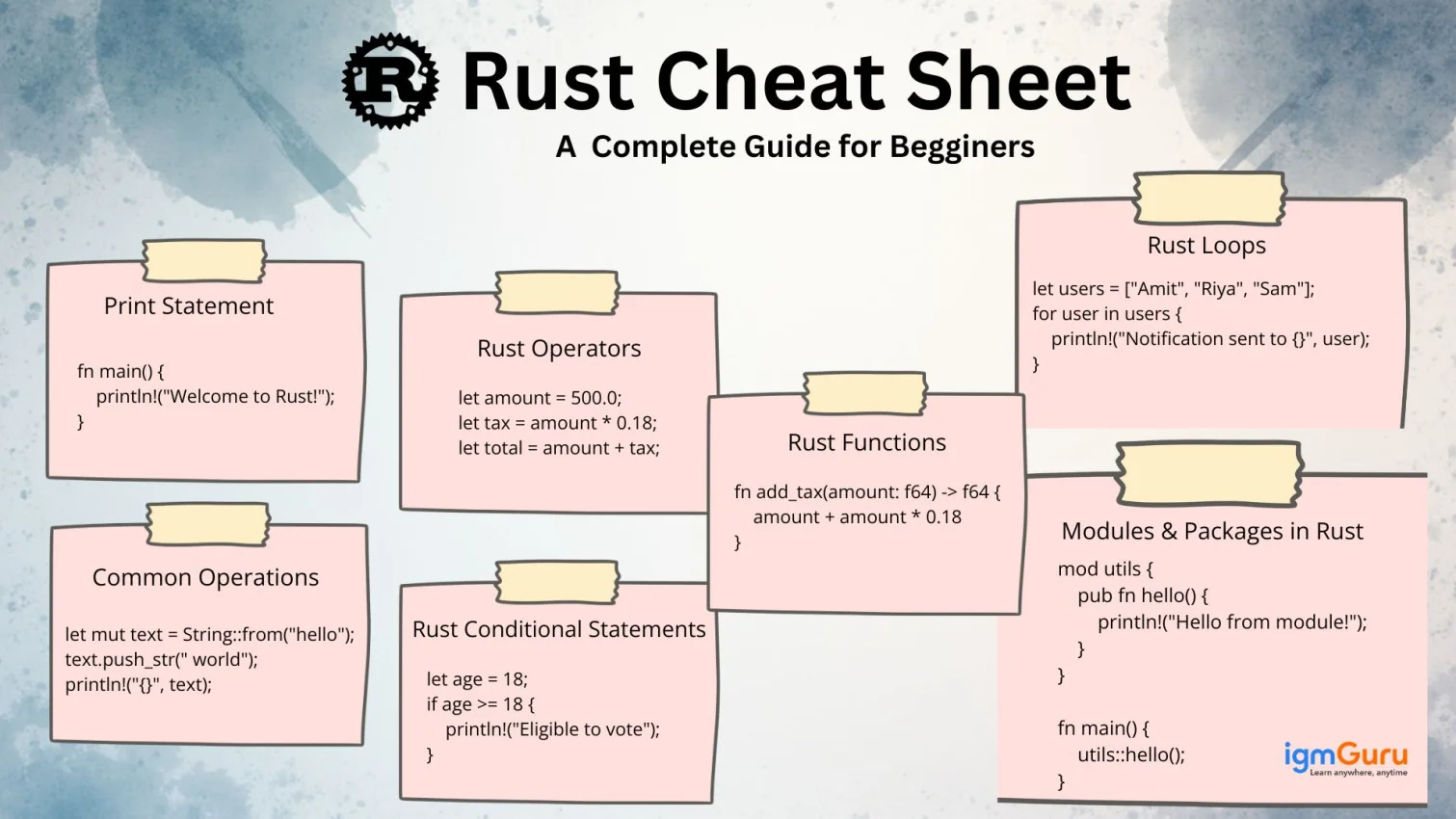
fn main() { println!("Welcome to Rust!"); }
|
Real-world example: Logging events in a CLI tool
println!("Backup process started...");
|
// This is a single-line comment

/*
This is a multi-line comment.
Useful for complex explanations.
*/
|
Real-world example: Explaining memory-safe code
// Borrowing a reference instead of moving ownership
|
Rust Variables & Data Types
We all know that variables and data types form the backbone of any program. Rust provides immutability by default and explicit typing that encourages safe and predictable code. This section explains common scalar and compound types, how to declare variables, and when to use &str, Vec, mut, String, Option, and Result in real projects.
Rust Data Types Table
| Data Type | Description | Example | Real Use Case |
i32 | 32-bit integer | let age: i32 = 25; | Counters, age |
f64 | Decimal number | let price = 499.99; | Prices, measurements |
bool | True/False | let active = true; | Flags, conditions |
char | Unicode char | let grade = 'A'; | Ratings, initials |
&str | String slice | "Hello" | Static text |
String | Growable string | String::from("Hi") | Dynamic input |
[T; N] | Array (fixed) | [1,2,3] | Fixed-length data |
Vec<T> | Vector | vec![1,2,3] | Dynamic lists |
Option<T> | Nullable value | Some(5), None | Missing data |
Result<T, E> | Safe error result | Ok(value) | File I/O, APIs |
Real-world example: Product data
let product_name = String::from("Wireless Mouse"); let product_price: f64 = 799.0; let in_stock: bool = true;
|
Strings in Rust
String handling in Rust is subtle because of ownership and UTF-8 encoding. This section covers the two main string types (&str and String), common operations like trimming, replacing, and splitting, and practical examples that show how to sanitize and manipulate user input safely and efficiently.
&str → fast, static textString → heap-allocated, growable text
Rust String Operations Table
| Method | Purpose | Example | Output |
to_uppercase() | Uppercase | "rust".to_uppercase() | "RUST" |
trim() | Remove spaces | " hi ".trim() | "hi" |
replace() | Replace text | "hello".replace("h", "y") | "yello" |
split() | Split text | "a,b".split(",") | Iterator |
push_str() | Append text | s.push_str("!!") | "Hello!!" |
len() | Length | "hello".len() | 5 |
starts_with() | Prefix check | s.starts_with("Re") | true |
ends_with() | Suffix check | s.ends_with(".rs") | true |
Common Operations
let mut text = String::from("hello"); text.push_str(" world"); println!("{}", text);
|
Real-world example: Cleaning user input
let email = " user@example.com "; let clean = email.trim().to_lowercase();
|
Rust Operators
Operators let you do arithmetic, compare values, manipulate bits, and control ranges for loops. Rust’s operators are familiar to C/C++ developers, but with safe typing and clear precedence rules. Here are commonly used operators with simple examples.
Rust Operators Table
| Type | Operators | Meaning | Example |
| Arithmetic | + - * / % | Math ops | a + b |
| Comparison | == != > < >= <= | Compare values | age >= 18 |
| Logical | && || ! | Conditions | is_ok && active |
| Assignment | = += -= *= | Update values | x += 1 |
| Range | .. ..= | Loops / ranges | 0..10 |
| Bitwise | & | ^ << >> | Bit operations | a & b |
Real-world example: Tax calculation
let amount = 500.0; let tax = amount * 0.18; let total = amount + tax;
|
Rust Collections
Collections store multiple values and are essential for real-world programs. Rust offers fixed-size arrays, growable Vec, tuples for mixed-type groups, and HashMap for key-value storage. Below are common collections and examples.
1. Vectors (Most Used Collection)
let mut nums = vec![10, 20, 30]; nums.push(40);
|
Real-world example: Shopping cart
let mut cart = vec!["laptop", "mouse"]; cart.push("keyboard");
|
2. Arrays (Fixed size)
3. Tuples (Store mixed data)
let user = ("Sanjay", 22, true); println!("{}", user.0);
|
Real-world example: Coordinates
let location = (28.7041, 77.1025);
|
4. HashMaps (Key-value store)
use std::collections::HashMap;

let mut student = HashMap::new();
student.insert("name", "Amit");
student.insert("age", "21");
|
Real-world example: Storing API response
let mut user = HashMap::new(); user.insert("id", "101"); user.insert("username", "rustacean");
|
Rust Conditional Statements
Conditionals let your program decide what to do next based on data. Rust’s if expressions also return values, making them useful inside assignments. Here’s a simple example.
let age = 18; if age >= 18 { println!("Eligible to vote"); }
|
Rust Loops
Loops are the building blocks for repetitive tasks. Rust provides for, while, and loop constructs. Use iterators with for, conditions with while, and loop for infinite loops with explicit breaks.
1. For Loop
let users = ["Amit", "Riya", "Sam"]; for user in users { println!("Notification sent to {}", user); }
|
2. While Loop
let mut count = 1; while count <= 5 { println!("{}", count); count += 1; }
|
Rust Functions
Functions are the tools to create reusable logic. Rust supports typed parameters and explicit return types. Use format! for string building and design small functions for testability and clarity.
I. Simple Greetings
fn greet(name: &str) -> String { format!("Hello, {}", name) }
|
II. Tax calculator
fn add_tax(amount: f64) -> f64 { amount + amount * 0.18 }
|
Modules & Packages in Rust
Modules organize code into reusable units, and crates package modules for distribution. mod defines modules and pub controls visibility. The Cargo.toml file manages dependencies.
Using modules
mod utils { pub fn hello() { println!("Hello from module!"); } }

fn main() {
utils::hello();
}
|
Using external crates (example: rand)
use rand::Rng;

let num = rand::thread_rng().gen_range(1..10);
|
File Handling in Rust
File I/O is common in scripts and CLI tools. Rust’s standard library provides safe APIs to read and write files. Use fs::read_to_string for small files, File and buffered readers for larger streams, and handle errors using Result.
File Modes / Common operations
| Mode | Meaning |
read_to_string | Read file |
write | Overwrite file |
append | Add to file |
Read file
use std::fs;

let data = fs::read_to_string("notes.txt").unwrap();
println!("{}", data);
|
Reading feedback
let feedback = fs::read_to_string("feedback.txt").unwrap();
|
Rust Error Handling
Error handling in Rust is explicit and safe. Result<T,E> models success or failure; Option<T> models presence or absence. Use ? to propagate errors, match to handle explicitly, and prefer graceful error messages for real-world apps.
fn divide(a: f64, b: f64) -> Result { if b == 0.0 { Err(String::from("Cannot divide by zero")) } else { Ok(a / b) } }
|
Rust Structs & Enums (OOP-like Concepts)
Rust expresses structured data using struct and algebraic data using enum. impl blocks add methods and associated functions. These constructs provide clear, type-safe modeling similar to OOP but with Rust’s ownership and pattern-matching strengths.
1. Structs
struct Car { brand: String, }

let my_car = Car { brand: "Tesla".into() };
|
2. Enums
enum Status { Success, Failed, }

let s = Status::Success;
|
Rust Built-In Functions
Rust provides core utility functions and macros for common tasks: string formatting, cloning, checking lengths, and more. Learn len, is_empty, clone, and format! to handle everyday programming tasks efficiently.
| Function | Description | Example | Output |
len() | Count items | "Rust".len() | 4 |
is_empty() | Check empty | vec.is_empty() | true |
clone() | Duplicate data | s.clone() | New copy |
format!() | Create string | format!("Hi {}", name) | "Hi Sanjay" |
Rust Iterators
Iterators are a powerful, idiomatic way to process sequences. Combined with adapter methods like map, filter, and collect, they enable concise and efficient data transformations without explicit indexing.
let nums = vec![1,2,3]; let doubled: Vec<_> = nums.iter().map(|x| x * 2).collect();
|
Popular Rust Libraries
The Rust ecosystem includes mature crates for HTTP, serialization, async runtime, and more. reqwest simplifies HTTP requests, serde handles JSON, and tokio powers async apps.
1. Reqwest (HTTP)
let body = reqwest::blocking::get("https://api.github.com")?.text()?;
|
2. Serde (JSON)
use serde::{Serialize, Deserialize};
|
3. Tokio (Async)
tokio::spawn(async { println!("Hello async!"); });
|
Rust Quick Interview Notes
Rust interviews often expect ownership concepts, borrow checker basics, lifetimes, Result/Option, common crates, and performance trade-offs. Use these points to answer questions succinctly and demonstrate practical knowledge of why Rust is used in modern systems programming.
- Rust is memory-safe without garbage collection
- Uses ownership, borrowing, and lifetimes
- Compiles to native machine code
- Used in browsers, blockchain, OS tools, embedded, APIs
- Zero-cost abstractions
Rust Ownership and Borrowing
Ownership is one of Rust’s most important features for managing memory safely without a garbage collector. Every value has an owner, and Rust automatically frees the value when its owner goes out of scope. Borrowing allows you to use a value without taking ownership, which helps prevent memory-related errors.
1. Ownership
let name = String::from("Rust");

let user = name;

println!("{}", user);
|
When name is assigned to user, ownership of the String moves to user. The original variable name can no longer be used because Rust prevents multiple owners of the same heap-allocated data.
2. Borrowing
fn display_name(name: &String) {
    println!("{}", name);
}

fn main() {
    let name = String::from("Rust");

    display_name(&name);

    println!("{}", name);
}
|
Borrowing uses a reference such as &name to temporarily access a value without transferring ownership. This allows the original variable to remain usable after the function finishes.
3. Mutable Borrowing
fn add_text(text: &mut String) {
    text.push_str(" Programming");
}

fn main() {
    let mut language = String::from("Rust");

    add_text(&mut language);

    println!("{}", language);
}
|
Use &mut when a function needs to modify borrowed data. The original variable must be declared with mut. Rust ensures that mutable and immutable references do not conflict in ways that could cause unsafe memory access.
Ownership Rules
| Concept | Description |
|---|
| Ownership | Each value has one owner at a time. |
| Move | Transfers ownership from one variable to another. |
| Immutable Borrow | &value provides read-only access without transferring ownership. |
| Mutable Borrow | &mut value provides temporary mutable access. |
| Scope | A value is automatically dropped when its owner goes out of scope. |
Build the Programming Skills Behind Modern Applications with Programming Trainings
Explore programming concepts, languages, frameworks, and development practices that help turn ideas into functional, maintainable, and scalable software.
Wrapping Up
This Rust cheat sheet has everything you need to know as a beginner to get started. Use this knowledge for practicing small projects, reading compiler errors (they’re helpful!), using rustfmt and clippy, and exploring crates. Learning this programming language is not as complicated as you think — it just needs patience. Keep practicing with real-world tasks and grow confidence quickly.
FAQs
1. Is Rust good for beginners?
- Rust is a little complicated in terms of strictness, but it is beginner-friendly once you understand ownership.
2. What should I learn first in the Rust programming language?
- Start with variables, data types, ownership basics, loops, and functions.
3. Is Rust used in real companies?
- It is used by various tech giants, including Amazon, Google, Discord, Cloudflare, Microsoft, and more.
4. Can I use Rust for WebAssembly?
- Rust is one of the best languages for WebAssembly (Wasm).
5. Is Rust faster than Python?
- It is faster than Python. You can relate its speed to C/C++.
Articles You Can Also Read:
Course Schedule