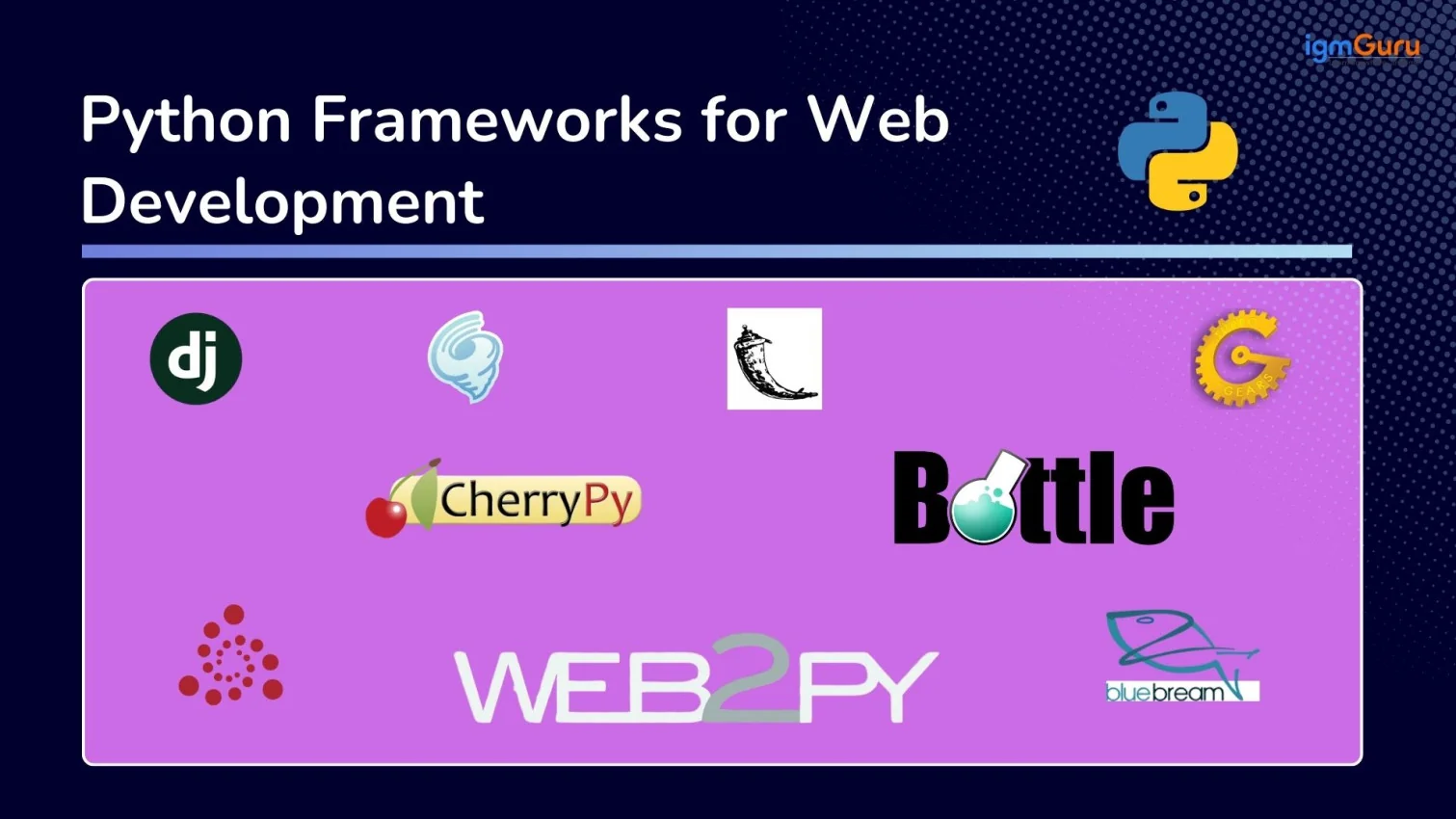
Python, being a versatile language, is also one of the most popular programming languages in web development. Do you know why? Well, Python frameworks for web development are the real reason. These frameworks are not only features with robust capabilities but are also easy to understand and use. Whether you are a beginner or a professional Python developer, you can easily learn to build full-fledged web applications using Python.
The best thing is that you don’t need to begin from scratch. Python offers powerful frameworks that handle much of the heavy lifting for you. In this guide, I’ll walk you through all Python frameworks for web development, covering their features, functionalities, applications and more. It also explains which one is best for your project and how to get started with real-world style examples.
What is a Python Web Framework?
A Python web framework is a collection of packages and modules that provides a structured foundation and pre-written code for developing web applications. It makes the development process smooth by managing common, low-level details like managing network protocols, database access, URL routing and security. These frameworks provide a variety of benefits for developers, including:
- Productivity: It saves their time by reusing tested components rather than coding everything from scratch in Python.
- Structure & Scalability: These frameworks encourage consistent patterns (e.g., MVC/MVT) so apps are easier to grow and maintain.
- Community Support: Some popular frameworks have strong ecosystems and ready-made solutions, which are helpful when you are learning.
- Better Security & Conventions: These frameworks also handle common pitfalls that provide more robust apps out of the gate.
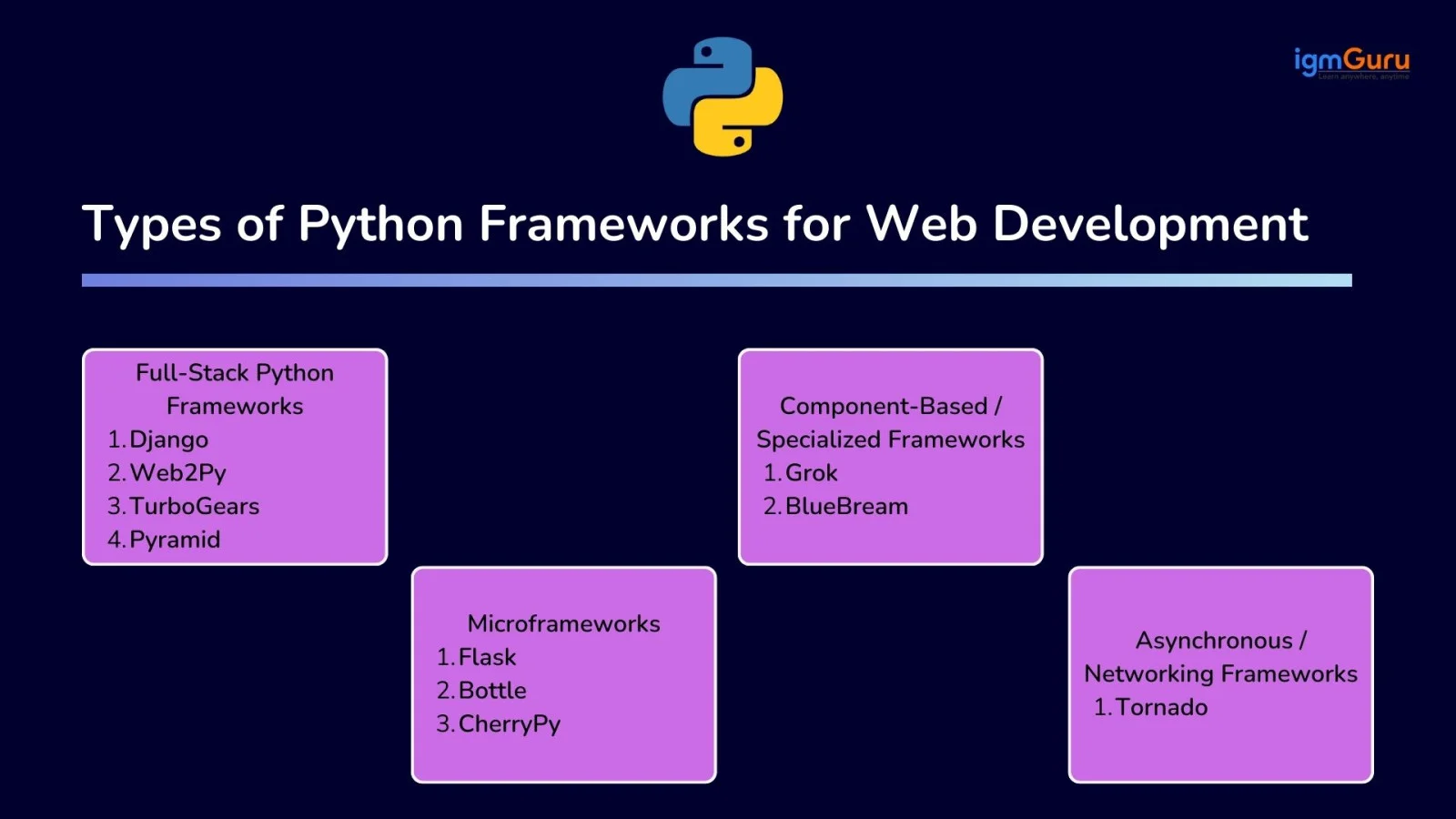
There are various types of web development frameworks in Python. Each of them is dedicated to different uses. Here are the common categories:- Full-Stack Python Frameworks
- Microframeworks
- Asynchronous / Networking Frameworks
- Component-Based / Specialized Frameworks
Master Python Programming with Python Training
Boost your coding skills and gain hands-on knowledge in Python.
Explore Now
Python Web Frameworks At-A-Glance
If you are unsure which Python framework to use for web development, the table below provides a quick overview of common use cases and the most suitable frameworks.
| Use Case |
Best Framework |
Why |
| Full-featured website with an admin panel and a database |
Django |
Provides ORM, authentication, and admin interface out of the box |
| Enterprise web applications |
TurboGears |
Combines multiple tools like SQLAlchemy and templating systems |
| Flexible applications that may grow over time |
Pyramid |
Highly customizable architecture |
| Rapid development with built-in tools |
Web2Py |
Includes web-based IDE and database abstraction layer |
| Lightweight web apps or REST APIs |
Flask |
Simple, flexible, and easy to extend |
| High-performance REST APIs |
FastAPI |
Automatic validation, API documentation, and excellent performance |
| Real-time APIs with high concurrency |
Sanic |
Designed for asynchronous request handling and speed |
| Async web applications with Flask-like syntax |
Quart |
Supports async programming while remaining compatible with Flask |
| Cloud-native backend services |
Litestar |
Modern API framework with dependency injection and async support |
| Small utilities or embedded web tools |
Bottle |
Minimal dependencies and simple structure |
| Backend services or embedded web interfaces |
CherryPy |
Object-oriented framework with built-in web server |
| Real-time applications or streaming systems |
Tornado |
Asynchronous networking with high concurrency |
| Component-based enterprise systems |
Grok |
Built on the Zope toolkit with reusable components |
| Modular enterprise applications |
BlueBream |
Component-based architecture designed for scalability |
Read Also: A Detailed Tutorial on Python Web Development
1. Full-Stack Python Frameworks for Web Development
Full-stack frameworks provide everything required to build complete web applications. They usually include built-in tools for routing, database interaction, authentication, templating and form handling. These frameworks follow structured development patterns and help developers build scalable applications without assembling many external libraries.
I. Django
Django is one of the most widely used Python web frameworks for building secure and scalable web applications. It follows the Model–View–Template (MVT) architecture and provides many built-in tools such as an ORM, authentication system, form handling and an admin interface. Django is designed to promote rapid development while encouraging clean and maintainable code.
Features of Django
- Built-in ORM for database operations
- Automatic admin interface
- Strong security protections
- Built-in authentication and user management
- Large community and ecosystem
When to Use Django
- When building large web applications
- When developing content-heavy websites
- When you need authentication and admin panels
- When you want rapid development with built-in tools
When to Avoid Django
- When building very small projects
- When creating simple APIs only
- When you need a lightweight framework
Example
from django.http import HttpResponse

def home(request):
   return HttpResponse("Hello from Django!")
|
Related Article: Django Interview Questions
II. Web2Py
Web2Py is a full-stack Python web framework designed to simplify web development by providing a complete development environment. It includes built-in tools for database management, security, form validation and application deployment. Web2Py also provides a browser-based interface that allows developers to manage applications easily without complex configuration.
Features of Web2Py
- Built-in web-based development environment
- Database abstraction layer
- Built-in authentication system
- Secure form validation
- Automatic database migration support
When to Use Web2Py
- When building small to medium web applications
- When rapid development is required
- When you want an all-in-one development environment
- When building applications with minimal setup
When to Avoid Web2Py
- When building very large scalable platforms
- When using modern async architectures
- When you need a very large ecosystem
Example
def index():
   return dict(message="Hello from Web2Py")
|
III. TurboGears
TurboGears is a full-stack Python web framework designed for building scalable web applications quickly. It combines several tools such as SQLAlchemy, WebOb and templating systems to provide a powerful development environment. TurboGears follows the Model–View–Controller (MVC) architecture and is suitable for both small applications and enterprise-level systems.
Features of TurboGears
- MVC-based architecture
- SQLAlchemy ORM integration
- Flexible templating systems
- Built-in authentication tools
- Support for RESTful web services
Learn AI with Python with Our Latest Training Program
Boost your coding skills and gain hands-on knowledge in AI with Python.
Explore Now
When to Use TurboGears
- When building complex web applications
- When flexibility in choosing components is required
- When developing enterprise-level applications
- When creating REST APIs
When to Avoid TurboGears
- When building small simple projects
- When you prefer simpler frameworks
- When you want a framework with a larger community
Example
from tg import expose

class RootController(object):

   @expose()
   def index(self):
       return "Hello from TurboGears!"
|
IV. Pyramid
Pyramid is a flexible Python web framework that allows developers to start with a small application and gradually expand it into a complex system. It provides minimal built-in components but allows developers to choose libraries for templating, database access and authentication. Pyramid is known for its flexibility and scalability.
Features of Pyramid
- Highly flexible architecture
- Supports both small and large applications
- URL routing and view configuration
- Supports multiple templating systems
- Large collection of extensions and plugins
When to Use Pyramid
- When you need high flexibility in architecture
- When building applications that may grow over time
- When you want full control over components and tools
When to Avoid Pyramid
- When you want many built-in features out of the box
- When you prefer structured frameworks like Django
- When you are a complete beginner
Example
from pyramid.config import Configurator
from pyramid.response import Response

def home(request):
   return Response("Hello from Pyramid!")
|
2. Python Microframeworks for Web Development
Microframeworks are lightweight frameworks that provide the core functionality required to build web applications. They typically include routing and request handling but rely on external libraries for additional features such as database interaction and authentication.
V. Flask
Flask is one of the most popular Python microframeworks known for its simplicity and flexibility. It provides the essential tools needed to build web applications such as routing and request handling, while allowing developers to choose their own libraries for database access, authentication and templating.
Features of Flask
- Lightweight and simple architecture
- Flexible extension system
- Built-in development server
- Easy routing and request handling
- Large ecosystem of plugins
When to Use Flask
- When building small web applications
- When creating REST APIs
- When learning web development with Python
- When you need full control over application components
When to Avoid Flask
- When building very large applications with many built-in features
- When you need a framework with an admin panel
- When you want strong built-in structure
Example
from flask import Flask

app = Flask(__name__)

@app.route("/")
def home():
   return "Hello from Flask!"
|
VI. Bottle
Bottle is a simple and lightweight Python microframework designed for building small web applications and APIs. It is distributed as a single file and requires minimal dependencies. Bottle provides basic features such as routing, templating and request handling, making it useful for prototypes and small tools.
Features of Bottle
- Single-file framework
- Minimal dependencies
- Simple routing system
- Built-in templating support
- Lightweight and fast
When to Use Bottle
- When building small web tools
- When creating quick prototypes
- When learning basic web development concepts
When to Avoid Bottle
- When building large web applications
- When you need advanced features
- When scalability is required
Example
from bottle import route, run

@route('/')
def home():
   return "Hello from Bottle!"

run(host='localhost', port=8080)
|
VII. CherryPy
CherryPy is a minimalist Python web framework that allows developers to build web applications in an object-oriented way. It includes a built-in web server and focuses on simplicity and performance. CherryPy is often used to build APIs, backend services, or embedded web applications.
Features of CherryPy
- Object-oriented development style
- Built-in web server
- Simple URL routing
- Supports plugins and tools
- Lightweight and efficient
When to Use CherryPy
- When building backend services
- When creating APIs
- When embedding web interfaces into applications
When to Avoid CherryPy
- When building large enterprise applications
- When you want a full-stack framework
- When you need extensive built-in features
Example
import cherrypy

class HelloWorld(object):
   @cherrypy.expose
   def index(self):
       return "Hello from CherryPy!"

cherrypy.quickstart(HelloWorld())
|
3. Python Asynchronous / Networking Frameworks for Web Development
These frameworks focus on handling many simultaneous connections efficiently using asynchronous programming.
VIII. Tornado
Tornado is an asynchronous networking library and web framework designed to handle thousands of simultaneous connections. It is commonly used for building real-time applications such as chat systems, streaming services and long-lived network connections.
Features of Tornado
- Asynchronous non-blocking networking
- High concurrency support
- Built-in web server
- WebSocket support
- Suitable for real-time applications
When to Use Tornado
- When building real-time applications
- When handling many concurrent users
- When developing streaming or messaging systems
When to Avoid Tornado
- When building simple websites
- When you do not need asynchronous performance
- When you prefer simpler frameworks
Example
import tornado.web
import tornado.ioloop

class MainHandler(tornado.web.RequestHandler):
   def get(self):
       self.write("Hello from Tornado!")

app = tornado.web.Application([
   (r"/", MainHandler),
])

app.listen(8888)
tornado.ioloop.IOLoop.current().start()
|
Master Data Science with Python with Our Training Program
Boost your coding skills and gain hands-on knowledge in Data Science with Python.
Explore Now
4. Python Component-Based / Specialized Frameworks for Web Development
These frameworks use a component-based architecture where applications are built using reusable components.
IX. Grok
Grok is a Python web framework built on the Zope toolkit that emphasizes component-based development. It focuses on simplicity while allowing developers to build structured applications using reusable components. Grok is mainly used for building scalable applications that benefit from modular architecture.
Features of Grok
- Component-based architecture
- Built on the Zope toolkit
- Automatic configuration
- Reusable application components
- Structured development model
When to Use Grok
- When building modular web applications
- When using the Zope ecosystem
- When reusable components are required
When to Avoid Grok
- When you need a lightweight framework
- When working with modern async frameworks
- When you want a large developer community
Example
import grok

class Index(grok.View):
   def render(self):
       return "Hello from Grok!"
|
X. BlueBream
BlueBream is a Python web framework built on top of the Zope toolkit that supports component-based development. It provides tools for building scalable web applications using reusable components and modular architecture.
Features of BlueBream
- Component-based architecture
- Reusable software components
- Built on the Zope framework
- Modular application structure
- Suitable for enterprise applications
When to Use BlueBream
- When building modular enterprise systems
- When working with component-based architecture
- When using the Zope ecosystem
When to Avoid BlueBream
- When building small applications
- When you want a lightweight framework
- When you need a modern async framework
Example
from zope.interface import Interface

class IHello(Interface):
   pass
|
5. Modern Python Web Frameworks
Python web development has evolved significantly over the past few years. While traditional frameworks like Django and Flask continue to dominate many projects, several modern frameworks have gained popularity because of their high performance, asynchronous capabilities and developer-friendly features. These frameworks are ideal for building APIs, cloud-native applications and scalable web services.
XI. FastAPI
FastAPI is one of the fastest-growing Python web frameworks for building APIs and backend services. It is built on top of Starlette and Pydantic and fully supports asynchronous programming using Python's async and await syntax. FastAPI automatically generates interactive API documentation and performs data validation, making it a popular choice for modern web applications.
Features of FastAPI
- High-performance asynchronous framework
- Automatic OpenAPI and Swagger documentation
- Built-in request validation using Pydantic
- Easy dependency injection system
- Excellent support for REST APIs
When to Use FastAPI
- When building RESTful APIs
- When high performance is required
- When developing microservices
- When building AI and machine learning backends
When to Avoid FastAPI
- When you need a built-in admin panel
- When building large CMS-style applications
- When your project relies heavily on Django's ecosystem
Example
from fastapi import FastAPI

app = FastAPI()

@app.get("/")
def home():
    return {"message": "Hello from FastAPI!"}
|
XII. Sanic
Sanic is an asynchronous Python web framework developed specifically for speed. It supports async request handling and is capable of processing thousands of concurrent requests with low latency. Sanic is widely used for real-time applications, APIs and high-performance backend systems.
Features of Sanic
- Native asynchronous architecture
- High-speed request processing
- WebSocket support
- Simple routing system
- Lightweight and scalable
When to Use Sanic
- When building high-performance APIs
- When handling many concurrent users
- When developing real-time applications
When to Avoid Sanic
- When building content management systems
- When you require many built-in development tools
- When a traditional synchronous framework is sufficient
Example
from sanic import Sanic
from sanic.response import text

app = Sanic("Demo")

@app.get("/")
async def home(request):
    return text("Hello from Sanic!")
|
XIII. Quart
Quart is an asynchronous Python web framework that is API-compatible with Flask. Developers familiar with Flask can migrate to Quart with minimal code changes while gaining asynchronous capabilities. It is suitable for applications that require WebSockets, HTTP/2 and long-running requests.
Features of Quart
- Flask-compatible API
- Supports async and await
- WebSocket support
- HTTP/2 support
- Easy migration from Flask
When to Use Quart
- When upgrading existing Flask projects
- When building asynchronous web applications
- When using WebSockets or streaming responses
When to Avoid Quart
- When a standard Flask application is sufficient
- When your project requires Django's built-in features
- When synchronous processing is preferred
Example
from quart import Quart

app = Quart(__name__)

@app.route("/")
async def home():
    return "Hello from Quart!"
|
XIV. Litestar
Litestar is a modern Python web framework designed for building high-performance APIs and web applications. It supports asynchronous programming, dependency injection and automatic data validation while providing excellent performance. Litestar is becoming increasingly popular for cloud-native applications and enterprise API development.
Features of Litestar
- High-performance asynchronous framework
- Built-in dependency injection
- Automatic data validation
- OpenAPI documentation generation
- Supports REST APIs and WebSockets
When to Use Litestar
- When building modern API services
- When developing scalable backend applications
- When performance is a priority
When to Avoid Litestar
- When you need a mature ecosystem like Django
- When building very small applications
- When your team has no experience with modern async frameworks
Example
from litestar import Litestar, get

@get("/")
def home() -> str:
    return "Hello from Litestar!"

app = Litestar(route_handlers=[home])
|
Quick Comparison of the Best Python Web Frameworks
| Framework |
Type |
Best For |
| Django |
Full-Stack |
Large web applications |
| Web2Py |
Full-Stack |
Rapid development projects |
| TurboGears |
Full-Stack |
Enterprise-level web systems |
| Pyramid |
Flexible / Full-Stack |
Customizable web applications |
| Flask |
Microframework |
APIs and small applications |
| Bottle |
Microframework |
Small utilities and prototypes |
| CherryPy |
Microframework |
Backend services |
| Tornado |
Asynchronous |
Real-time and high-concurrency applications |
| FastAPI |
Modern Async |
High-performance REST APIs and microservices |
| Sanic |
Modern Async |
Real-time applications and high-speed APIs |
| Quart |
Modern Async |
Async Flask-style web applications |
| Litestar |
Modern Async |
Cloud-native APIs and scalable backend services |
| Grok |
Component-Based |
Modular web applications |
| BlueBream |
Component-Based |
Enterprise systems with reusable components |
How to Choose the Best Python Web Framework?
Knowing the top Python web frameworks for web development is not enough for building robust applications. You have to choose the right one depending on several factors such as project size, performance requirements and the level of flexibility required. Different frameworks are designed to solve different types of problems, so understanding their strengths will help you make a better decision.
- If you are building a large, feature-rich website, a full-stack framework like Django can save development time because it includes built-in tools for authentication, database management and administration.
- For enterprise systems requiring flexibility, frameworks like TurboGears or Pyramid can provide more customization.
- If your goal is to build APIs or small applications, microframeworks such as Flask, Bottle, or CherryPy are often better choices because they provide a lightweight architecture and allow you to choose your own tools.
- For applications requiring high concurrency or real-time communication, asynchronous frameworks like Tornado can handle many simultaneous connections efficiently.
- Finally, if your project relies on component-based architecture, frameworks like Grok and BlueBream offer modular design patterns that help build scalable enterprise applications.
Read Also: Top Python Interview Questions And Answers (2026)
Wrapping Up
This comprehensive guide has provided a solid overview of the best Python frameworks for web development. Now you know what they are, which one might suit you, and how to get started. So you have the key, just keep practicing and learning, and unlock the doors to success.
Get Certified in Cyber Security with Python with Our Training Program
Boost your coding skills and gain hands-on knowledge in CyberSecurity with Python.
Explore Now
FAQs: Python Frameworks for Web Development
Q1. Do I need to know HTML/CSS/JavaScript to use Python frameworks?
Yes, you will need that kind of knowledge. Python indeed handles server-side logic, but you will still need basic front-end knowledge to build a full web interface.
Q2: Can I switch frameworks later?
Yes, you can switch them, but it may require rewriting parts of your code if your app relies heavily on framework-specific patterns or libraries. That’s why thinking ahead about architecture helps.
Q3. Is learning Django better than Flask for beginners?
It depends on your goal. If you want full-stack capability and ready-made features, Django might be better. If you want to learn gradually and start simple, Flask is friendly.