Are you looking for the best JavaScript interview questions and answers? Look no further! This article lists the most-asked interview questions and answers designed with the help of experienced professionals.
The questions are categorized based on experience levels, from beginner to advanced scenario-based. Whether you are a fresher who wants to start a new career or an experienced professional want to switch jobs for better opportunity, it will be your go-to guide.
Let's begin!
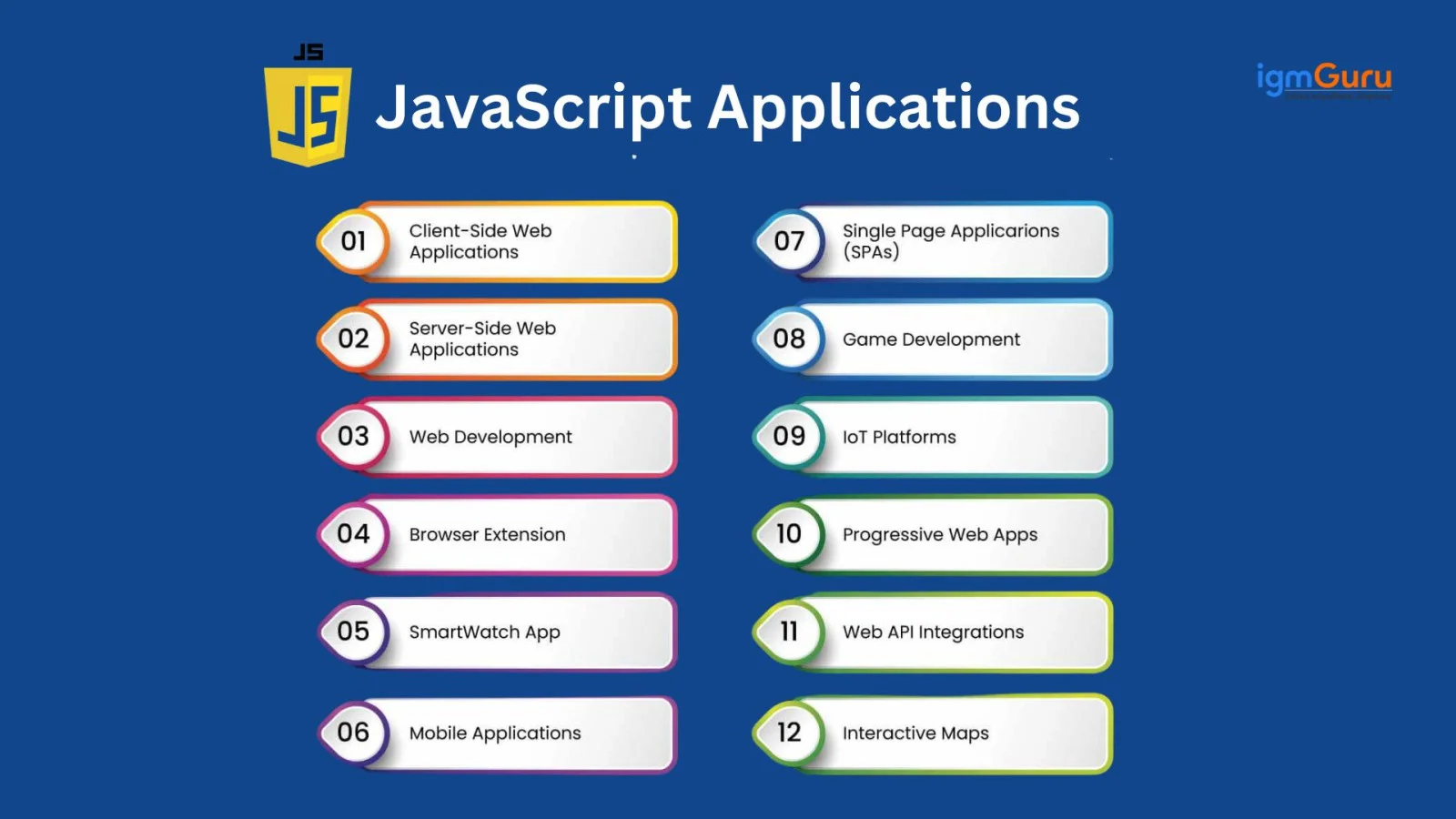
JavaScript is an interpreted programming language that enables the creation of interactive and dynamic content on websites. You may have seen various templates and graphics on different websites. Most of them are created using JavaScript. It also has different applications, such as:
The == (loose equality) and === (strict equality) operators in JavaScript differ in their handling of type coercion. The loose equality operator compares two values after type coercion to determine whether they are equal. This converts the operands to the same type before comparing them. The strict quality operators compare the values and their types before type conversion.
Here is what’s new in ECMAScript 2025, the 16th edition of ECMAScript, introduced in June 2025:
| Feature | Category | What It Does | Example |
| Iterator Helpers (map, filter, take, drop, reduce, some, every, toArray, etc.) | Iteration improvements | Adds chainable, lazy iterator methods for any iterable | Iterator.from([1,2,3]).map(x=>x*2).toArray() |
| Set Methods (union, intersection, difference, symmetricDifference, isSubsetOf, etc.) | Data structure upgrades | Adds built-in set operations and relationship checks | A.union(B) |
| Import Attributes + JSON Import | Module system | Let's you import JSON files and use attributes in imports | import data from './file.json' with { type:'json' } |
| RegExp.escape() | Regular expressions | Safely escapes strings before inserting into regex | RegExp.escape("(hello)") |
| Inline Regex Modifiers | Regular expressions | Allows enabling/disabling flags for part of a regex | /(?i:abc)/ |
| Duplicate Named Capture Groups | Regular expressions | Allows same same-named group to be used in different alternatives | `/(?a) |
| Promise.try() | Promises | Wraps sync/async code into a promise in one call | Promise.try(() => doSomething()) |
| Float16Array + Float16 Support | Typed arrays / Math | New 16-bit float type for memory-efficient computation | new Float16Array([1.5, 2.5]) |
| DataView getFloat16 / setFloat16 | Typed arrays / DataView | Allows reading/writing 16-bit floats in DataView | dv.getFloat16(offset) |
| Math.f16round() | Math | Rounds a number to 16-bit float precision | Math.f16round(1.2345) |
The name of both programming languages sounds similar, but they are totally different languages. There is no similarity or relation between them. Here is a detailed comparison:
| Category | Java | JavaScript |
| Type | Object-oriented, class-based, statically typed | Multi-paradigm, dynamically typed |
| Execution | Runs on JVM | Runs in browsers and Node.js |
| Use Cases | Backend apps, Android apps, enterprise systems | Web development (frontend + backend), APIs, interactive UI |
| Compilation | Compiled to bytecode | Interpreted/JIT-compiled |
| Concurrency | Multithreading | Event loop + async/await |
| Learning Curve | More complex, strict syntax | Beginner-friendly, flexible syntax |
There are various methods to access an HTML code in JavaScript. Here are some of the most common methods I would use:
|
|
|
|
|
JavaScript has a total of 8 data types, categorized into the following two categories:
| Data Type | Description | Example |
| String | Represents textual data | "hello" |
| Number | Represents integers and floating-point numbers | 10, 3.14 |
| BigInt | Represents very large integers beyond Number limits | 9007199254740991n |
| Boolean | Represents logical values | true, false |
| Undefined | A declared variable with no assigned value | let x; // undefined |
| Null | Intentional absence of value | let data = null |
| Symbol | Unique and immutable value, used as object keys | Symbol("id") |
| Data Type | Description | Examples |
| Object | Represents collections of key-value pairs and complex data structures. Includes plain objects, arrays, functions, dates, and more. | { name: "John" }, [1, 2, 3], function() {}, new Date() |
Also Read: JavaScript Cheat Sheet
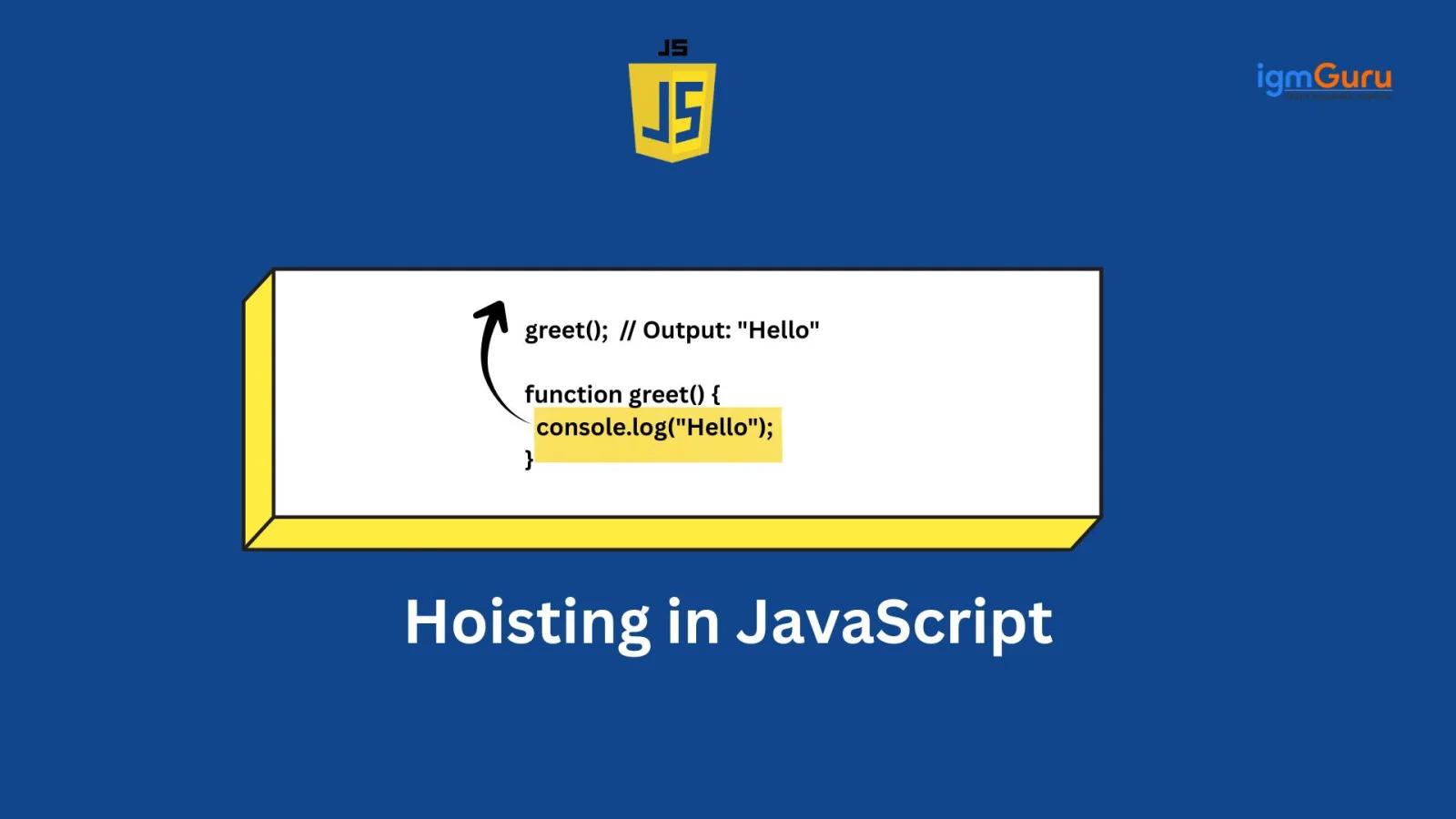
Hoisting is an interesting mechanism in JavaScript. It allows variable and function declarations to move to the top of their containing scope during the compilation phase. This is all done before the code execution. Developers use variables and call functions before their actual declaration in the code. Here is an example of Hoisting:
|
Implicit type coercion is the automatic conversion of values from one data type to another. It is done by the JavaScript engine during operations, comparisons, or assignments. This happens without any explicit instruction from the developer to perform the conversion.
The Document Object Model, or DOM, is a programming interface used for web documents. Think of it as a bridge between the static web page and the dynamic capabilities of JavaScript. It allows developers to create interactive and responsive user experiences. It describes the structure of an HTML or XML document as a tree of objects. In this structure, each object corresponds to a part of the document, such as elements, attributes, and text.
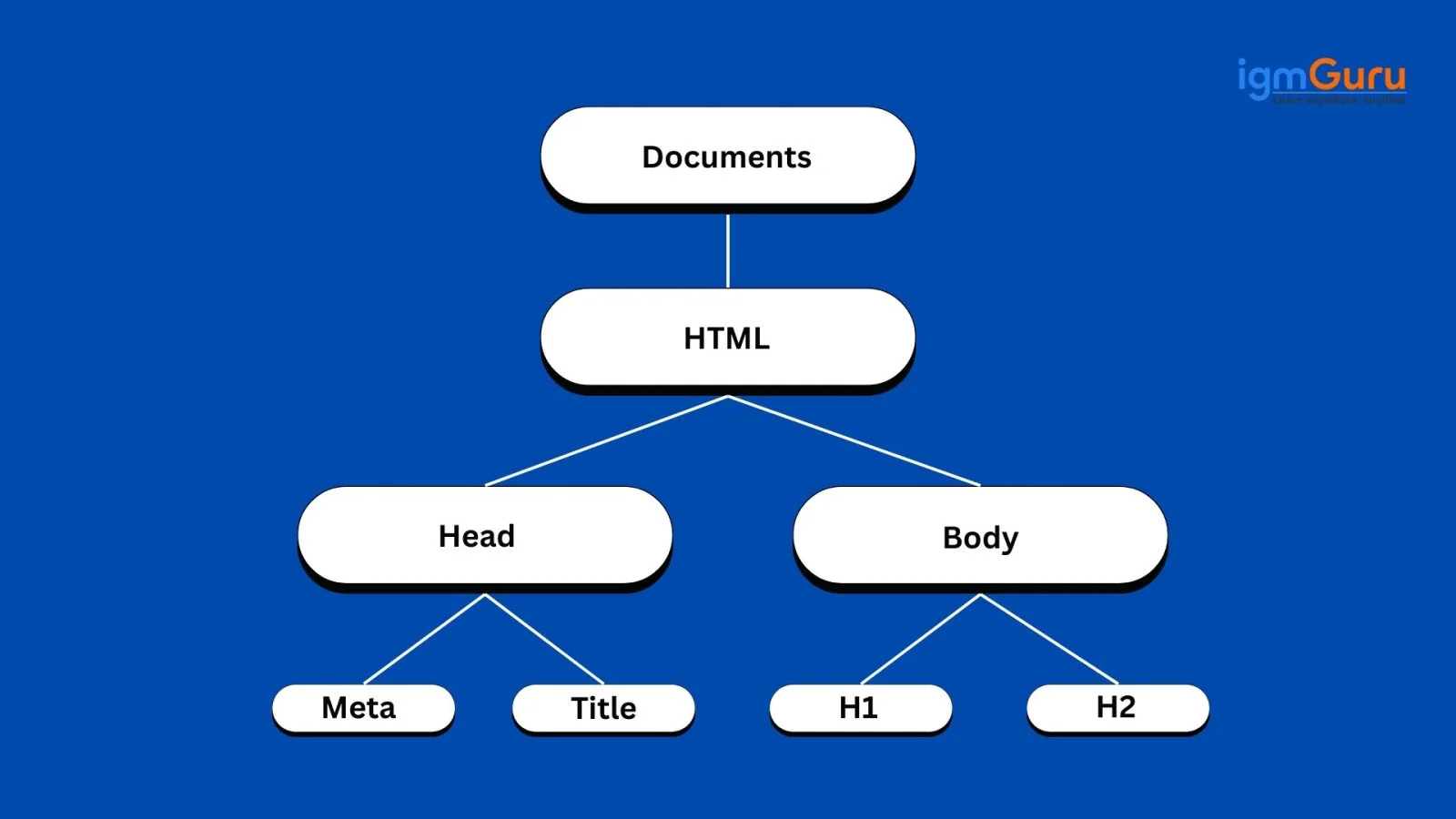
Here is a comprehensive list of JavaScript keywords and their uses:
| Keyword | Use / Description |
| var | Declares a variable (function-scoped, hoisted). |
| let | Declares a block-scoped variable. |
| const | Declares a block-scoped constant (cannot be reassigned). |
| if | Executes code based on a condition. |
| else | Executes alternative code if if condition is false. |
| switch | Selects code to run based on matching cases. |
| case | A block inside a switch statement. |
| default | Code that runs if no switch case matches. |
| for | Creates a loop with an initializer, condition, and increment. |
| while | Creates a loop that runs while a condition is true. |
| do | Used with while to run the loop at least once. |
| break | Exits a loop or switch block. |
| continue | Skips one iteration of a loop. |
| function | Declares a function. |
| return | Returns a value from a function. |
| try | Wraps code that may throw an error. |
| catch | Handles errors thrown inside try. |
| finally | Runs code after try/catch (always executes). |
| throw | Throws a custom error. |
| class | Declares a class. |
| extends | Creates a class that inherits from another. |
| super | Calls the parent class constructor/method. |
| import | Imports modules. |
| export | Exports modules. |
| new | Creates a new instance of an object/class. |
| delete | Removes a property from an object. |
| typeof | Returns the type of a variable. |
| instanceof | Checks if an object belongs to a specific class. |
| in | Checks if a property is available in the object. |
| this | Refers to the current object context. |
| await | Pauses execution inside async functions until a promise resolves. |
| async | Declares a function that returns a promise. |
| yield | Pauses and resumes generator functions. |
| with | Extends scope (not recommended; deprecated). |
| void | Evaluates an expression and returns undefined. |

This programming language provides various features, including:
| Feature | Description |
|---|---|
| Closures | Functions that access variables from their parent scope even after execution. |
| Prototypal Inheritance | Objects inherit properties and methods from other objects via prototype. |
| Higher-Order Functions | Functions that take other functions as arguments or return them. |
| Async/Await | Modern syntax for handling asynchronous operations in a cleaner way. |
| Promises | Efficiently manage async operations without deep callback nesting. |
| Event Loop | Handles non-blocking operations using queues and scheduling. |
| ES6 Modules | Supports code modularity using import and export. |
| Arrow Functions | Compact function syntax with lexical this binding. |
| Destructuring | Extracts values from arrays/objects into variables easily. |
| Spread/Rest Operators | Copy, merge, and pass multiple data elements flexibly. |
| Generators | Functions that pause and resume execution using yield. |
| Iterators | Custom iteration mechanisms over collections. |
| WeakMap / WeakSet | Stores objects without blocking garbage collection. |
| Proxy | Intercepts operations (get, set, delete) for controlled behavior. |
| Reflect API | Provides meta-programming utilities for object operations. |
| Typed Arrays | Work with raw binary data for high-performance applications. |
| Symbols | Unique identifiers useful for keys and avoiding conflicts. |
| BigInt | Handles extremely large integers beyond Number limits. |
| Web Workers | Enables parallel execution for CPU-heavy tasks. |
| WebSockets | Real-time two-way communication between client and server. |
Destructuring is a feature that allows you to unpack values from arrays or properties from objects into distinct variables. It makes assignments concise and readable. To swap two variables using array destructuring:
|
Template literals are string literals enclosed by backticks (`) that support embedded expressions and multi-line strings. This makes string interpolation and formatting easier. Example:
|
Destructuring can be applied directly in function parameters to extract values from objects or arrays, and you can assign default values to parameters. Example:
|
JavaScript provides several ways to create arrays:
|
Each approach has its use cases. The array literal is most common; Array.from and Array.of are often used for array-like or iterable conversions.
JavaScript supports several array-like types:
Regular Array: The standard, most-used array for storing ordered collections of values.
|
Typed Arrays: Arrays for handling binary data, such as Int8Array, Uint8Array, Float32Array, Float64Array, and (in ES2025) Float16Array.
Example:
|
Array-like Objects: Objects with indexed properties and a length, such as arguments and NodeList. Example:
|
Sparse Arrays: Arrays with missing indices, e.g.,
|
Typed arrays are used for performance and binary data; regular arrays are used for most general purposes.
map(): Transforms each element in an array and returns a new array.
|
filter(): Returns a new array containing only elements that pass a test.
|
reduce(): Reduces the array to a single value by applying a function cumulatively.
|
Mutating methods (change the original array):
Non-mutating methods (return a new array or value):
This distinction is important because mutating methods can lead to unexpected side effects, especially when sharing arrays across parts of an application. Non-mutating methods help maintain predictable, functional code.
for loop: Use when you need full control over the index or want to break early.
|
forEach(): Use for side effects on each element; cannot break or return a value.
|
for…of loop: Use for simple iteration over array values, especially with ES6 or later.
|
map/filter/reduce: Use when you want to transform, filter, or accumulate results from an array.
|
TypeScript adds static typing, IDE autocompletion, compile-time error checking, and better maintainability for large codebases while still compiling to JavaScript.
The key difference is that an undeclared variable doesn't exist, while an undefined variable exists but has no value.
Global variables are variables that are declared in the global scope. This means they can be accessed from anywhere in the script, from inside functions and loops to conditional blocks, or other parts of the code. They are typically declared outside of any function or block, making them available throughout the entire JavaScript program.
However, using too many global variables is not recommended because they can create naming conflicts and make debugging harder. Here is an example showing how the global variable message is accessible both inside and outside the function.
|
This example shows how the global variable message is accessible both inside and outside the function.
The keyword ‘this’ in JavaScript is a dynamic reference to the object that is executing the current function or method. Its value is determined at runtime, based on how the function is called. Here is a table showing different function-calling types and how each one determines the value of this keyword.
| Function Calling Type | How Function Is Called | Value of this | Example Use Case |
| Global Function Call | Called normally (e.g., func() ) | window (browser) or global (Node.js) | Default binding |
| Method Call | Called as a property of an object (obj.func()) | The object before the dot | Object methods |
| Constructor Call | Using new (e.g., new Person()) | The newly created object | Creating objects |
| call() / apply() Binding | Using func.call(obj) or func.apply(obj) | Manually sets this to the provided object | Explicit binding |
| bind() Binding | Using func.bind(obj) | Permanently binds this to the provided object | Function copying |
| Arrow Function Call | Called with (), but arrow functions ignore call context | Inherited from the surrounding (lexical) scope | Closures, callbacks |
| Event Handler Call | Attached to DOM event (element.onclick = fn) | The element that triggered the event | DOM programming |
Timers are used to set intervals between tasks. These are not a part of the JS engine itself. They come from the Web APIs (browser) or Node.js environment. Here are some of the timers, with examples, used in JavaScript:
|
|
|
|
|
|
JavaScript provides four main browser storage mechanisms, each suited for different use cases:
| Storage Type | Capacity | Lifetime | Accessible From | Best For |
| localStorage | ~5–10 MB | Until manually cleared | Same origin, all tabs | User preferences, theme, tokens |
| sessionStorage | ~5 MB | Tab close / session end | Same tab only | Temporary form data, wizard steps |
| Cookies | ~4 KB | Set via expires/max-age | Client + server (via HTTP headers) | Auth tokens, tracking, server-read data |
| IndexedDB | Hundreds of MB | Until manually cleared | Same origin | Large structured data, offline apps |
Quick example — using localStorage:
|
A higher-order function is a fundamental concept in functional programming and are widely used in JavaScript to promote code reusability, abstraction, and modularity. It either takes one or more functions as arguments or returns a function as its result. This enable powerful patterns like function composition and helps in writing cleaner, more maintainable code.
|
|
The process of reading and writing files in JavaScript depends on the environment in which the JavaScript code is executed. Here are the most common ways and environments a developer will be working on:
Example 1: Read a File in Browser (FileReader API)
HTML:
|
JavaScript:
|
Example 2: Write (Download) a File in Browser
|
Node.js allows full file system access using the built-in fs (File System) module.
Example 1: Read File (Synchronous)
|
Example 2: Read File (Asynchronous)
|
JavaScript modules are the best way to partition the code into smaller and reusable blocks. They help to move functions, variables, and objects from one file to another. This helps to organize code and reduce global namespace pollution to nearly zero. They have an in-built support in modern JavaScript using import and export statements.
Client-side JavaScript runs in the browser and is mainly used for updating the UI, handling events, and interacting with the DOM. Server-side JavaScript runs on the server (Node.js) and is used for database operations, authentication, file handling, and backend logic. Client-side code is visible to users, while server-side code remains hidden and secure on the server. Here are some of the differences between them:
| Feature | Client-Side JS | Server-Side JS |
| Runs In | Browser | Node.js server |
| Main Use | UI, DOM, events | Database, APIs, backend |
| Security | Visible to the user | Hidden and secure |
| File System Access | No | Yes |
| Database Access | No | Yes |
The Prototype design pattern is basically a creational pattern that creates new objects by cloning an existing object. This way, you do not have to initiate them from scratch. This method is mostly useful for the prototype-based nature of JavaScript. This is the best method to create objects in resource-intensive conditions or when they need to inherit properties.
The Prototype Pattern builds various objects, but does not return uninitialized objects. Its objects always have the values of a template or sample object. Here is an example of prototyping:
|
Here, carPrototype acts as the prototype. New car objects (myCar, anotherCar) are created by cloning carPrototype using Object.create(), inheriting its properties and methods. These cloned objects can also be further customized.
Also Explore: JavaScript MCQs
|
|
|
|
|
|
|
|
|
|
Here are some of the most asked technical JavaScript interview questions and answers usually asked in the interview.
Synchronous programming executes code line by line, where each operation waits for the previous one to finish. Asynchronous programming allows tasks like API calls, timers, and file operations to run in the background without blocking the main thread. JavaScript uses callbacks, Promises, and async/await to handle asynchronous operations efficiently.
Event delegation is a technique where a parent element handles events for its child elements using event bubbling. Instead of attaching listeners to multiple child elements, a single listener is attached to the parent, improving performance and reducing memory usage.
|
All three methods are used to control the value of the this keyword in JavaScript.
this value.A closure is created when a function remembers variables from its outer scope even after the outer function has finished execution. Closures are commonly used for data privacy, function factories, and maintaining state.
|
Debouncing is a performance optimization technique that limits how often a function executes. The function only runs after a specified delay once the user stops triggering the event. It is commonly used in search bars, resize events, and autocomplete features.
Throttling ensures a function executes at a fixed interval, regardless of how many times the event occurs. It is useful for scroll events, mouse movement tracking, and rate-limiting actions.
Both are Web Storage APIs used to store data in the browser.
| Feature | localStorage | sessionStorage |
|---|---|---|
| Lifetime | Persists until manually cleared | Cleared when tab/browser closes |
| Scope | Shared across tabs | Limited to one tab/session |
| Storage Limit | ~5-10 MB | ~5 MB |
Currying is a functional programming technique where a function with multiple arguments is transformed into a sequence of functions, each taking one argument at a time.
|
Optional chaining (?.) allows safe access to deeply nested object properties without throwing errors if a property is undefined or null.
|
A shallow copy copies only the first level of an object, while nested objects still reference the original memory location. A deep copy creates completely independent copies of all nested objects.
| Type | Behavior | Example |
|---|---|---|
| Shallow Copy | Nested objects are shared | Object.assign(), spread operator |
| Deep Copy | Completely independent copy | structuredClone(), JSON methods |
JavaScript is single-threaded, but it handles asynchronous tasks through the event loop. The event loop continuously checks whether the call stack is empty and then pushes pending callbacks (tasks/microtasks) into the stack. This enables asynchronous behavior without blocking execution.
Microtasks (Promises, MutationObservers) run before macrotasks (setTimeout, setInterval). After each script execution, the engine will empty all microtasks before moving to the next macrotask.
Callbacks cause "callback hell" — deeply nested, hard-to-read code. Promises improved this with chaining, and async/await makes asynchronous code read like synchronous code while still being non-blocking. Error handling with try/catch is also far cleaner than nested .catch() calls.
|
A Promise has three states:
Once a Promise moves from Pending to either Fulfilled or Rejected, it is immutable — its state cannot change again.
|
These four methods handle multiple Promises differently and are commonly asked in intermediate-to-senior interviews:
| Method | Resolves when | Rejects when | Use case |
| Promise.all() | All promises fulfill | Any one rejects | Run parallel tasks where all must succeed |
| Promise.allSettled() | All promises settle (either way) | Never rejects | Run all and inspect each result individually |
| Promise.race() | First promise settles | First promise rejects | Timeout patterns, first-response wins |
| Promise.any() | First promise fulfills | All promises reject | Fallback strategies, first success wins |
|
Generators are special functions defined with function* that can pause execution using yield and resume later. They support lazy evaluation and stateful iteration.
An iterator is an object that follows the iterator protocol and provides a next() method returning { value, done }, enabling sequential data access (like for...of loops).
ES modules (import/export) support compile-time optimization (tree shaking), are asynchronous, and work natively in browsers, unlike CommonJS which is synchronous and Node-specific.
Memory leaks often occur due to abandoned DOM references, global variables, unreleased timers, or event listeners that prevent objects from being garbage collected.
Minimizing DOM manipulation, using debouncing/throttling, avoiding deep nested loops, lazy loading assets, and caching results all improve performance.
Node.js has multiple execution phases (timers → pending → poll → check → close) while browsers treat tasks and microtasks more simply. Node’s loop also interacts with its C++ bindings.
Async iterators allow iterating over asynchronous data using for await ... of, making streaming operations simpler and cleaner.
Tree shaking is a dead code elimination technique used by bundlers like Webpack and Rollup. It statically analyzes your import/export statements at build time and removes any exported code that is never imported anywhere — resulting in a smaller bundle size.
It only works with ES modules (import/export), not CommonJS (require), because CommonJS imports are dynamic and cannot be analyzed statically.
|
To enable tree shaking: set "sideEffects": false in your package.json and use ES module syntax throughout your codebase.
A Proxy wraps an object and intercepts fundamental operations (get, set, delete, etc.), enabling behavior like validation, logging, or custom access logic.
The key difference is memory management. In a regular Map, object keys are held with a strong reference — the garbage collector cannot remove them even if no other part of your code references them. In a WeakMap, keys are held with a weak reference, so when the object key has no other references, it is automatically garbage collected.
| Feature | Map | WeakMap |
| Key types | Any value | Objects only |
| Garbage collection | Prevents GC of keys | Allows GC of keys |
| Iterable | Yes | No |
| Size property | Yes | No |
| Best for | General key-value storage | Storing metadata about DOM nodes / objects without leaking memory |
|
It’s a historical bug from the first JS implementation where null’s type tag referenced “object.” Changing it now would break legacy code.
A polyfill is a piece of JavaScript code that replicates the behavior of a modern browser API or language feature in older environments that do not support it natively. The term comes from a UK brand of wall filler — it fills in the gaps.
For example, Array.prototype.includes() does not exist in IE11. A polyfill adds it manually:
|
Popular polyfill libraries include core-js (used internally by Babel) and Polyfill.io, which serves only the polyfills each browser actually needs.
Polyfill vs Transpiling: A polyfill adds missing runtime functionality. A transpiler (like Babel) converts modern syntax (arrow functions, optional chaining) into older syntax at build time. Both are often used together.
JavaScript errors can be divided into various types based on different scenarios. Understanding these error types helps developers pinpoint debugging problems faster. Below is the list of common JavaScript error types and their meanings.
| Error Type | Description |
|---|---|
| SyntaxError | Occurs when code has invalid syntax (e.g., missing parentheses or brackets). |
| ReferenceError | Raised when referencing a variable that hasn’t been declared. |
| TypeError | Happens when a value is not of the expected type (e.g., calling a non-function as a function). |
| RangeError | Thrown when a value is not within the allowed range (e.g., invalid array length). |
| EvalError | Related to the use of the eval() function (rare in modern code). |
| URIError | Occurs with malformed URI handling functions (e.g., decodeURIComponent). |
JavaScript provides the try...catch...finally construct for handling exceptions. The try block wraps code that might throw an error, catch block runs if an error occurs, and finally block executes always for cleanup.
|
This structure prevents application crashes and helps handle problems gracefully.
The throw statement allows developers to create custom error messages and stop code execution immediately. It helps communicate issues clearly and allows handling logic to occur.
|
These techniques help identify issues efficiently and enhance code reliability.
Now we will delve into the most asked JavaScript interview questions and answers for experienced professionals. These questions are asked to check candidates' proficiency in the most advanced concepts.
Memoization is an optimization technique. It stores the results of expensive function calls and also returns the cached result when the same inputs occur again. This technique significantly improves performance, especially for functions that are frequently called with the same arguments or involve complex computations. Let’s understand it with an example:
|
| Line | Meaning |
| const cache = {}; | Creates an empty object to store previously calculated results. |
| (...args) | Allows the function to receive any number of arguments. |
| JSON.stringify(args) | Converts inputs into a unique string key for caching. |
| if (cache[key]) ... | Checks if the result for these inputs already exists. |
| fn(...args) | Calls the original function only if the result is not in cache. |
| cache[key] = result | Stores the computed value in the cache. |
| return result; | Returns the final value. |
It is an easy process. You just have to use navigator.userAgent property or navigator.appVersion. It is a read-only property that returns the string representing the version information of the browser being used.
The data type is not explicitly declared in JavaScript. This means you can also change it during runtime. Here is an example of variable typing:
|
Generator functions are a kind of function that can be paused and resumed during execution. This functionality allows them to yield multiple values over time rather than returning a single value and terminating. They are defined using the function* syntax. Here is an example:
|
A WeakSet is a collection of unique objects, just like a regular Set, but with a crucial difference. It stores ‘weak’ references to its elements. This means that if an object stored in a WeakSet is no longer referenced anywhere else in the code, it can be garbage collected, even if it's still present in the WeakSet. Let’s see an example:
|
There are multiple techniques to create objects. Here are some of the most commonly used ones:
|
|
|
|
|
|
|
8. Using Object.assign()
|
9. Using a Singleton Pattern
|
These are newly introduced features of JavaScript ES6. Both of them use a similar syntax (...), but for different uses. The spread operators are used for spreading elements from an object or array. The rest parameter is used for collecting multiple values into an array. Let’s see examples of their uses:
|
|
Closure is a combination of a function and the lexical environment within which that function was declared. This allows an inner function to access the variables and scope of its outer function, even after the outer function has finished executing. Here is an example of closure in JavaScript:
|
Event delegation is a special technique that os used to manage evens for multiple child events by a single event listener on a parent element. It uses the process of event bubbling. This reduces the number of listeners, simplifies code by centralizing logic, and makes it easier to handle events on dynamically added elements. This all results in beter performance.
An Immediately Invoked Function Expression (IIFE) in JavaScript is a function that is defined and executed immediately after its creation. It is a common pattern used to create a private scope for variables, preventing them from polluting the global scope. Here is the basic syntax of IIFE:
|
Example of using IIFE:
|
Output:
|
Related Article: Top Frontend Programming Languages
For promises, errors are caught using the .catch() method:
|
With async/await, try...catch is used to handle errors:
|
This ensures that asynchronous operations fail safely and do not break application flow.
Read Also- Top Python Interview Questions
Modern JavaScript interviews are no longer limited to theoretical definitions as companies are now asking scenario-based and debugging questions to evaluate how well you apply concepts in real-world situations. In this section, you will find practical problems that test your understanding of closures, asynchronous behavior, performance optimization, memory management and debugging skills.
|
Problem: It prints 5 five times.
Reason: Because var is function-scoped. By the time the callback executes, the loop has completed and i becomes 5.
Solution: Use let (block-scoped variable).
|
|
Problem: It logs undefined.
Reason: fetch() is asynchronous. The function returns before the promise resolves.
Solution: Use async/await.
|
Likely Cause: Memory leak due to unremoved event listeners.
|
Fix: Remove listeners when the component/page is destroyed.
|
Reason: The listener was attached before dynamic elements were added.
Solution: Use event delegation.
|
I would consider follwing these best practices:
|
Answer: It is a historical bug in JavaScript’s early implementation. Changing it would break legacy code, so it remains.
|
Risk: Cross-Site Scripting (XSS).
Safer Alternative:
|
|
|
Problem: This becomes window/global.
Solution: Use an arrow function.
|
Solution: Disable the button temporarily.
|
Preparing for a JavaScript interview requires more than memorizing concepts. Interviewers usually evaluate your understanding of core JavaScript fundamentals, problem-solving ability, debugging skills, and practical coding experience. Following these tips can significantly improve your confidence and performance during technical interviews.
this keyword.A successful JavaScript interview preparation strategy combines theoretical knowledge with hands-on practice. The more real-world applications and coding problems you solve, the easier it becomes to answer both conceptual and scenario-based interview questions with confidence.
This JavaScript interview questions and answer guide has all the concepts one should prepare for before going for an interview. By preparing these questions, you will be confident enough to crack any type of interview, whether you go as a beginner or an experienced professional. You can also check our self-paced training programs to get a detailed guide.
Based on frequency across technical interviews in 2025, the most commonly asked JavaScript topics are: closures, the event loop, Promises and async/await, prototypal inheritance, scope and hoisting, the this keyword, debouncing and throttling, and array methods (map, filter, reduce). For senior roles, add memory management, design patterns, and performance optimization.
For a fresher or junior role, 2–3 weeks of focused preparation covering ES6+ fundamentals, DOM manipulation, and basic async patterns is typically sufficient. For mid-level roles, add 1–2 weeks on closures, prototypes, and system design basics. For senior roles, allow 4–6 weeks and include deep dives into performance, security (XSS, CSRF), and architectural patterns.
Core JavaScript knowledge is the foundation, but most frontend roles in 2025 also expect familiarity with at least one framework (React, Vue, or Angular), CSS fundamentals, Git, and basic REST API consumption. Pure JavaScript expertise is highly valued, but companies typically expect it alongside these adjacent skills rather than in isolation.
JavaScript interview questions focus on runtime behavior, how the language executes, scope, closures, and async patterns. TypeScript questions additionally cover static types, interfaces vs types, generics, and utility types like Partial, Pick, and Readonly. Many companies now interview on both, expect a JS fundamentals round followed by TS-specific questions if TypeScript is listed in the job description.
According to Glassdoor and AmbitionBox, JavaScript developer salaries vary by experience and location. In India, entry-level developers typically earn ₹3–6 LPA, mid-level ₹8–18 LPA, and senior developers ₹20–40 LPA. In the USA, the average JavaScript developer salary ranges from $75,000 to $130,000+ per year depending on seniority and company size. Salaries at FAANG-level companies can exceed $180,000 total compensation for senior engineers.