Django is a web framework written in the Python programming language that helps developers build websites very efficiently and rapidly. It includes various built-in features such as user login, database access and security that allow you not to have to create the code that implements these features yourself.
I have approximately 3 years of working experience developing in Django and have developed many dynamic web applications, including managing data effectively. I have also established exceptional skills in developing models, views and templates as well as developing very smooth backend processing. Developers worldwide use Django to develop web applications that are developed quickly, organized and secure.
In this blog, I will explain to you what is Django, its architecture, how to install and set it up and much more like this. Let’s start!
TL;DR
Django is a Python-based web framework that helps developers build secure, scalable, and feature-rich web applications quickly using pre-built components and a structured development approach. This blog, from the Python Web Development category, explains Django's key features, MVT (Model-View-Template) architecture, installation and setup process, real-world applications, advantages, limitations, comparison with Node.js, and the history behind the framework.
Django is a Python-based web framework that makes building websites faster and easier by providing pre-built components such as database handling, user logins and backend logic, meaning you won’t need to code everything yourself. It will also keep your code safe, neat, and simple, which makes it an excellent platform for both amateurs and experts.
Also Read: What is Fullstack Developement?
Django is a popular web framework that helps developers build websites easily and quickly. It comes with many useful features that reduce effort and make development more organized and secure. Here are its key features explained in simple words:
Related Article: Django Interview Questions and Answers
Django is built around the MVT (Model, View, Template), which refers to the three main components that provide a fully functioning website together. Here is an overview of each part in a more detailed manner:
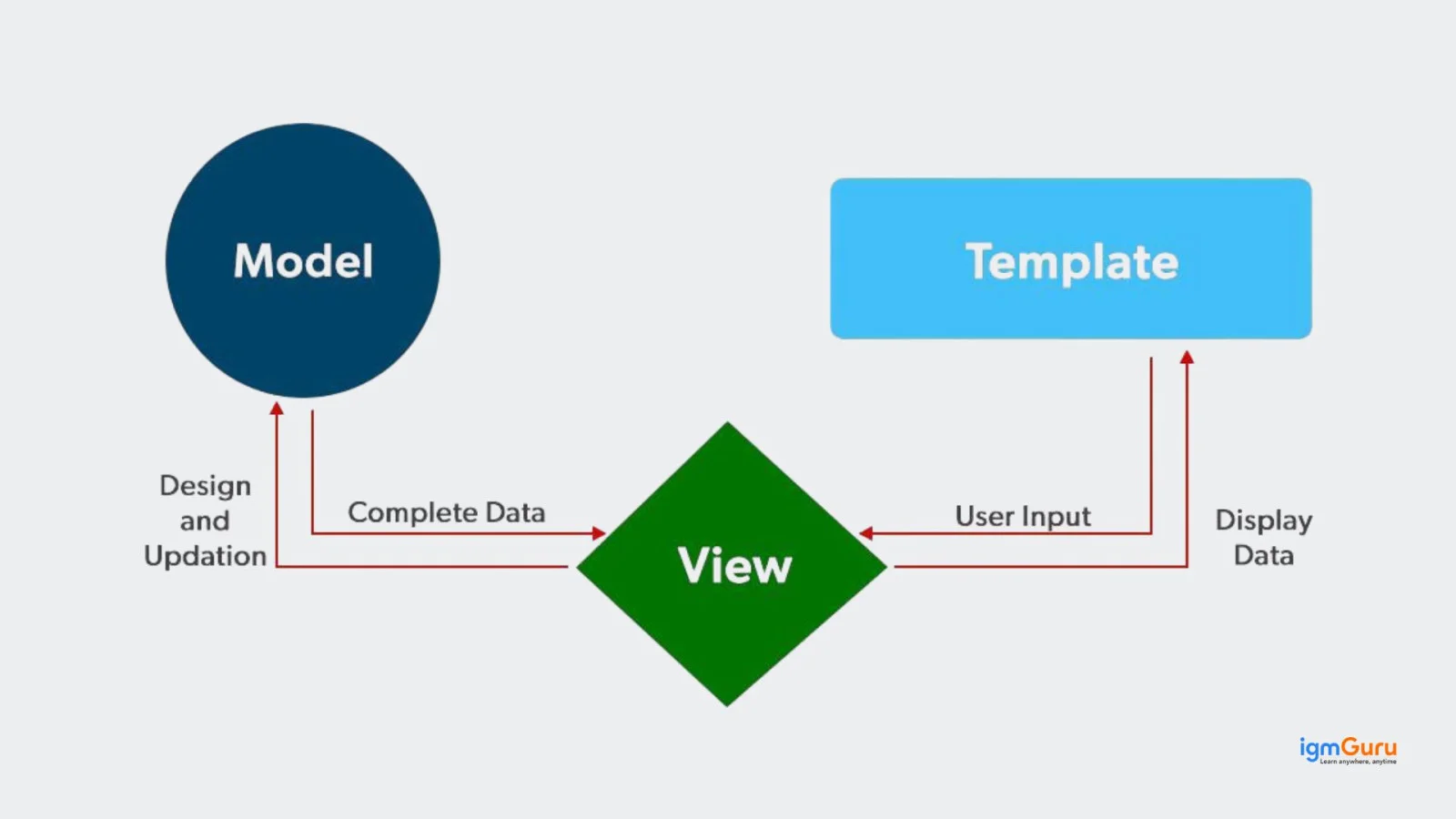
The model acts as the data layer of an application, which will define the structure of your database and handle data-related logic. Their main tasks are:
View or you can also call it as the brain of your database, which contains the business logic of the application. It processes incoming user requests and prepares the data that needs to be displayed. They are responsible for:
The template is responsible for how it will present the data to the users. It combines static content with dynamic data by using template syntax. They basically:
Also Explore: What is Numpy?
Installing and setting up Django is an easy process. Below is a step-by-step process on how you can install and set up this web framework.
Before you start installing Django, make sure you have:
Python installed (preferably Python 3.8+)
Internet connection
Basic command-line knowledge
Installing Django on Linux and Mac is similar. Right now I am showing it in Windows for Linux and Mac, just open the terminal in place of the command prompt and follow these commands.
|
When you set up the virtual environment, it will allow you to edit the dependency that your system generally wouldn't allow.
First, go to the directory where you want to create the virtual environment, then type the following command to create a virtual environment in Django:
|
Now you just have to activate your virtual environment.
For Windows
|
For Mac/Linux
|
You can install Django by giving the following command:
|
|
This command creates a new folder named my_site that contains all the basic files required for your Django project.
|
It will take you inside your project folder so you can work on it.
|
This will start the local server on your computer. It allows you to view your website in a browser.
Open your web browser and go to:
http://127.0.0.1:8000/
If everything is working well, you will see a welcome page.
Related Article: Web2py Python Framework
Django is a powerful and reliable framework that is used for building modern web applications. Many well-known platforms use Django to manage data, handle traffic, and deliver smooth user experiences at scale. Here are some of it applications in real world:
Django powers parts of Instagram’s backend, helping manage millions of users, posts, comments and likes efficiently. It handles database operations, user authentication and content delivery at scale.
|
It helps manage video metadata, user accounts and recommendations. It allows fast development and scalability needed for handling huge traffic and data.
|
Django supports backend services like playlist management, user libraries and recommendation systems. It ensures fast data handling and smooth user experience.
|
Pinterest uses Django to manage large collections of images and user boards. It handles uploading, organizing and displaying visual content while supporting millions of users smoothly.
|
Disqus uses Django to handle real-time comments across websites. It manages user input, moderation and storing large volumes of discussions efficiently.
|
Also Explore: Sanic Web Framework
Django is a powerful Python web framework that helps developers build secure and scalable web applications quickly. It comes with many built-in features, reducing development time and making coding easier for beginners and professionals.
Although Django is highly useful, it may not always be the best choice for every project. Some of its features can feel heavy or unnecessary depending on the application requirements.
1. Monolithic Structure: Django includes many built-in features, which can make it heavy and less flexible for small or simple applications.
2. Learning Curve for Beginners: Understanding its structure and concepts like MVT can be difficult for beginners at the start.
3. Not Ideal for Microservices: Django is better suited for full applications and may not be the best option for a lightweight microservices architecture.
Related Article: Pyramid Framework
Django and Node.js are both tools used to build websites and web apps, but they work in different ways. Django is simple and ready-to-use, while Node.js is faster and more flexible. When you know their difference, you can easily choose the suitable tool.
| Features | Django | Node.js |
|---|---|---|
| Language Used | Uses Python (easy to read and beginner-friendly) | Uses JavaScript (same language as frontend) |
| Type | Full web framework (comes with many built-in features) | Runtime environment (you need extra tools/frameworks like Express) |
| Speed | Slightly slower for real-time apps. | Faster for real-time apps (like chat apps) |
| Learning Curve | Easier for beginners (clean structure) | Can be a bit confusing at start (async behavior) |
| Built-in Features | Has many built-in features (auth, admin panel, etc. | Minimal by default, you add features using packages |
| Best For | Best for large, secure websites (like blogs, dashboards) | Best for real-time apps (chat, streaming, APIs) |
Adrian Holovaty and Simon Willison are the founders of website development software, Django, which was established in 2003, as a solution to not having to start from the ground up each time they wanted to develop a new website. It took two years for them to create code and design components that could be reused across multiple projects. After completing this project, they released Django to the public in 2005. Currently, thousands of developers have been contributing to and using Django and continue to add to and improve it.
Also Explore: Tornado Framework
In conclusion, Django is an extremely flexible and user-friendly framework to build web applications. With a structured approach and amazing built-in functionality, it is easy to create secure, scalable web applications very quickly. Developers will save time, write clean code and efficiently manage data using this framework. After streamlining the development process, you will learn how to practice the installation of Django and build a small website to get experience with the framework for real world web development.
Additional Resources:
Django is a backend web framework, but it has capabilities to handle both the frontend and backend, which makes it a full-stack framework.
Django officially supports the following relational database management systems (RDBMS).
Some common apps built using Django are Dropbox, Reddit, Mozilla and National Geographic, but there are many more platforms and websites that use Django for building powerful and scalable web applications.