Technological progress is at an all-time high, which means companies are working hard to keep up. There is a constant race to adopt the most useful technologies in the best way possible. Cloud computing is a technology that has proven highly beneficial for organizations. The demand for experts who understand cloud computing architecture and infrastructure is increasing at a rapid pace.
It has become an indispensable aspect of many companies today. There are also quite a few reasons behind this multiplying popularity, and that includes its cost-efficiency and flexibility. This blog discusses everything about cloud computing architecture.
Wondering what is cloud computing architecture? Here's a brief introduction to cloud-based architecture to get things going.
Cloud computing architecture refers to the structure showcased by cloud computing systems. It pertains to how the multiple components of cloud computing work with one another and provide certain services. It usually has multiple components like network infrastructure, management tools, cloud providers, etc.
Its architecture is an amalgamation of EDA (event-driven architecture) and SOA (service-oriented architecture). It is divided into two parts, including the frontend and backend. Businesses that migrate to the cloud enjoy many more benefits than on-premises environments. These include better cost efficiency, agility, and scalability. It's like a blueprint to run and deploy apps in cloud environments.
Explore igmGuru's best Cloud Computing Certification Courses and choose the best one as per your requirements.
Cloud architecture in cloud computing is divided into two key segments: frontend and backend. Both of these are incomplete without one another and hence, it's important to learn about both. Those who wish to have a career as a cloud architect must gain in-depth knowledge about these aspects. This section uncovers the two segments:
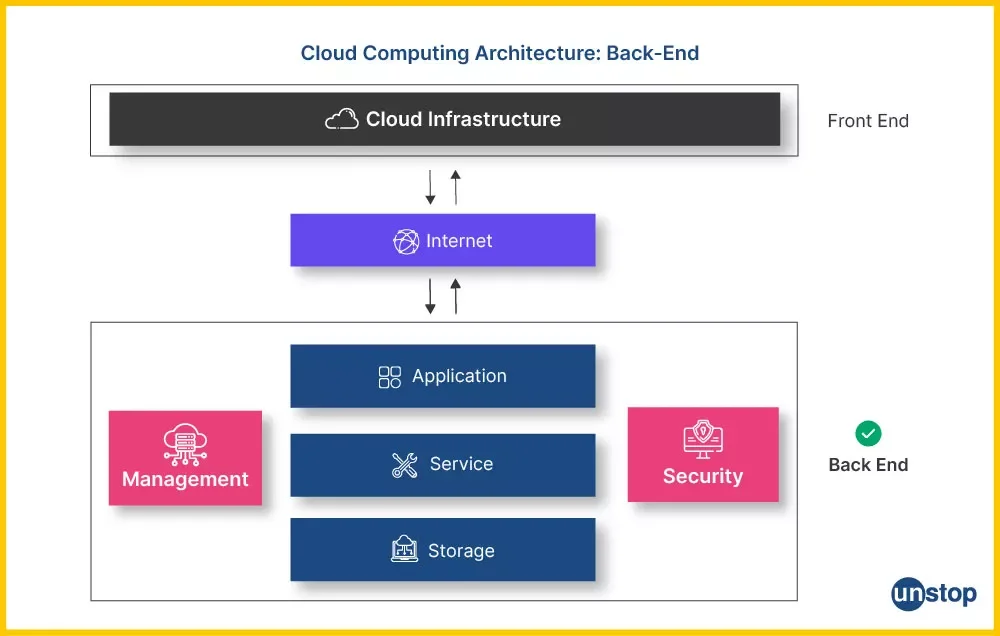
(This image showcases the two parts of the cloud computing architecture)
Frontend in cloud computing pertains to the client infrastructure. This includes client-side applications, client network or device, and user interfaces. All these aspects enable the user to access and interact with the cloud computing services. These three are also the frontend cloud architecture components.
Backend, on the other hand, is about the cloud architecture components that lead to the cloud itself. There are various components in the backend of the cloud. Understanding all these components is imperative to having a successful career in this field. Its key components are application, runtime cloud, management, services, storage, security, and infrastructure.
The network is the backbone that connects the frontend and backend of the cloud computing architecture. It enables seamless communication between client devices and cloud infrastructure through a combination of technologies like virtual private networks (VPNs), DNS, load balancers, and dedicated bandwidth channels. Without a robust network layer, data cannot flow reliably between users and cloud services.
A well-architected network layer ensures low latency, high availability, and secure data transmission. It also governs how traffic is routed, monitored, and optimized across multiple regions and data centers, making it a critical component for businesses that rely on real-time cloud operations.
The cloud-based delivery platform is the layer through which cloud services are actually packaged and delivered to end users. It encompasses the three primary service models, including SaaS (Software as a Service), PaaS (Platform as a Service), and IaaS (Infrastructure as a Service), each offering a different level of control, flexibility, and management responsibility.
This platform acts as the bridge between raw cloud infrastructure and the applications or services that businesses and users interact with daily. Choosing the right delivery model directly impacts how scalable, cost-effective, and manageable a cloud environment becomes for an organization.
Related Article: Top Cloud Computing Interview Questions
The radical transformation of cloud computing architecture over the past two decades culminates in a shift from passive, centralized infrastructure to an active, autonomous, and distributed digital nervous system. In its infancy, cloud architecture was merely a digital warehouse. In simple terms, it is a way for companies to rent virtualized servers and storage to escape the high costs of physical hardware.
Today, driven by the massive computational demands of generative AI and the zero-latency requirements of edge computing, the modern cloud is an intelligent ecosystem that continuously optimizes itself.
It has moved past simple data storage to become a predictive engine where AI-Ops automatically manages workloads, carbon-aware scheduling minimizes environmental impact, and Zero-Trust frameworks enforce security at every layer.
Ultimately, cloud architecture is no longer just a technical foundation for running software; it is a strategic business driver that enables instant global scaling, continuous innovation, and resilient digital operations.
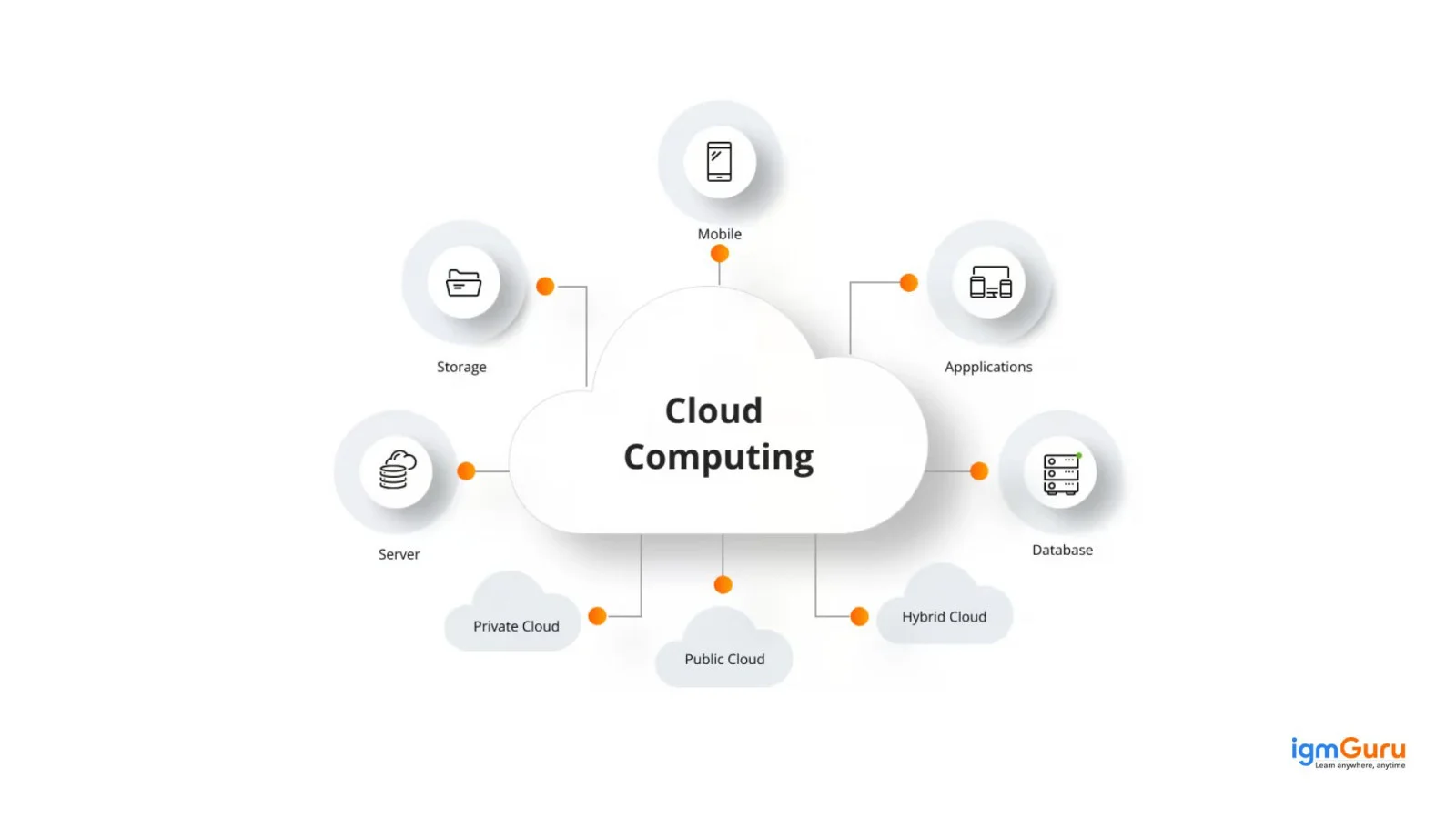
There are plenty of components of cloud computing, most of which belong to the backend. Gaining knowledge of how to manipulate and mold these components is an essential aspect of gaining prowess in this field. However, this blog discussed components belonging to both the frontend and the backend.
Client infrastructure is a component of the front end of its architecture. This is where the user interfaces and the applications needed to access the cloud platform are stored. So basically, it offers a graphical user interface or a GUI to help the user interact with the cloud.
Analytics is a part of the backend components that offer various analytic capabilities to manage data in the cloud. There are multiple analytic capabilities like business intelligence (BI), machine learning (ML) and data warehousing.
A database is that aspect of the backend that offers the database (DB) needed to store structured data. This includes databases like NoSQL and SQL. Top database services comprise Google Cloud SQL, Microsoft Azure SQL database and Amazon RDS.
Application is a backend component. It refers to a platform or software that is accessed by the client. In simpler words, an application is that aspect that offers the service in the backend according to the requirements of the client.
Storage is a component of the backend. It offers a scalable and flexible storage service, along with management of all stored data. It's an incredibly important component.
Networking in the backend is what drives the impeccable networking infrastructure available for applications in the cloud. There is a brilliant networking infrastructure that includes virtual private networks (VPNs), DNS and load balancing.
Service is a backend component, which basically is about the three major kinds of cloud-based services. These services are SaaS (software as a service), PaaS (platform as a service) and IaaS (infrastructure as a service). This section also manages which of these services are accessed by the user.
Security is a part of the cloud backend. It means the implementation of various security mechanisms in the cloud computing backend. The purpose is to ensure security for systems, infrastructure, files and resources for the end users.
In the backend, management is what leads to the management of all other backend components. These include runtime cloud, infrastructure, cloud computing security architecture, application, etc.
Runtime cloud is a backend component that plays a vital role in association with virtual machines (VMs). It offers the runtime and execution environment/ platform to these VMs.
Infrastructure is a backend component that refers to both the software and the hardware components of the cloud. It includes network devices, servers, virtualization software, storage and much more.
Related Article- Cloud Computing Tutorial For Beginners
Modern cloud architecture relies on several technologies that help organizations build flexible, scalable and resilient cloud environments. These technologies allow applications and infrastructure to be deployed, managed and updated efficiently while supporting changing business requirements.
Virtualization allows multiple virtual machines (VMs) to run on a single physical server. Each virtual machine can operate independently with its own operating system and resources. This technology improves hardware utilization and enables cloud providers to allocate computing resources efficiently according to user demand.
Containers package an application with its dependencies so that it can run consistently across different computing environments. Compared with traditional virtual machines, containers are lightweight and can be deployed quickly. Technologies such as Docker and container orchestration platforms such as Kubernetes are widely used to manage containerized applications in cloud environments.
Application Programming Interfaces (APIs) enable different cloud applications, platforms and services to communicate with one another. APIs play an important role in cloud integration and automation by allowing developers to connect services and exchange data without building every functionality from scratch.
Microservices architecture divides a large application into smaller, independent services that perform specific functions. Each service can be developed, deployed and scaled separately. This approach improves flexibility and makes it easier for development teams to update individual parts of an application without affecting the entire system.
Automation reduces manual effort by automatically performing repetitive cloud management tasks such as resource provisioning, configuration and deployment. Orchestration coordinates multiple automated processes and services. Together, these technologies help organizations manage complex cloud environments more efficiently and maintain consistent operations at scale.
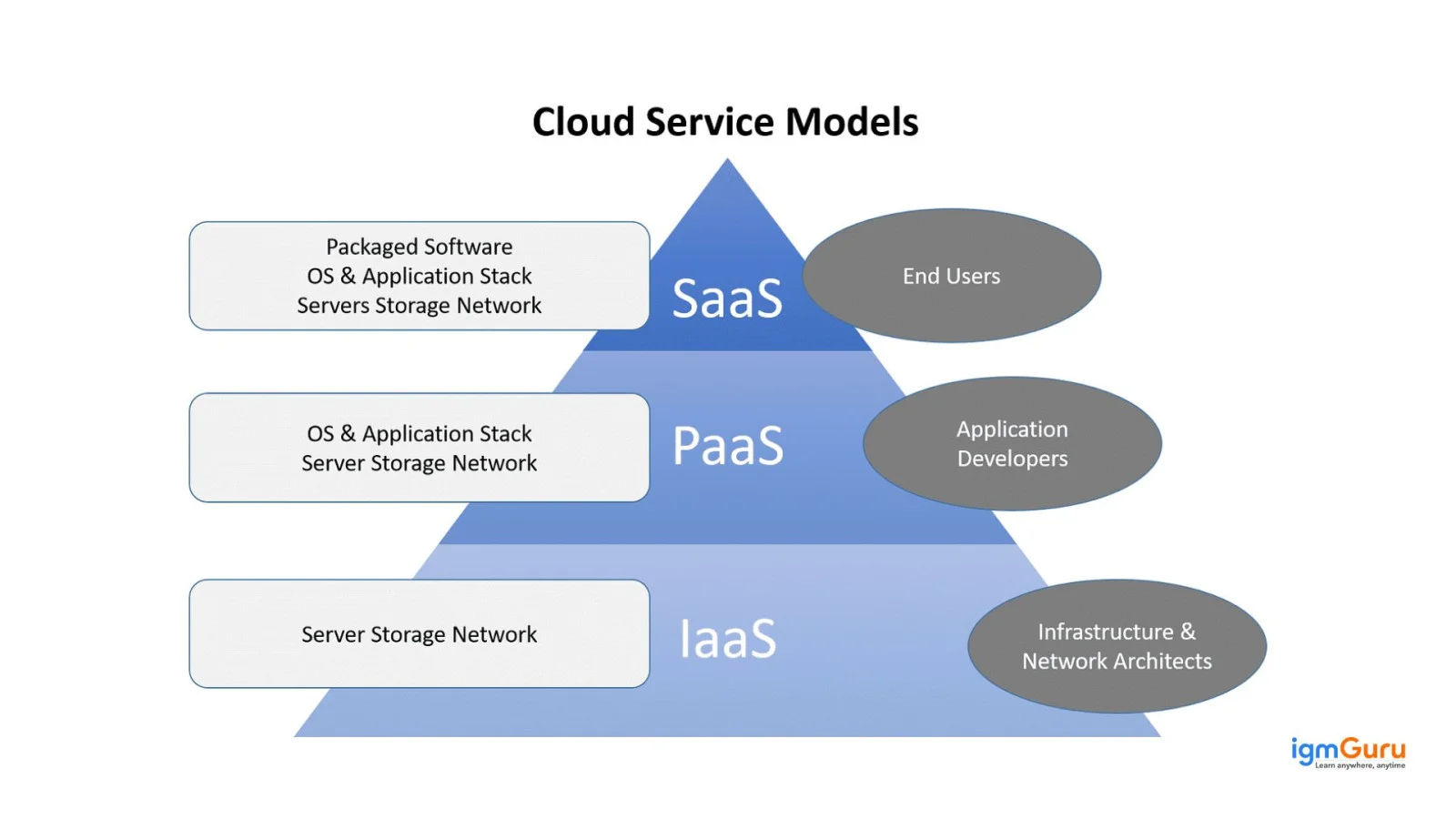
The cloud computing reference model is a big part of understanding its architecture. This model refers to an abstract model that segregates the cloud computing environment into various abstract layers & cross-layer functions. This aids in standardizing and characterizing its functions. This model creates five logical layers and three cross-layer functions.
Every single layer that's created here takes different aspects of the cloud computing environment into consideration. These include networking, virtualization software, control & management software, computing systems, security measures, etc. This reference model is classified into three service models.
The top prevalent cloud driver models are SaaS, IaaS and PaaS. Here is a complete guide to understand what each of these stands for.
With Software as a Service, users no longer have to fret about software maintenance. Additionally, testing and development become easier for cloud service providers (CSPs).
The applications are located in the top layer of this cloud delivery model. End clients gain access to this tier's services through web portals. Customers are switching rapidly from locally installed computer programs to online software services. This is because the latter provides the same functionality as the former. ILMs and many other application software are accessible as a service through the web.
SaaS is certainly an imperative service, especially in relation to editing, collaboration, document sharing, data access and storage. The most popular and widely used SaaS example is the email service in a web browser.
Controls in SaaS are as follows -
Infrastructure as a Service is used by IT organizations and developers for delivering business/ customer solutions. This is done via the computer and storage resources provided by the CSPs to the consumer. It includes computer hardware like storage, data center space, servers and networking technology as a service. Resources are also managed by delivering virtualization and OS technology.
The key point in IaaS is that its consumers rent computing resources. Thus, they save a lot of money on buying and installing said resources in their data centers. The customers usually go for a pay-as-you-go payment plan. Hence, dynamic scaling is a part of IaaS. This allows customers to immediately increase or decrease usage as per their demand and utility.
Controls in IaaS are as follows -
PaaS offers high-level abstraction that renders the cloud readily programmable. Additionally, there are infrastructure-oriented clouds offering basic storage and compute capabilities. With PaaS, developers don't have to know about core aspects to construct and deploy apps. They don't have to know how much memory or processors are used by their applications.
Google App Engine is a popular PaaS offering that offers a scalable environment to create and host web apps.
Controls in PaaS are as follows -
Cloud deployment models define how cloud infrastructure is hosted, managed and made available to users. Organizations can choose a deployment model according to their requirements for security, scalability, cost and control. The four commonly used cloud deployment models are public cloud, private cloud, hybrid cloud and multicloud.
A public cloud is an environment in which computing resources are owned and managed by a third-party cloud service provider and delivered over the internet. Multiple customers share the provider's underlying infrastructure while their data and workloads remain logically separated. Public clouds are commonly chosen for their scalability, flexibility and pay-as-you-go pricing.
A private cloud is a cloud computing environment dedicated to a single organization. It may be hosted within the organization's own data center or managed by a third-party provider. Private clouds provide greater control over infrastructure, security and data, making them suitable for organizations with specific compliance or governance requirements.
A hybrid cloud combines private cloud or on-premises infrastructure with public cloud services. It allows organizations to move or connect workloads and data between different environments when needed. This approach helps businesses maintain greater control over sensitive workloads while using the scalability and flexibility of public cloud resources.
A multicloud strategy involves using cloud services from two or more cloud providers. Organizations may choose different providers for specific applications, workloads or business requirements. Multicloud architectures can help reduce dependence on a single provider and give businesses greater flexibility when selecting cloud services.
Cloud computing architecture helps organizations or companies run and manage applications in a flexible and reliable way. Below are the major benefits explained clearly:
Read Also: Top 5 Cloud Computing Courses To Consider in 2026
Here are some practical use cases of Cloud Computing Architecture in real-world scenarios:
Cloud computing gained extreme popularity during the pandemic. Those few years changed everything for the world everywhere. It drove the world towards being a more technologically driven one and led to a spike in cloud computing popularity. This popularity surge was followed by many new job opportunities and career roles.
Those exploring a career in cloud computing should think about these popular ones. Here are the top job roles.
A Cloud architect is a strategic professional with many years of expertise. They envisage an organization's cloud landscape before implementation and come up with a complete blueprint. This blueprint is the execution map for app developers, administrators, cloud engineers and security professionals.
They make important decisions around the organization's cloud computing strategy. They oversee cloud application design, cloud monitoring and management, and cloud adoption plans. Best certifications for cloud architects are -
A cloud administrator looks after system maintenance, provisioning and configuration according to the fixed parameters. They must have 3-5 years of experience. They are focused on directing the everyday cloud computing operations. These professionals know about remote monitoring tools, configuration management, scripting languages and troubleshooting.
They work with the IT department to support and develop Unix, Windows or Cloud infrastructure. Best certifications for cloud administrators are -
Cloud engineers are professionals with a minimum experience between three to five years. They are familiar with cloud database management, integration design and APIs. These professionals generally work to solve all technical issues related to the cloud platform. These include maintenance, support and planning.
They are good at programming languages like Python and Java. They have prior experience and expertise in designing and developing cloud-based web services that are cloud-based. Hands-on experience with Microsoft Azure, OpenStack, Linux, Docker, and AWS is beneficial. Best certifications for cloud engineers are -
A cloud developer usually has experience of between two to three years in managing cloud environments or app development. They create software platforms to run on the cloud. They work closely with architects, analysts, technicians and engineers.
They have good hands-on experience in developing on major cloud platforms like Google Cloud, Microsoft Azure and AWS. Good knowledge of programming languages and development tools is recommended. Best certifications for cloud developers are -
A cloud architect is an IT professional responsible for designing and overseeing an organization's cloud computing strategy and architecture. They create the overall blueprint for how applications, data, networks, security and computing resources should work together within a cloud environment.
Cloud architects evaluate business and technical requirements before selecting suitable cloud services, deployment models and technologies. They also focus on important architectural considerations such as scalability, reliability, security, performance and cost optimization.
Depending on an organization's requirements, a cloud architect may design solutions for public, private, hybrid or multicloud environments. They often collaborate with cloud engineers, developers, administrators and security teams to ensure that the proposed architecture can be implemented and maintained effectively.
To succeed in this role, professionals typically need knowledge of networking, virtualization, cloud security, databases, application architecture, automation and major cloud platforms. Strong problem-solving and communication skills are also important because cloud architects must translate business requirements into practical technical solutions.
Following cloud architecture best practices helps organizations create cloud environments that are secure, reliable, scalable and cost-effective. The exact approach depends on business requirements and the cloud platform being used, but the following practices provide a strong foundation for designing and managing modern cloud architectures.
There is a lot to know about cloud computing architecture and infrastructure. The best way to learn it all is to get enrolled in a leading training program and learn from industry experts. This step is crucial to becoming a professional in this field. There are plenty of job opportunities and job roles, many of which are based on years of experience.
Tap into this leading field and make the most of the never-ending series of growth. Experience a career boost like never before with cloud computing, a field that's expanding in an unprecedented manner.
It is the framework of components and services used to build and manage cloud-based solutions.
It provides scalability, flexibility, and cost-efficiency for managing IT resources effectively.
The key components include front-end platforms, back-end platforms, cloud-based delivery, and a network.
It includes encryption, firewalls, and access controls to protect data and applications.
The average annual salary for a cloud architect ranges from $130,000 to $203,000 in the United States and from ₹21.75 LPA to ₹36.6 LPA in India, depending on your experience, location, and industry
Couse Schedule
| Course Name | Batch Type | Details |
| Google Cloud Platform Training | Every Weekday | View Details |
| Google Cloud Platform Training | Every Weekend | View Details |