Hugging Face is an open-source AI platform that helps people in using, building, and sharing ready-made machine learning models. It is especially known for understanding and working with human language.
As someone who has been working in the field of Artificial Intelligence and the Machine Learning industry for a while now, one thing has become very clear to me. The biggest challenge is not building models, but building them efficiently and reliably.
To solve this problem comes Hugging Face. It allows beginners and professionals to use powerful AI models for tasks like text analysis, translation, chatbots, summarization, image recognition, and speech processing. All this without creating everything from scratch.
In this blog, I will explain everything from what is Hugging Face to its features and applications. Let’s begin.

Hugging Face is a popular open-source platform and community for artificial intelligence, often described as the "GitHub for machine learning". It provides a central hub for sharing AI models, datasets, and interactive demos. You can explore the ecosystem directly on the Hugging Face Platform.
It is mainly used to build applications related to natural language, images and audio. Hugging Face is known for its transformer Python Library that helps in simplifying the process of downloading and training ML models.
In my opinion, the best revolutionary twist of this tool is that the models in this already come pre-trained. That means the developers are not required to start anything from scratch. They can just simply load a pre-trained model from its hub, then fine-tune it according to their task needs and start. Previously, it was popular only for Natural Language Processing, but today it also supports:

Hugging Face was started in 2016 as a startup. It was focused on building a chatbot for casual conversations and emotional support. After some time, the founders realized something important. It was about the technology behind understanding language.
In 2018–2019, Hugging Face shifted its focus toward open-source AI tools. It also released a Transformers library that changed everything.
Through this change, language models got accessible to everyone. Hugging Face quickly became a central platform for the AI community. Today, it is being used by researchers, startups and large companies across the world.
Previously, Hugging Face used to be a chatbot. With the release of different versions, it became what we see today.
| Version | Released Around | Key Info / Description |
| v3.x | Legacy (pre-2020) | Older major branches of Transformers before v4, supported early transformer models. |
| v4.0.0 | Late 2020 | Major stable line; brought big API changes and became the mainstream install version. |
| v4.7.0 | 2021-2022 | Added migration improvements from earlier 3.x versions. |
| v4.17.0 | 2022-2023 | Continued stable improvements in the v4 series. |
| v4.49.0 | 2024-2025 | Example mid-v4 release; reflects ongoing additions and bug fixes. |
| v4.57.3 | Late 2025 | Latest stable v4 line for general use before v5. |
| v5.0.0rc0 / v5 Release Candidates | 2025 | First major new line after v4, redesigned APIs, and improved interoperability. |
| v5.0.0 | 2026 | First stable release of the Transformers v5 series with API simplifications, improved performance, better model interoperability, and removal of deprecated legacy features. |
| smolagents | 2025 | Lightweight agent framework introduced by Hugging Face that enables developers to build AI agents with minimal code and integrate large language models into autonomous workflows. |
| Hugging Face Agents Platform | 2025–2026 | Expanded ecosystem for building, evaluating, and deploying AI agents, including tools, courses, and agent orchestration capabilities for real-world automation tasks. |
Read Also: Top 45 Artificial Intelligence Interview Questions
Hugging Face is mainly used to build and apply AI models that understand and generate human language, images, and audio. It helps users perform tasks like text analysis, sentiment detection, translation, summarization, and chatbot development without creating models from scratch. Hugging Face is also widely used for training and fine-tuning models using custom data, making it useful for real-world applications in business, education, healthcare, and research. Overall, it is used to simplify AI development and make advanced machine learning accessible to more people.
Starting with Hugging Face is quite simple. Even for beginners, getting started does not take more than a few minutes. Below are the exact steps you need to follow to set up your account and begin working with Hugging Face.
Start by visiting the official Hugging Face website. On the homepage, you will see the Sign Up option. Click on Sign Up to begin the registration process.

You can sign up using 3 things: Email and password, GitHub account, or Google account. Choose the option that feels most convenient to you. Once you select the option through which you want to sign up, enter the required details and submit. These steps will create your Hugging Face account.

After you complete your sign-up, Hugging Face will tell you to complete your profile. Now, here you need to add your username and full name compulsorily. Other optional things are also here like twitter username, GitHub username, etc. Completing your profile helps personalize your experience and makes collaboration easier within the community.
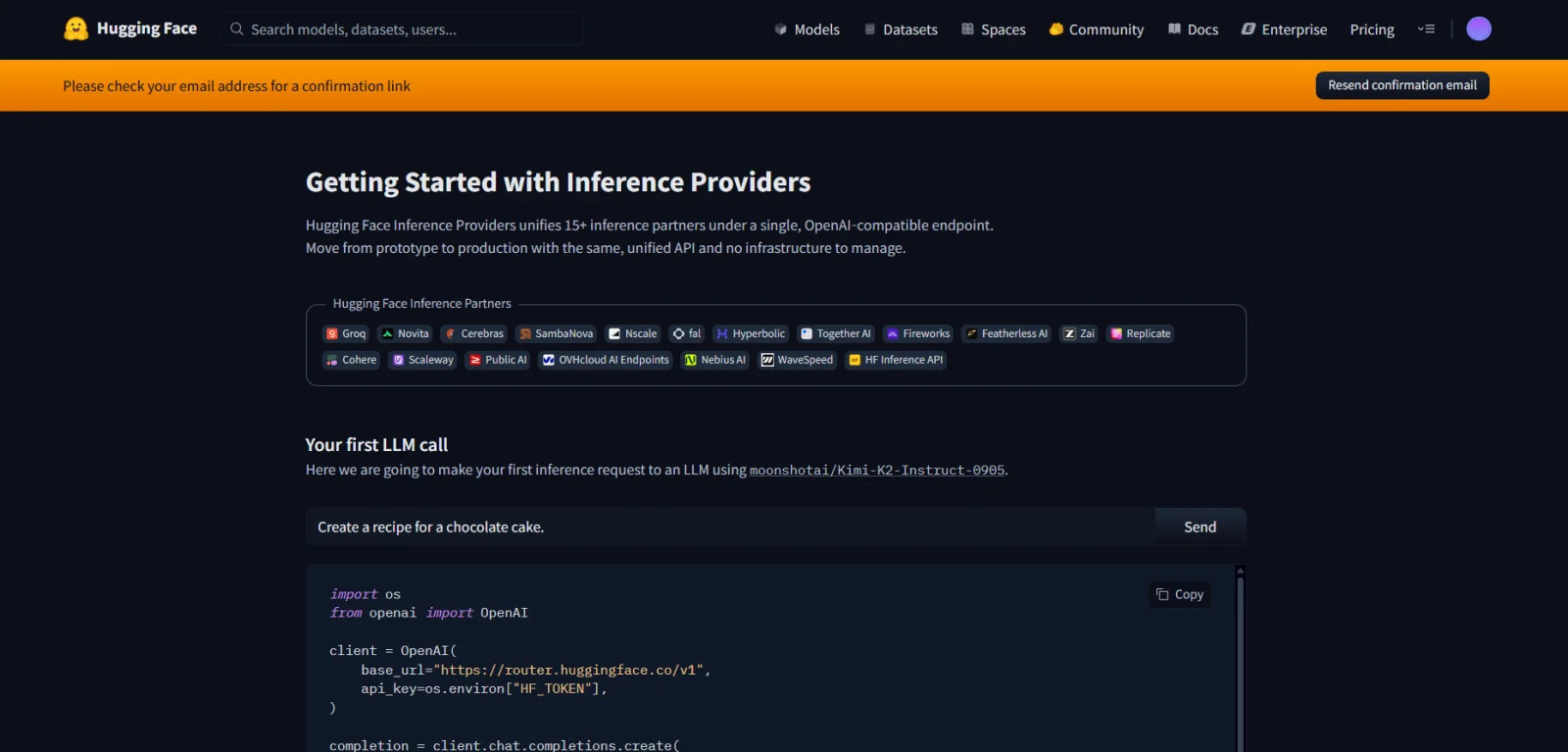
Once your account is created completely, Hugging Face will send you a confirmation email to your registered email address. Open the email and click on the verification link provided. This is very important to activate your account fully.

Now your account is ready to use. You can now explore models on the Model Hub, try out demos and Spaces, access datasets and can start using Hugging Face libraries in your projects.
Also Explore: Best AI Tools For Coding
Hugging Face is used by a wide range of professionals across industries. The platform supports different needs and skill levels. The table below shows who commonly uses Hugging Face and what they typically use it for.
| Who Uses Hugging Face? | What do they use it for? |
| Data Scientists | Building and fine-tuning machine learning models, performing text analysis, sentiment analysis, and experimenting with NLP tasks. |
| Machine Learning Engineers | Developing, optimizing, and deploying AI models into production systems and scalable applications. |
| AI Researchers | Training new models, testing research ideas, sharing models, and contributing to open-source AI development. |
| Software Developers | Integrating AI features like chatbots, text classification, and language translation into web and mobile applications. |
| Business Analysts | Analyzing customer feedback, reviews, and text-based data to extract insights for decision-making. |
| Students and Learners | Learning NLP, experimenting with pre-trained models, building projects, and understanding how modern AI works. |
| Startups and Companies | Creating AI-powered products such as recommendation systems, support bots, and content analysis tools. |
| Marketing and Content Teams | Generating content ideas, analyzing audience sentiment, and automating text-based workflows. |
Hugging Face is so popular for its wide range of real-world applications. It works especially well when you want quick and reliable AI solutions without building everything from scratch. Let’s look at some of the most common and practical applications that make it popular.
Hugging Face is most commonly used for natural language processing tasks. It helps machines understand and work with human language. You can easily analyze text, classify documents, summarize long articles and understand the meaning behind sentences with its model. This is widely used in customer feedback analysis, document processing and research-based applications.
Hugging Face also helps in building chatbots. By using pre-trained language models, you can create intelligent chat systems that answer questions, guide users, and provide support. These chatbots are used on websites, mobile apps, and customer support platforms. It helps in improving user experience and reduces manual workload.
Hugging Face is also used for generating written content. It can help you in creating blog drafts, emails, product descriptions, and social media content. This application is especially useful in industries like marketing and content. As here, saving time and maintaining consistency is important.
Hugging Face provides models that support multiple languages and translation tasks. These models are used to translate text from one language to another and to build multilingual applications. This is helpful for businesses and platforms that serve users from different regions and language backgrounds.
It can analyze reviews, social media posts, and feedback. Generally, it is used to determine whether sentiments are positive, negative or neutral. This helps companies make better decisions based on real customer insights.
Read Also: Hugging Face Cheat Sheet
In my experience, I have learned that real strength does not come from a single feature. It comes from how its core components fit together and simplify the entire AI workflow. Below are the core components that are most valuable in practical scenarios.
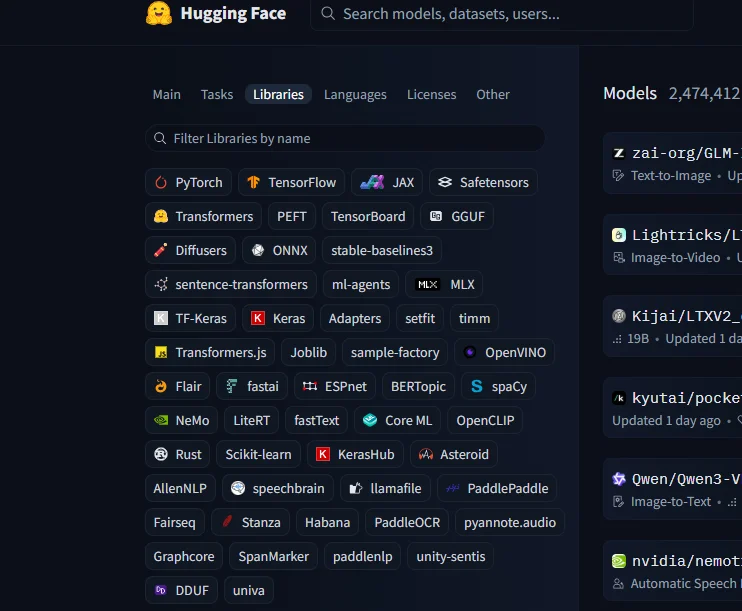
The Transformers library is the main component of Hugging Face. It is the part where most of the professionals interact first.
In real projects, this library removes the need to build complex neural networks from scratch. It provides access to powerful pre-trained transformer models that already understand language patterns, context, and meaning. It's been time, since I have started using the Transformers library, now I can:
The models behind this library are extremely advanced, still it is very simple and easy to use. By writing a few lines of code, you can load models like BERT, GPT, or T5 and apply them directly to your task.
From my perspective, this saves enormous development time and allows faster experimentation and iteration.

The Hugging Face Model Hub is where all the collaboration is actually being done. This Hub is like a global marketplace of AI models. It hosts thousands of pre-trained models created by researchers, companies, and independent developers from around the world. This is especially valuable in production environments where reliability and tested performance matter.
From my experience, I believe that the Model Hub is useful because of the following things:
Tokenizers look like a small technical detail, but they are critical in real-world AI systems. They convert text into a structured numerical format that models can process efficiently. It helps AI models to understand text, which they can not do by themself.
Hugging Face provides optimized tokenizers that are designed specifically for each model type. Good tokenization directly affects model accuracy and performance. Hugging Face’s tokenizers remove many common errors and inconsistencies that beginners often struggle with.
In my experience, Hugging Face tokenizers handle:

Data quality often matters more than the model itself. This is something I have learned repeatedly in real projects.
The Datasets library in Hugging Face simplifies the process of working with data at scale. It provides access to a wide range of public datasets while also allowing users to load and manage custom datasets easily.
Using the Datasets library, I have been able to:
The seamless integration between Datasets and the Transformers library makes training and fine-tuning models much smoother and more reliable.
One of the biggest reasons Hugging Face is so useful in real projects is its wide availability of pre-trained NLP models. These models are already trained on massive amounts of text data. It means they already understand language structure, grammar and context.
From my experience, using pre-trained models saves a huge amount of time. You are not required to start from zero, you directly begin with a model that already knows how language works. This makes it easier to solve tasks like sentiment analysis, text classification, summarization and translation.
Pre-trained models also reduce resource usage and experimentation time. You can quickly test ideas, validate concepts, and move faster from development to real-world implementation.
In the process of fine-tuning, Hugging Face works really well. Fine-tuning means taking an existing model and training it further on your own data so it performs better for a specific task.
Fine-tuning allows you to customize models for real business problems. For instance, you can train a model to understand industry-specific language, company-specific documents, or customer feedback more accurately. Hugging Face makes this process structured and manageable.
With the strong integration between Transformers, Tokenizers, and Datasets, fine-tuning becomes smoother and more reliable. This is especially useful when you want higher accuracy and better performance in real applications.
Everything comes with certain challenges, even if it is a powerful and widely used AI platform. From my experience, if you know these limitations early, it will help you set realistic expectations and lead to better project decisions. Below are some common challenges users may face while working with Hugging Face.
Many Hugging Face models are large and require strong computing power to run smoothly. This can be a challenge for beginners who are working with their laptops, especially when models need high RAM or GPU support.
Basic usage of Hugging Face is beginner-friendly but advanced tasks like fine-tuning models or deploying them at scale require a good understanding of machine learning concepts. New users may need time and practice to feel comfortable.
Hugging Face offers thousands of models on its Model Hub. This variety is helpful, but it can also confuse beginners. Selecting the best model for a specific task most of the time requires experimentation and careful reading of documentation.
Using Hugging Face models in real-world applications can be challenging when it comes to speed and scalability. Managing response time, cost, and performance becomes important, especially for applications with many users.
Most of the Hugging Face workflows require a proper internet connection to download models and datasets. Frequent updates to libraries may also require users to keep their code up to date, which can sometimes cause compatibility issues.
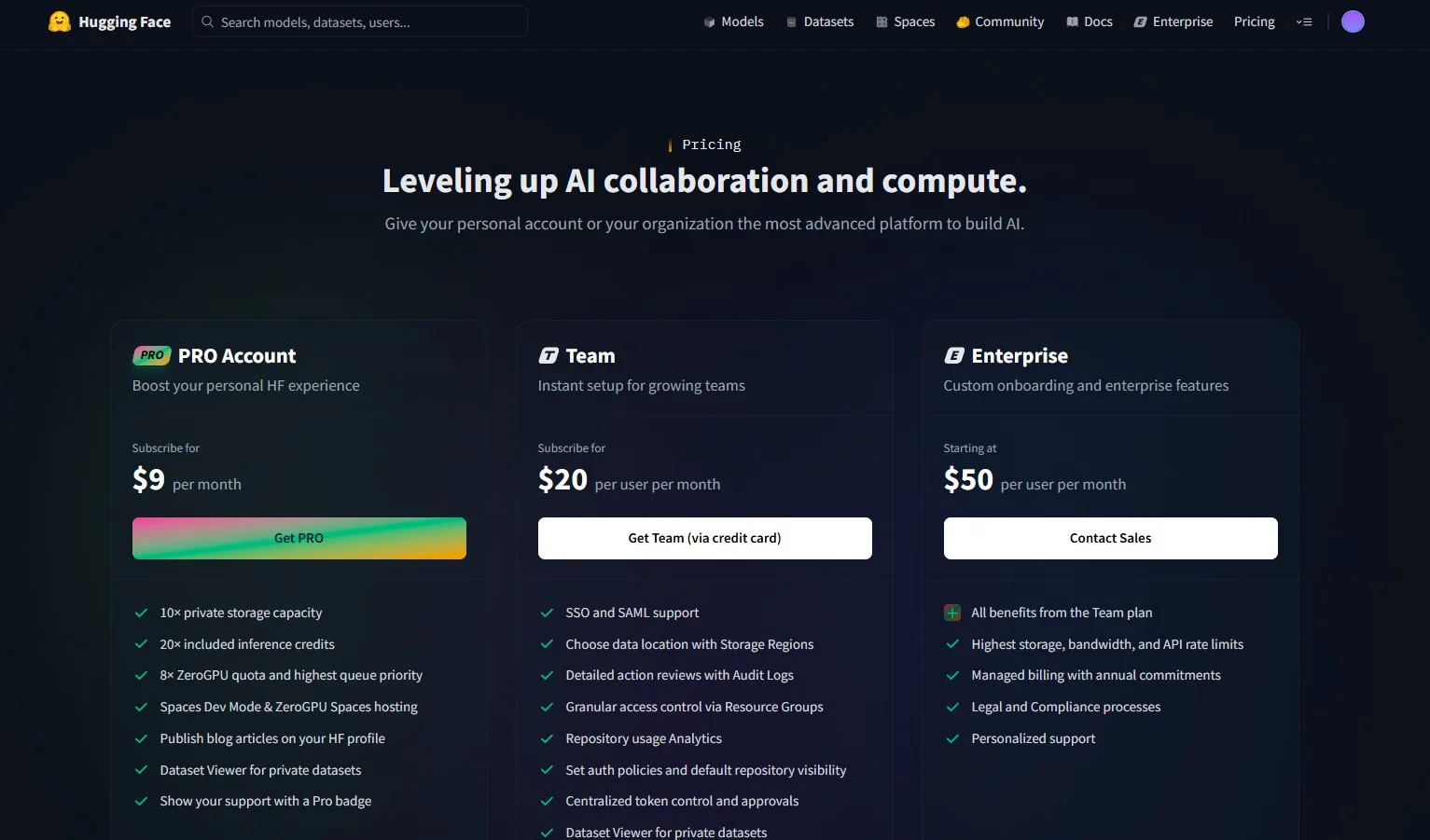
Hugging Face offers flexible pricing plans designed for individuals, teams, and large organizations. One of the best things about Hugging Face is that you can start for free and upgrade only when your needs grow. The pricing is transparent and mainly depends on storage, compute usage, and collaboration features.
Hugging Face provides a free tier that is perfect for beginners, students, and learners. You can explore public models and datasets, try basic experiments and understand how the platform works. This plan is enough for learning, practice, and small personal projects.
The Pro plan is priced at $9 per month. It is designed for individuals who want more power and flexibility. It offers higher private storage and includes inference credits, faster queues, and better access to Spaces and ZeroGPU features. This plan is ideal for freelancers, researchers, and professionals.
The Team plan starts at $20 per user per month. It is suitable for small to medium teams. It includes features like team collaboration, access control, audit logs, shared storage, and better dataset and repository management. This plan works well for startups and teams building AI products together.
The Enterprise plan starts at $50 per user per month and is built for large companies. It includes everything from the Team plan, along with advanced security, compliance support, high API limits, managed billing, and personalized support. This plan is best for organizations running Hugging Face in production at scale.
Hugging Face is clearly the most popular open-source AI platform available today. But depending on your specific needs, budget, or project type, there are other platforms and tools worth exploring. In my experience, no single platform fits every use case perfectly. So knowing the alternatives helps you make a smarter choice for your project.
Below, I have listed the most relevant alternatives to Hugging Face and compared them based on the factors that matter most in real-world development.
| Platform | Best For | Open Source | Pre-Trained Models | Fine-Tuning Support | Free Tier | Main Limitation |
| Hugging Face | NLP, Computer Vision, Audio, Multimodal AI | Yes | Yes (400,000+) | Yes | Yes | High compute requirements for large models |
| TensorFlow Hub | TensorFlow-based deployments and model reuse | Yes | Yes | Yes | Yes | Tightly tied to the TensorFlow ecosystem |
| PyTorch Hub | Research-focused model sharing and experimentation | Yes | Yes | Yes | Yes | Less polished UI and tooling than Hugging Face |
| OpenAI API | Production-grade GPT models via API | No | Yes (closed models) | Limited | Limited (credits) | Expensive at scale, no model access or ownership |
| Google Vertex AI | Enterprise-scale MLOps and Google Cloud users | No | Yes | Yes | No (pay-as-you-go) | Steep learning curve and high cost |
| AWS SageMaker | End-to-end ML pipelines within AWS infrastructure | No | Yes | Yes | No (free trial limited) | Complex setup and AWS-dependent |
| Replicate | Deploying and running open-source models via API | Partial | Yes | Yes | Yes (pay-per-run) | Limited customization compared to Hugging Face |
| Cohere | NLP for enterprise applications like search and classification | No | Yes (closed models) | Yes | Yes (limited) | Only NLP focused, no multimodal support |
One of the biggest reasons behind Hugging Face's popularity is that it removes much of the complexity traditionally associated with machine learning and artificial intelligence development. Instead of spending weeks collecting data, training models from scratch, and building infrastructure, developers can start with powerful pre-trained models and focus directly on solving business problems. This significantly reduces development time while improving productivity and experimentation.
Whether you are a beginner learning AI concepts or an experienced machine learning engineer building production systems, Hugging Face provides tools that simplify the entire workflow. From accessing models and datasets to fine-tuning and deployment, everything is designed to make AI development faster and more accessible.
| Benefit | How It Helps |
| Pre-Trained Models | Allows developers to use powerful AI models immediately without training them from scratch. |
| Open-Source Ecosystem | Provides free access to models, datasets, libraries, and community contributions. |
| Faster Development | Reduces the time required to build NLP, computer vision, and AI applications. |
| Easy Fine-Tuning | Enables customization of existing models using domain-specific datasets. |
| Large Model Hub | Offers thousands of ready-to-use models for different AI tasks. |
| Strong Community Support | Provides documentation, tutorials, examples, and active community discussions. |
| Multi-Domain Support | Supports natural language processing, computer vision, speech recognition, audio processing, and multimodal AI. |
| Production Readiness | Helps organizations deploy AI models efficiently through APIs, Spaces, and enterprise solutions. |
From my experience, the biggest advantage of Hugging Face is accessibility. A task that previously required extensive machine learning expertise can now often be accomplished using a few lines of code. This lowers the barrier to entry for beginners while still providing the flexibility and performance needed by advanced AI practitioners.
Hugging Face has a very strong future scope. It is continuously growing as one of the leading open-source platforms for artificial intelligence and machine learning. In the future, Hugging Face aims to democratize AI by making powerful models, datasets, and tools that are easily accessible to everyone. It is also expected to play a major role in open-source AI development and multimodal AI systems that combine text, images, and audio, and large-scale collaboration between researchers, developers, and companies. Hence, from my experience, I can already see that Hugging Face is going to grow more in the future.
Hugging Face is a powerful yet easy-to-use AI platform. It helps people in working with ready-made machine learning models for language, images, and audio. In this blog, I have explained what Hugging Face is, how it allows users to build AI applications faster and why it is useful for beginners as well as professionals. By using Hugging Face, users can save time, experiment with advanced models and build real-world solutions more easily. I have also discussed about some challenges users may face, such as the need for strong computing resources, selecting the right model, and handling deployment in real applications.
Now that you have understood the basics of Hugging Face, the next step is to start using it hands-on. You can now explore models on the Model Hub, try simple NLP tasks using pre-trained models. You can also start building small projects like sentiment analysis or chatbots. Once you gain confidence on this, you can move toward fine-tuning models, working with datasets, and eventually deploying AI solutions.
Explore Our Trending Articles-
Hugging Face and OpenAI both serve different needs. Hugging Face is best for open-source learning and customization, while OpenAI focuses on ready-to-use AI APIs.
Hugging Face is famous for its Transformers library and large collection of pre-trained models. It is especially for natural language processing tasks.
Yes, Hugging Face is free to use, but to access some of the advanced features you need to go for the paid version.