DevOps revolutionizes each stage of the software development process by merging development and operations departments. It brings a shift where operations professionals and developers embrace automation to provide constructive software solutions.
Businesses apply automation to deliver up-to-par software solutions to users. This automation process, combined with correct processes and tools, is referred to as a DevOps pipeline. This guide highlights the answer to what is a pipeline in DevOps and its role in the software development process.
DevOps pipeline a compilation of automated steps and tools for software teams to compile, test and release their code faster. It would be quick to make, test, and launch updates if a company can set up a good pipeline. This is more like an assembly line as it gets everything together.
Software delivery becomes quite easy by cutting out different manual tasks in the process. Automation reduces the number of tasks done by humans that usually take up a lot of time. Teams can speed up the release process and make few errors to send out better code with this technology.
Explore our DevOps certification training program to learn with industry experts.
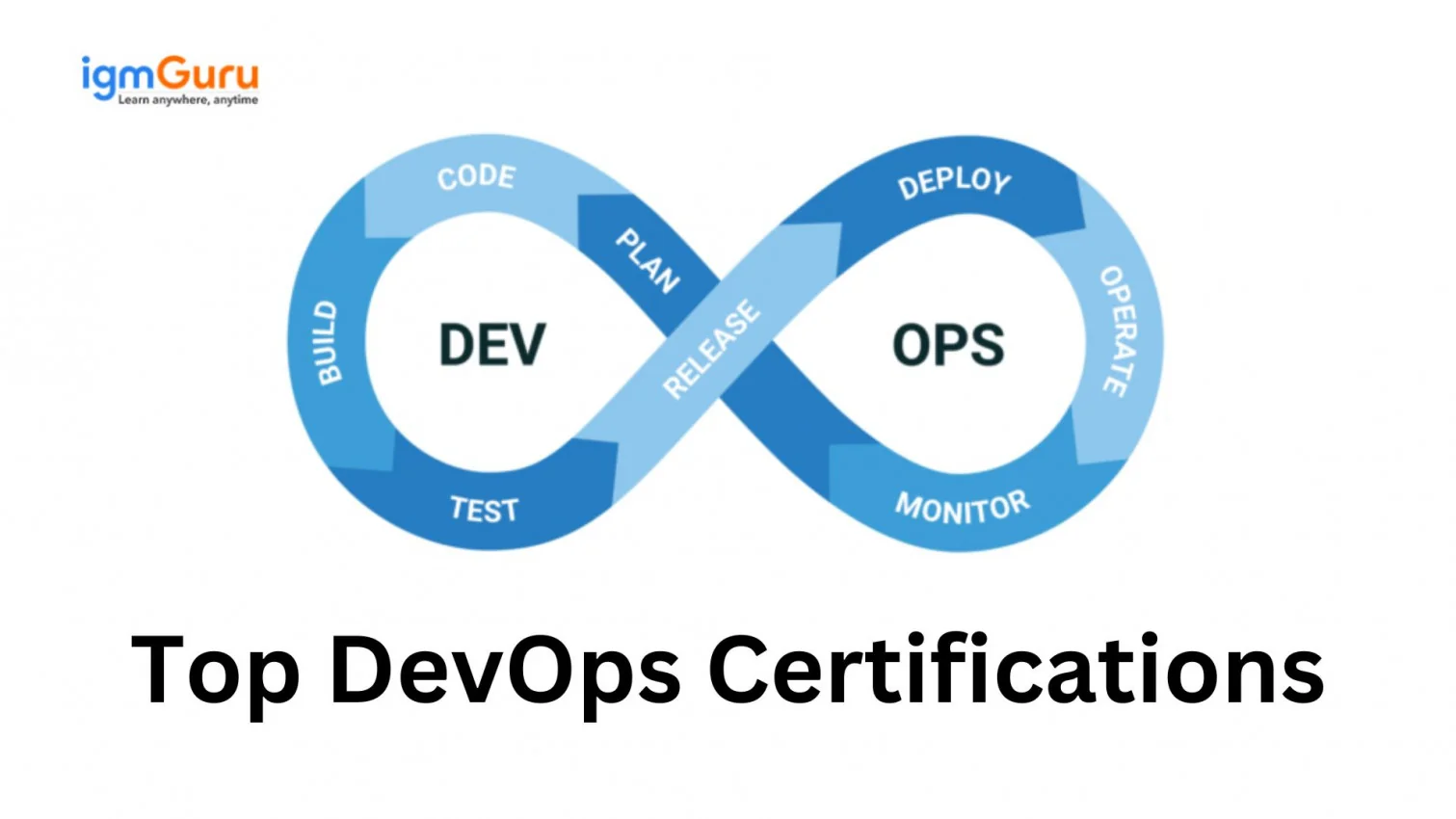
DevOps is a process of continuous cycle instead of having a specific beginning and an end. The final product or software goes through a repeated circle of improvements even after it has been released to users. This section breaks down the eight stages of DevOps pipelines and how they clasp back together.
DevOps practices are implemented to ensure the uninterrupted transfer of code from one stage to the next. There are seven different components of the pipeline in DevOps.
Continuous integration is a main process that brings together the different components of the software production lifecycle. This process automates the build and deployment phases through different tools and best practices. The CI automates code building and testing every time the source code changes.
The next phase is continuous delivery and is like an extension of the previous phase. The updated code here is tested both automatically and manually. Successful completion of testing leads to its deployment for production. Its objective is to deliver faster updates at a frequent pace. Releasing the source code with minute but impactful changes ensures simpler troubleshooting with lesser software delivery time.
This is for companies to run tests during every part of making software. Teams can quickly check for risks when they mix new code in. Tests start running on their own as soon as the code is added.
The next phase in the DevOps pipeline is continuous deployment. This is an automated process wherein the software only gets deployed to the production stage if it is error-free. This automatic stage does not wait for release dates but rather releases just as the software clears the testing stage. It hence makes the software delivery speed better.
This stage validates the stability of the environment while verifying whether the applications are actually doing what they have been designed to do. The operations teams also monitor the systems and applications while keeping an eye on their performance.
This phase is important for a new plan of action to be built as it involves the evaluation of the latest updates depending on customer feedback. This report is then sent to developer teams after the evaluation is done.
It maintains an always-running operation with zero to none planned downtime. It ensures that the end user does not suffer interruptions because of any hardware or software changes. This stage is often cited as an expensive initial investment but ultimately does prevent costly production losses later.
Related Article- DevOps Tutorial For Beginners
Its speed, tools, and automated testing deliver the software on time and keep it secure. This keeps the focus on the main goal, which is getting better software for users faster. Here are a few key advantages of a pipeline in DevOps.
Some tasks are too tiring and take up so much time. Computers can handle these tasks so much better as compared to a human hand. This leads to a visible cut down on the time people spend doing it. Teams can thus shift their focus on more important tasks like the creation and delivery of software with automation.
A DevOps pipeline delivers the software to users in no time. This mostly involves continuous integration and continuous delivery. It automates the process of building, testing and delivering software. Teams send more quick updates to users.
Companies can avoid bugs and issues in their finished products by applying automated testing during the software development process. Automation of tasks comes with fewer mistakes caused by manual work. The method of continuous integration and continuous development is what makes speedy software delivery and find problems right after any changes in code.
DevOps pipeline applies automated tests during the software development process. This test is done to check the functions and security of a software, which makes it more trustworthy and a better quality software. It goes through similar tests every time before its launch.
Related Article- Top 45 DevOps Interview Questions and Answers
Companies use different tools and methods to set up the pipelines that work for them. It's a process starting with CI/CD solution and ending with the deployment of their work to production. Here are the detailed steps to create a pipeline in DevOps.
Continuous Integration and Continuous Delivery are key parts of any DevOps process. The first step is to select the right tool for the team to build a good DevOps pipeline. Some well-known options are Jenkins, GitLab CI, CircleCI and Azure DevOps.
Companies with big teams want to keep and share their code safely. They create different versions of the apps to avoid issues, like possible conflicts between two people working on the same code.
One of the source control tools, GIT, is a great rescue for companies. It gives a platform to teams to work together by keeping every developer's code in a shared place. Conflicts can be avoided, and everyone gets to update and access the code.
A build server is important to move a project forward and make it possible for everything to work well in a team setting. It collects code from the source code repositories where developers can add their work. Everyone's code gets tested in a clean environment to catch any rising issues this way. There are different build servers to choose from and each has its own features. Jenkins is a popular choice, but one can also go for TeamCity and Travis-CI.
The code is tested after it is ready on the build server. Developers run automated tests here to make only good code move on to be deployed. Different tests are run during this phase through continuous integration.
The process comes to an end when the program is ready to go live. The fastest way to deploy the code is to set up the build server like Jenkins. One can create a script that will handle the deployment, which can be done automatically or manually. It's important to be sure that no poor code gets pushed to the production stage if one is choosing automatic deployment.
DevOps market value was recorded at around $13.16 billion in 2024. Its share is however expected to grow to approximately $81.14 billion by the end of 2033. A solid pipeline is for all kinds of companies to get their code out smoothly. It lowers mistakes and speeds up deployment.
Take an example of a two-stage pipeline might have a source stage called Source and a second stage called Prod. The pipeline is updating the application with the latest changes and continuously deploying the latest result in this example.
It has phases and teams might change these phases depending on their workflow. There are four phases one will see in nearly every pipeline. These are develop, build, test and deploy. Some teams also add planning and monitoring.
CI/CD tools are main in software development for faster and better apps. CI/CD stands for continuous integration and delivery. It's all about automating how we build, test and share changes in software.
Explore These Trending Articles:
Course Schedule
| Course Name | Batch Type | Details |
| DevOps Training | Every Weekday | View Details |
| DevOps Training | Every Weekend | View Details |