Gemini 4 Argon is a reasoning AI model by Google's flagship. It is built for complicated software engineering, scientific problem-solving, and autonomous multi-step agents. It was announced on September 30, 2026, and released globally on October 13, 2026.
It introduces an optimized architecture with many new features such as state-of-the-art native multimodal performance and industry-leading security guardrails. It is specifically designed for enterprise scalability and high-concurrency environments.
If you also use AI models often for your tasks, this tool may help you. This article will take you through features, use cases, capabilities, and the path to getting started with this AI model. Let’s begin with an introduction to Gemini 4 Argon.
Related Article: Gemini for Developers
Gemini 4 Argon (gemini-4-argon) is a frontier reasoning model of Google DeepMind. It is built specifically for deep, multi-step, and long-horizon professional workflows. It comes with multiple key features and capabilities including massive token context and output, multimodal inputs, cybersecurity defense and many built-in tools. You can use it for:
Model Id for developers:
| gemini-4-argon |
Also Explore: What is Google Antigravity?
Google said that Gemini 4 Argon provides various new features and capabilities that were not available in the previous models. Let’s understand how it is different from the other models:
It features a unified context window of 1,048,576 tokens and supports up to 1 million output tokens in a single continuous generation. Its default synchronous output is 65,536 tokens that scale up with long decode.
The long decode feature here is the cherry on the top. Usually normal replies pause at near 65K tokens, but with this feature you can write up to 1M tokens at once. Google calls Argon an industry led output limit. This helps you ask for a full code migration, long report, huge document set and the model doesn’t finish out of space so fast.
The older models usually disappear during multiple step tasks. Argon is perfectly trained for staying on the track for longer tasks and pretty useful for AI agents. This solves one of the major issues of any artificial intelligence tool. Google has shared some instances from its own teams and they are Google’s own claims not the independent tests:
Gemini 4 Argon supports long decoding up to 1M tokens through background execution
|
which lets you extend trajectory tasks like full scale code migrations.
This offers configurable thinking modes ( low for speed/lesser tokens, medium as default balanced mode and high for complicated reasoning).
It is capable of vulnerability discovery, validation and patching which is initially tested through the Fairwind Program and Wiz ‘scan for good’ initiative.
This platform gives on point answers with less repetition and also gives results for the longer tasks as well.
It also blends with the other apps on your device and gives results accordingly in texts. You can give prompts to Argon through images, videos, audio and much more and yet it will still give you results.
You can use Gemini 4 Argon through the Gemini Enterprise Agent platform on Google Cloud. Even Google’s Antigravity can be used for AI led coding tasks. I will describe on how to use Gemini 4 Argon through steps:
Make a paid tier API key in Google AI Studio, since Argon does not have a free trial.
Make use of a supported version of Google’s SDK for JavaScript, Go and even Python.
Use -
|
in your API request.
You can choose low, medium and high in spite of
|
Go thoroughly with your own tests to keep a check on the model’s accuracy and performance before making it use in a live application.
Let me explain you through a basic Python example on Google’s SDK pattern.
Operate this command in your terminal:
|
You will also need access to the model through Google’s supported API terrain. The normal Gemini Developer API and Google Cloud’s enterprise terrain can have different access and authentication needs.
|
Following Google’s documented -
|
pattern.
from google import genai
Makes Google's Gen AI Python library available.
|
Initializing the API client using the configured credentials.
|
This sends your question to the specified model.
|
This prints the generated text in your terminal.
For a Gemini Developer API setup, obtain an API key through Google AI Studio, then set it as an environment variable.
Windows PowerShell:
|
macOS or Linux:
|
Use your actual key locally, and never publish it in source code or a public repository. If you are using Gemini 4 Argon through Google Cloud's enterprise platform, follow its separate project, location and authentication setup.
In short, you can install google-genai, configure access, create the client, specify gemini-4-argon and send your prompt. That's the basic Google SDK workflow for calling the model.
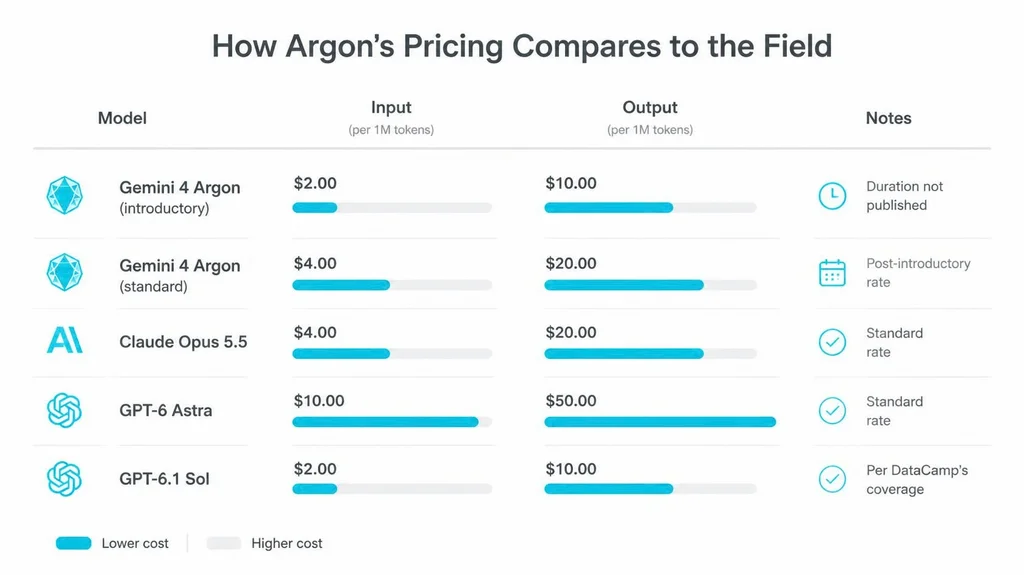
The Gemini 4 Argon API and platform pricing relies on the promotional timeline and whether you make use of global or non global routing. Here are the pricing for this platform given below:
Also Explore: What is Gemini Omni?
As Gemini 4 Argon is a promising AI model with useful features for coding, reasoning and business automation. The introductory prices make it even more affordable before 1st December 2026, because of the rise in cost after this date. Google offers the strongest proof about its abilities, free testing and is still growing.
So before you use it in your business, test the model on your own tasks. And keep a check on its accuracy and predict costs through standard pricing. You should keep your system easy going, enough to switch between AI models. Without the need to rebuild your entire application when better options are available.
Explore Related Guides:-
Absolutely Yes! Gemini 4 Argon is good at its work and particular tasks like long context analysis and knowledge work. Though this latest model does have notable limitations as compared to rivals such as Claude Opus 5.5 or GPT-6 Astra.
Gemini 4 Argon’s context window is 1M tokens which are shared between input and output.
No, it does not have any free tier of the Gemini API, so you do require a paid key. The Gemini app is open to Google AI Pro and Ultra subscribers, both have paid plans since 13th Oct 2026.