On 18 November 2025, Google introduced Gemini 3, its most advanced large language model to date. Gemini 3 is Google's next-generation LLM built to support reasoning, writing, coding, analysis and multimodal understanding in a more structured and dependable way. This is not like earlier Gemini models which focused on incremental improvements. Gemini 3 prioritizes practical intelligence like how well the model works in everyday workflows, rather than just on benchmarks.
When compared to previous versions, Gemini 3 delivers stronger reasoning, better long-context handling, improved multimodal capabilities and clearer separation between models like Pro, Flash and Deep Think.
This article explains what Gemini 3 is, how it improves on earlier models, how its variants compare, key benchmarks, pricing, real-world use cases, and how it stacks up against competitors like ChatGPT and Grok.
Sundar Pichai has stated in his LinkedIn post that Google's focus is on building AI systems that are more helpful, reliable, and capable of reasoning through complex problems- a direction clearly reflected in Gemini 3.
TL;DR (Short Summary)
- Gemini 3 is Google’s latest LLM, built around stronger reasoning, long-context understanding, and multimodal capabilities.
- Pro, Flash, and Deep Think serve different needs: Pro for complex tasks, Flash for speed, and Deep Think for advanced reasoning.
- Gemini 3 stands out for long documents, images and video, coding, analysis, and multi-step workflows, with deeper integration across Google’s ecosystem.
- It is best suited to users who value structured, reliable reasoning, especially for learning, coding, writing, research, and business analysis.
Gemini 3 is not just a normal upgrade. It has not been upgraded with flashy features. Google focused on fixing the real limitations users experienced with earlier Gemini models.
Before Gemini 3 (What Users Struggled With)
Earlier versions like Gemini 1.5 and Gemini 2.5 were capable, but in everyday use, they showed clear gaps like:
These issues became noticeable when people used to work on real tasks like long-form writing, large code files or detailed analysis.
What Gemini 3 Does Differently
Gemini 3 directly addresses these pain points:
Another main improvement is balance. Gemini 2.5 improved reasoning quality and now Gemini 3 makes that intelligence more usable across text, images, code and mixed inputs. It is also better optimized for production use with fewer random errors and more predictable behavior. Gemini 3 created a shift from incremental upgrades to clear real-world performance gains. It is especially for users who rely on AI for learning, writing, coding and analysis.
Gemini 3 is Google’s latest large language model (LLM). It is built to handle reasoning, writing, coding, analysis, and multimodal tasks in a much more reliable way than earlier versions.
Gemini 3 is trained on massive amounts of text, code, and structured information. So it can understand prompts, generate responses, and reason through problems instead of just predicting the next word blindly.
When I used Gemini 3, it felt more experimental. It is clearly designed to work across products, APIs, and real workflows.
Another important thing to understand is that Gemini 3 is not a single model. It comes in different variants like Pro and Flash, each optimized for different use cases. Some are built for deep reasoning and complex tasks, while others focus on speed and efficiency.
Gemini 3 is available in multiple models, each of which is designed for a different type of task. In this section, I will break down Gemini 3 Pro, Flash, and Deep Think. It also explains how they differ and when each model is best suited for real-world use.
Gemini 3 Pro is the best multimodal LLM in 2026 in the Gemini family. This is the model built for depth. When tasks require serious reasoning, detailed analysis, or long-form output, Gemini 3 Pro is best for it.
While using Gemini 3 Pro, you can notice the difference easily. It thinks more carefully. It takes a little more time but the answers are structured and logical. This makes it especially useful for tasks where accuracy and clarity matter more than speed.
Gemini 3 Pro is mainly designed for complex reasoning problems, long-form content writing, code generation and debugging, Research and analysis, Multi step tasks that require memory and context.
One of its strongest points is context handling. Gemini 3 Pro can work with long prompts and detailed instructions without losing track. You can ask follow-up questions, refine outputs, or change direction mid-conversation, and it still understands what you are trying to achieve.
Another thing I noticed while using Pro is how well it handles structured tasks. If you ask for outlines, comparisons, step-by-step explanations, or formatted outputs like tables, it sticks to the structure cleanly. There is very little randomness.
Gemini 3 Pro is best when quality matters more than speed. If you are working on complex or technical topics and need detailed, well-reasoned responses, doing deep research, building logic-heavy workflows, or working with code, Gemini 3 Pro feels reliable and professional.
Gemini 3 Flash is the fastest and most lightweight model in the Gemini 3 lineup. It is designed for speed, efficiency and high volume usage. If Gemini 3 Pro is about depth, then Flash is about responsiveness.
The first thing I noticed in Gemini is how quickly it responds. The outputs arrive almost instantly. This makes it ideal for everyday tasks where you do not need deep reasoning but still want accurate and relevant answers.
Gemini 3 Flash is mainly built for quick content generation, short explanations and summaries, chat-style interactions, simple coding help and high-frequency tasks where speed matters. It is perfect for workflows like customer support bots, real-time applications or quick brainstorming sessions.
The main difference is thinking depth. Gemini 3 Flash handles straightforward tasks very well, but when prompts become complex or require multi-step reasoning, Pro performs better. Flash may simplify things or skip deeper logic to keep responses fast. For simple writing, rephrasing, explanations, or quick ideas, it does the work without unnecessary delay.
Gemini 3 Flash is best when speed is more important than depth. If you need quick answers or you are working on repetitive tasks. Additionally, when cost efficiency matters and you are building real-time or user-facing applications, you should go for Gemini 3 Flash.
Gemini 3 Deep Think is a reasoning-focused mode designed for tasks that need careful thinking. It uses parallel thinking and reinforcement learning to significantly improve responses. In this, the model takes more time to break the problem into parts, evaluate possibilities and then respond with a more logical and structured output. This is especially useful when the task is complex, multi-step, or prone to mistakes if handled casually. It is very close to how a human would pause, think, and then answer.
Gemini 3 Deep Think works best for complex reasoning questions, strategy and decision making, long-form explanations, technical or analytical writing, multi-step problem solving, and tasks where accuracy matters more than speed.
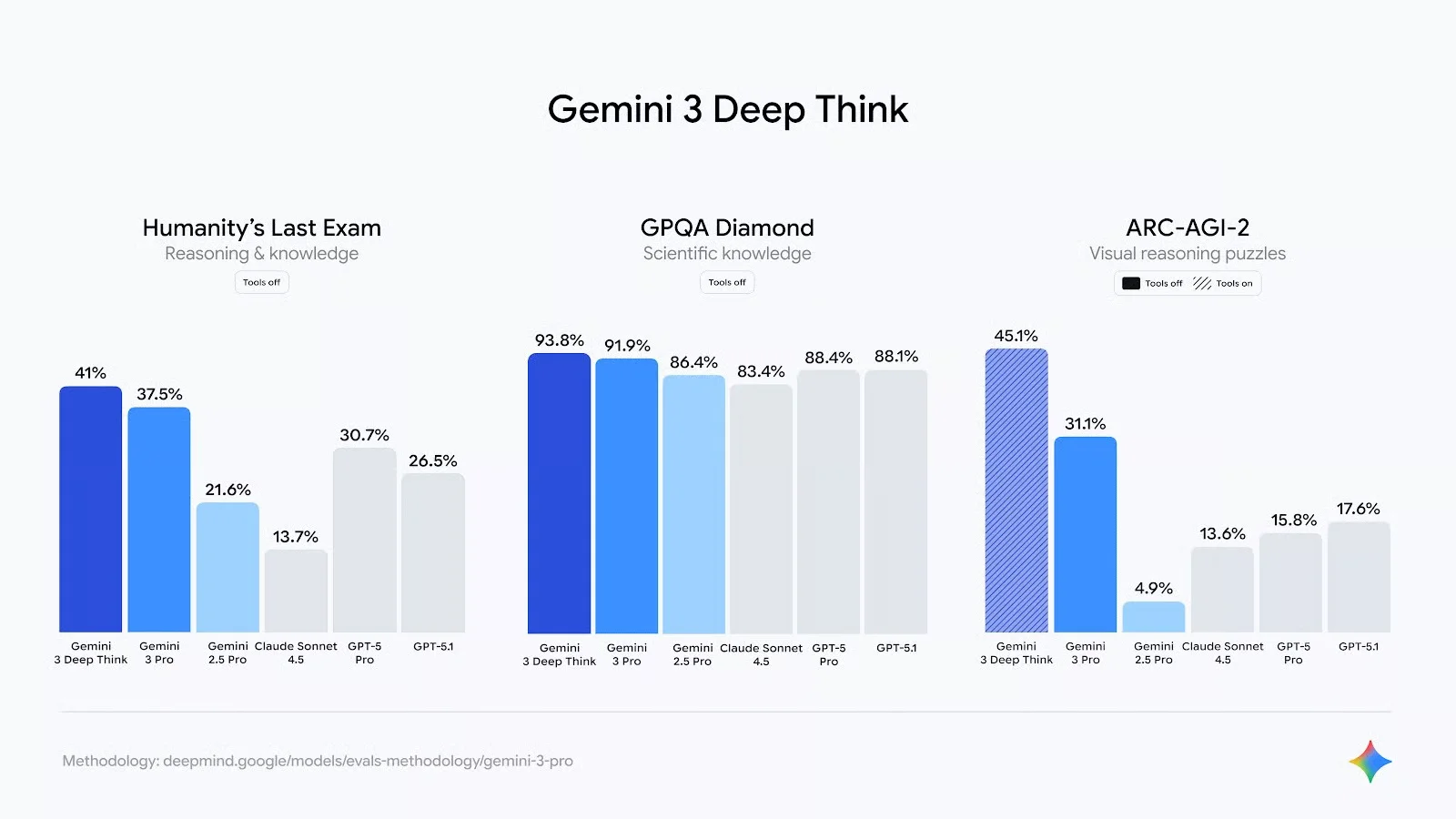
When Google launched Gemini 3, it did not just make the model smarter. It introduced a set of real improvements that change how we use AI every day. These are not just small upgrades. These new features make Gemini 3 more capable, more interactive, and more useful across many types of tasks. Here are the key new features you should know about:
Gemini 3 can think through problems more deeply in comparison with the earlier models. It doesn’t just give direct answers. It can break down complex questions, follow multi-step logic and give you more thoughtful explanations. Developers can even control how deeply the model thinks depending on the task.
One of the biggest upgrades is a huge context window (up to around 1 million tokens). That means Gemini 3 can handle extremely long documents or complex conversations without losing track of the details.
Gemini 3 goes beyond text. It is better at understanding and reasoning about images, video, and other media. This makes it more useful for visual tasks, explanations, and real-world problems.
This is not like those older models that respond to single prompts. Gemini 3 can plan and execute multi-step tasks. It can chain actions together to work through a goal.
A new development platform called Google Antigravity lets Gemini 3 work directly inside coding environments. It helps in generating and managing code more autonomously.
Gemini 3 now powers features inside Search, Chrome, and other Google tools. For instance, Google Search uses Gemini 3 for better summaries and conversational follow-ups, and Chrome can use it to automate tasks from browsing to research.
Developers can fine-tune how Gemini 3 approaches a task with the help of new parameters like thinking level, media resolution and structured outputs. This gives more control over speed, depth and cost.
Gemini 3 is best for anyone who wants an AI tool that is practical and reliable for everyday use. It works well for students who need clear explanations and study support, professionals who rely on structured writing and analysis, developers looking for reliable coding help, and businesses building or using AI-powered workflows. Whether you need quick answers through Flash or deeper reasoning with Pro and Deep Think, Gemini 3 fits users who need clarity, control and real-world usefulness.
Google has made Gemini 3 available across multiple platforms. It depends on how you want to use it. You can simply access it from Google by typing Gemini 3. You can also access it through Google AI Studio. It lets you test prompts, experiment with different Gemini 3 models and understand how the model behaves. For production and enterprise-level use, Vertex AI is where Gemini 3 fits into real applications. This is mainly used by developers and teams building AI-powered products.
Gemini 3 is also available in Gemini CLI, Google Antigravity platform and inside popular third-party tools like Cursor AI, GitHub, JetBrains, Manus, and Replit.
Google AI Ultra subscribers also get access to Gemini 3 Pro and they can also use the experimental Gemini Agent feature for building multi-step agents.
To understand how Gemini 3 performs beyond benchmarks, I tested it across realistic everyday and professional tasks such as writing, reasoning, studying, coding and data analysis. Instead of crafting perfect prompts, I used natural, imperfect instructions, similar to how most users interact with AI tools.
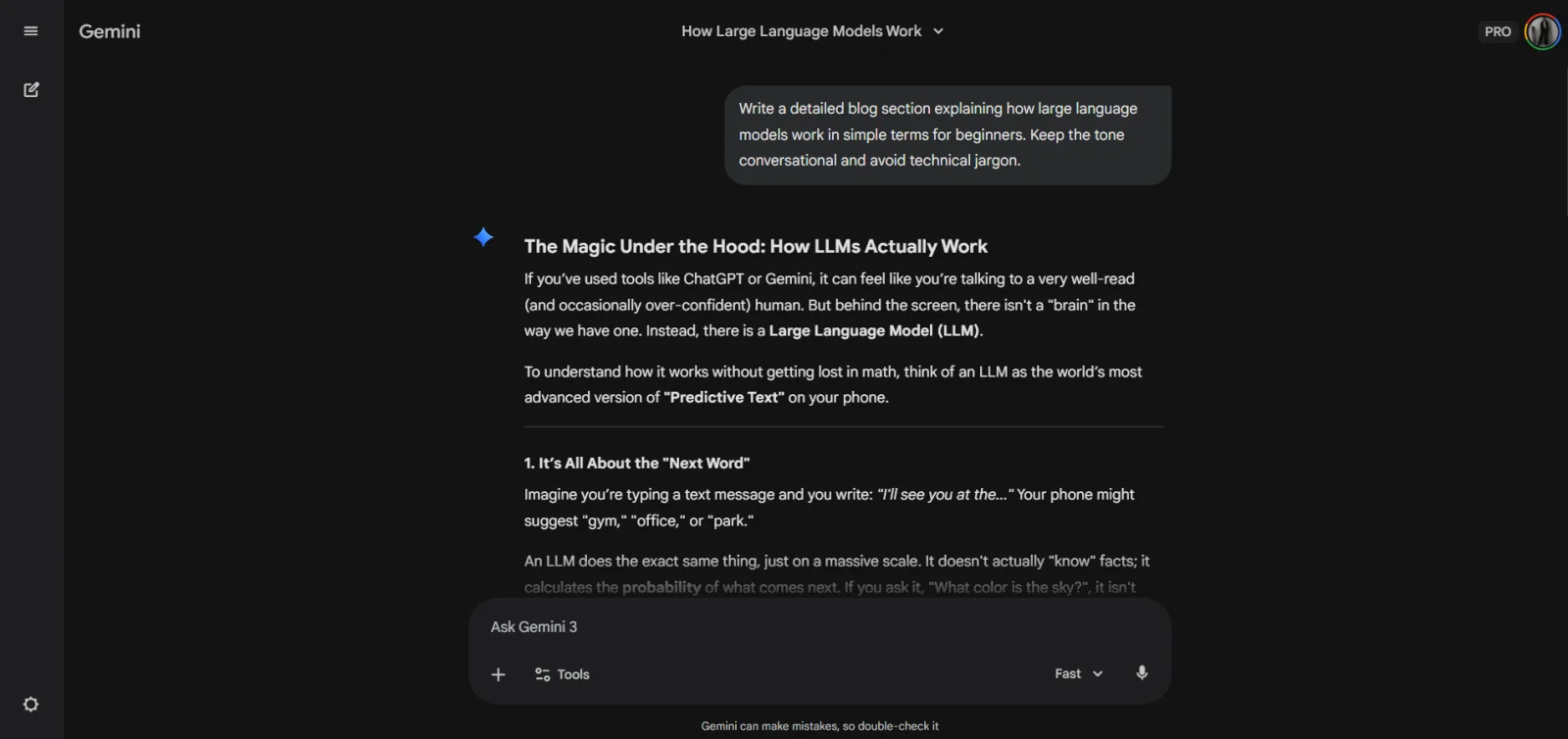
Here, I tested whether Gemini 3 writes structured, readable long-form content without sounding robotic or repetitive.
Prompt: Write a detailed blog section explaining how large language models work in simple terms for beginners. Keep the tone conversational and avoid technical jargon. (fast mode)
You can see how it responded. According to me Gemini 3 handled this extremely well. The explanation was simple, logically structured, and beginner friendly. It avoided unnecessary jargon and kept the flow natural. The content felt usable with minimal editing.
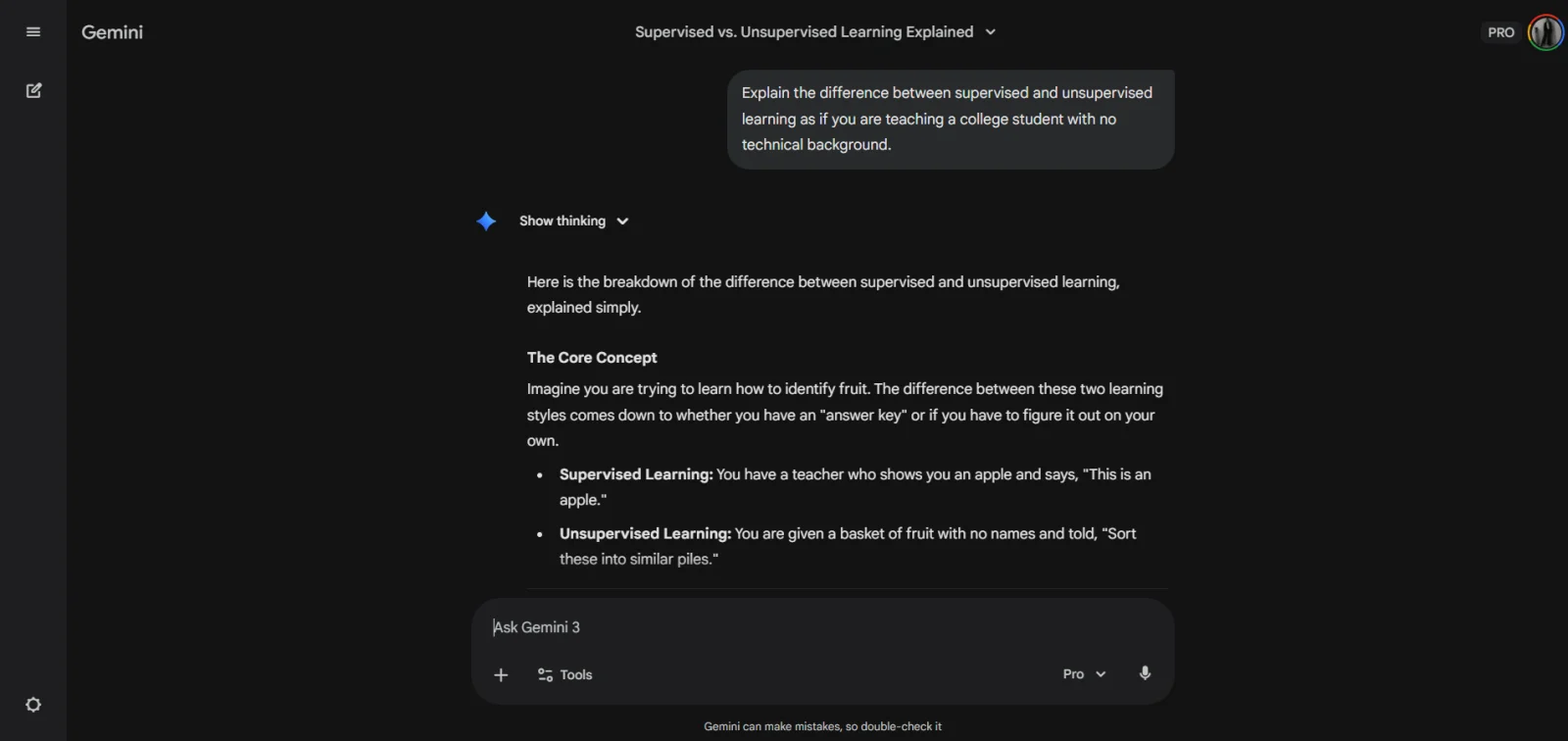
In this I wanted to see how well Gemini 3 can explain complex topics in an easy way?
Prompt: Explain the difference between supervised and unsupervised learning as if you are teaching a college student with no technical background.(pro mode)
The explanation I got in response was clean and layered. It started simple, then added depth gradually. The reasoning felt controlled, especially when using Pro or Deep Think.
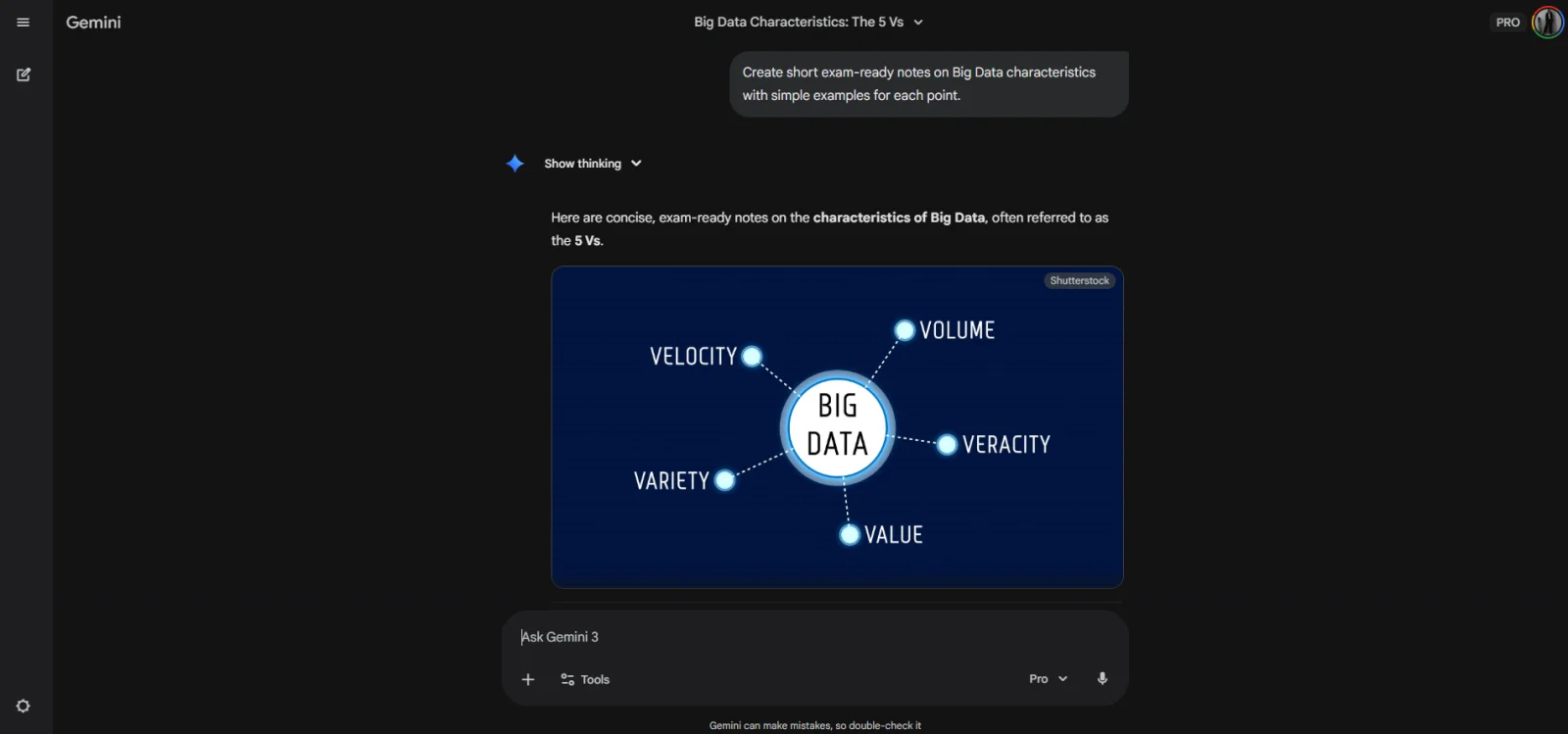
In this, I wanted to check if Gemini 3 can help with structured studying?
Prompt: Create short exam-ready notes on Big Data characteristics with simple examples for each point.(Pro Mode)
You can check that Gemini even responded with the image. It produced concise, structured notes with clear examples. The formatting made it easy to revise quickly.
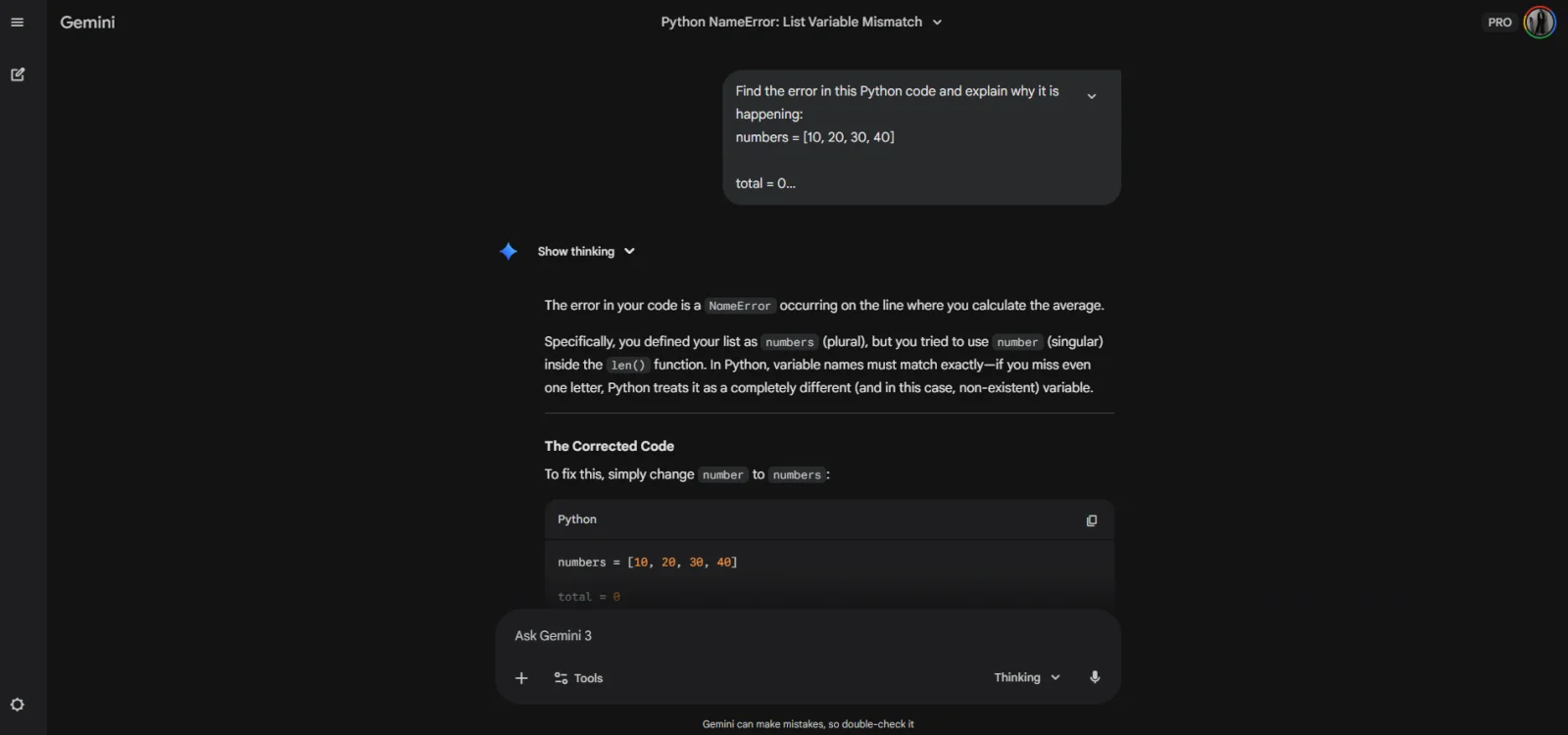
In this, I wanted to test how reliable is Gemini 3 for basic coding assistance.
Prompt: Find the error in this Python code and explain why it is happening:(Thinking mode)
|
In the response, I observed that Gemini 3 identified the issue correctly and explained it in plain language. It did not jump straight to a solution without context.
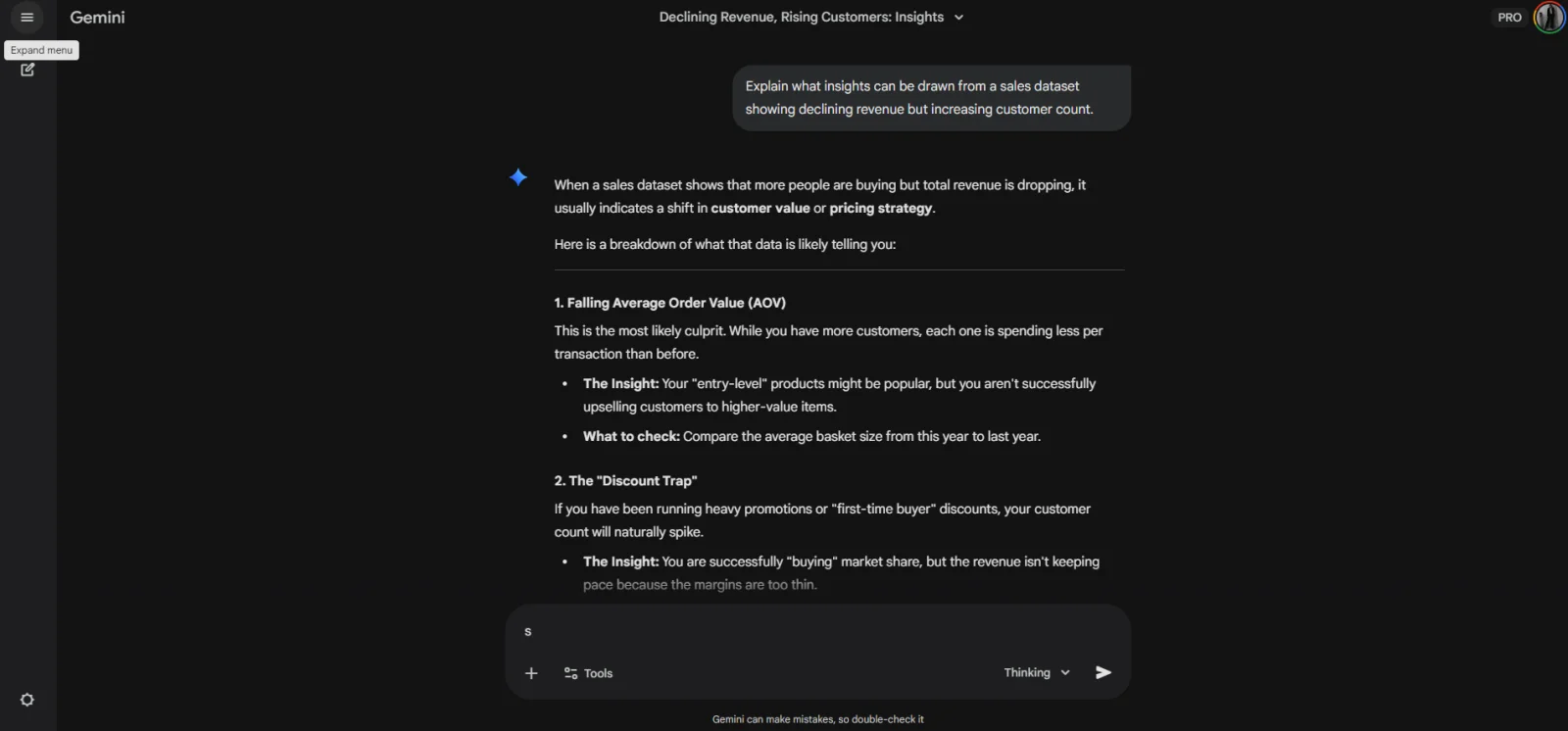
In this, I tested how well Gemini 3 can interpret data conceptually?
Prompt: Explain what insights can be drawn from a sales dataset showing declining revenue but increasing customer count. (Thinking Mode)
The response was logical and multi-dimensional. Gemini 3 explored multiple possible reasons behind the trend instead of jumping to a single conclusion. This kind of reasoning is very useful for business analysis and decision-making tasks.
The most practical and common applications of Gemini 3 in real scenarios are as follows:
Gemini 3 works very well for writing blogs, articles, reports, summaries and marketing content. It helps with outlining ideas, improving clarity, rewriting sections and maintaining a consistent tone. The output usually needs very little polishing and you are done.
Gemini 3 can act like a personal tutor for students and self-learners. It explains complex topics in simple language, creates notes, answers doubts and helps with revision. It also has tools like NotebookLM, which becomes even more useful for study-focused workflows.
Gemini 3 supports developers with code generation, debugging, logic explanation, and documentation. It is especially helpful for beginners who want to understand why something works or fails.
Gemini 3 can analyze scenarios, interpret trends, and explain business problems clearly. It is useful for tasks like understanding data patterns, preparing reports, brainstorming strategies, and supporting decision-making.
Gemini 3 helps structure tasks in a realistic way from study plans to project outlines and daily schedules. It works well in terms of thinking when you need clarity and direction.
Overall, Gemini 3 is not limited to one domain. Its real value is how easily it fits into writing, learning, building, decision-making and many more.
Gemini 3 and ChatGPT 5.2 both are powerful large language models, but they are built with slightly different priorities. ChatGPT has been widely adopted and polished through massive user feedback. Gemini 3 reflects Google’s approach to building an LLM that fits deeply into real-world workflows, products, and developer ecosystems.
| Feature | Gemini 3 | ChatGPT 5.2 |
| Core focus | Practical reasoning and real-world usability | Conversational intelligence and creativity |
| Reasoning style | More structured and controlled | More flexible and expressive |
| Long context handling | Strong, especially in Pro and Deep Think | Very strong in higher-tier models |
| Speed vs depth | Flash for speed, Pro for depth | Depends on model tier |
| Multimodal abilities | Text, images, strong Google ecosystem support | Text, images, voice, and tools |
| Writing style | Clear, structured, and factual | Natural, fluent, and creative |
| Best for | Research, analysis, structured content, planning | Brainstorming, creative writing, and conversations |
| Ecosystem integration | Deep integration with Google tools and platforms | Strong ecosystem built by OpenAI |
Related Article: Gemini vs ChatGPT
Gemini 3 and Grok 4.1 represent two very different philosophies in AI design. They both are among the top models of 2026. Gemini 3 focuses on structured reasoning, deep multimodal understanding, and professional use cases. Grok 4.1, developed by xAI, focuses on speed, real-time interaction, and creative or narrative-driven outputs in a more witty tone.
| Feature | Gemini 3 | Grok 4.1 |
| Primary Focus | Structured reasoning and deep multimodal tasks | Fast, expressive, and narrative-oriented responses |
| Best Strength | Research, synthesis, professional documentation | Creative writing, conversational style, trend context |
| Reasoning Style | Deliberate, explicit, logical | Quick, fluid, immediate |
| Context Handling | Excellent for large, long inputs | Very strong, especially in fast/reactive modes |
| Use Case Fit | Reports, analysis, workflows | Real-time chat, expressive content |
| Tone | Neutral, controlled | More expressive, social-centric |
| Output Shape | Structured and predictable | Narrative and conversational |
| Ideal For | Professional tasks and deep reasoning | Trend insights and conversational interactions |
Gemini 3 is now offering a lot of advantages. Here is a simple breakdown of the advantages that matter most:
Gemini 3 delivers clearer, more structured responses that feel like they are made for people, not for the machines. It does not just shortcut to a quick reply. It breaks down ideas step by step when needed, especially in Pro or Deep Think mode. This makes deep explanations and complex reasoning easier to understand.
Gemini 3 keeps conversations on track even over long texts, whether it is essays, detailed reports or multi-part answers. That massive context window means the model remembers more of what you said earlier and stays consistent.
Gemini 3 does not just read text. It understands images and combines them with text in a meaningful way. That makes explaining visuals, analyzing screenshots or working with mixed inputs much smoother and more intuitive.
Gemini 3 works seamlessly inside many Google products. It helps power smarter search summaries, better email drafting, planning inside apps like Docs or Gmail and everyday tasks that benefit from AI insight.
Gemini 3 is not just a chatbot for developers. It can assist with real engineering tasks like generating code, debugging, and supporting multi-step workflows with the help of tools like the Gemini CLI and integrations in IDEs or platforms such as Google Antigravity.
Gemini 3 is powerful, yet it’s not flawless. Understanding its limits helps you avoid confusion and use it more effectively. The limitations of Gemini 3 are:
Gemini 3 can read a million tokens (like a massive book), but it starts to lose its focus after about 120,000 to 150,000 tokens.
Gemini 3 offers modes that focus on deeper reasoning. These are great for complex logic, math, or coding but they take more time to respond. Therefore, for quick questions or simple writing, use fast modes. Use deeper reasoning modes only when accuracy matters more than speed.
Gemini 3 handles images well at a general level. It can understand, describe, and generate images. Yet, it still struggles with very specific visual edits. Hence, If you need exact visual changes like adjusting a small element or modifying a specific detail in a crowded image, the results may not be precise.
Gemini 3 is designed for wide use, therefore it follows strict safety rules. Sometimes it becomes overly cautious and refuses to answer questions that are actually harmless.
When you ask Gemini 3 for very strict formats like JSON, configuration files, or structured code outputs, it usually does well. But it is not always perfect. Therefore, always review technical outputs before using them directly in production.
Gemini 3 doesn’t just improve a little, it sets new standards across multiple key areas where large language models are tested. These benchmarks give us clear numbers showing how well Gemini 3 performs compared to previous versions and other advanced models.
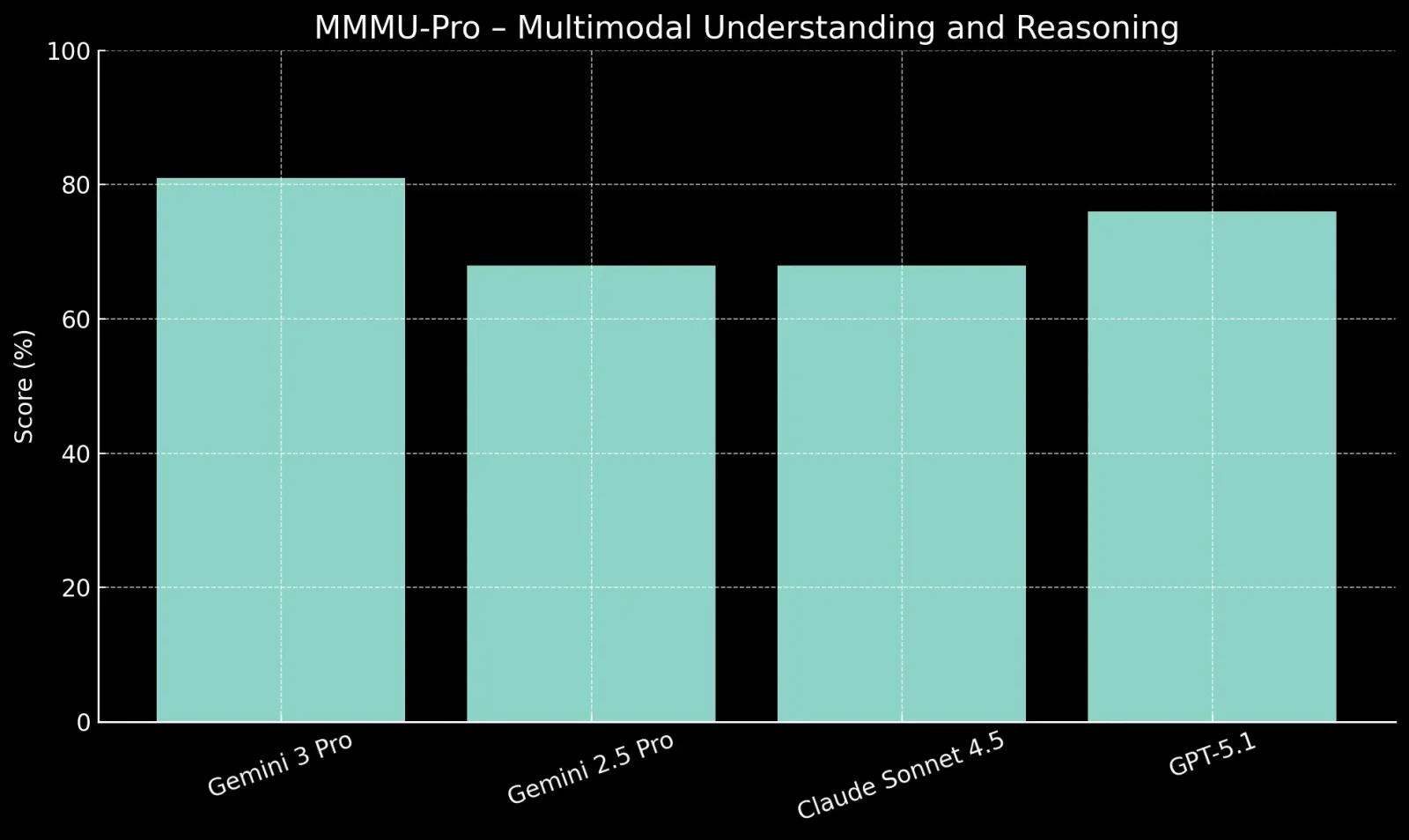
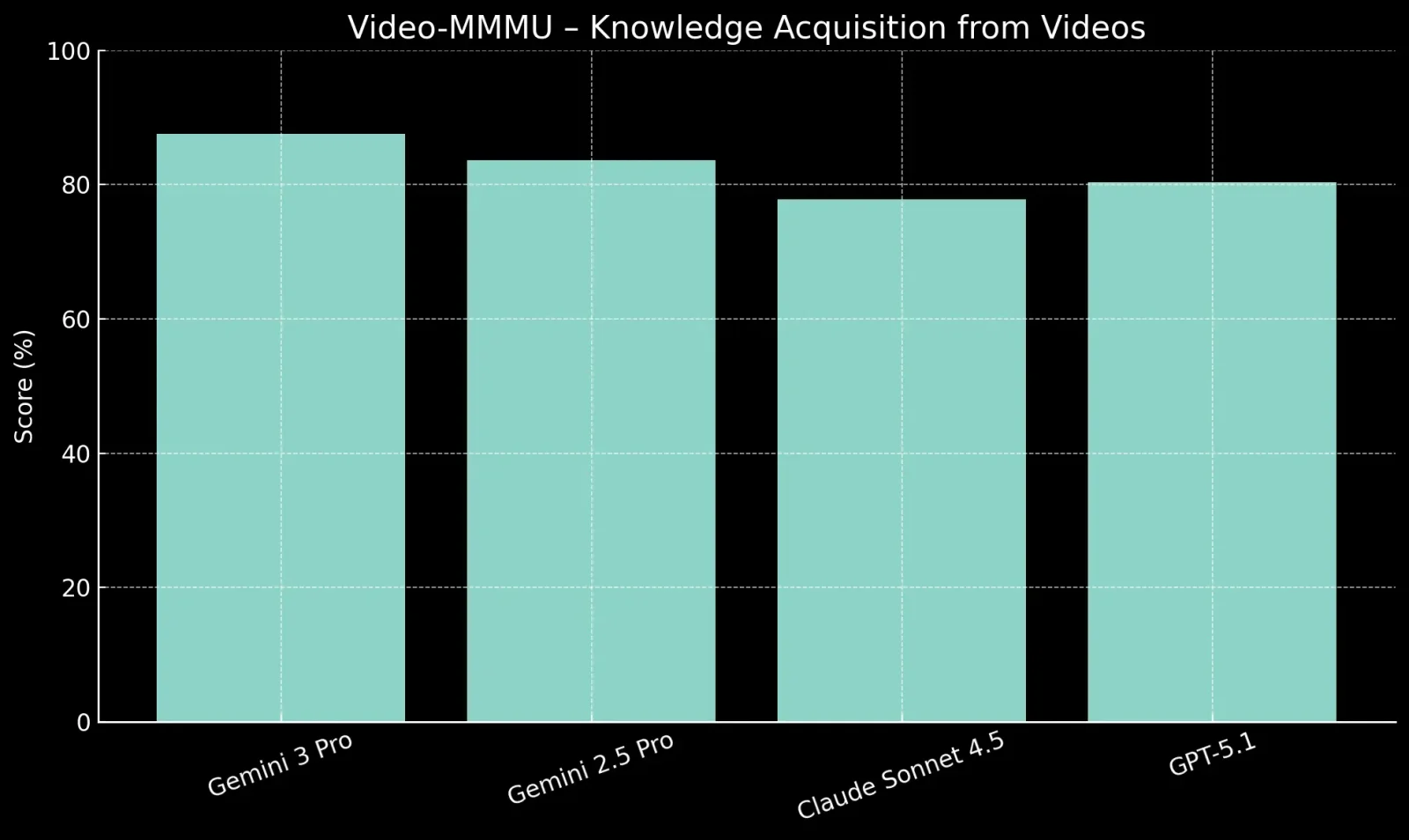
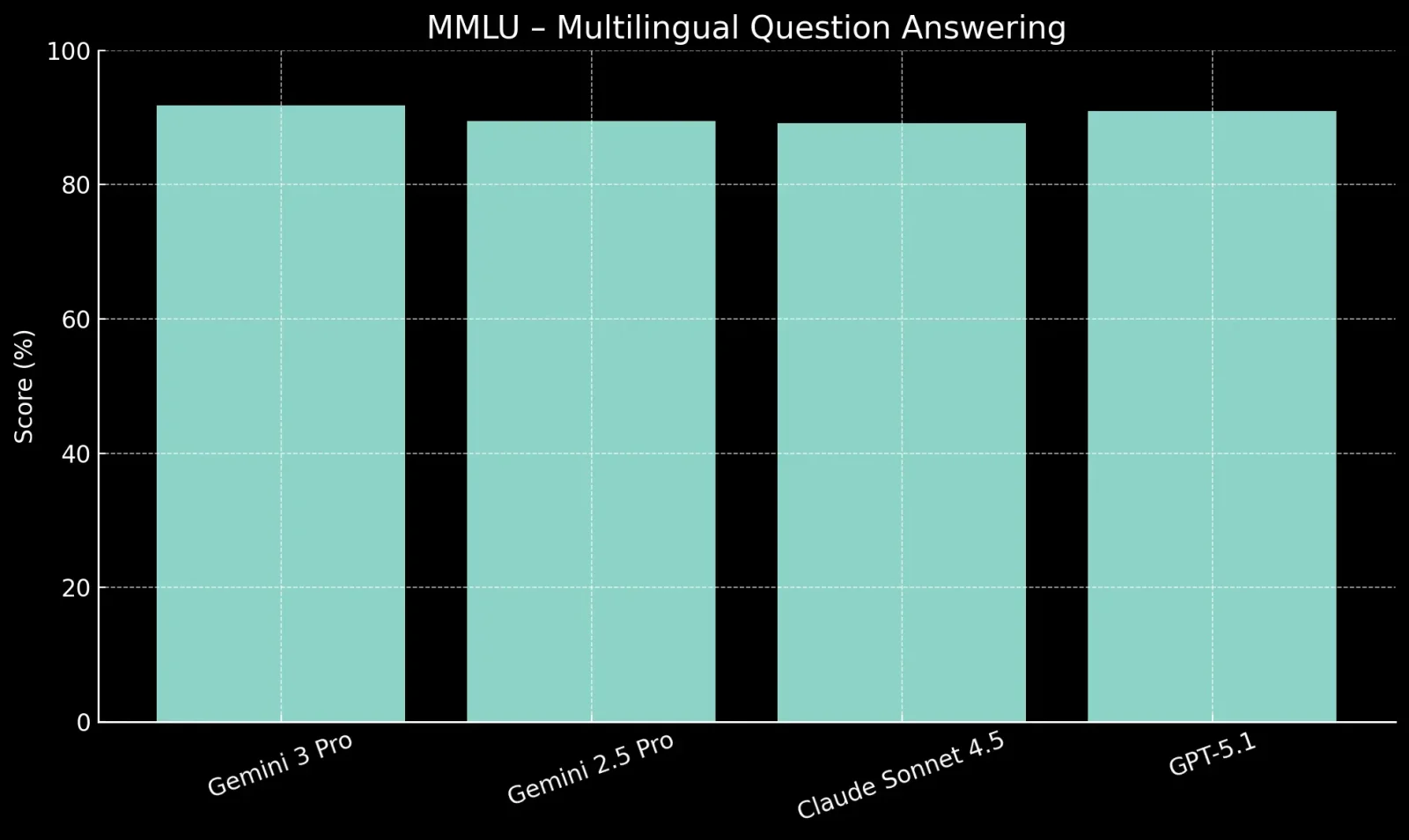
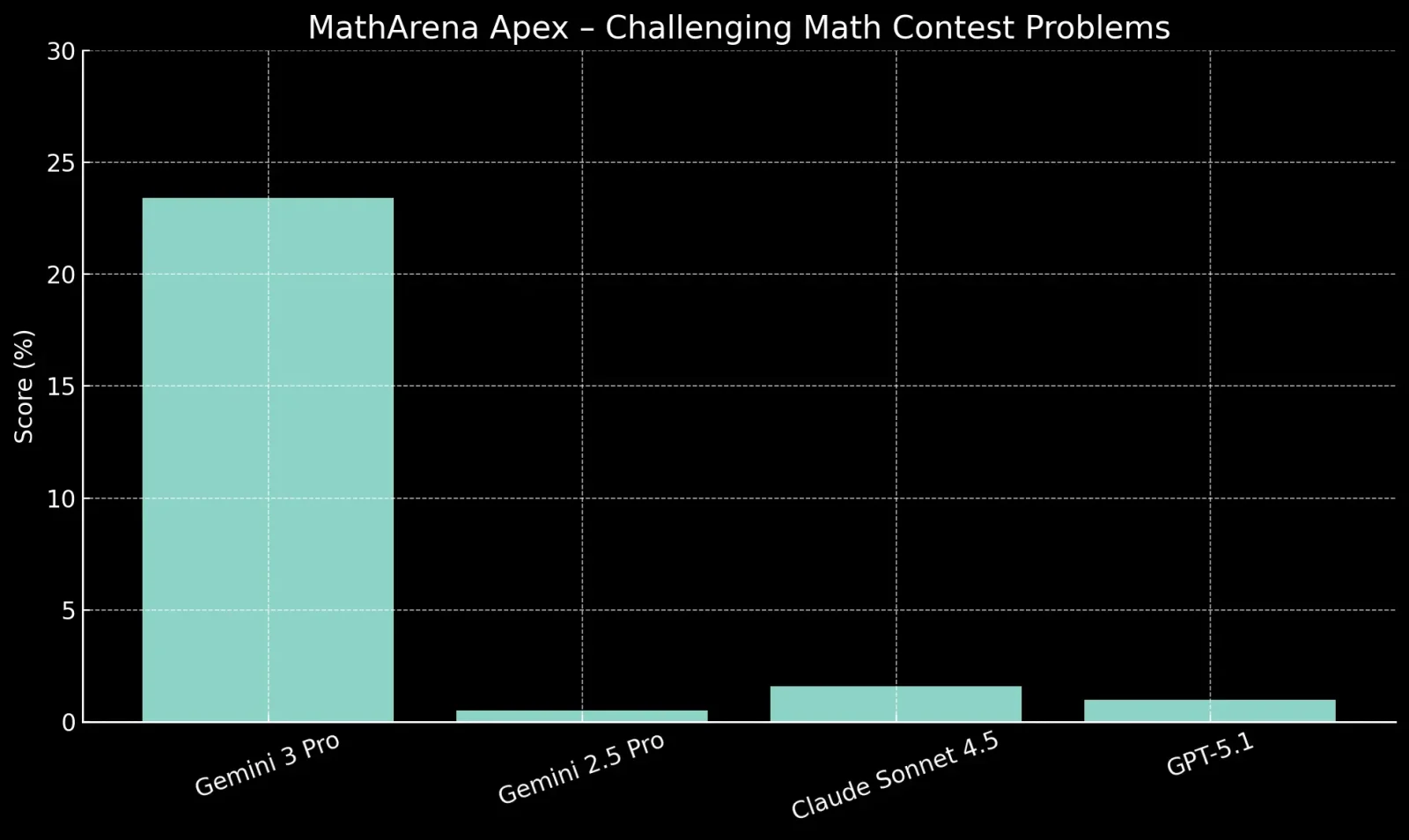
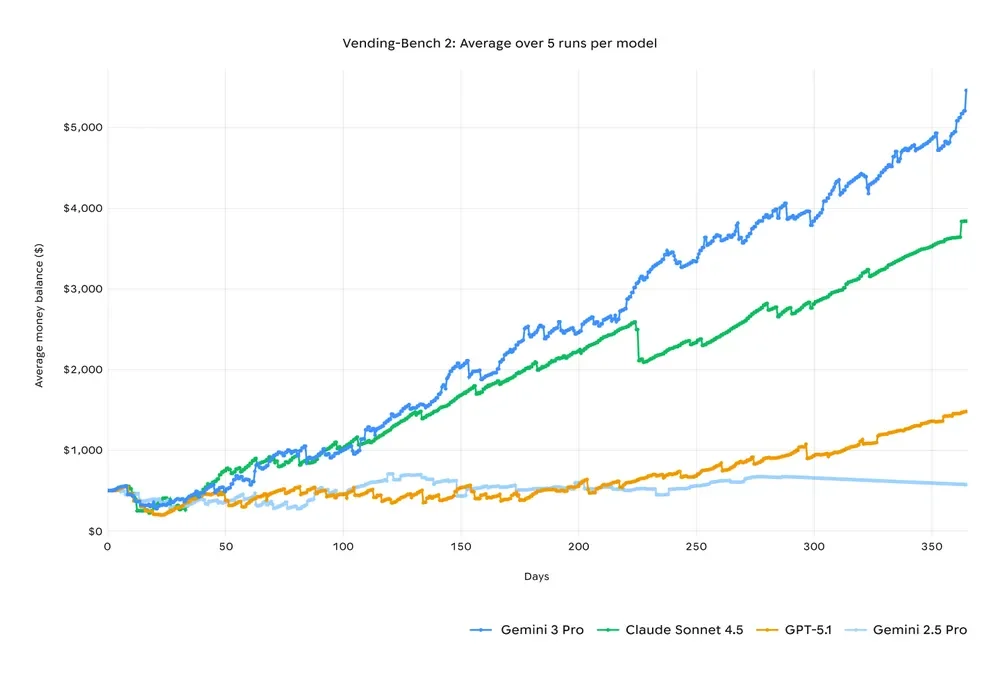
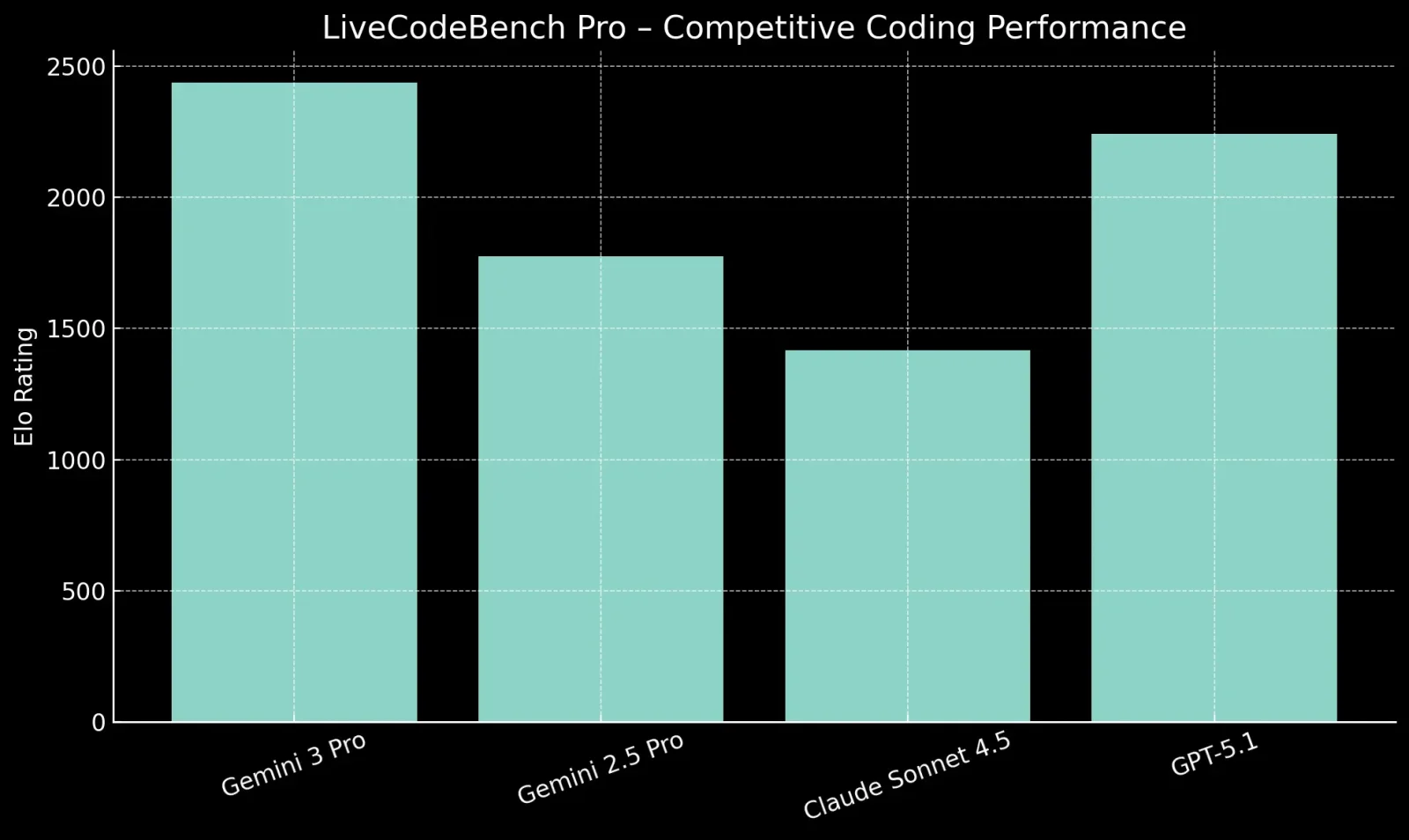
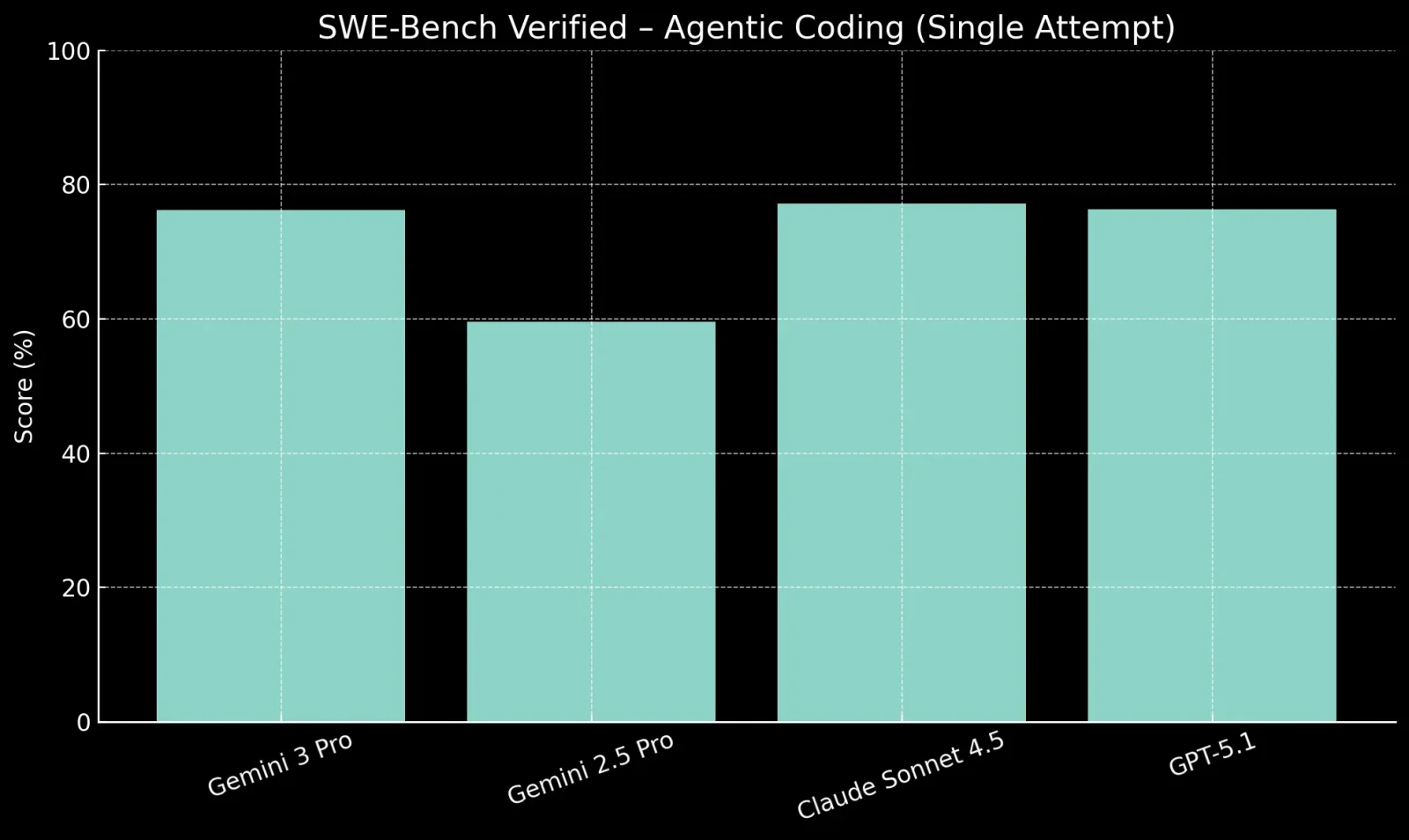
Gemini 3 is designed for users who want structured reasoning, clarity, and reliability. It performs best when tasks require understanding context, following instructions, and working through problems step by step.
Gemini 3 works well for explaining complex topics in simple language, creating structured notes, and supporting exam preparation. Its ability to reason step by step makes it useful for learning-focused workflows rather than quick fact lookups.
Gemini 3 produces clear and organized outputs that require minimal editing for long-form writing, reports, documentation, and structured content. It is especially useful when accuracy and coherence matter more than creative flair.
Gemini 3 is helpful for code explanation, debugging, logic walkthroughs, and multi-step technical reasoning. Pro and Deep Think modes are particularly useful when understanding why something works or fails.
Tasks like data interpretation, trend analysis, planning, and decision support benefit from Gemini 3’s controlled reasoning and structured responses.
If the primary goal is highly expressive storytelling, humor, or informal chat, some users may find Gemini 3 more neutral and structured compared to other AI tools.
For quick and lightweight queries where speed matters more than depth, Gemini 3’s deeper reasoning modes may feel slower than necessary.
Gemini 3 explains the code well. Still, outputs for complex or strict formats should always be reviewed before direct use in production.
Here is a clear breakdown of how pricing works for Gemini 3 access, both for everyday users and developers.
| Plan / Access Type | Cost (Approx) | Key Inclusions |
| Free Tier | $0 / month | Basic usage of Gemini models with limits; entry-level access without payment. |
| Google AI Plus | Around ₹399 / month (India) | Enhanced access to Gemini 3 models, more credits, AI in Google apps, extra tools and storage. |
| Google AI Pro | ~$19.99 / month | Priority access to Gemini 3 Pro and higher usage limits, 2 TB cloud storage, tools like NotebookLM and CLI. |
| Google AI Ultra | ~$249.99 / month | Highest usage limits, Deep Think and agent capabilities, 30 TB storage, advanced AI tools. |
| API (Developers) | Token-based pricing | Pay per use; pricing depends on token count (input/output) and context length. |
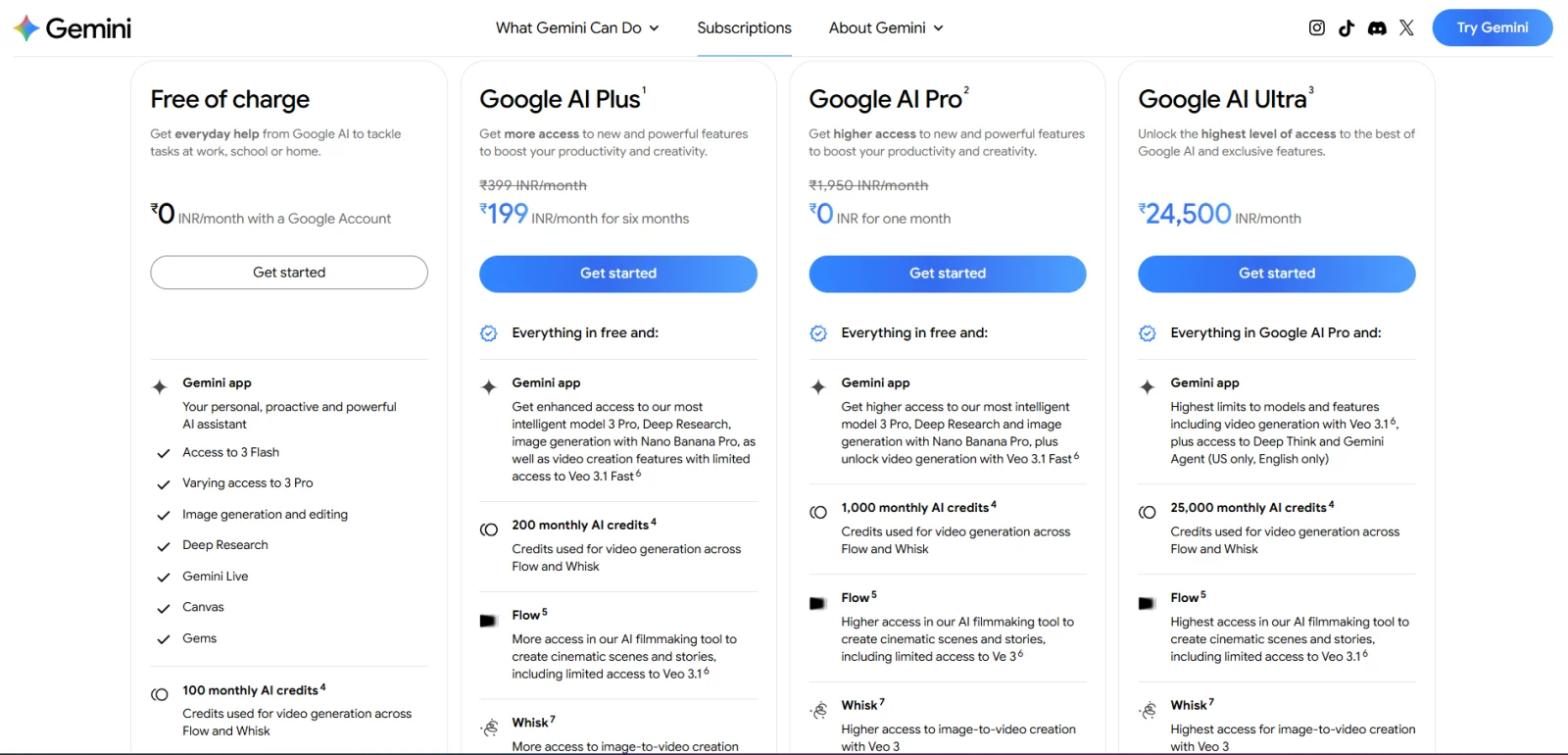
Currently some really good offers are going on the pricing of Gemini 3, you can take a lot of benefit from them.
For students, Google offers a free one year plan that includes Gemini 3 Pro, unlimited image uploads, 2 TB storage, and tools like NotebookLM.
Gemini 3 focuses on being reliable, structured and genuinely useful across real-world tasks. After using Gemini 3 for writing, reasoning, coding, studying, and analysis, one thing stands out clearly: it is very helpful. Flash handles speed, Pro handles depth, and Deep Think shines when accuracy truly matters. But can we say that it is perfect? No. It still has limits with very long conversations, strict safety filters, and precise formatting. But overall, Gemini 3 feels mature, production-ready, and well-suited for people who want clarity and control rather than just clever responses.
If you work, study, write, build, or analyze things daily, Gemini 3 is easily one of the most practical LLMs available right now.
Gemini 3 Flash is built for speed and efficiency. Gemini 3 Pro is designed for deep reasoning, long-form work, and complex tasks. Flash is best for quick responses, while Pro is better for accuracy and depth.
Yes. Gemini 3 has strong multimodal capabilities. It can understand and reason over text, images, and videos together. This makes it useful for visual explanations and analysis.
Gemini 3 is stronger in structured reasoning, long context handling, and deep integration with Google tools. ChatGPT still feels more natural for creative writing and casual conversation. Now which one is better depends on your use case.
Yes, Google offers a free one-year student plan that includes access to Gemini 3 Pro, unlimited image uploads, 2 TB storage and tools like NotebookLM.