Python lowercase is a commonly used string method that helps in converting text into lowercase letters. This is done using the built-in .lower() method. It changes all uppercase characters in a string to lowercase without modifying the original string. This makes text easier to compare, process and standardize in Python programs.
In simple words, Python's lowercase() is used to convert strings to lowercase. It is especially done when you are working with user input, text comparisons or data processing tasks.
In this guide, you will learn about what is lowercase() in Python, how the Python lower() function works, how to convert a string to lowercase in Python and many more. Let’s begin.
The lowercase() method in Python is written as lower(). It is a built-in string function. It returns a new string where all uppercase characters are converted into lowercase. Python treats strings as immutable, so the original string will always be unchanged.
The lower() method is mainly used to make text consistent. This is especially useful when you want to compare strings, validate user input or handle text data where letter case should not matter.
In short, Python's lowercase() converts text to lowercase. It works only on strings, and it also does not change the original string. It is a standard and recommended practice when working with text in Python.
Note: Python does not have a method called lowercase(). The correct built-in method used to convert text into lowercase is lower().

The syntax of the Python lower() method is simple and easy to understand.
|
PARAMETER: There are no parameters required for the lowercase() method.
Read Also: Python Tutorial for Beginners
Python scans each character in the string when you apply lower() to a string. If the character is an uppercase letter, it converts it to its lowercase. Characters that are already lowercase, numbers, or symbols remain unchanged. This makes lowercase in Python reliable and safe to use in most text-processing scenarios.
The example below shows how the Python lower() function converts all uppercase letters into lowercase.
|
|

|
|
Here, the lowercase() method converts only uppercase letters while keeping lowercase letters unchanged.

One of the most common uses of Python's lowercase() is handling user input. User input can be in any case, so converting it to lowercase helps in comparisons and validations. This ensures that the input is processed consistently.
|

When you are working with data in Pandas, sometimes you need to deal with text stored inside columns of a DataFrame. In such cases, the regular Python lower() method does not work directly on a Pandas column because a Pandas column is a Series object. It is not a normal string. Pandas provides the str.lower() method to convert all string values in a column to lowercase.
The str.lower() method works on each value in the column and returns a new column with all text converted to lowercase.
|
|
In this example str.lower() converts each string in the Name column to lowercase. Only string values are affected and the DataFrame structure remains unchanged.
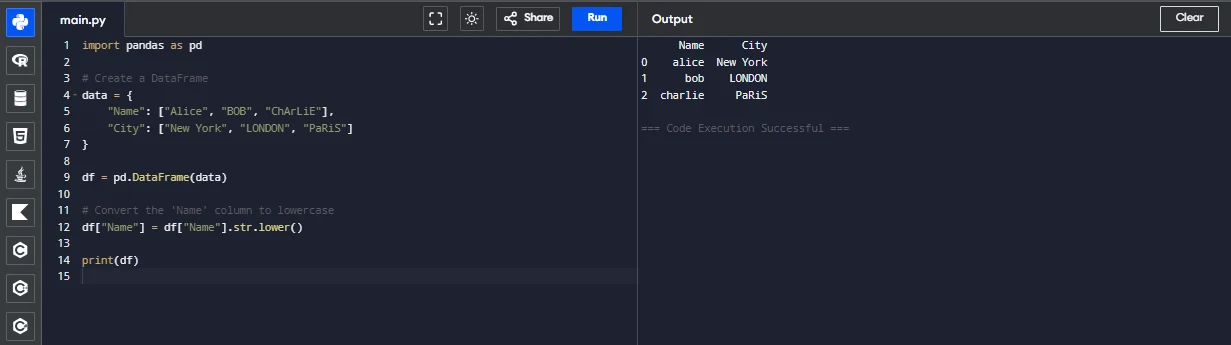
If you try to use lower() directly on a Pandas column like this which is shown below:
|
You will get an error. That is why you need to use:
|
Read Also: Python Interview Questions And Answers
Use of lowercase in Python is important for writing clean and reliable programs. It helps in avoiding errors caused by case sensitivity and makes string comparisons more accurate. In real-world Python applications, converting strings to lowercase is a common practice before performing comparisons, searches, or data processing tasks.
Beginners sometimes make small mistakes while using the Python lower() method. Here are a few things to you should keep in mind while working:
Example mistake:
|
Correct way:
|
In this article, you have learned what Python lowercase() is and how the lower() method works to convert strings into lowercase. We have covered the syntax of the Python lower() function. We saw practical examples, learned how to convert a string to lowercase in Python using user input and understood why lowercase() is important for writing clean and reliable code.
Now that you understand how lowercase() works, try using it in real practice. Apply lower() to user input before making comparisons. You can also try combining lowercase() with conditional statements and practice converting mixed-case strings to lowercase. Additionally, explore other Python string methods like upper(), capitalize(), and title().
Mastering string methods like lowercase in Python will help you write better programs and prepare you for more advanced Python concepts.
The lowercase() method is written as lower(). It converts all uppercase letters in a string into lowercase and returns a new string.
No, Python strings are immutable. The lower() method returns a new lowercase string without modifying the original one.
No, lowercase() works only on strings. If you apply it to numbers it will result in an error.
It helps make text comparisons case-insensitive, standardizes data, and improves the reliability of Python programs.
Explore Our Trending Articles-