In today's IT-driven enterprises, managing operations manually through emails, spreadsheets, and disconnected tools often leads to delays, inefficiencies, and frustration. Organizations now demand faster service delivery, better visibility, and automated workflows. This is where ServiceNow comes into the picture. ServiceNow is a cloud-based SaaS platform designed to automate and manage enterprise workflows across IT, HR, customer service, and other business functions. ServiceNow is widely used by enterprises like banks, healthcare providers, and global IT firms to automate service delivery. And it is also one of the highest-paying ITSM skills today.
In this article, I will explain what ServiceNow is, what it is used for, its features, use cases, and more.
Let's get started.
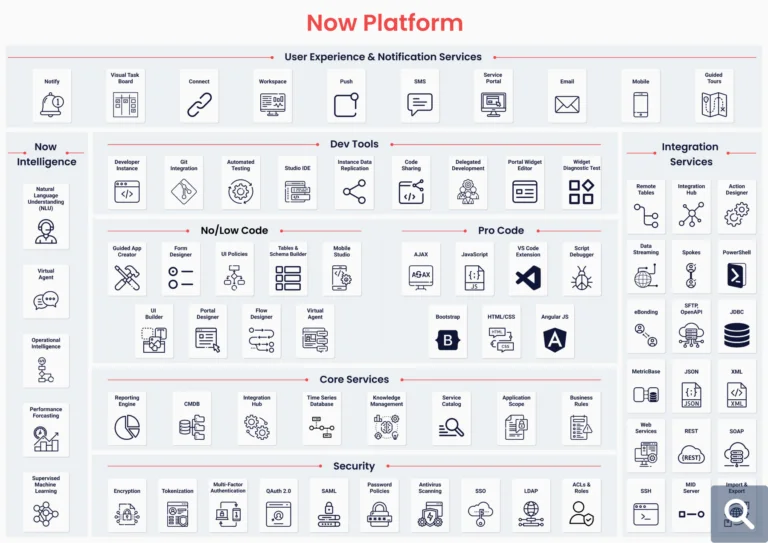
ServiceNow is a cloud-based platform offering workflow automation capabilities. It is not just a tool but a complete development ecosystem that allows organizations to build, test, and deploy applications to automate everyday business challenges such as incident handling, service requests, and operations management.
This suite of services and products helps organizations automate routine tasks, streamline operations, and improve overall operational efficiency. By implementing automated workflows, businesses can reduce manual effort and achieve better process consistency.
Also called Now, ServiceNow specializes in IT service management, IT operations management, and IT business management. The platform works on top of existing enterprise systems and data, minimizing digital sprawl while enabling seamless digital transformation across the organization.
Fred Luddy, the man behind this famous platform, founded it in 2003 as Glidesoft,Inc. He quoted “It was November 5th, 2003. I knew that we had to start a company before I became 50, because a 50 year old can't start a company. So, at 49- November 24th is my birthday-we started”.
Initially, this became a cloud-based platform for automating IT tasks and providing a smooth alternative to existing on-site software. After this, it was renamed as ServiceNow in 2006. In 2011, it integrated with Accenture and had 275 employees in its offices from multiple locations like Chicago, San Diego, New York, London, Frankfurt and Atlanta. The company went public in 2012 and since then, it has expanded beyond IT Service Management (ITSM). By 2017, this platform had a UI/UX company called Telepathy. And in October 2019, Bill McDermott became the CEO, he was the former CEO of SAP SE.
This became an enterprise workflow platform, providing modules for HR, customer service, security operations and more, for automating procedures across different business departments. Now that you know what it is, let's see why and where to use ServiceNow and what its top products and services are.
Companies use ServiceNow to digitalize, streamline, and automate enterprise-wide workflows across multiple departments such as HR, IT, and customer service. By bringing processes into a single, unified digital platform, organizations can replace manual and disconnected procedures with well-structured workflows.
This transformation helps improve efficiency, consistency, and collaboration across teams. Due to these benefits, many organizations rely on ServiceNow to modernize their operations, making it important to understand the key reasons why ServiceNow is widely used.
Also Read- ServiceNow Tutorial
After getting an answer to the question of 'what is ServiceNow', most people turn towards understanding what it is used for. Here are some points to help you understand how it works a bit better.
This platform is a pro player in transforming how business operations happen. It streamlines all key operational aspects into a single platform, leading to high automation. As a result, businesses enjoy efficient process handling and lesser response time, all leading to enhanced business efficiency.
It integrates with other platforms and systems to improve its utility in a plethora of use cases. Hence, this versatile tool proves to be highly beneficial for enterprises coming from different technological ecosystems.
It aids in retrieving any sort of information more easily with features like customizable interfaces and comprehensive reports. Integrated ticketing systems and drag-and-drop editors deliver a user-friendly experience. As businesses receive actionable insights, decision-making improves.
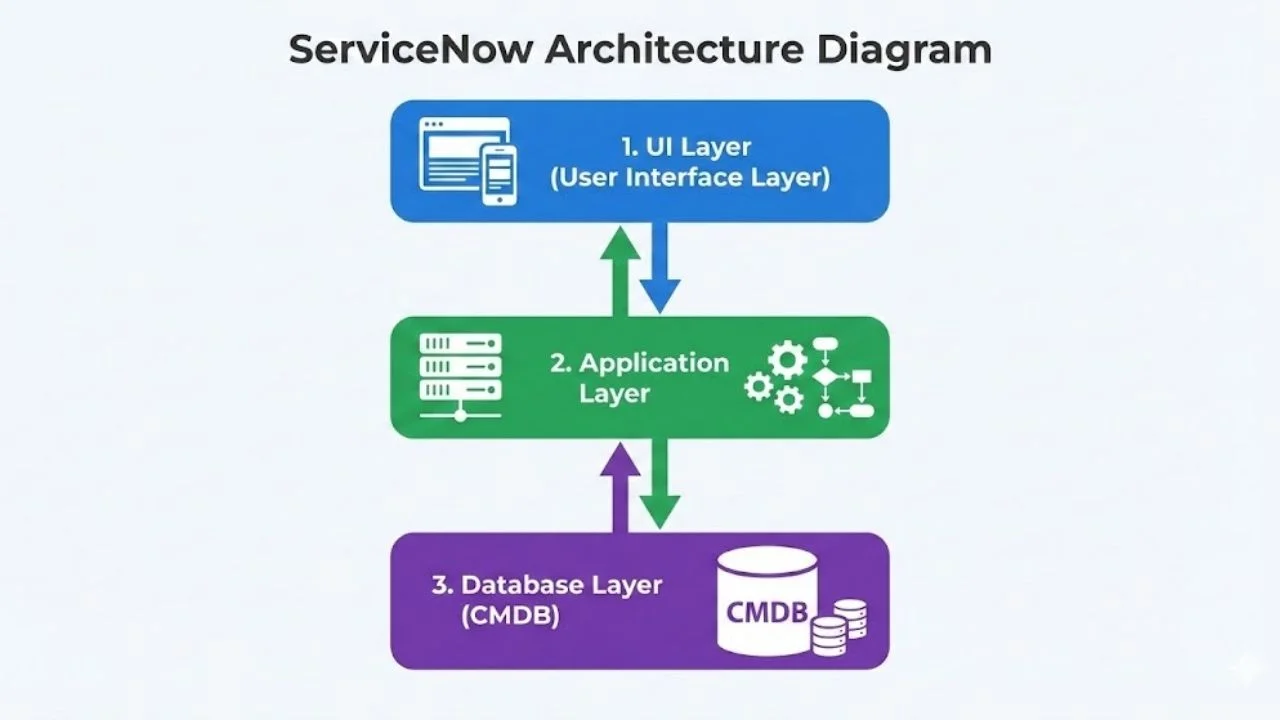
Understanding the ServiceNow Architecture gives you a clearer picture of how ServiceNow processes requests, stores data, and integrates with other systems. Basically, it follows a layered, cloud-based architecture that ensures scalability, security, and flexibility for any enterprise use.
In this section, I am going to simplify the key architectural layers of ServiceNow.
The UI Layer is the front-facing part of ServiceNow where users can interact with the platform. This includes the self-service portal, dashboards, forms, lists, and reports. Whether an employee is raising an incident, an HR request, or a change ticket, all interactions happen through this layer.
ServiceNow provides a highly configurable UI that can be customized using forms, views, portals, and widgets. The goal of this layer is to deliver a consistent, intuitive experience for different user roles such as end users, IT staff, administrators, and managers.
The Application Layer is the core engine of ServiceNow. It contains all business logic, workflows, rules, and automation that drive the platform. Modules such as Incident Management, Problem Management, Change Management, HR Service Delivery, and Customer Service Management operate within this layer.
This layer uses workflows, Flow Designer, business rules, client scripts, and server-side scripts to define how requests are processed from start to finish. Whenever a ticket is created, approved, routed, or resolved, the logic responsible for these actions resides in the Application Layer.
At the foundation of ServiceNow lies its Database Layer, which includes the Configuration Management Database (CMDB). This layer stores all records, such as incidents, users, assets, services, and configuration items (CIs), along with their relationships.
The CMDB provides a single source of truth for IT infrastructure and service data. By understanding relationships between servers, applications, networks, and business services, ServiceNow enables impact analysis, root cause analysis, and smarter decision-making. This structured data model is one of the reasons ServiceNow is so powerful in large enterprise environments.
ServiceNow offers several additional capabilities that enhance operational efficiency and user experience. The following are the useful features that make ServiceNow a scalable and reliable solution for enterprises of all sizes.
ServiceNow helps IT teams track, prioritize, and resolve incidents quickly to minimize system downtime. It follows ITIL-based workflows to ensure incidents are handled in a standardized and efficient manner. The Incident form captures key details such as category, priority, assignment group, and resolution notes, allowing teams to monitor issues and take timely action.
Problem Management focuses on identifying the root cause of recurring incidents and preventing them from happening again. ServiceNow supports proactive investigation through structured problem records that include root cause analysis, known errors, and resolution tracking. This helps organizations reduce repeated disruptions and improve service stability.
ServiceNow uses a Configuration Management Database (CMDB) to track IT assets and their relationships. This provides complete visibility into hardware, software, and services, enabling better impact analysis, improved decision-making, and effective management of IT infrastructure.
Change Management in ServiceNow provides a controlled and structured approach to implementing changes in IT environments. It reduces risk by using approval workflows, impact analysis, and automated scheduling, ensuring that changes are deployed smoothly without disrupting ongoing operations.
ServiceNow offers a user-friendly self-service portal where employees can request IT and business services. The Service Catalog standardizes requests, automates approval processes, and tracks fulfillment status, improving response times and overall service efficiency.
ServiceNow includes built-in reporting and analytics tools that allow organizations to monitor performance, identify bottlenecks, and gain actionable insights. Real-time dashboards and customizable reports help teams track service levels, workload distribution, and process efficiency.
ServiceNow includes an AI-powered Virtual Agent that helps users resolve common issues through conversational chat without requiring human intervention. Employees can reset passwords, check ticket status, request services, and receive instant support 24/7. This reduces service desk workload while improving response times and user satisfaction.
Flow Designer enables organizations to automate business processes using a low-code interface instead of writing complex scripts. Users can create workflows, approvals, notifications, and integrations through drag-and-drop actions, allowing faster development and easier maintenance of enterprise workflows.
IntegrationHub allows ServiceNow to connect with hundreds of third-party applications such as Microsoft Teams, Jira, Salesforce, Azure, AWS, Slack, SAP, and many others. This enables organizations to automate processes across multiple systems without extensive custom development.
ServiceNow uses machine learning through Predictive Intelligence to automatically categorize incidents, recommend assignments, prioritize requests, and suggest relevant solutions. This improves service desk efficiency, reduces manual effort, and speeds up ticket resolution.
To help organizations enhance their operations and enjoy better outcomes, ServiceNow offers plenty of products and solutions. Here is a list of a few of them:
ITSM aids organizations in managing their IT infrastructure and services. These include problem management, asset management, incident management, and change management.
CSM offers a personalized and consistent customer experience throughout all available touchpoints and channels. This is great for businesses that look forward to optimizing their customer experiences.
ITOM offers highly valuable support to manage business performance. It also keeps a check on the availability of IT services and infrastructure, such as servers, applications, and networks.
Intelligent technologies are put to work with the Automation Engine. The goal is to reduce manual efforts, enhance efficiency, and automate processes and workflows.
With HR Service Delivery, organizations streamline their HR processes easily to deliver a retention-building employee experience. This is done via HR case management, onboarding/offboarding support, and advanced employee self-service.
With App Engine, companies can build custom apps on this platform. With Now's no-code and low-code development capabilities, it turns software concepts into reality.
SecOps offers essential tools for managing security vulnerabilities and incidents swiftly and successfully. This aids in the identification and eradication of any potential issues before they become big enough to cause any damage to the business.
Related Article- Salesforce Vs ServiceNow
This platform is put to use to meet business goals and manage IT services. The users make use of this platform for many things, which are given below.
They make use of ServiceNow to make new functionalities that will extend more features and configurations.
These employees make use of this platform to manage their IT requirements and business services.
Admins can access many management services of ServiceNow, like roles, tasks, delivery, and access to the users of ServiceNow.
The company's support teams make use of this platform to support the company's employees and other management staff.
Facilitators make use of this platform for deploying the latest processes in the applications and to expand the standard configurations for more usage.
Now, a ServiceNow workflow is a digital chain of automated tasks or activities that carry out a business procedure, guiding a record from initiation to completion. Tasks like running scripts, getting approvals, updating record fields or sending messages. All the visually represented and designed tasks are done in the ServiceNow Workflow Editor. The whole procedure is handled by a Workflow Context. This keeps a track of the condition of the workflow and individual activities, giving a visual representation of the procedure's progress.
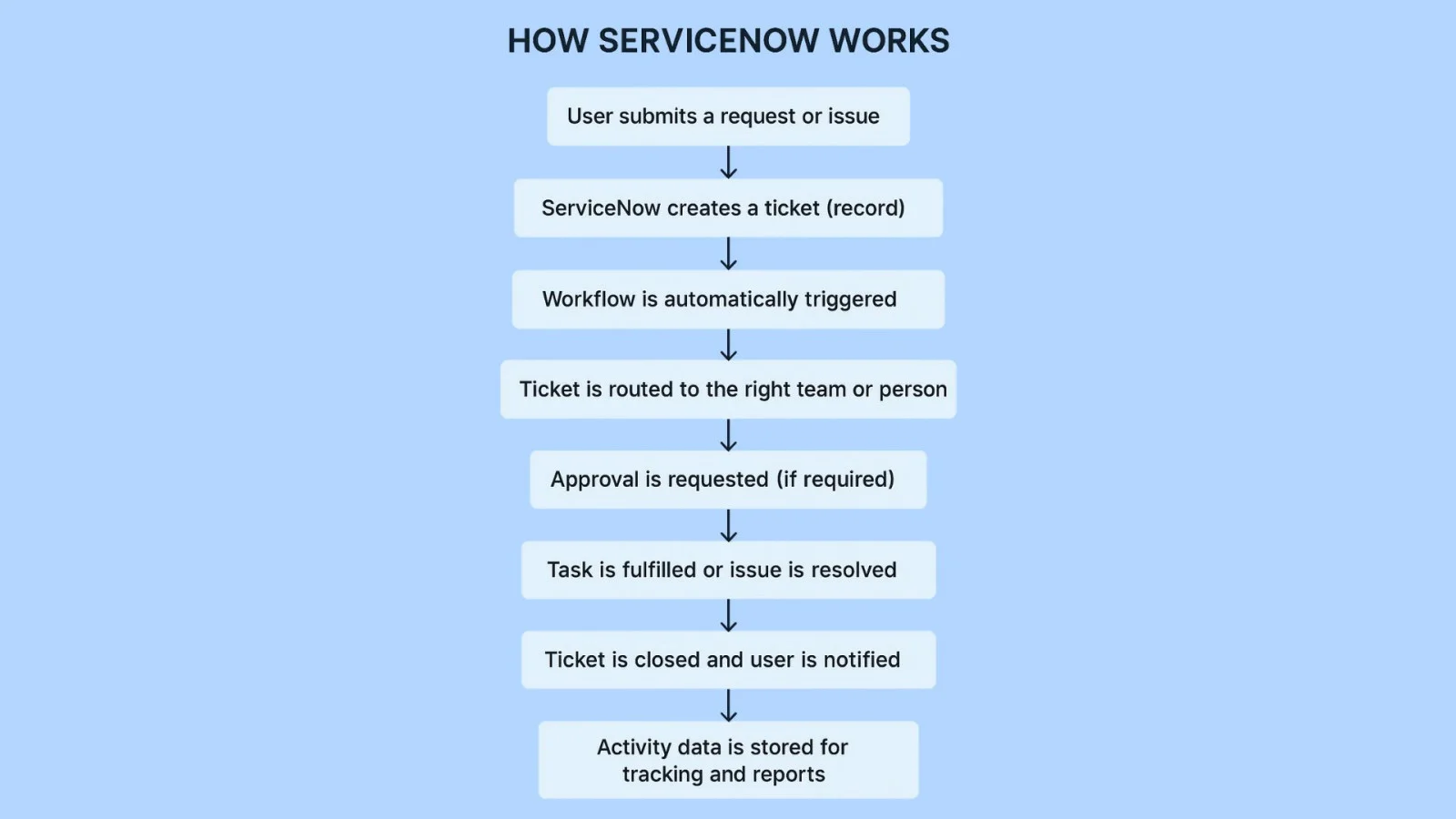
The following are the steps that help you understand how it works.
Step 1. A user initiates a request or reports an issue through the ServiceNow self-service portal, email, or integrated system.
Step 2. Once the request is submitted, ServiceNow automatically creates a ticket (record) in the system with all relevant details.
Step 3. Based on predefined rules, the appropriate workflow is triggered. This workflow defines what actions should happen next.
Step 4. The ticket is then routed to the correct team or assignee for review and action.
Step 5. If required, approval requests are automatically sent to managers or stakeholders.
Step 6. After approval, the task moves into the fulfillment stage, where the assigned team resolves the issue or completes the request.
Step 7. Once the work is completed, the ticket is closed, and the user is notified.
Step 8. All actions, updates, and timelines are recorded, allowing teams to track performance and generate reports.
Read Also- What is Workflow in ServiceNow?
Applying ServiceNow best practices is not just a technical task. The fact that automation-first strategies will run a huge part of this growth. For success, you need powerful project management, smart process design and effective user training too. Below are the best practices for using ServiceNow.
Before applying ServiceNow, it is important to have a proper understanding of what we aim to achieve. Describe your objectives and needs carefully. This procedure must include identifying the particular issues we wish to solve, procedures we wish to automate and the goals we wish to fulfill. Engaging with stakeholders from various departments to collect complete needs and making sure of alignment with the company's strategic objectives.
The triumph of any ITSM tool majorly relies on user adoption. To run adoption, one must prioritize user experience (UX) through designing intuitive user-friendly interfaces.
A better UX makes interactions and improves productivity by allowing users to locate and use the tools required quickly and easily. Companies should make designs straightforward workflows and interfaces that match users' daily tasks to accomplish this.
The governance framework for ServiceNow basically includes a structured approach to manage and control the platform's deployment, usage and change within any company. A successful governance platform starts with establishing a dedicated governance team, usually known as the ServiceNow Governance Board. It has key IT, business units, compliance and security stakeholders making sure of a cross-functional perspective. The board's main responsibilities involve defining policies, standards, and best practices for making use of ServiceNow. Also by overseeing configuration and personalized decisions and handling change control procedures. Setting up clear guidelines and observing adherence assists the governance board in managing consistency, aligning with business objectives and regulatory compliance.
The ServiceNow ITIL library is a complete collection of best practices, guidelines and procedures made to align with the Information Technology Infrastructure Library (ITIL) platform.
ITIL is a universally known set of practices for IT service management (ITSM) that concentrates on delivering high-quality IT services that meet the needs and requirements of business. ServiceNow ITIL library gives pre-configured procedures and templates that assist companies in this platform. These involve modules for incident, change, problem, service request management and more. All these are made for smoothening IT operations and enhancing service delivery.
Reliability and fidelity of the data are the backbone of any ITSM platform. Create a strong data management strategy that involves data governance, quality management and integration. Applying data validation rules and cleaning processes to manage accuracy, consistency and entirety. Must also make sure that the data is clean, constant and up to date. Apply data validation rules and periodic audits to manage data integrity. \
Daily data audits and reviews are crucial for locating and rectifying faults, duplicates and inconsistencies. Employing automated tools for managing the quality of data can smooth these procedures and give real monitoring and reporting of data quality metrics. The high-quality data improves the reliability of dashboards, reports and analytics, which leads to better decision-making and operational efficiency.
This platform offers strong automation and AI abilities to improve efficiency and productivity. For instance, ServiceNow's Virtual Agent is an AI bot that automates common service requests and inquiries. Its predictive intelligence features make use of machine learning for automatically differentiating, prioritizing and routing incidents, requests and tasks.
This platform's users have multiple automation options to smooth repetitive tasks, lessening manual effort and improving accuracy. It uses AI features like predictive analytics, virtual agents and machine learning for improving service delivery and making decisions.
Here are the advantages and disadvantages of ServiceNow-
| Aspect | Advantages of ServiceNow | Disadvantages of ServiceNow |
|---|---|---|
| Automation | Automates repetitive business and IT workflows, reducing manual effort and human error. | Over-automation without proper planning can lead to complex workflows that are difficult to manage. |
| Centralized Platform | Brings IT, HR, customer service, and other departments onto a single unified platform. | Centralization may create dependency on the platform for multiple business functions. |
| Scalability | Easily scales with organizational growth, making it suitable for small teams to large enterprises. | Scaling often increases licensing and operational costs. |
| Customization | Highly customizable workflows, forms, dashboards, and integrations. | Excessive customization can make upgrades and maintenance challenging. |
| Cloud-Based (SaaS) | No need to manage infrastructure, servers, or software updates. | Limited control over underlying infrastructure compared to on-premise solutions. |
| Integration | Integrates smoothly with third-party tools, APIs, and legacy systems. | Some integrations may require additional configuration or technical expertise. |
| User Experience | Provides self-service portals, dashboards, and intuitive interfaces for end users. | Initial user adoption may require training due to platform complexity. |
| Reporting & Analytics | Offers real-time dashboards and detailed reports for better decision-making. | Advanced reporting may need experienced configuration or customization. |
| Security & Compliance | Strong security controls, role-based access, and compliance support. | Security configurations must be handled carefully to avoid misconfigurations. |
There are plenty of industries that benefit from using ServiceNow and this list is going to keep on expanding with time. Here are a few industries using this platform today:
Its centralized platform aids in seamlessly connecting departments, school staff, students, and faculty. This delivers a seamless and modernized learning experience.
Companies in insurance, wealth management, and banking use this platform for a more integrated customer experience. It helps advisors and agents to make the right decisions, maintain compliance, and deliver a top-notch service experience.
Healthcare service providers are able to deliver enhanced healthcare experiences and outcomes with Now. It aids in connecting teams, integrating systems, and streamlining processes.
A secure platform like this one is highly useful in government tasks. It aids in optimizing services and enhancing decision-making processes.
Companies in the energy and utility domain, such as gas and oil companies, enjoy great benefits. This is because many critical operations are automated and many reliable services are delivered.
Here is the quick comparison of ServiceNow and other traditional tools.
| Aspect | ServiceNow | Traditional Tools (Emails, Excel, Manual Systems) |
|---|---|---|
| Process Handling | Uses automated workflows to manage incidents, requests, and changes from start to finish. | Processes are handled manually through emails, spreadsheets, or phone calls. |
| Visibility | Provides real-time dashboards, reports, and tracking for every task and request. | Limited visibility; tracking progress often requires manual follow-ups. |
| Efficiency | Reduces manual effort by automating approvals, routing, and notifications. | Time-consuming due to repetitive manual work and human dependency. |
| Scalability | Easily scales with business growth and increased workload. | Becomes difficult to manage as data volume and requests increase. |
| Centralization | All services, data, and workflows are managed on a single platform. | Data is scattered across multiple tools and systems. |
| Error Handling | Built-in rules and validations reduce human errors. | High chances of errors due to manual data entry and tracking. |
| Integration | Integrates smoothly with third-party tools, APIs, and enterprise systems. | Integration is limited or requires significant manual intervention. |
| User Experience | Offers self-service portals and role-based access for users. | Users rely on emails or support teams for even basic requests. |
| Reporting & Analytics | Advanced reporting with real-time insights and performance metrics. | Reporting is manual and often outdated or incomplete. |
| Long-Term Value | Ideal for long-term digital transformation and automation. | Suitable only for small-scale or short-term operational needs. |
Let's have a look at the pricing ServiceNow offers to its customers or enterprises.
Note: These are the estimated pricing models. ServiceNow does not publish fixed pricing. Actual costs are finalized through direct consultation with ServiceNow or certified partners. For more, visit ServiceNow's official pricing page.
ServiceNow is transforming its platform with the Zurich release and Knowledge 2026, shifting the focus to autonomous automation. Here are some of the main key features it has introduced:
No doubt, ServiceNow comes with many advanced features and modules, but choosing it depends on your specific requirements or your organization's needs.
| Scenario | ServiceNow is Ideal When | ServiceNow May Not Be Necessary When |
|---|---|---|
| Organization Size | You are a mid-to-large enterprise with multiple teams and departments. | You are a small business or startup with limited operations. |
| Process Complexity | You have complex, multi-step workflows involving approvals, SLAs, and dependencies. | Your processes are simple and linear, handled easily with basic tools. |
| IT & Service Volume | You manage a high volume of incidents, requests, and changes daily. | You receive very few service requests that can be managed manually. |
| Automation Needs | You want to automate repetitive tasks and reduce manual intervention. | Manual handling through emails or spreadsheets is still manageable. |
| Cross-Department Use | You want a single platform for IT, HR, CSM, SecOps, and more. | Each department works independently with minimal overlap. |
| Visibility & Reporting | You need real-time dashboards, KPIs, and analytics for decision-making. | Basic reporting or periodic manual tracking is sufficient. |
| Scalability | You expect business growth and need a platform that scales easily. | Your operations are stable with no major growth plans. |
| Budget Availability | You have the budget for enterprise-grade SaaS tools. | Budget constraints make lower-cost tools more practical. |
| Compliance & Security | You require strong security, role-based access, and compliance controls. | Compliance and security requirements are minimal. |
ServiceNow is a highly popular all-in-one solution that assists its users in plenty of ways. This includes customer relationship management functions, employee workflow automation, and Smart IT support services, among others. Now that you know 'what is ServiceNow platform' and have understood what does ServiceNow do, you can think further about how this platform can help your future. If you are planning to learn ServiceNow then you have to build a foundation first.
Explore These Trending Articles:
ServiceNow is an intelligent, cloud-based platform that aids organizations in digital transformation.
What is the ServiceNow tool? It is used to set up systems for managing, defining, structuring, and automating IT services for the organizations using it. In simple terms, it's a tool that aids in raising and tracking processes and tickets to catalog regular IT service requests.
The 3 main parts of ServiceNow are IT business management (ITBM), IT operations management (ITOM), and IT service management (ITSM).
ServiceNow is a leading platform that aids in customer growth, drives technology intelligence, achieves operational excellence, digitizes unique business processes, enhances employee productivity, and transforms business-critical operations.
ServiceNow is neither a traditional ERP nor a CRM platform. It is primarily a cloud-based enterprise workflow automation platform known for IT Service Management (ITSM). However, ServiceNow also provides solutions for customer service, HR service delivery, security operations, and other enterprise workflows, allowing organizations to automate and manage processes across multiple departments.