Welcome to the world of Java, a versatile and enduring programming language that has shaped modern software development. First introduced by Sun Microsystems in 1995, it was designed with one bold promise in mind: "Write Once, Run Anywhere". That means Java applications, once compiled into bytecode, can run on any device equipped with a Java Virtual Machine (JVM), regardless of the underlying operating system. It lies within the top 10 on the list of the most used programming languages globally.
It is reported that nearly thirty percent of software developers around the world use Java regularly. I have created this detailed guide for you to understand what is Java from scratch. New features, frameworks, and trends emerge as Java keeps evolving. Let's get to know them all by understanding how this programming language is used in practice, not just in theory.
Java is a widely used, object-oriented programming language and computing platform known for its "write once, run anywhere" (WORA) capability. This feature enables Java applications to operate/run seamlessly across various devices and operating systems through the Java Virtual Machine (JVM). Renowned for its versatility, Java powers everything from enterprise systems and mobile applications to cloud services, gaming software, and big data solutions- making it one of the most valuable and in-demand skills in the technology sector. Its syntax shares quite a few similarities with C and C++.
It has remained as a consistent name among developers for almost two decades now. This has led to millions of Java apps being in use today. This object-oriented, network-centric and multi-platform language can be used as a platform itself. There are three main editions of this language and they're discussed here.
There are three platforms or editions to learn. Each of these editions is based on the use cases that they offer. Any of these can be realized according to one's applications. Its Standard Edition is the most commonly used edition in this language.
This programming language was created in 1991 by James Gosling at Sun Microsystems (now a part of Oracle after acquisition). It was consequently released in 1995 and the purpose behind its making was to facilitate communications over the network.
A group of engineers referred to as the 'Green Project' started working on the coming together of digital consumer devices and computers in 1991. This group was led by James Gosling and they worked to create a new language. This new language had an interactive and hand-held home entertainment controller. This concept was, however, too advanced for that time and could not take off.
With the internet's advent, the same team announced the Netscape Navigator Internet Browser to include Java Technology in 1995. This programming language has only grown since then and today is one of the most globally used ones.
What is Java architecture cannot be answered so simply. While there are three main components of its architecture, there is still a lot to learn. Each of these components has extensive functionality and features associated with it. Let's understand each of these individually.
Java applications are called WORA (Write Once, Run Anywhere) because they can run code on any platform. This is possible because of the JVM, which is a platform component. Its environment executes this language's programs and interprets the bytecode into machine code. JVM performs the functions like loading, verifying and executing the code while providing a runtime environment.
JRE builds a runtime environment wherein this language's programs can be executed. It is an on-disk system that picks the code, merges it with the necessary libraries and begins the JVM for executing it. The JRE has all the needed software and libraries for running the programs.
JDK is a software development environment for developing applications and applets. It has JRE and many other development tools too. It also has an interpreter/loader, an archiver (jar), a compiler (javac) and a documentation generator (javadoc).
Java sets the rules for how the Java language works. This covers the basic words and grammar you need to write code, like basic data types, if/else statements, and loops. APIs are like ready-made software parts that come with Java.
They're pre-built Java programs you can easily add to your code to do common tasks. For example, you can use these APIs to get the current date, do math, or work with text. When developers write Java apps, they usually mix their own code with existing code from Java APIs and libraries.
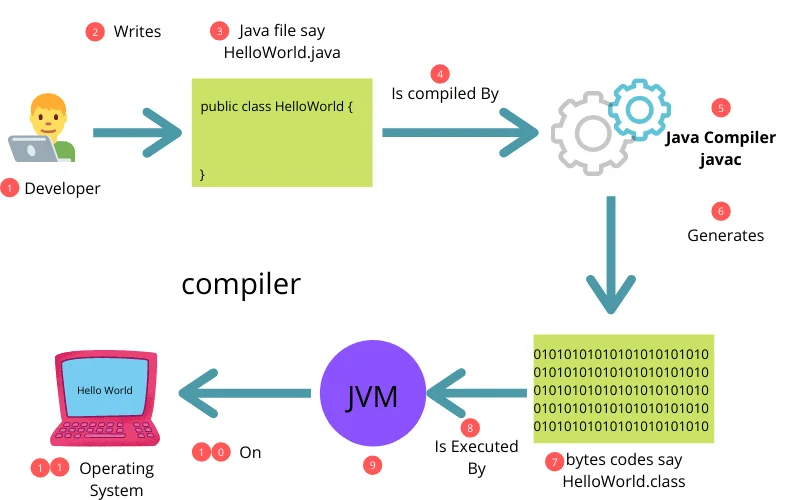
Image Source- Medium.com
Another important question often asked in association with these questions is: how does Java work? It is a compiled language and runs on the JVM. This virtual machine further runs atop a physical machine (like a smartphone or computer) and executes Java bytecode.
All programming languages work as a means for communicating with machines. Machine hardware responds only to electronic communication. It is a high-level programming language that acts as a meeting point between hardware language and human language.
Related Article- How to Become a Java Developer?
There are dozens of perks of using this language that both beginner and professional developers are aware of. Due to the abundance of useful features, its use has been increasing with time. Its reliability is one reason why it's becoming their preference. Here's an answer to what is Java used for.
Over the last twenty-odd years, this programming language has been used extensively for web app development. This includes enterprise-level systems, e-commerce websites and social media platforms. Many of its frameworks prove to be beneficial and are most often picked as choices for web application development. Hibernate, Struts and Spring are popular frameworks of this language.
This programming language is a popular choice for developing large-scale enterprise applications. This includes supply chain systems, finance and banking systems and healthcare systems. Many of its frameworks are brilliant for this use point. Top choices for enterprise app development are JMS (Java Message Service), JSF (Java Server Faces) and JPA (Java Persistence API).
Artificial intelligence and machine learning are slowly taking over the world, and they require languages like this one to make it happen. Many AI and ML apps use this programming language, especially for developing data processing and analysis tools. H2O.ai, Apache Spark and Deeplearning4j are top frameworks picked in such cases.
Billions of developers globally employ this programming language for building mobile applications, especially for Android. In fact, this language has sprouted to be a popular one for building cross-platform mobile applications. Tools like PhoneGap and Xamarin are used to make this come true.
Many mobile and desktop games are built using this language as their primary programming language. Popular gaming engines like jMonkeyEngine and LibGDX use this.
Internet of Things or IoT applications necessitate the use of scalable and lightweight software solutions. Such a demand has rendered it a brilliant pick for IoT applications. ThingWorx, Kura and Eclipse are popular frameworks that are primarily chosen for developing such apps.
It's a popular choice to build data processing engines. These engines hold the capability to work with complicated data sets and gigantic data volumes, all in real-time. This particular use case is expanding continuously with data becoming more prominently used.
It is known for its WORA capacity- Write Once and Run Anywhere. Thus, it stands well for developing decentralized cloud-based apps. Top cloud service providers have chosen this programming language for running programs on various underlying platforms.
Related Article- Golang vs Java: What Should You Choose?
Multiple features of this programming language make it stand out on the list. This section explores the top ones.
Java's syntax is easy to pick up. It cuts out complicated stuff like pointers and multiple inheritance, making it beginner-friendly.
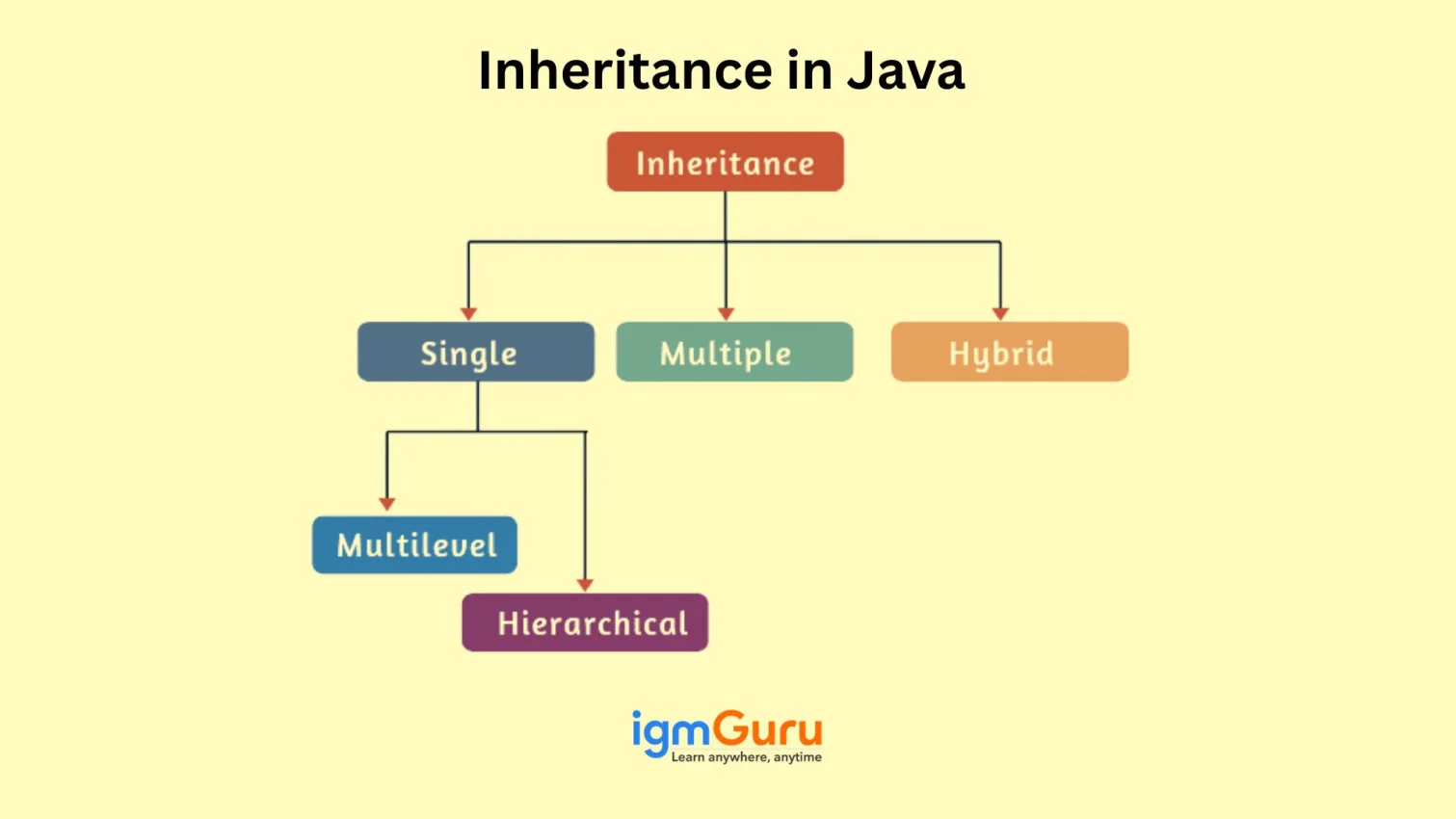
This language is built on object-oriented principles. It uses concepts like:
Example: OOP Concepts
```java // Java program to check the basic concepts of oops // like class, object, Constructor and method import java.io.*; class Student { int age; String name; public Student(int age, String name) { this.age = age; this.name = name; } // This method displays the details of the student void display() { System.out.println(Name is: + name); System.out.println(Age is: + age); } } class {igmGuru public static void main(String[] args) { Student student = new Student(22, Vidhi); student.display(); } } ``` |
Output
Here is the output:
Name is: Vidhi Age is: 22 |
Explanation
In this example, the `Student` class has variables for `age` and `name`. The constructor sets these values when you create a `Student` object. The `display` method then prints the student's details.
It works on any platform thanks to the Java Virtual Machine (JVM). The code is compiled into bytecode, which can run anywhere with a JVM.
It isn't directly run by the computer. It turns into bytecode first, which the JVM reads. This lets Java run on different systems without needing code changes.
It handles both small and big applications. With features like multithreading and distributed computing, it's easier to handle increased workloads.
Java bytecode doesn't rely on a specific operating system. You can run it on any platform with a JVM. Since JVMs exist for most devices, Java programs are highly portable.
This language is dependable because it catches mistakes early and checks for errors during runtime. Exception handling helps manage unexpected issues smoothly.
The JVM automatically takes care of memory management in Java.
It is faster than older interpreted languages because bytecode is faster than interpreted code. While it is not the fastest language in the world, Just-In-Time (JIT) compilation helps Java run faster.
Java allows multiple threads to run at once. This makes better use of the CPU and boosts performance in applications that do many things at the same time. It includes built-in support for managing multiple threads. A thread is the smallest unit of execution within a process.
Read Also- 60+ Java Interview Questions and Answers (2026)
Java syntax basics are important to get familiar with the main rules and structures to write accurate Java code.
Identifiers are names given to classes, variables, methods, and other entities to identify them in the program uniquely.
Rules:
Examples:
Keywords are reserved words that have special meaning in Java and cannot be used as identifiers.
Examples:
abstract, boolean, byte, case, catch, break, void, char, class, extends
Literals are constant values assigned to variables. They represent fixed data values.
Types of Literals:
Here are the different types of literals
Decimal: 87, 53
Binary: 0b1011, 0b110
Octal: 01177
Hexadecimal: 0xA54C
Represent fractional numbers: 10.876
Single characters enclosed in single quotes: 'a', 'j'
Escape sequences: '\n' (new line), '\t' (tab)
Unicode representation: '\u0041' (represents 'A')
Sequence of characters enclosed in double quotes: "Hello, World!"
True, False
Comments are used to explain code and make it more readable. They are ignored by the compiler.
Types of Comments:
Begins with //
Example:
| // This is a single-line comment |
Begins with /* and ends with */
Example:
/* This is a multi-line comment */ |
Example:
Begins with /** and ends with */
Used to generate documentation using tools like Javadoc
/** * This method adds two numbers * @param a first number * @param b second number * @return sum of a and b */ public int add(int a, int b) { return a + b; } |
Let me guide you into writing your first Java program with ease. Here is a simple example of your first Java program, called the Hello World program. Open any text editor like Notepad if you are using Windows or TextEdit on macOS. Type the following code:
public class HelloWorld { public static void main(String[] args) { System.out.println("Hello, World!"); } } |
Now, save the file as helloworld.java and make sure the file extension is .java.
Output
Here is the expected output you get after running the program:
| Hello, World! |
Read Also- How to Install Java on Windows, macOS and Linux?
Here are some of the most relevant libraries, frameworks, tools and much more included in the Java ecosystem.
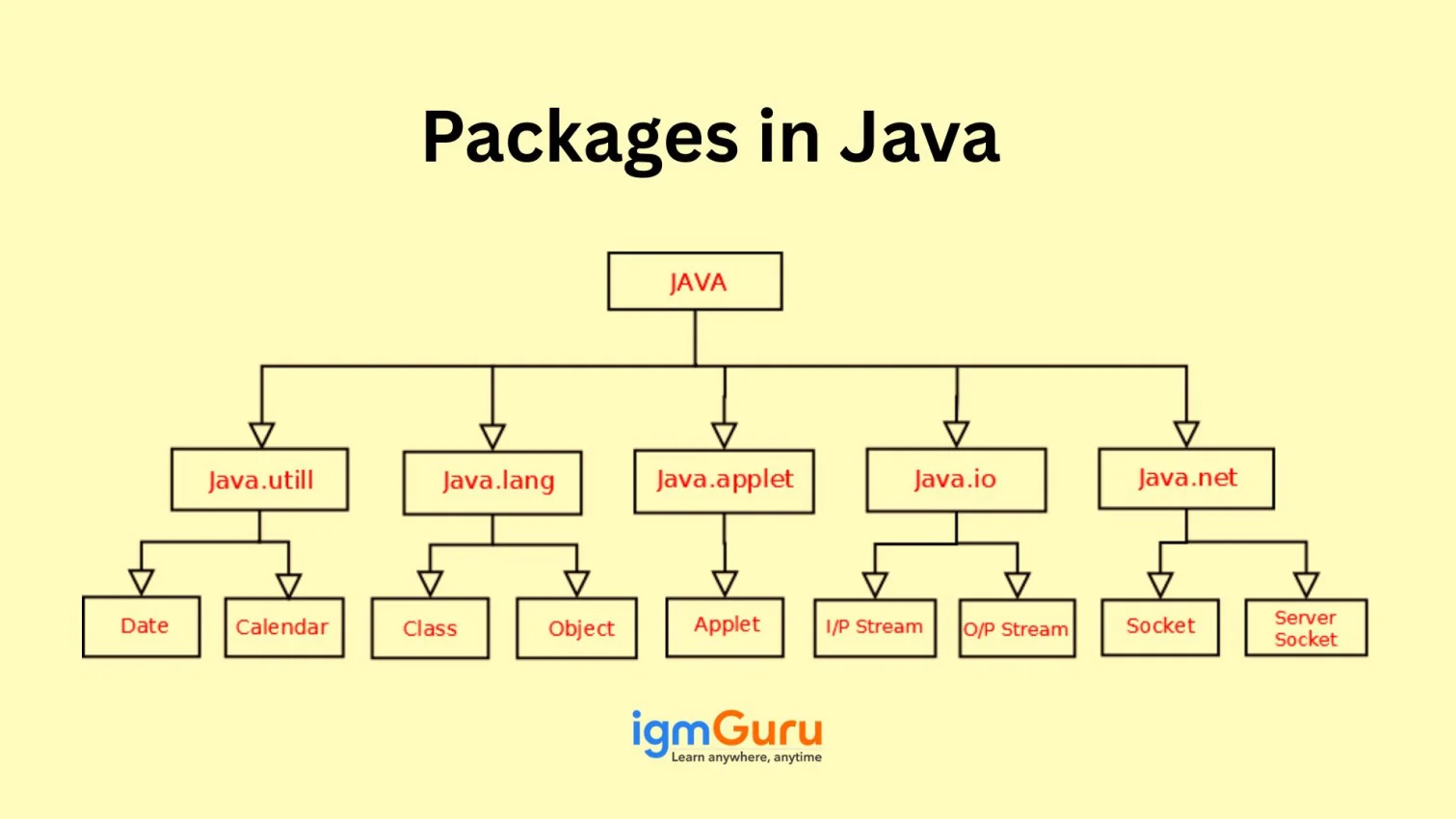
Java's standard library, known as the Java Standard Library or Java SDK, provides a comprehensive set of classes and interfaces essential for everyday programming tasks.
These libraries enhance productivity and simplify common programming tasks:
These tools automate the build process, manage dependencies, and streamline project configurations:
IDEs provide comprehensive facilities to programmers for software development:
These frameworks simplify the development of web applications:
i) Spring Boot: Simplifies Spring application setup.
ii) Spring Security: Provides authentication and authorization.
iii) Spring Data: Simplifies database interactions.
These tools facilitate database operations:
Ensuring code quality and reliability is crucial:
These libraries help in securing applications:
Java is also used in mobile application development:
Java supports machine learning and AI development:
Managing project dependencies is streamlined with:
Engaging with the Java community can enhance your development experience:
Related Article- What is Full Stack Development?
Like any programming language, Java has advantages and disadvantages. Let's discuss them:
| S.N. | Advantages of Java | Disadvantages of Java |
| 1. | Platform Independence: Java programs run on any device with the Java Virtual Machine (JVM), making it truly cross-platform. | Slower Performance Compared to languages like C or C++, this programming language is generally slower due to its interpreted nature via the JVM. |
| 2. | Object-Oriented: It follows the object-oriented programming model, promoting code reuse and easy maintenance. | High Memory Usage: Java applications can consume more memory, especially in larger enterprise systems. |
| 3. | Large Standard Library: It offers a comprehensive set of built-in libraries for everything from networking to GUI development. | Verbose Syntax Writing code in Java can be wordy and sometimes requires more lines compared to modern languages like Python. |
| 4. | Strong Community Support: It has a vast global community, tons of tutorials, forums, and open-source resources. | Complex GUI Building Although possible, creating rich user interfaces in Java can be complicated and less intuitive. |
| 5. | Robust and Secure: This language includes strong memory management, exception handling, and built-in security features. | Mobile Development Decline With Android moving towards Kotlin, Java's dominance in mobile app development is fading. |
| 6. | Multi-threading Support: This language supports multithreading, allowing better use of CPU resources and smoother performance in applications. | Requires JVM: Java programs can't run without a JVM, which adds a layer of dependency and can be a hurdle in some environments. |
| 7. | Backward Compatibility: New versions of Java maintain compatibility with older ones, making upgrades less painful. | Slower Startup Time: Java applications can have slower startup times, which may impact user experience in smaller applications. |
| 8. | Used in Enterprise Applications: Java is a go-to choice for large-scale systems, especially in banking, insurance, and government sectors. | Limited Low-Level Programming: Java doesn't provide direct access to hardware or system-level programming like C/C++. |
Read Also- How to Learn Java from Scratch
Here are some of the most prominent real-world use cases of Java:
Java has long been the foundation for large-scale, enterprise-level applications. With frameworks like Spring, Hibernate, and Jakarta EE, businesses build reliable, secure, and scalable solutions. Banks, insurance companies, and e-commerce platforms use Java for applications that handle millions of transactions daily.
Example: Banking systems like Goldman Sachs and Citibank use Java to manage transactions and financial operations.
Java is extensively used in developing dynamic, secure, and high-performing web applications. Its robust frameworks such as Spring Boot, Struts, and JSF (JavaServer Faces) simplify backend development and support complex web architectures.
Example: Popular e-commerce sites, booking systems, and content management systems often rely on Java-based backends.
Java was the official programming language for Android development for over a decade and continues to play a critical role today. Millions of Android apps still use Java, thanks to its stability and vast community support.
Example: Apps like Spotify, Twitter, and Uber were originally built with Java for Android platforms.
Java’s performance, scalability, and strong ecosystem make it a go-to language for big data applications. Frameworks like Apache Hadoop, Apache Spark, and Apache Kafka are either written in or compatible with Java, allowing developers to build efficient data processing pipelines.
Example: Companies like LinkedIn and Netflix use Java-based systems for real-time data analytics.
In the era of cloud computing, Java is used extensively for building and deploying cloud-native applications. Its platform independence, combined with tools like Spring Cloud and MicroProfile, makes it ideal for developing microservices-based cloud architectures.
Example: Leading cloud platforms like AWS, Google Cloud, and Microsoft Azure support Java for building scalable enterprise cloud solutions.
Java continues to evolve with every new release, introducing faster performance, stronger security, and modern developer-friendly features. With growing demand for cloud-native systems, microservices, big data solutions, and enterprise-scale applications, Java remains a key technology in global software development. Its active community, long-term support releases, and expanding ecosystem ensure that Java will stay relevant, powerful, and widely adopted for years to come.
This blog begins with 'what is Java' but also covers its popular uses and the steps to become a developer. The goal is to help aspirants know the right path to pick and grow with the growing popularity of this language. Get started with these steps and take this guidance to grow as a Java developer.
Explore Our Trending Articles:
Yes, Java is beginner-friendly because it has a clear structure, strong community support, and is widely taught in schools and universities.
No, Java and JavaScript are completely different languages. Despite the similar names, they serve different purposes and have different syntax and use cases.
Yes, you need the Java Runtime Environment (JRE) or Java Development Kit (JDK) installed to run or develop Java programs.